Text shaping in the PDFium component goes through one installable object. ConfigureTextShaper installs the shaper that every shaping entry point routes through, replacing and freeing whatever was there; ActiveTextShaper returns the installed one and creates the platform default on first use; ActiveTextShaperName reports which backend is live; ClearTextShaper drops the installation and lets the default be created again. On Windows the default is TPdfUniscribeTextShaper. Under Free Pascal there is TPdfHarfBuzzTextShaper, which binds libharfbuzz at run time so a missing library is a reported condition rather than a load failure
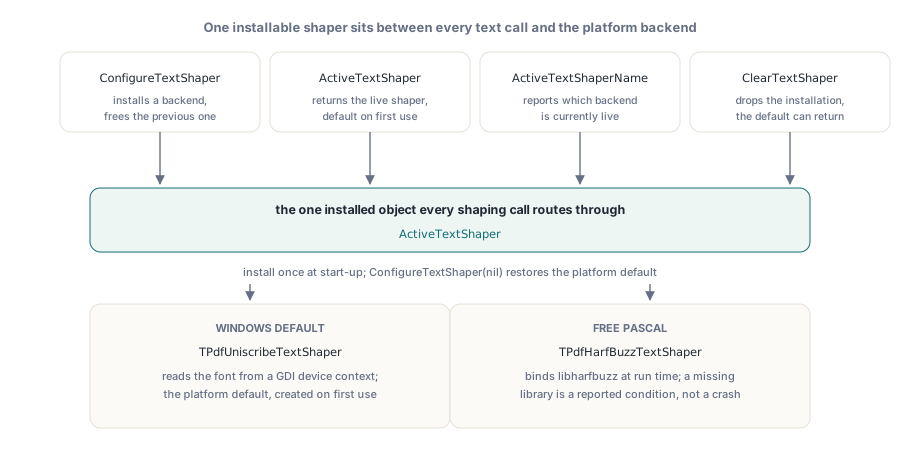
One interface, two backends that divide the work completely differently. Understanding that asymmetry is what stops the portable path from producing text that is shaped correctly and positioned wrongly
Why is the Windows backend one class and the portable one three pieces?
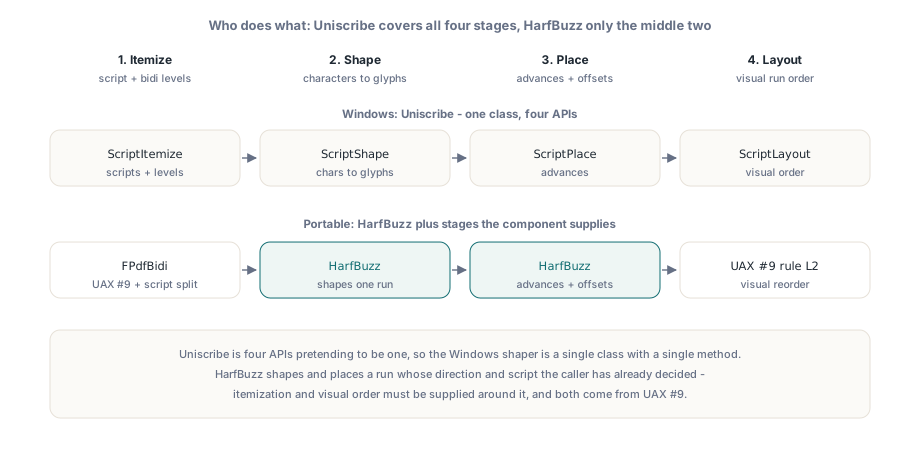
Because Uniscribe is four APIs pretending to be one. ScriptItemize segments a string by script and resolves bidirectional levels; ScriptShape maps characters to glyphs; ScriptPlace computes advances and offsets; ScriptLayout puts the resulting runs into visual order. A backend built on it therefore has nothing left to add, which is why the Windows shaper is a single class with a single method
HarfBuzz covers the middle two. It shapes and places a run whose direction and script the caller has already decided, and it has no opinion about how a paragraph splits into runs or what order those runs appear in. So the portable backend supplies the rest: the bidirectional algorithm resolves embedding levels, the HarfBuzz Unicode functions segment the text by script, and the runs are laid out in the visual order that UAX #9 rule L2 produces. The bidirectional half is substantial enough to be its own unit, described in the UAX #9 embedding levels article
The shaper does not resolve fonts, and that is deliberate
Uniscribe reads the font binary out of a GDI device context. There is no portable equivalent of that, and inventing one inside a shaping unit would mean deciding, on behalf of every application, whether fonts come from fontconfig, from CoreText, from an application font folder, or from a database. So the HarfBuzz backend takes a resolver: a callback that maps a font name to the TrueType or OpenType bytes. Returning False fails the shaping request the same way an unreadable GDI font fails it on Windows
uses
  FPdfTextShaping
{$IFDEF FPC}
  , FPdfTextShapingHb
{$ENDIF}
  ;

function TFontCatalogue.Resolve(const FontName: WideString;
  out FontData: TBytes): Boolean;
var
  Path: string;
begin
  // Your policy: fontconfig, CoreText, an app font folder, a database
  Result := FLookup.TryGetValue(LowerCase(FontName), Path);
  if Result then
    FontData := TFile.ReadAllBytes(Path);
end;

procedure InstallShaper(Catalogue: TFontCatalogue);
begin
{$IFDEF FPC}
  // Ownership passes to the unit; call once during start-up,
  // before anything shapes text
  ConfigureTextShaper(TPdfHarfBuzzTextShaper.Create(Catalogue.Resolve));
{$ENDIF}
  // On Delphi the platform default (Uniscribe) is created on demand,
  // so no installation is needed at all
  LogInfo('shaping backend: ' + ActiveTextShaperName);
end;
Keeping font discovery outside the shaper has a second benefit that shows up in servers: the same process can shape with an embedded font set that has nothing to do with what is installed on the machine, which is what you want when output must be byte-reproducible across hosts. The component also exposes a host system font provider for the cases where you do want installed fonts, covered in the system font provider article
The result record is backend-neutral, and clusters are the reason
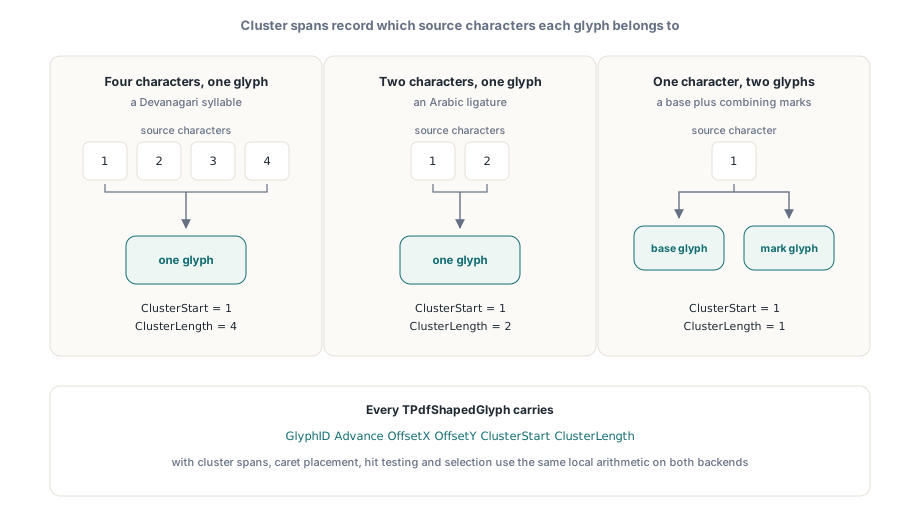
Both backends fill the same TPdfShapedText: the source text, font name, size, font bytes, an array of runs, the total width, the glyph count and the logical character count. Each TPdfShapedRun carries its span in the source text, its visual X position, its width, its bidirectional level and a right-to-left flag, plus its glyphs. Each TPdfShapedGlyph carries a glyph identifier, an advance, X and Y offsets, and the cluster it belongs to as a start and a length in the source text
Those cluster fields are what make the record usable rather than merely informative. Shaping is not a one-to-one mapping: a Devanagari syllable becomes one glyph from four characters, an Arabic ligature merges two, and a single character can produce several marks. Without cluster spans you cannot place a caret, hit-test a click, or highlight a selection, because you cannot say which characters a glyph belongs to. With them, the arithmetic is local and the same code works for both backends
var
  Shaped: TPdfShapedText;
  R, G: Integer;
begin
  if ShapePdfText(Line, 'Noto Sans Arabic', 14, ptdAuto, Shaped) then
    for R := 0 to High(Shaped.Runs) do
    begin
      // Runs already arrive in visual order with VisualX filled in
      X := Shaped.Runs[R].VisualX;
      for G := 0 to High(Shaped.Runs[R].Glyphs) do
      begin
        EmitGlyph(Shaped.Runs[R].Glyphs[G].GlyphID,
          X + Shaped.Runs[R].Glyphs[G].OffsetX,
          Shaped.Runs[R].Glyphs[G].OffsetY);
        X := X + Shaped.Runs[R].Glyphs[G].Advance;
      end;
    end;
end;
Budgets belong in the options record
TPdfTextShapingOptions carries a direction plus three caps: maximum characters, maximum glyphs and maximum runs, with a Default class function that fills sensible values. The caps are not paranoia about malformed input; they are arithmetic. Shaping expands: a font with aggressive contextual substitution can emit more glyphs than input characters, and a paragraph that alternates scripts every few characters produces a run per switch. A document assembled to maximize both turns a modest string into a large allocation, and a service that shapes text from untrusted PDFs needs a limit it chose rather than a limit the machine imposes
Setting the direction explicitly rather than leaving it on automatic is worth doing whenever you already know it. Automatic applies the paragraph-direction rules to guess from the first strong character, which is right for free text and wrong for a form field whose direction is a property of the field rather than of the value someone typed into it
Run-time binding, not a build dependency
The HarfBuzz backend loads the library dynamically. That is a deployment decision with real consequences: one binary runs on a machine with HarfBuzz and on a machine without it, reporting reduced capability in the second case instead of failing to start. For a library shipped to other developers that is the only workable arrangement, because you cannot require every consumer of a PDF component to acquire and version-match a shaping library they may not need
The corresponding rule for callers is to check. ActiveTextShaper returns nil when the platform has no default and none was configured, and the shaping entry point reports that as an unavailable shaper rather than as a shaping failure. Those are different problems and deserve different messages: one is a deployment gap, the other is a font or text problem
Install once, before anything shapes
Installation replaces and frees the previous shaper, so calling it repeatedly is safe but pointless, and calling it while another thread is shaping is not safe at all. Do it during start-up. If you need to fall back to the platform default later, pass nil, which is also how you undo a test double at the end of a test
Once a backend is installed, measurement and wrapping behave the same on both platforms, since they consume the run and glyph metrics rather than calling the platform directly; the wrapping model is described in the text measurement and word wrap article. Supported platforms and toolchains for the component are listed on the PDFium Delphi component product page