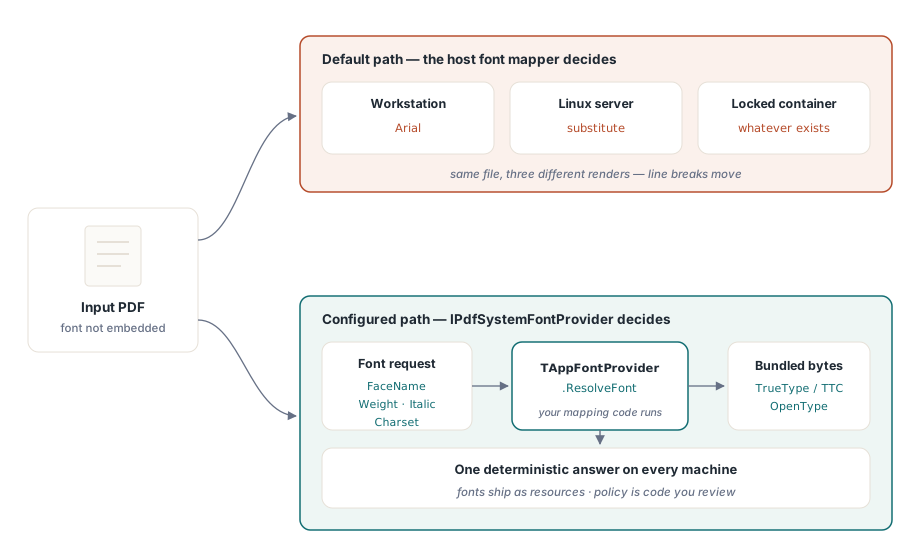
A packing slip produced on a Windows desk names Arial in its font dictionary, carries no font program, and looks fine in every viewer on that desk. Rasterized inside a Debian container, the same file draws every glyph from a different sans serif. The text still starts where it should, because glyph positions come from the /Widths array stored in the PDF, but the letter shapes change, spacing looks uneven wherever the substitute's outlines are narrower than the widths they sit in, and a character the substitute lacks leaves a hole. The renderer is not at fault. The document handed the choice of font to whoever renders it, and that choice can be made in your own code by supplying font bytes you ship with the application
ISO 32000-1 allows this. The standard 14 fonts of §9.6.2.2 may always be referenced by name alone, and any other simple font can be left unembedded as long as its dictionary and font descriptor (§9.8) describe metrics and flags. PDF/A forbids it outright (ISO 19005-1 §6.3.4 requires every font program to be embedded), which says a lot about how reliable name-only fonts are once a file leaves the machine that wrote it
Why not just install the fonts on the server?
Sometimes installing the fonts is enough. It breaks down in three common situations. A font license may permit desktop use but not installation on a server that renders documents automatically. Container images are rebuilt often, and a font copied in by hand disappears with the next deployment. Regulated workflows want the rendering stack reproducible from artifacts under version control, and a machine-wide font folder is not one of them
There is also a middle step. TPdfLibraryConfiguration.UserFontPaths, passed through ConfigurePdfLibrary before the library loads, tells PDFium's native mapper which folders to scan for font files. The list replaces the platform defaults rather than adding to them, and on Windows it also turns off GDI font enumeration, so include the system font folder if documents still need installed fonts. The mapper still decides which file wins for a given request, by its own matching rules. When you need to know exactly which bytes answer "Arial, bold, Cyrillic charset", that decision has to live in code you can read, and that is what a system font provider gives you
Installing an IPdfSystemFontProvider before PDFium loads
PDFium Component exposes font mapping through one interface with one method. IPdfSystemFontProvider.ResolveFont receives a TPdfSystemFontRequest carrying FaceName, Weight, Italic, Charset and PitchFamily, and answers with a TPdfSystemFontData record holding the face name, the complete TrueType, OpenType or TrueType Collection bytes, a charset and a TTCIndex. Returning False declines the request
ConfigureSystemFontProvider has to run before the library is loaded. PDFium takes its font mapper once, during initialization, so the component raises EPdfError ("Configure the system font provider before loading PDFium") if Loaded is already true. Many calls load the library on demand, including the feature probes, so put the configuration at the very top of startup. The provider below builds a lookup table and reads every font file in its constructor; after that, ResolveFont only reads:
uses
  System.SysUtils, System.Classes, System.IOUtils, PDFium;

type
  TBundledFontProvider = class(TInterfacedObject, IPdfSystemFontProvider)
  private
    FKeys: TStringList;           // sorted once in the constructor, read-only later
    FFonts: array of TBytes;
    FFaces: array of WString;
    class function KeyFor(const Face: string; Bold, Italic: Boolean): string; static;
    procedure AddFont(const Face: string; Bold, Italic: Boolean;
      const ReportedFace, FileName, FontDir: string);
  public
    constructor Create(const FontDir: string);
    destructor Destroy; override;
    function ResolveFont(const Request: TPdfSystemFontRequest;
      out Font: TPdfSystemFontData): Boolean;
  end;

class function TBundledFontProvider.KeyFor(const Face: string;
  Bold, Italic: Boolean): string;
begin
  Result := LowerCase(Face) + '|' + IntToStr(Ord(Bold)) + IntToStr(Ord(Italic));
end;

procedure TBundledFontProvider.AddFont(const Face: string; Bold, Italic: Boolean;
  const ReportedFace, FileName, FontDir: string);
var
  I: Integer;
begin
  I := Length(FFonts);
  SetLength(FFonts, I + 1);
  SetLength(FFaces, I + 1);
  FFonts[I] := TFile.ReadAllBytes(TPath.Combine(FontDir, FileName));
  FFaces[I] := WString(ReportedFace);
  FKeys.AddObject(KeyFor(Face, Bold, Italic), TObject(NativeInt(I)));
end;

constructor TBundledFontProvider.Create(const FontDir: string);
begin
  inherited Create;
  FKeys := TStringList.Create;
  FKeys.Sorted := True;
  FKeys.Duplicates := dupError;
  AddFont('Arial', False, False, 'Arial', 'arial.ttf', FontDir);
  AddFont('Arial', True,  False, 'Arial', 'arialbd.ttf', FontDir);
  // An alias: report the family actually served, so the policy can see it
  AddFont('Helvetica', False, False, 'Arial', 'arial.ttf', FontDir);
end;

destructor TBundledFontProvider.Destroy;
begin
  FKeys.Free;
  inherited;
end;

function TBundledFontProvider.ResolveFont(const Request: TPdfSystemFontRequest;
  out Font: TPdfSystemFontData): Boolean;
var
  Index: Integer;
begin
  Font := Default(TPdfSystemFontData);
  Result := FKeys.Find(KeyFor(string(Request.FaceName),
    Request.Weight >= 600, Request.Italic), Index);   // 600 and up served as bold
  if not Result then
    Exit;
  Index := Integer(NativeInt(FKeys.Objects[Index]));
  Font.FaceName := FFaces[Index];
  Font.FontData := FFonts[Index];
  Font.Charset := Request.Charset;
  Font.TTCIndex := 0;                // face number inside a .ttc collection
end;

procedure ConfigureFonts(const FontDir: string; Audit: Boolean);
var
  Policy: TPdfSystemFontPolicy;
begin
  Policy := TPdfSystemFontPolicy.Default;
  Policy.AllowDefaultFallback := not Audit;
  Policy.AllowFaceSubstitution := not Audit;
  Policy.MaxFontBytes := 32 * 1024 * 1024;
  Policy.MaxCacheEntries := 64;
  ConfigureSystemFontProvider(TBundledFontProvider.Create(FontDir), Policy);
  // Only now open documents; the first call that needs PDFium loads it
end;
The table keys in this sample are deliberately naive. Real documents spell the same family several ways, so log Request.FaceName from a representative batch before freezing the table; the recording wrapper further down produces exactly that list. The weight threshold is a choice too: FXFONT_FW_NORMAL is 400 and FXFONT_FW_BOLD is 700 in the FPdfExtensions unit, and a semibold request at 600 has to land on one side or the other
What the policy flags actually decide
Every request follows the same order. The component checks its cache first, then calls your provider, then validates the answer. An accepted answer is cached and handed to PDFium. A declined or rejected answer goes to the platform mapper returned by FPDF_GetDefaultSystemFontInfo, but only when AllowDefaultFallback is on; otherwise the request is counted as failed and PDFium proceeds without your font
Validation itself is short. Empty FontData is refused, and so is anything longer than MaxFontBytes. An empty FaceName in the answer is filled in with the requested name. With AllowFaceSubstitution off, a reported face name that differs from the requested one (compared without regard to case) is refused as well. That check reads the name you report and nothing else. A provider that serves Liberation Sans bytes while reporting "Arial" sails through, which is why the sample reports the real family for its Helvetica alias: with the flag off, a Helvetica request answered with "Arial" is refused and lands in RejectedProviderResponses
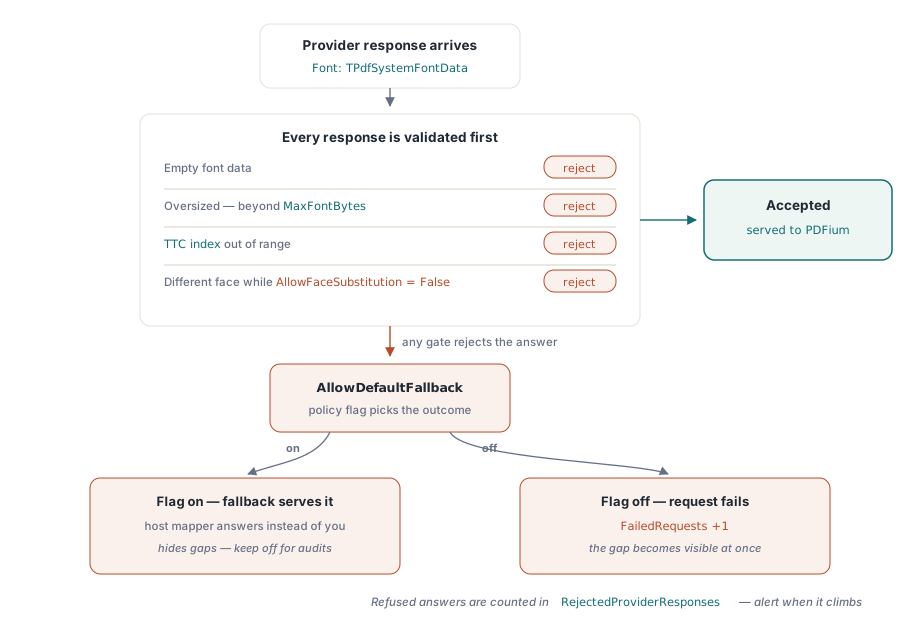
The TTC index is checked at a different point. PDFium often asks for one sfnt table at a time, such as cmap or glyf, and the component answers those queries by walking the table directory of the bytes you returned. For a collection it starts from the directory selected by TTCIndex; an index past the number of fonts in the ttcf header, or a nonzero index on a single font file, makes those table queries return nothing. The directory walk recognizes TrueType (0x00010000 and true), OpenType with CFF outlines (OTTO) and collections (ttcf). WOFF and WOFF2 files have to be decompressed to plain sfnt before the provider returns them
TPdfSystemFontPolicy.Default turns both flags on, with a 64 MB ceiling per font and 32 cache entries. That suits a provider rolled out a few families at a time, where everything you have not mapped yet keeps rendering the way it did. An audit build should switch both flags off. Gaps then show up as counted failures and refused substitutions, and a fallback hit can no longer hide a family the font set forgot
Which thread calls ResolveFont?
ResolveFont runs on whichever thread is loading or rendering the page that needs the font, which is not necessarily the main thread. The component guards its own cache and counters with a critical section, but it does not hold that lock while your method runs. If your application renders on background threads, any state the provider changes after construction needs its own guard
Exceptions are the second thing to keep inside the method. The component catches anything that escapes ResolveFont at the boundary with the native library and treats it as a declined request, so the request continues to fallback or failure. Relying on that turns a bug in your mapping code into a font quietly served by somebody else. The wrapper below records every miss under a lock and keeps exceptions local, which also gives you the list of face names to add to the table:
uses
  System.SysUtils, System.Classes, System.SyncObjs, PDFium;

type
  TRecordingFontProvider = class(TInterfacedObject, IPdfSystemFontProvider)
  private
    FInner: IPdfSystemFontProvider;
    FLock: TCriticalSection;
    FMisses: TStringList;
  public
    constructor Create(const Inner: IPdfSystemFontProvider);
    destructor Destroy; override;
    function ResolveFont(const Request: TPdfSystemFontRequest;
      out Font: TPdfSystemFontData): Boolean;
    function MissedFaces: string;
  end;

constructor TRecordingFontProvider.Create(const Inner: IPdfSystemFontProvider);
begin
  inherited Create;
  FInner := Inner;
  FLock := TCriticalSection.Create;
  FMisses := TStringList.Create;
  FMisses.Sorted := True;
  FMisses.Duplicates := dupIgnore;
end;

destructor TRecordingFontProvider.Destroy;
begin
  FMisses.Free;
  FLock.Free;
  inherited;
end;

function TRecordingFontProvider.ResolveFont(const Request: TPdfSystemFontRequest;
  out Font: TPdfSystemFontData): Boolean;
begin
  try
    Result := FInner.ResolveFont(Request, Font);
  except
    Result := False;            // log it here; do not let it reach PDFium
  end;
  if Result then
    Exit;
  FLock.Enter;
  try
    FMisses.Add(Format('%s weight=%d italic=%s charset=%d pitch=%d',
      [string(Request.FaceName), Request.Weight,
       BoolToStr(Request.Italic, True), Request.Charset, Request.PitchFamily]));
  finally
    FLock.Leave;
  end;
end;

function TRecordingFontProvider.MissedFaces: string;
begin
  FLock.Enter;
  try
    Result := FMisses.Text;
  finally
    FLock.Leave;
  end;
end;
Hold the recorder through an interface variable as well as the object variable. The component keeps its own interface reference, and ClearSystemFontProvider drops it; if that was the last reference, the object goes with it and a plain class variable now points at freed memory. For finding which fonts a document references before any rendering happens, the per-document listing in analyzing PDF font properties shows embedded and non-embedded fonts side by side
Sizing the font cache
Mapping requests repeat constantly during rendering, so accepted answers are cached. The cache key covers the face name (case-insensitive), weight, italic flag, charset and pitch family, and when MaxCacheEntries is reached the least recently used entry is evicted. A value of 0 switches caching off, so every request reaches your provider and is validated again. A negative value, or a MaxFontBytes of zero or less, makes ConfigureSystemFontProvider raise "Invalid system font provider policy"
Entry counts say little about memory when a single CJK collection can run past 20 MB. For a byte budget, ConfigureSystemFontCacheGovernor attaches a TPdfCacheGovernor from the FPdfCache unit, created with a maximum byte count and shared with the component's other caches. It also has to be set before the library loads. Each cached entry is charged the full length of its font data, so a 20 MB collection answering requests for four different charsets counts four times against the budget even if your provider returns the same array each time. When the governor refuses a reservation the font is still served, just not cached. Keep the governor object alive until UnloadLibrary has run, since the cached entries hold reservations against it
Proving the mapping in production
GetSystemFontProviderStatistics returns a TPdfSystemFontStatistics record. Configured and Installed say whether a provider is set and whether it has been handed to PDFium. MapRequests counts every mapping request, and CacheHits, ProviderHits and DefaultFallbackHits show how they were answered. FailedRequests counts the ones nothing answered and RejectedProviderResponses the answers the policy refused. The remaining fields track table-level reads (FontDataRequests), live font handles, cached fonts, cached bytes and evictions
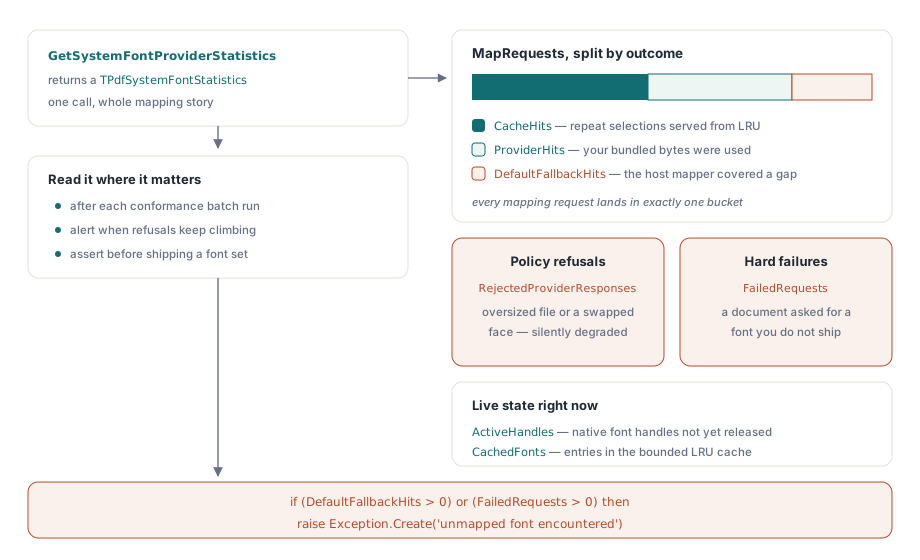
A conformance run reads the counters after the batch, then unloads. UnloadLibrary detaches the provider from PDFium, releases the platform mapper and empties the cache before it shuts PDFium down, and it refuses to run while documents are still open. ClearSystemFontProvider comes last; it raises if PDFium is still loaded, and it resets the counters, so read them first:
var
  Recorder: TRecordingFontProvider;
  RecorderRef: IPdfSystemFontProvider;   // keeps the object alive
  Policy: TPdfSystemFontPolicy;
  Stats: TPdfSystemFontStatistics;
begin
  Recorder := TRecordingFontProvider.Create(TBundledFontProvider.Create(FontDir));
  RecorderRef := Recorder;
  Policy := TPdfSystemFontPolicy.Default;
  Policy.AllowDefaultFallback := False;
  Policy.AllowFaceSubstitution := False;
  ConfigureSystemFontProvider(RecorderRef, Policy);

  // FontDir, SampleFiles and RenderCorpus are your own; the batch must
  // close every document it opens before UnloadLibrary runs
  RenderCorpus(SampleFiles);

  Stats := GetSystemFontProviderStatistics;
  Writeln(Format('requests=%d cache=%d provider=%d fallback=%d',
    [Stats.MapRequests, Stats.CacheHits, Stats.ProviderHits,
     Stats.DefaultFallbackHits]));
  Writeln(Format('rejected=%d failed=%d evictions=%d cachedBytes=%d',
    [Stats.RejectedProviderResponses, Stats.FailedRequests,
     Stats.CacheEvictions, Stats.CachedFontBytes]));

  UnloadLibrary;               // detaches the provider, then shuts PDFium down
  ClearSystemFontProvider;     // allowed only once PDFium is unloaded

  if (Stats.FailedRequests > 0) or (Stats.RejectedProviderResponses > 0) then
    raise Exception.Create('Font set incomplete:' + sLineBreak +
      Recorder.MissedFaces);
end;
With fallback off, DefaultFallbackHits stays at zero and every gap lands in FailedRequests, often alongside RejectedProviderResponses when the provider did answer but the policy refused the name or the size. In a production build with fallback on, the same gap moves into DefaultFallbackHits, and that counter is the one to chart: a rise after a new customer starts sending documents means a family your font set does not cover is now being rendered with whatever the host offers. Threading rules for the rest of the component follow the render lock discipline described separately
The same library instance handles font provisioning, rendering and text extraction across Delphi, C++Builder and Lazarus, and the PDFium Component for Delphi page covers editions and deployment of the native library