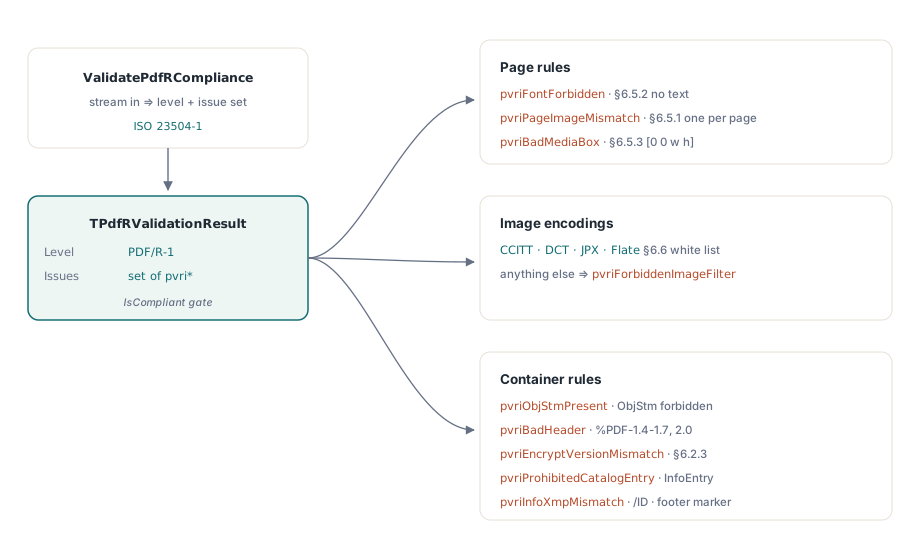
PDF/R, standardized as ISO 23504-1, is the PDF profile for scanned documents: every page carries exactly one strip image and nothing else. PDFium Component validates it from Delphi, Lazarus and C++Builder through ValidatePdfRCompliance, which reads a stream and returns the conformance level plus a set of concrete issues
The profile exists because scanners and document-capture systems needed a target narrower than PDF/A. An archival PDF may contain anything the part allows; a raster PDF is deliberately impoverished, so any conforming reader can display it identically and any conforming writer can produce it from a scan without an authoring engine
What does PDF/R forbid that PDF/A allows?
Text, in practice. A raster page carries the scanned image and nothing else, so a font resource on a page is a violation — reported as pvriFontForbidden under ISO 23504-1 §6.5.2. That surprises people who add an invisible OCR text layer for searchability, which is a normal and useful thing to do in a PDF/A workflow and simply is not PDF/R
The page-to-image relationship is equally strict. §6.5.1 makes every page exactly one strip image, so pvriPageImageMismatch fires when the image count does not match the page count — a page with no image and a page with two are both non-conforming. And pvriBadMediaBox reports a page whose MediaBox does not have the form [0 0 w h] (§6.5.3), because a scan has no reason to sit at an offset origin
uses FPdfPdfr;

var
  Src: TFileStream;
  Res: TPdfRValidationResult;
begin
  Src := TFileStream.Create('scan-batch-0142.pdf', fmOpenRead or fmShareDenyWrite);
  try
    Res := ValidatePdfRCompliance(Src);
    if Res.IsCompliant then
      Memo1.Lines.Add('PDF/R-1 conformant')
    else
    begin
      if pvriFontForbidden in Res.Issues then
        Memo1.Lines.Add('A page names a font resource; a raster page carries no text');
      if pvriPageImageMismatch in Res.Issues then
        Memo1.Lines.Add('Image count does not match page count');
      if pvriForbiddenImageFilter in Res.Issues then
        Memo1.Lines.Add('A strip image uses an encoding outside the white list');
    end;
  finally
    Src.Free;
  end;
end;
Which image encodings are allowed
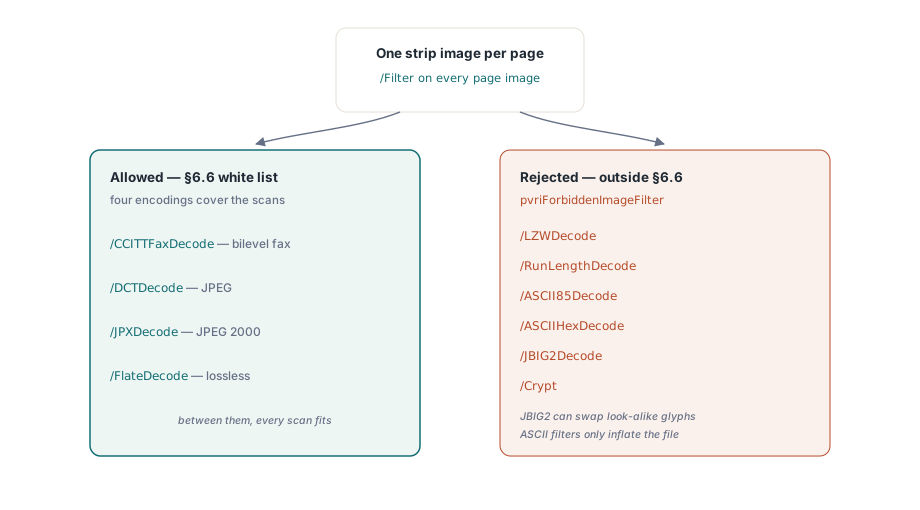
Four, and the white list is short for a reason. §6.6 admits /CCITTFaxDecode, /DCTDecode, /JPXDecode and /FlateDecode — bilevel fax, JPEG, JPEG 2000 and lossless deflate, which between them cover every scanner output that matters. Everything else is reported as pvriForbiddenImageFilter, including /LZWDecode, /RunLengthDecode, /ASCII85Decode, /ASCIIHexDecode, /JBIG2Decode and /Crypt
Two of those rejections are worth understanding rather than memorizing. /JBIG2Decode compresses bilevel scans extremely well and is perfectly legal in PDF/A, but its symbol-dictionary reconstruction can substitute visually similar glyphs — a documented failure mode for scanned digits — and a profile whose whole purpose is faithful raster reproduction cannot admit that risk. The ASCII filters are excluded for the opposite reason: they inflate the file without adding anything a raster profile needs
Structure rules that fire before any page is read
PDF/R constrains the container too. pvriObjStmPresent reports a /Type /ObjStm stream, which the profile forbids outright — object streams complicate the simple, sequential parse that a raster reader is meant to be able to perform. pvriBadHeader reports a header outside %PDF-1.4 to 1.7 and %PDF-2.0, and pvriEncryptVersionMismatch reports an encrypted file whose header is not %PDF-2.0, per §6.2.3
The catalog and Info dictionary are white-listed, not merely checked. pvriProhibitedCatalogEntry and pvriProhibitedInfoEntry fire for entries outside the permitted set, and pvriInfoXmpMismatch fires when an Info entry disagrees with its XMP equivalent. A missing catalog /Metadata stream, a missing trailer /ID and an absent %PDF-raster-1.0 footer marker each have their own issue as well
Why the save options record omits Title and Author
TPdfRSaveOptions carries Creator, Producer, CreationDate, ModDate, DocumentId and InstanceId, and deliberately has no field for Title, Author, Subject or Keywords. Those four are the entries §6.4.3 prohibits, so a record that exposed them would be inviting callers to write a non-conforming file through a conforming API
Two boolean options control cleanup when converting an existing PDF. StripInfoOptionalEntries defaults to True and removes Title, Author, Subject, Keywords and Trapped from the source Info dictionary. StripCatalogOptionalEntries also defaults to True and removes Names, Outlines, StructTreeRoot, OutputIntents, Lang and the rest, leaving only the §6.3 white list. Set either to False and you keep the entries — and lose conformance, which is occasionally what a caller genuinely wants for an internal file
var
  Opts: TPdfRSaveOptions;
  Src, Dest: TFileStream;
begin
  Opts := TPdfRSaveOptions.Default;
  Opts.Creator := 'Capture Station 4';
  Opts.Producer := 'PDFium Component';
  Src := TFileStream.Create('scan-in.pdf', fmOpenRead or fmShareDenyWrite);
  try
    Dest := TFileStream.Create('scan-pdfr.pdf', fmCreate);
    try
      InjectPdfRMarkers(Src, Dest, Opts);   // markers + metadata, not page content
    finally
      Dest.Free;
    end;
  finally
    Src.Free;
  end;
end;
Note what marker injection does not do: it adds metadata and identification, and it cannot supply page content. A source page that carries no strip image will still fail pvriPageImageMismatch after injection, because the missing image was never a metadata problem
Where PDF/R fits in a capture pipeline
Use it where the deliverable is the scan itself and fidelity is the whole contract — evidentiary imaging, check and remittance capture, engineering drawing archives from a large-format scanner. Use PDF/A instead the moment the document needs searchable text, tagging, embedded attachments or anything else the raster profile strips
A common and workable arrangement is to produce both: a PDF/R original that never changes, and a PDF/A derivative with an OCR layer for retrieval. The validators are independent, so the same batch job can check each artifact against the profile it actually claims. For the archival side of that pair, see the notes on PDF/A archival compliance and PDF/A preflight validation, and for print-oriented output the walkthrough of validating print-ready PDF/X documents
PDFium Component brings the PDFium engine to Delphi, C++Builder and Lazarus with a VCL API and conformance validators for PDF/A, PDF/X, PDF/E, PDF/UA and PDF/R — the PDFium Component product page lists the supported standards and IDE versions