Drop seven pages out of a 200-page handbook and every bookmark lands somewhere wrong. The fix is not rebuilding the outline from a flat title list. PDFiumPas exposes TPdfOutlineEditor, which loads the real outline tree, lets you move and retarget items, then runs ApplyPageMap to shift every explicit destination through your page plan
Why does deleting pages break every bookmark?
Because an outline item does not store a page number. It stores a reference to a page object, and when the page objects change the reference either points at a page that moved or at nothing at all. ISO 32000-1 §12.3.2.2 defines an explicit destination as an array whose first element is an indirect reference to a page dictionary, followed by a fit name such as /Fit or /XYZ. Delete the page and you are left with a dangling reference; reorder the pages and the reference is still valid but now describes a different chapter. PDFiumPas resolves that array back to a page number when it loads, so TPdfOutlineItem.PageNumber gives you a one-based page index that matches the public TPdf API rather than an object number. That is the whole point of the abstraction: your remapping logic works in the same coordinate system as the page plan you already built when you split, reordered, or imposed the document. If you are building that plan, the same one-based convention runs through splitting PDF documents into multiple files and through n-up imposition and page reordering
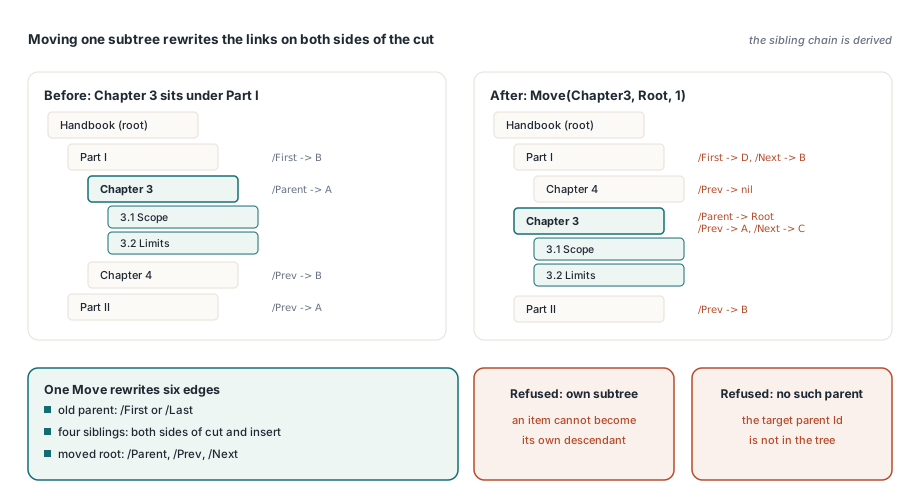
The outline is a doubly linked tree, not a list
The reason you cannot simply serialize a flat array of titles is that ISO 32000-1 §12.3.3 wires every outline item into five separate links: /Parent, /Prev, /Next, /First, and /Last. Moving a single subtree therefore rewrites the old parent, the new parent, both neighboring siblings on each side of the cut and the insertion point, and the parent pointer of the moved node itself. Get one of those wrong and conforming readers show a truncated tree, or loop. PDFiumPas keeps the edit state as a depth-first array of TPdfOutlineItem records with a stable integer Id, so a subtree is a contiguous slice and the sibling chain is derived, never hand-maintained. TPdfOutlineEditor.Move lifts that slice, reinserts it under the new parent at the requested sibling index, and reassigns only the root of the block. It also refuses the two moves that would corrupt the graph: moving an item into its own subtree, and naming a parent that does not exist
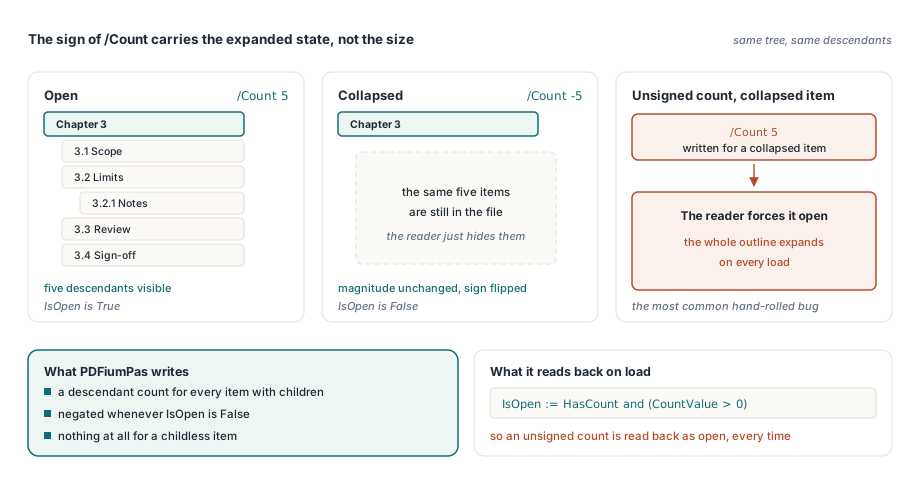
Why is /Count signed?
Because the sign carries the expanded state, not the size. A positive /Count means the item is open and the number is how many descendants are currently visible; a negative /Count means the item is collapsed. PDFiumPas writes the descendant count for every item that has children and negates it when IsOpen is False, and on load it reads the state back as IsOpen := HasCount and (CountValue > 0). This is the single most common hand-rolled bug in outline writers: emitting an unsigned count and silently forcing the whole tree open
var
  Source, Dest: TMemoryStream;
  Editor: TPdfOutlineEditor;
  Options: TPdfOutlineEditOptions;
  Report: TPdfOutlineValidationReport;
  RootId, ChapterId: Integer;
begin
  Source := TMemoryStream.Create;
  Dest := TMemoryStream.Create;
  Editor := nil;
  try
    Source.LoadFromFile('handbook.pdf');
    Options := TPdfOutlineEditOptions.Default;   // MaxItems 100000, MaxDepth 64
    if not TPdfOutlineEditor.TryLoad(Source, Options, Editor, Report) then
      raise Exception.Create(Report.ErrorMessage);

    RootId := Editor[0].Id;
    ChapterId := Editor[2].Id;

    Editor.Move(ChapterId, RootId, 1);           // becomes second child of root
    Editor.SetTitle(ChapterId, 'Appendix B');
    Editor.SetStyle(ChapterId, [posBold, posItalic]);
    Editor.SetColor(ChapterId, 0.25, 0.5, 0.75);
    Editor.SetExpanded(RootId, False);           // writes a negative /Count
    Editor.Retarget(ChapterId, 12, '/XYZ 10 20 1');

    if not Editor.SaveIncremental(Source, Dest, Report) then
      raise Exception.Create(Report.ErrorMessage);
    Dest.SaveToFile('handbook-edited.pdf');
  finally
    Editor.Free;
    Dest.Free;
    Source.Free;
  end;
end;
Retarget handles both shapes the specification allows. Pass DestinationInAction as False and PDFiumPas writes a direct /Dest array; pass True and it writes a Go-To action, /A << /S /GoTo /D [ page ref suffix ] >>, per ISO 32000-1 §12.6.4.2. Either way it first strips any existing /Dest and /A from the item so the two cannot coexist and disagree. The suffix defaults to /Fit and must begin with a PDF name, which is why an empty or malformed suffix raises immediately instead of producing a destination array that no reader can parse
How does ApplyPageMap consume a page plan?
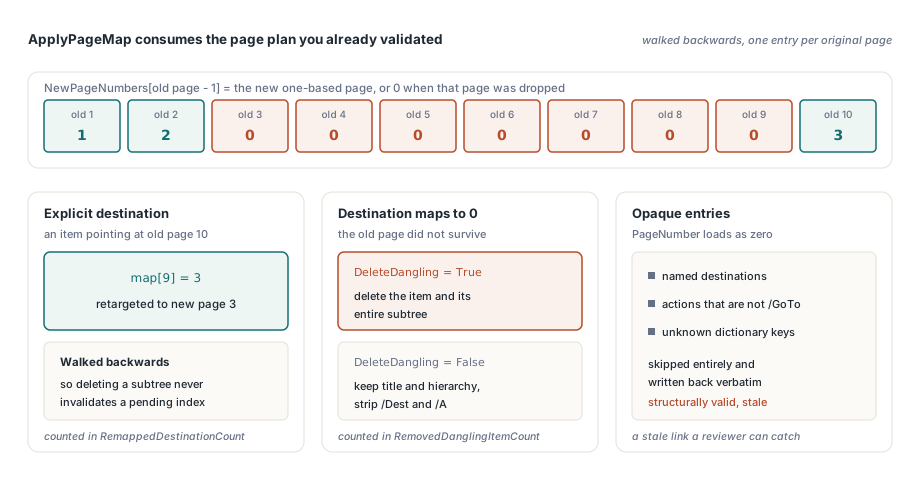
ApplyPageMap takes exactly the array your page plan already validated: NewPageNumbers, indexed by old page minus one, holding the new one-based page number or zero when that page did not survive. It walks the item array backwards so that deleting a subtree never invalidates an index it has yet to visit, and it reports what it did through RemappedDestinationCount and RemovedDanglingItemCount
var
  NewPageNumbers: array of Integer;
  Report: TPdfOutlineValidationReport;
  I: Integer;
begin
  // One entry per page of the ORIGINAL document
  SetLength(NewPageNumbers, OriginalPageCount);
  for I := 0 to OriginalPageCount - 1 do
    NewPageNumbers[I] := 0;              // 0 == this page was dropped

  NewPageNumbers[0] := 1;                // old page 1 -> new page 1
  NewPageNumbers[1] := 2;
  NewPageNumbers[9] := 3;                // old page 10 -> new page 3

  // True: delete the whole dangling subtree. False: keep the item, strip its target
  if not Editor.ApplyPageMap(NewPageNumbers, True, Report) then
    raise Exception.Create(Report.ErrorMessage);

  WriteLn(Format('%d remapped, %d dangling items removed',
    [Report.RemappedDestinationCount, Report.RemovedDanglingItemCount]));
end;
The DeleteDangling flag decides the policy for a destination that mapped to zero, and both branches are deliberate. With True, PDFiumPas deletes the item and its entire subtree, because an outline node whose target vanished usually heads a chapter that vanished with it. With False, the item survives with its title and hierarchy intact but its /Dest and /A removed, which is what you want when a human is going to retarget it in review. Genuinely malformed input still fails loudly rather than being patched: a negative entry or a destination pointing past the end of the supplied map returns False with IssueKind set to poviInvalidPageMap
Opaque entries, and the honest trade-off
Not every outline item has a page number PDFiumPas can reason about. Three kinds are carried through untouched: named destinations, actions that are not /S /GoTo, and unknown dictionary keys added by whatever produced the file. These load with PageNumber equal to zero, keep their original bytes in the item, and are written back verbatim unless you explicitly call Retarget on them
- A named destination is a key into the document name tree, so remapping it correctly means resolving the tree and rewriting the target entry, not guessing at the outline level
- A
/URI,/Launch, or JavaScript action has no page semantics at all and must not be silently converted into a Go-To - Vendor-specific keys and structure destinations are preserved because dropping what you do not understand is how round-trips lose data
The cost is real and worth stating plainly: ApplyPageMap skips those items entirely, so a document whose bookmarks all use named destinations will come through a page deletion with its outline structurally valid and semantically stale. That is the deliberate choice — a stale link a reviewer can catch beats a confidently wrong one nobody notices. If you are triaging incoming files before you edit them, an inventory pass in a PDF intake review workbench will tell you which documents fall into that bucket
Saving: incremental revision, then an independent reload
TPdfOutlineEditor.SaveIncremental appends a sparse incremental revision rather than rewriting the file. Items that were loaded keep their original indirect object reference including the exact generation, so existing cross-references stay valid; only items you added draw a fresh number, allocated from one past the revision maximum object number. The catalog is updated in the same revision, and a missing /Outlines entry is added to it when the source had no outline at all
What happens after the write is the part worth copying. PDFiumPas reopens the destination stream with a completely independent editor and compares the reloaded tree against the in-memory one — item count, titles, page numbers, destination suffixes, action-versus-direct destination form, styles, expanded state, and parent relationships. Any mismatch, or any load failure, clears the destination stream and returns poviVerificationFailure instead of handing you a plausible-looking file. Encrypted sources are refused up front with poviEncryptedInput, since new titles and destinations create string content that cannot be produced by copying the /Encrypt trailer forward
if not Editor.SaveIncremental(Source, Dest, Report) then
  case Report.IssueKind of
    poviEncryptedInput:
      Log('Source is encrypted; outline editing needs an unprotected copy');
    poviInvalidDestination:
      Log(Format('Item %d %d targets a missing page',
        [Report.ObjectNumber, Report.Generation]));
    poviVerificationFailure:
      Log('Reload check rejected the written revision: ' + Report.ErrorMessage);
  else
    Log(Report.ErrorMessage);
  end;
Treat the outline as what it is — a linked object graph with its own invariants — and page deletion stops being a bookmark disaster and becomes a page map you hand to one method call. TPdfOutlineEditor, ApplyPageMap, and the verified incremental writer ship in PDFiumPas from v3.98.0 for Delphi, C++Builder, and Lazarus; you can review the full API and download a trial on the PDFium Delphi Component product page