PDFium Component gives you one method for PDF splitting: ImportPages. Everything else, whether you are isolating a single page, cutting on arbitrary boundaries, or following the document's own bookmark structure, is just different ways to decide which page numbers go into each output file. The mechanics stay the same. Understanding that early saves a lot of wrong turns
How the split loop works
The pattern is the same regardless of how you divide the source document. Create a fresh TPdf instance, call CreateDocument on it to initialize an empty PDF in memory, import the pages you want with ImportPages, save the result, then reset Active to False before the next iteration. That last step is the one people miss: CreateDocument does not implicitly close the document still in memory, so you must save your output and reset Active := False explicitly before calling it again; resetting first keeps the state clean and well defined. The outer TPdf instance is reused across all iterations, which keeps allocation pressure low on large jobs
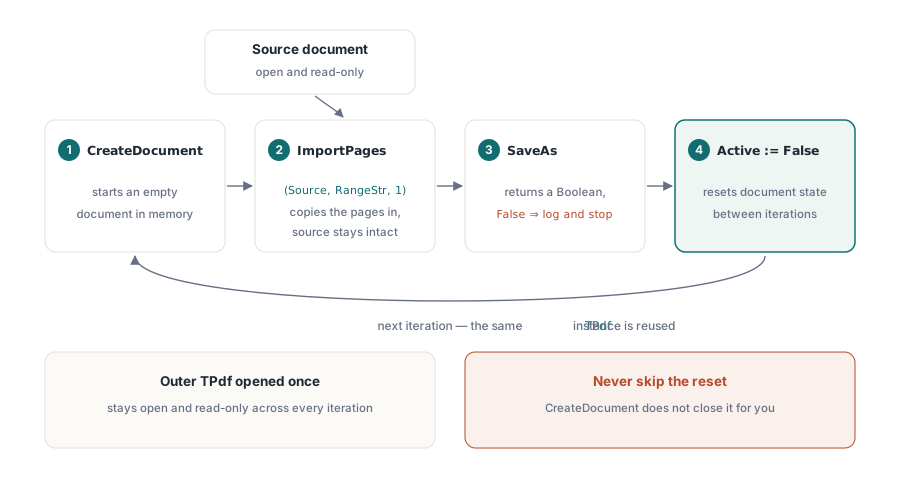
Here is what page-by-page splitting looks like stripped to its essentials:
procedure SplitIntoPages(Source: TPdf; const OutputDir: string);
var
  I: Integer;
  PdfOut: TPdf;
  OutFile: string;
begin
  PdfOut := TPdf.Create(nil);
  try
    for I := 1 to Source.PageCount do
    begin
      PdfOut.CreateDocument;

      // Range is a 1-based page number string; insertion point 1 = first position
      if not PdfOut.ImportPages(Source, IntToStr(I), 1) then
        raise Exception.CreateFmt('Failed to import page %d', [I]);

      OutFile := OutputDir + '\page_' + Format('%.4d', [I]) + '.pdf';
      if not PdfOut.SaveAs(OutFile) then
        raise Exception.Create('Failed to save ' + OutFile);

      PdfOut.Active := False;   // reset before next CreateDocument
    end;
  finally
    PdfOut.Free;
  end;
end;
The Range parameter to ImportPages is the same string format PDFium uses internally: a comma-separated list of page numbers or hyphen-delimited ranges, all 1-based. '3' imports page 3. '1-5' imports pages 1 through 5 in order. '2,5,8' imports those three pages. The third parameter is the 1-based insertion position in the destination document; passing 1 always places imported pages at the beginning of an otherwise empty file, which is what you want here
Splitting by page ranges
When the caller supplies a list like 1-12,13-24,25-36, you parse it into start/end pairs and run the same loop, constructing the range string from each pair:
procedure SplitByRanges(Source: TPdf; const RangeList: array of string;
  const OutputDir: string);
var
  I: Integer;
  PdfOut: TPdf;
  OutFile: string;
begin
  PdfOut := TPdf.Create(nil);
  try
    for I := 0 to High(RangeList) do
    begin
      PdfOut.CreateDocument;
      if not PdfOut.ImportPages(Source, RangeList[I], 1) then
        raise Exception.Create('Invalid page range: ' + RangeList[I]);
      OutFile := Format('%s\section_%d.pdf', [OutputDir, I + 1]);
      if not PdfOut.SaveAs(OutFile) then
        raise Exception.Create('Failed to save ' + OutFile);
      PdfOut.Active := False;
    end;
  finally
    PdfOut.Free;
  end;
end;
Validation before you reach ImportPages matters here. ImportPages returns False when a page number in the range string exceeds Source.PageCount, but it does not raise an exception and it does not produce a partial output file you can detect by name alone. Check SaveAs's return value and log failures separately; a range that produces an empty output file is not obviously wrong until someone opens it
Splitting at bookmark boundaries
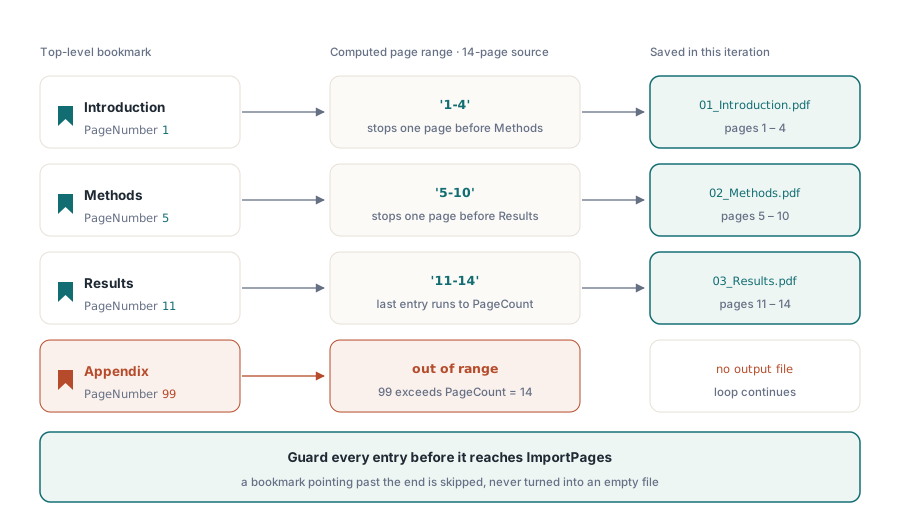
The third approach uses the document's own structure rather than an externally supplied list. Each top-level bookmark carries a target page number; the section it defines runs from that page to one before the next bookmark's page, or to the end of the document for the last entry
procedure SplitByBookmarks(Source: TPdf; const OutputDir: string);
var
  Bm: TBookmarks;
  I, StartPage, EndPage: Integer;
  PdfOut: TPdf;
  RangeStr, OutFile, SafeTitle: string;
begin
  Bm := Source.Bookmarks;
  if Length(Bm) = 0 then
    Exit;

  PdfOut := TPdf.Create(nil);
  try
    for I := 0 to High(Bm) do
    begin
      StartPage := Bm[I].PageNumber;
      if I < High(Bm) then
        EndPage := Bm[I + 1].PageNumber - 1
      else
        EndPage := Source.PageCount;

      if (StartPage < 1) or (EndPage < StartPage) then
        Continue;

      RangeStr := Format('%d-%d', [StartPage, EndPage]);

      PdfOut.CreateDocument;
      if not PdfOut.ImportPages(Source, RangeStr, 1) then
      begin
        PdfOut.Active := False;
        Continue;   // skip a malformed section instead of writing an empty file
      end;

      SafeTitle := StringReplace(Bm[I].Title, '/', '_', [rfReplaceAll]);
      SafeTitle := StringReplace(SafeTitle, ':', '_', [rfReplaceAll]);
      OutFile := Format('%s\%02d_%s.pdf', [OutputDir, I + 1, SafeTitle]);
      if not PdfOut.SaveAs(OutFile) then
        raise Exception.Create('Failed to save ' + OutFile);

      PdfOut.Active := False;
    end;
  finally
    PdfOut.Free;
  end;
end;
A document that has no bookmarks is not an error condition worth surfacing to the user as one; it just means this splitting mode has nothing to work from. The Length(Bm) = 0 guard handles that silently. What is worth surfacing is when a bookmark's page number is outside the document's range, which happens in malformed files where the outline was never updated after pages were deleted. The bounds check on StartPage and EndPage skips those entries rather than passing a garbage range to ImportPages
Output file naming and the Active reset
Filename safety for bookmark-derived names needs explicit attention. Bookmark titles can contain characters that are valid in a PDF string but not in a filesystem path. At minimum, replace forward slash, backslash, and colon before building the output path. On Windows, *, ?, ", <, >, and | are also forbidden; a simple loop over a fixed set covers them without pulling in a regex
The Active := False line at the end of each iteration deserves emphasis because it is the only non-obvious requirement in the pattern. CreateDocument does not implicitly close whatever is open. If Active is still True when CreateDocument runs again, the document still in memory was never properly closed or saved, and you cannot rely on well-defined behavior in that state, so save and reset explicitly before starting the next document. Think of it as the pair to try/finally: the finally block frees the outer object; the Active := False resets the inner document state between loop iterations
Memory use across a large split job stays flat with this approach because you are never holding more than one output document in memory at once. The source document remains open and read-only throughout; ImportPages copies page data into the new document without modifying the source. If the source is encrypted, open it with its password before the loop and the copied pages in each output file will be unencrypted, which is usually the right behavior for split output distributed to different recipients
One more thing about SaveAs: it returns a Boolean. An output directory that does not exist, a path with characters the OS rejects, or a disk-full condition will all cause SaveAs to return False without raising an exception. In a batch job that splits a 200-page document into 200 single-page files, a silent failure on page 147 is easy to overlook. Check the return value on each call and count successes against the expected total when the loop finishes
The ImportPages and CreateDocument methods shown here are part of PDFium Component for Delphi and C++Builder