Starting with version 3.223.0, PDFium Component for Delphi orders form field navigation by each page's declared /Tabs policy: R for row order, C for column order, S for structure order, plus the PDF 2.0 values A and W. TPdf.FormFieldTabOrder returns that order, and its status overload reports whether the declared policy was applied or a fallback was used
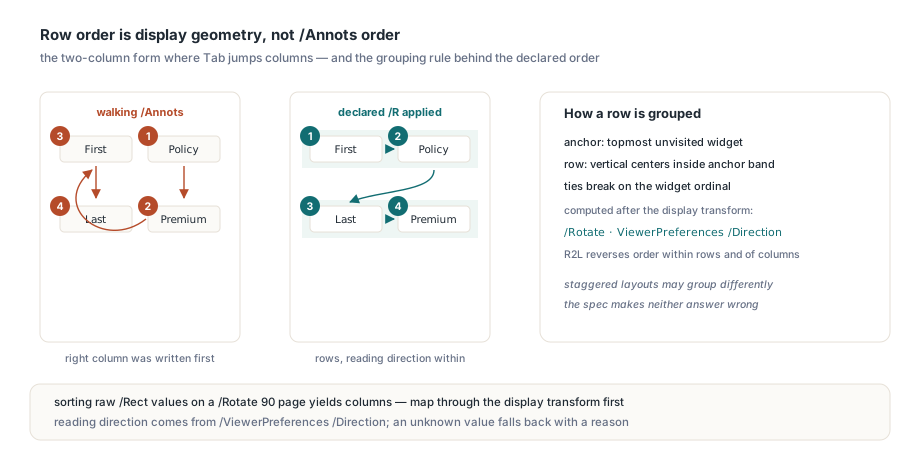
The complaint that motivates all of this is always the same. A user fills a two-column insurance form, presses Tab after the first name field, and the cursor jumps to the bottom of the right-hand column. Nothing is broken in the indexes. The producer simply wrote the right column into /Annots first and declared /Tabs /R on the page to fix the visual order, so a viewer that walks /Annots and ignores the declaration lands in the wrong place. The article on widget index versus annotation index covers how widget ordinals relate to the /Annots array. In PDFium Component the declared policy wins whenever it can be established, and when it cannot, the component tells you why
What does the /Tabs entry actually declare?
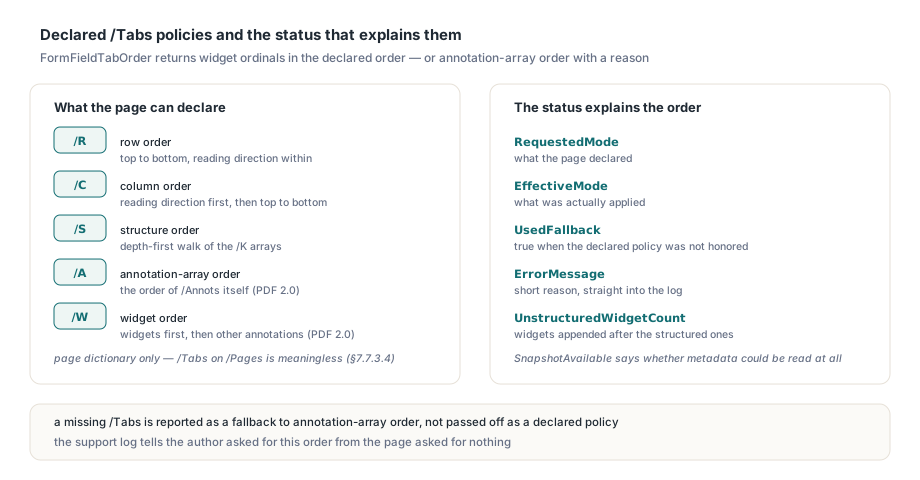
/Tabs is an optional name in the page object (ISO 32000-2 §7.7.3.3; Table 30 in ISO 32000-1) that tells a processor in which order to visit the annotations on that page, and its semantics are spelled out under annotations in §12.5.1. PDF 1.5 introduced three values, and PDF 2.0 added two more:
/R, row order: rows from top to bottom, and within each row the reading direction of the viewer/C, column order: columns in the reading direction, and top to bottom within each column/S, structure order: the order in which the logical structure tree references the annotations/A, annotation-array order: the order of/Annotsitself (PDF 2.0)/W, widget order: widgets first in array order, then the other annotations (PDF 2.0)
The detail that trips up hand-written implementations is inheritance. /Tabs belongs to the page dictionary only. ISO 32000-2 §7.7.3.4 limits inheritable page attributes to Resources, MediaBox, CropBox and Rotate, so a /Tabs key sitting on a /Pages node is meaningless, and a reader that walks up the parent chain to find one is inventing a policy the author never set. PDFium Component reads /Tabs from the page itself and nowhere else
Reading the declared order with FormFieldTabOrder
TPdf.FormFieldTabOrder returns the current page's form fields as zero-based widget ordinals in the declared tab order, and the overload with an out Status: TPdfFormTabOrderStatus parameter explains how that order was produced. The same pair exists on TPdfView, and the plain overload uses the identical policy while discarding the status
uses
  PDFium;

const
  ModeNames: array[TPdfFormTabOrderMode] of string =
    ('unspecified', 'R', 'C', 'S', 'A', 'W', 'unsupported');

procedure DumpTabOrder(const FileName: string; PageNo: Integer);
var
  Pdf: TPdf;
  Order: TPdfIntegerArray;
  Status: TPdfFormTabOrderStatus;
  I: Integer;
begin
  Pdf := TPdf.Create(nil);
  try
    Pdf.FileName := FileName;
    Pdf.FormFill := True;          // already the default; required for fields
    Pdf.Active := True;
    if not Pdf.Active or (Pdf.FormType <> ftAcroForm) then
      Exit;
    Pdf.PageNumber := PageNo;
    Order := Pdf.FormFieldTabOrder(Status);
    Writeln('requested ', ModeNames[Status.RequestedMode],
      ', applied ', ModeNames[Status.EffectiveMode]);
    if Status.UsedFallback then
      Writeln('fallback: ', Status.ErrorMessage);
    if Status.UnstructuredWidgetCount > 0 then
      Writeln(Status.UnstructuredWidgetCount, ' widgets not in the structure tree');
    for I := 0 to High(Order) do
      Writeln(I, ': field ', Order[I], ' ',
        string(Pdf.FormFieldInfo[Order[I]].Name));
  finally
    Pdf.Free;
  end;
end;
The status record is what turns a silent ordering decision into something you can log. RequestedMode is what the page declared, EffectiveMode is what was applied, and UsedFallback is true when the declared policy could not be honored and annotation-array order came back instead, with a short reason in ErrorMessage. SnapshotAvailable says whether the component could read the document metadata at all. A missing /Tabs is reported as a fallback to annotation-array order rather than passed off as a declared policy, so a support log can tell "the author asked for this order" apart from "the page asked for nothing"
Why can't row and column order just sort the /Rect values?
Row and column order have to be computed in display geometry, not raw annotation coordinates, because a page's /Rotate and the document's reading direction both change what "row" means. Sort the /Rect arrays of a page with /Rotate 90 by their y coordinate and you get what the viewer shows as columns. The component therefore maps every widget rectangle through the page's display transform, intrinsic rotation included, at 1/64 point resolution, and groups from there
The reading direction comes from the catalog's ViewerPreferences dictionary (ISO 32000-2 §12.2). /Direction /R2L reverses the order within a row and reverses the order of columns, which is what an Arabic or Hebrew form expects. When /Direction is absent, L2R applies. When it holds anything other than L2R or R2L, row and column order fall back to annotation-array order with the reason in the status, because guessing a direction is worse than admitting there is none
Grouping is where processors legitimately differ, so it is worth knowing the exact rule. For row order, the topmost unvisited widget becomes the anchor, and every widget whose vertical center falls inside the anchor's top and bottom joins its row. Column order mirrors this horizontally. Ties break deterministically on the widget ordinal. On a clean grid this matches any sensible viewer. On a layout with heavily overlapping or staggered fields, another processor using a different tolerance may group differently, and no part of ISO 32000 makes either answer wrong
How does structure order decide the sequence?
Structure order follows the object reference (OBJR) dictionaries in the structure tree, in the order a depth-first walk of the /K arrays actually reaches them. It does not follow the /ParentTree key order, and it does not follow whatever order an enumeration of StructTreeRoot happens to produce. Those orders often coincide in files from a single producer and diverge after an editor rearranges the tree, which is precisely when a tagged form's reading order matters most. If you maintain that tree yourself, the guide to keeping /ParentTree and /StructParents in sync covers the reverse mapping that has to stay consistent with it
Widgets the structure tree never references are left to the processor by the specification. PDFium Component appends them after the structured widgets in annotation-array order and reports how many it appended in UnstructuredWidgetCount. A page that declares /S on a document with no structure tree at all is treated as an empty traversal: every widget lands in that tail, the count says so, and the result is not flagged as a full fallback. A structure tree with a cycle, an OBJR referenced twice, or an OBJR whose /Pg contradicts the page that owns the annotation makes structure order fall back. Those defects make S unusable, but they do not disturb R or C on other pages
Why are tab-order values not annotation indexes?
The values in the array returned by FormFieldTabOrder count widgets only, while an OBJR identifies an annotation object that lives in the full /Annots array. Mixing the two index spaces is the single most likely bug in any code that consumes structure order. Take a page whose /Annots is [Link, Widget A, Widget B]. The OBJR for Widget B points at annotation index 2. Widget B is field ordinal 1. Feed 2 to FocusFormField and you either focus the wrong field or nothing at all, depending on how many widgets the page has
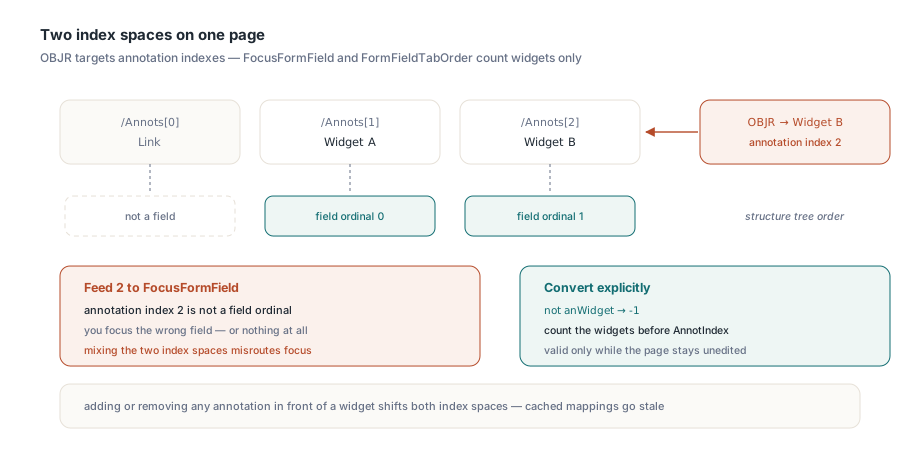
The component performs that conversion internally, which is why its result can go straight into FocusFormField and FormFieldInfo. If your own code reads OBJR targets or other annotation indexes, convert them explicitly before treating them as fields:
// Converts a page annotation index to the widget ordinal used by
// FocusFormField, FormFieldInfo and FormFieldTabOrder; -1 if not a widget
function AnnotationToFieldOrdinal(Pdf: TPdf; AnnotIndex: Integer): Integer;
var
  I: Integer;
begin
  Result := -1;
  if (AnnotIndex < 0) or (AnnotIndex >= Pdf.AnnotationCount) then
    Exit;
  if Pdf.Annotation[AnnotIndex].Subtype <> anWidget then
    Exit;                          // links, notes and popups are not fields
  Result := 0;
  for I := 0 to AnnotIndex - 1 do
    if Pdf.Annotation[I].Subtype = anWidget then
      Inc(Result);
end;
Treat the result as valid only while the page stays loaded and unedited. Adding or removing any annotation in front of a widget shifts both index spaces, and a cached mapping from before the edit is exactly the kind of off-by-one that reproduces only on customer files
Cross-page navigation with FocusNextFormField
FocusNextFormField(AcrossPages: Boolean; WrapDocument: Boolean = True; MaxPagesToScan: Integer = 256) walks the current page's tab order, then continues into later pages, and from 3.223.0 every page it visits applies its own declared policy. The cross-page overload arrived in version 3.220.0, so the advice in the form field navigation article to detect the wrap and change PageNumber yourself now applies only to the no-argument overload, which still cycles within one page
procedure TFormViewer.HandleTabKey(Shift: TShiftState);
var
  Field: Integer;
begin
  if ssShift in Shift then
    Field := PdfView.FocusPreviousFormField(True)  // across pages, wraps
  else
    Field := PdfView.FocusNextFormField(True);
  if Field < 0 then
    Beep   // nothing eligible within the scan; page and focus unchanged
  else
    UpdateFieldStatus(PdfView.PageNumber, Field);
end;
The return value is the page-local field ordinal on whatever page now holds focus, so read PageNumber alongside it. Cross-page traversal skips widgets a user cannot meaningfully tab into: hidden, invisible, NoView, read-only, signature, unknown-type and empty-rectangle widgets. Passing WrapDocument = False stops at the document boundary with -1. MaxPagesToScan must lie between 1 and 4096, and every inspected page counts, including the current one. When the scan finds nothing or the native engine refuses focus on the target, the call returns -1 and leaves the previous page and focus exactly as they were
Where does the declared order stop applying?
The declared policy is honored only when the component can read the page metadata reliably, and every case where it cannot falls back to annotation-array widget order with an explicit reason. The boundaries are specific enough to list:
- Metadata comes from a bounded private serialization of the current native document, not the original file bytes, because in-memory page moves and edits make the file on disk stale. The snapshot is cached per content revision, so notified edits invalidate it, and failed snapshots are cached too
- Encrypted documents, and snapshots requested during a page-object edit, have no snapshot and always fall back
- The snapshot is capped at 64 MiB, 65536 active objects, 4096 pages, 4096 annotations per page, 65536 annotations overall and a structure depth of 64; larger documents fall back rather than stall navigation
- Only AcroForm documents are covered. XFA forms stay outside this profile
- Row and column order need finite, nonempty widget rectangles and sane page dimensions; degenerate geometry triggers the fallback
- These APIs drive navigation from your code. PDFium's own handling of a Tab key forwarded to the engine is not replaced, so route the key through
FocusNextFormFieldif you want the declared order
Queries preserve the current page, native focus and any pending edit text in the focused field, and they run no document or page lifecycle actions. Calling FormFieldTabOrder on every keystroke is therefore safe, and after the first call on a given content revision it is cheap
Declared tab order, the status diagnostics and cross-page focus navigation are part of the PDFium Component for Delphi and C++Builder; the product page links the full API reference, including the TPdfFormTabOrderMode and TPdfFormTabOrderStatus entries