PDFium Component can open a PDF that lives inside a larger buffer directly from a byte range. The overload LoadDocument(const Data: TBytes; Index, Count: Integer; Buffered: Boolean) addresses a window in place, so no preliminary Copy is needed. In exchange it asks you to understand one rule: when Buffered is False, the backing array is borrowed, not copied
This is a different mechanism from the callback-driven approach described in streaming large PDFs on demand with PDFium VCL, which hands PDFium an FPDF_FILEACCESS reader and lets it pull blocks from disk as it needs them. That one is for documents too large to hold in RAM. This one is for documents already in RAM, sitting at a known offset inside something else. The two are complements, and the last section explains which situation belongs to which
The 40 MB copy nobody asked for
The scenario shows up wherever PDFs travel inside other formats. A mail store keeps message bodies and attachments in one record. An archive container concatenates a manifest, a few images and a PDF. A custom wire protocol frames a document behind a length-prefixed header. In every case you end up holding one large TBytes and knowing that the PDF starts at byte 1 182 336 and runs for 312 kilobytes
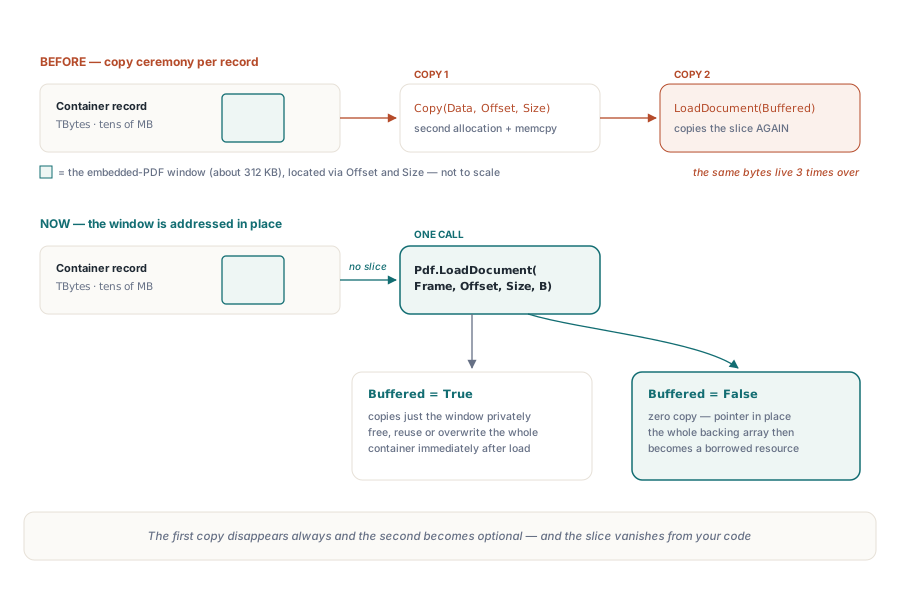
Before the byte range overload existed, the idiomatic answer was Copy(Data, Index, Count), which allocates a second array and memcpys the window into it. You then hand that slice to LoadDocument with Buffered = True, which copies it again into the component private buffer. Two copies of the same bytes, one of them pure ceremony, and on a large mailbox scan repeated for every message. The byte range overload removes the first copy unconditionally and the second one optionally
What the byte range overload actually does
The overload is thin by design: it validates, computes one pointer, and delegates to the pointer form of LoadDocument that the whole family already funnels through. Index is zero based, Count is a byte length, and Buffered defaults to True exactly as it does on the other overloads. The single-argument LoadDocument(const Data: TBytes; Buffered: Boolean) is itself now just a call to this one with Index = 0 and Count = Length(Data), so there is one validation path rather than two
Calling it looks like the code you were already writing, minus the slice
var
  Frame: TBytes;          // whole container record, tens of megabytes
  Offset, Size: Integer;
begin
  Frame := LoadContainerRecord('mailbox.dat');
  LocateEmbeddedPdf(Frame, Offset, Size);   // your container parser

  // No Copy(Frame, Offset, Size) here - the window is addressed in place
  Pdf.LoadDocument(Frame, Offset, Size, True);
  try
    RenderPreview(Pdf);
  finally
    Pdf.UnloadDocument;
  end;
end;
Why does Index plus Count overflow the bounds check?
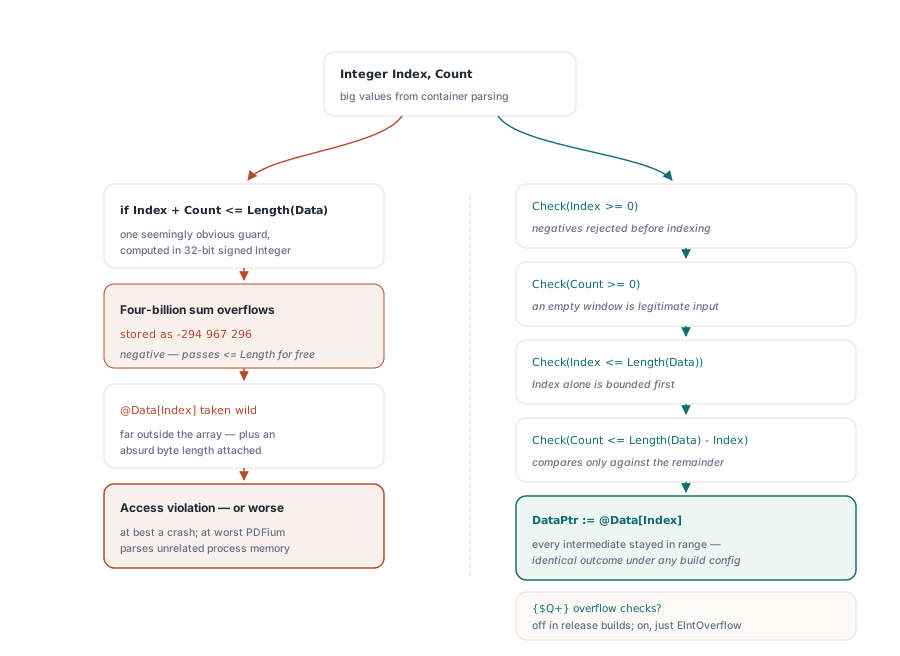
Because Index and Count are both Integer, and the sum of two large positive Integer values is not necessarily a large positive Integer. This is the technical core of the overload, and it is the one place where a natural-looking check is a memory-safety hole. The obvious formulation is wrong
// WRONG: Index + Count is evaluated in Integer and can wrap negative
if Index + Count <= Length(Data) then
  DataPtr := @Data[Index];

// RIGHT: reject signs first, then bound each term separately,
// with the only arithmetic done as a subtraction that cannot wrap
Check(Index >= 0,  'PDF byte range index cannot be negative');
Check(Count >= 0,  'PDF byte range count cannot be negative');
Check(Index <= Length(Data), 'PDF byte range index exceeds data length');
Check(Count <= Length(Data) - Index, 'PDF byte range exceeds data length');
Work the failing case through. Take Index = 2000000000 and Count = 2000000000. Their true sum is four billion, but in 32-bit signed arithmetic the result wraps to exactly minus 294 967 296. That value is comfortably less than Length(Data), so the wrong check passes, @Data[Index] is taken far outside the array, and PDFium is handed a wild pointer plus a two-gigabyte length. What follows is an access violation on a good day and silent parsing of unrelated process memory on a bad one
The correct order fixes this by never adding. Negatives are rejected before anything is indexed, so @Data[Index] can never be taken below the array. Then Index is bounded on its own against Length(Data), which guarantees Length(Data) - Index is a non-negative Integer. Only then is Count compared against that remainder. Every intermediate value stays inside the representable range, so no build configuration can change the outcome. Do not be tempted to rely on {$Q+} overflow checking as the safety net either: release builds routinely ship with it off, and even when it is on you have converted a memory-safety bug into an EIntOverflow escaping from the middle of a validation routine. PDFium Component treats untrusted length arithmetic the same way it treats the rest of the boundary, a discipline covered more broadly in hardening the PDFium VCL ABI and memory safety in Delphi
Why must a zero length window pass nil?
Because @Data[Index] is not a legal expression for every Index the validation accepts. Index = Length(Data) with Count = 0 is a perfectly well-formed empty window at the tail of the buffer, and an empty TBytes gives Index = 0 on an array that has no element zero at all. Taking the address in either case indexes past the end, or dereferences a nil dynamic array. So the overload branches: Count = 0 yields a nil pointer, any other count yields @Data[Index]. The nil then flows into the pointer overload, whose own guard accepts a nil pointer when the size is zero, and the load ends in the ordinary "Cannot load PDF document" error rather than an access violation. A caller that computed a zero-byte window from a malformed container gets a clean, catchable EPdfError like any other bad input
Borrowed or copied: what Buffered decides
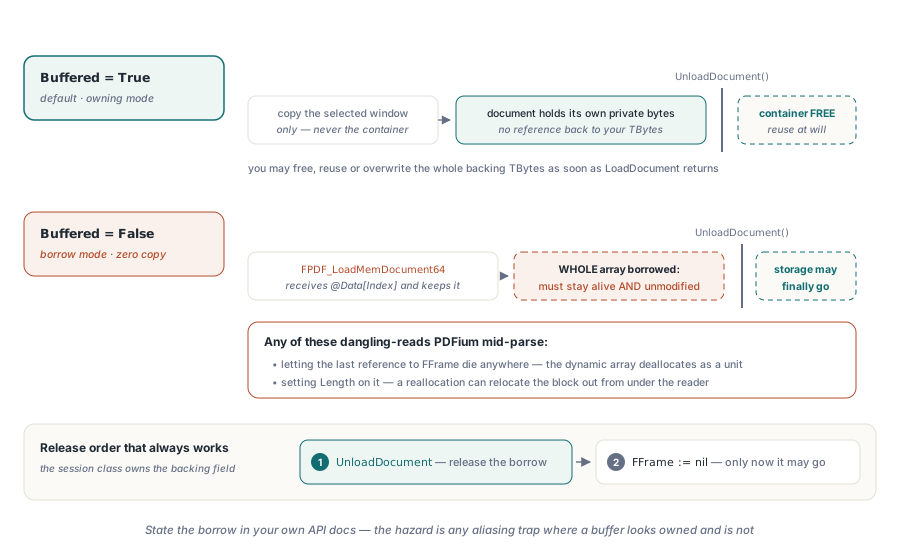
Buffered selects the ownership contract, and it is the only parameter here with consequences beyond the call. With Buffered = True, PDFium Component copies the selected window, and only the window, into its internal buffer before loading. The 40 MB container is not copied; the 312 KB PDF is. Once LoadDocument returns you may free, reuse or overwrite the container immediately, because the component no longer references it. This is the default and the right choice for almost all code
Buffered = False passes @Data[Index] straight to FPDF_LoadMemDocument64, and PDFium keeps that pointer for the life of the document rather than copying the bytes. That makes the load allocation-free, and it makes the entire backing TBytes a borrowed resource. It must stay alive and unmodified until UnloadDocument runs or Active goes False. Not the window, the whole array: a dynamic array is reference counted as a unit, and letting the last reference go anywhere in your code frees the memory PDFium is still reading. Setting Length on it is just as fatal, because a reallocation can move the block. State this in your own API documentation wherever you expose such a load, in the same spirit as any other borrow-versus-own boundary in Pascal code; the failure mode is identical to the aliasing hazards described in the FillChar and result string leak in Delphi, where a buffer looks owned and is not
type
  TFrameSession = class
  private
    FFrame: TBytes;   // owns the backing storage for as long as FPdf is loaded
    FPdf: TPdf;
  public
    procedure OpenEmbedded(Offset, Size: Integer);
    destructor Destroy; override;
  end;

procedure TFrameSession.OpenEmbedded(Offset, Size: Integer);
begin
  // Buffered = False: FFrame must outlive the loaded document
  FPdf.LoadDocument(FFrame, Offset, Size, False);
end;

destructor TFrameSession.Destroy;
begin
  FPdf.UnloadDocument;   // release the borrow first
  FFrame := nil;         // only now may the storage go
  inherited;
end;
When the byte range window is the wrong tool
Be honest about the boundary. The byte range overload assumes the container is already fully in memory, and Count is an Integer, so a single window cannot exceed two gigabytes. If the container is a 6 GB archive on disk, or arrives over a socket you cannot rewind, this overload cannot help you and reading the whole thing into TBytes just to address a window inside it defeats the point. That is precisely where the FPDF_FILEACCESS path belongs, and the on-demand streaming article shows how to expose an offset-shifted view of a file as a custom document source. Equally, if the embedded bytes need transformation before PDFium sees them, decompression, decryption, an unwrapping step, then a real copy is unavoidable and Buffered = True on the transformed array is the honest answer. The byte range window pays off in exactly one shape: contiguous, unmodified PDF bytes, already resident, at a known offset
If you are evaluating this for a viewer, a preview pane or a batch intake pipeline, the byte range overload and the streaming loader are two of the loading strategies PDFium Component ships alongside file, stream and raw pointer loads. The full API surface, licensing and Delphi and C++Builder version support are documented on the PDFium Component product page