A scanned archive can run to several gigabytes in a single PDF. A viewer that opens such a file usually wants to show one page, maybe the table of contents, maybe a page the user jumped to from a bookmark. Reading the whole file into memory to render two pages is wasteful on every axis: it burns address space, it stalls the user behind a long initial read, and on a 32-bit Delphi process it can fail outright before a single page appears. PDFium was built with this in mind. It can load a document through a callback that asks for the specific byte ranges it needs, when it needs them, and it never demands the entire file at once. One boundary belongs up front: this streaming channel describes the file with a 32-bit length, so it serves a single file up to 4 GiB, which covers nearly every scanned archive in practice. A file past that line is not this article's territory; it wants to be split into volumes at scan time or opened through a direct-access strategy instead, and the guard that enforces the ceiling honestly gets a section of its own below
The component exposes that path through a stream adapter. You hand it any TStream, and PDFium pulls blocks from that stream on demand. The file can sit on disk, in a database blob field, or behind any other TStream descendant, and none of it is copied into memory up front
How PDFium asks for bytes
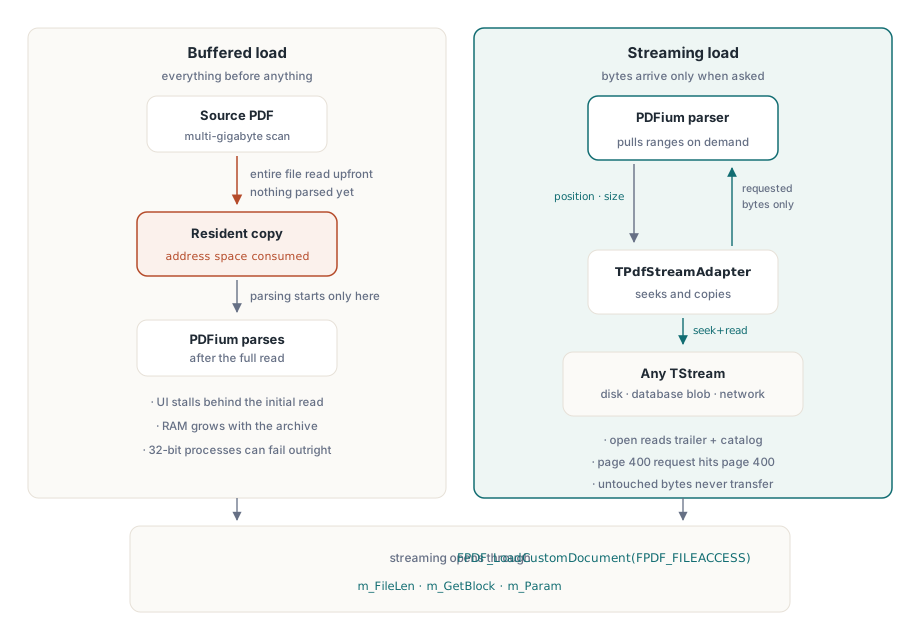
PDFium's C API loads a document from a caller-supplied object described by the FPDF_FILEACCESS structure. The structure has three parts that matter here: a length field, a read callback, and an opaque user parameter. The entry point that consumes it is FPDF_LoadCustomDocument. Once PDFium holds that structure it parses the trailer, locates the cross-reference table, and from then on reads only what a given operation requires. Opening the document touches the file's tail and a handful of catalog objects. Rendering page 400 reads the content streams and resources for that page and nothing else
This is the difference between a buffered load and a streaming load. A buffered load reads the file end to end before PDFium sees byte zero. A streaming load inverts the relationship: PDFium drives the reads, and the bytes that never get touched never get read. For a multi-gigabyte file viewed a page at a time, that is the gap between an unusable load and an instant one
The stream adapter
The adapter that bridges a Delphi TStream to FPDF_FILEACCESS is TPdfStreamAdapter. Its constructor takes the stream and an ownership flag, captures the stream length once, fills in the FPDF_FILEACCESS record, and wires the read callback. When PDFium later calls back with an offset and a size, the adapter seeks the stream to that offset and copies exactly that range into the buffer PDFium provided
// Verbatim from the component: the stream-to-FPDF_FILEACCESS bridge
constructor TPdfStreamAdapter.Create(AStream: TStream; AOwnsStream: Boolean);
begin
  inherited Create;
  if AStream = nil then
    raise EPdfError.Create('TPdfStreamAdapter: AStream is nil');
  FStream := AStream;
  FOwnsStream := AOwnsStream;

  // FPDF_FILEACCESS.m_FileLen is a 32-bit unsigned long. Refuse a stream
  // that would silently truncate past 4 GiB.
  if AStream.Size > High(FPDF_DWORD) then
    raise EPdfError.Create('TPdfStreamAdapter: stream exceeds the 4 GiB limit');

  FillChar(FFileAccess, SizeOf(FFileAccess), 0);
  FFileAccess.m_FileLen  := FPDF_DWORD(AStream.Size);
  FFileAccess.m_GetBlock := GetBlockCallback;
  FFileAccess.m_Param    := Self;
end;
The ownership flag decides who frees the stream. Pass False and the caller keeps the stream and must keep it alive for the whole life of the document. Pass True and the adapter takes over, freeing the stream when the document closes. Either way the stream has to outlive every read PDFium will perform, because PDFium holds the FPDF_FILEACCESS pointer and will call back at any point while the document is open, not only during the initial load
Why the callback is a static function
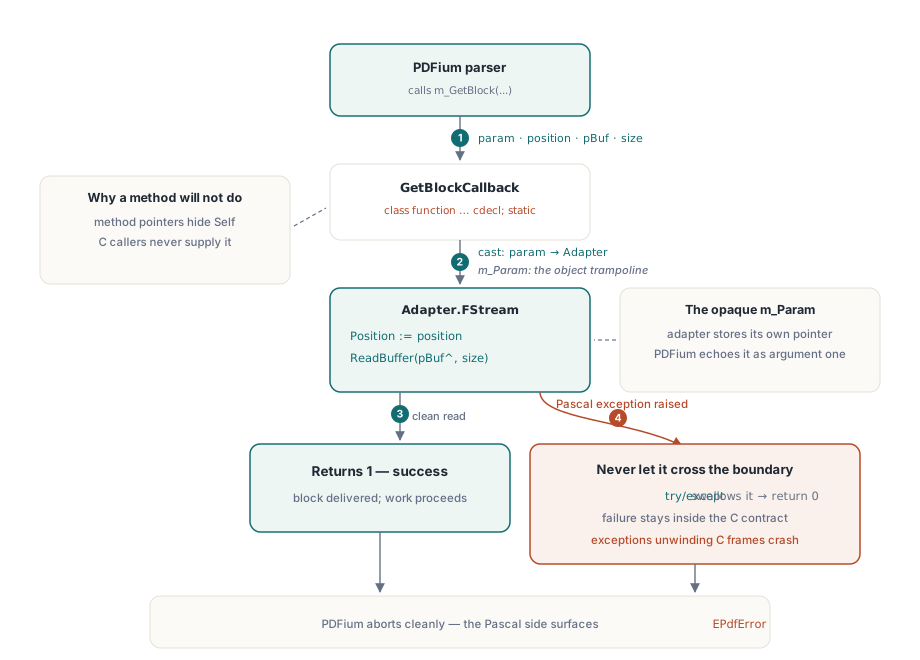
The read callback that PDFium stores in m_GetBlock is a plain C function pointer with the cdecl calling convention. A Delphi method cannot be used directly, because a method carries a hidden Self argument that a C caller knows nothing about and will never supply. The adapter therefore declares the callback as a class function marked cdecl; static, which compiles to a free-standing function with the C frame layout PDFium expects and no implicit Self
That solves the calling convention but raises a second question: with no Self, how does the callback reach the specific stream it is supposed to read from? The answer is the opaque user parameter. When the adapter builds the record it stores its own instance pointer in m_Param. PDFium hands that same pointer back as the first argument of every callback. The static function casts it back to a TPdfStreamAdapter and dispatches the read against that instance's stream. This is the standard trampoline for handing object context across a C boundary that has no notion of objects
// Verbatim from the component: the cdecl trampoline back to the instance
class function TPdfStreamAdapter.GetBlockCallback(
  param   : Pointer;
  position: FPDF_DWORD;
  pBuf    : PByte;
  size    : FPDF_DWORD): Integer; cdecl;
var
  Adapter: TPdfStreamAdapter;
begin
  Result := 0;
  if (param = nil) or (pBuf = nil) or (size = 0) then
    Exit;
  Adapter := TPdfStreamAdapter(param);   // recover the instance from m_Param
  if Adapter.FStream = nil then
    Exit;
  try
    Adapter.FStream.Position := Int64(position);
    Adapter.FStream.ReadBuffer(pBuf^, Int64(size));
    Result := 1;
  except
    Result := 0;  // report failure by return value, never by raising
  end;
end;
The 4 GiB ceiling and why it needs a guard
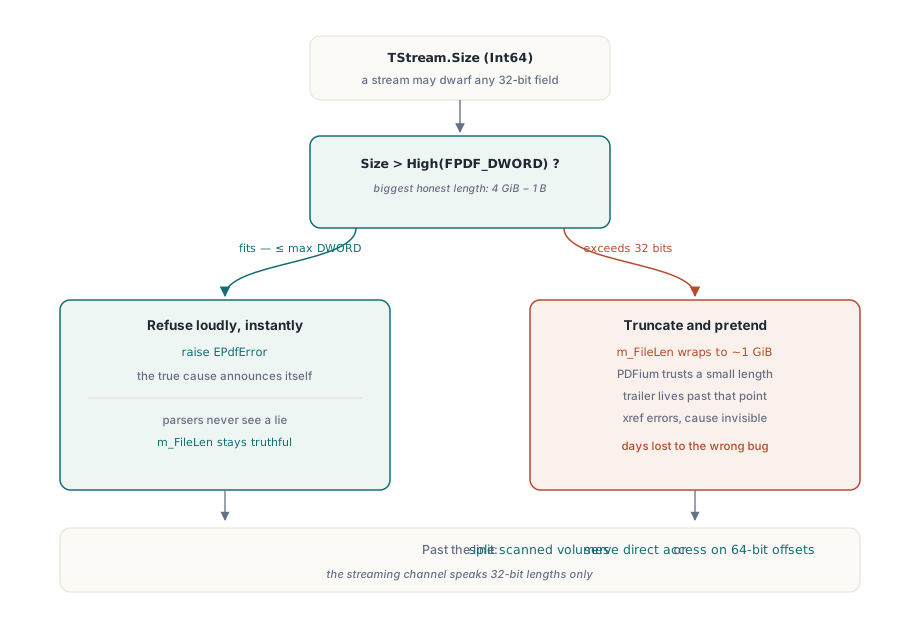
Here is where the boundary stated in the opening comes from. The length field m_FileLen in FPDF_FILEACCESS is a 32-bit unsigned value. Its largest representable length is one byte short of 4 GiB. A TStream reports its size as an Int64, so a stream can describe far more bytes than the field can hold. The moment a stream's size exceeds that ceiling, there is no honest way to tell PDFium how long the file is
The wrong response is to assign the size and let it wrap. Truncating a 5 GiB length to a 32-bit field produces a small, plausible-looking number, and PDFium will then parse the file believing it ends roughly a gigabyte in. The trailer and cross-reference table live at the real end of the file, well past the truncated length, so the parse fails in a way that has nothing to do with the actual cause. You would be debugging a cross-reference error on a file that is perfectly valid, with no hint that an integer wrapped two layers up
The adapter refuses the input instead. The constructor compares the stream size against High(FPDF_DWORD) and raises EPdfError the instant the stream is too large to describe. An explicit, immediate error names the real problem at the point of construction. A silent truncation hides it behind a misleading symptom you would chase much later. The 4 GiB limit is a genuine constraint of this loading path, and the honest thing is to surface it loudly rather than paper over it with arithmetic that happens to compile. When an archive genuinely crosses the line, the remedies promised at the top live outside this API: split the scan into per-volume files that each stay under the ceiling, or leave the document on disk and serve it through a direct-access design built on 64-bit offsets rather than through FPDF_FILEACCESS
Failures must not cross the boundary
A read can fail. The stream might be a network-backed object that times out, a blob handle that was closed underneath you, or a file that was truncated after the document opened. PDFium's contract for the read callback is a return value: non-zero for success, zero for failure. It is a C frame, and it has no machinery to catch or propagate a Pascal exception
This is why the trampoline wraps the seek and the read in a try/except that swallows the exception and returns zero. If a Delphi exception were allowed to propagate out of the callback, it would unwind through PDFium's cdecl stack frames, which were never built to be unwound by the Pascal exception machinery. The result is undefined behavior at best and a hard crash at worst, deep inside the PDF parser with no usable stack. Returning zero keeps the failure inside the contract. PDFium sees a failed block read, aborts the operation cleanly, and FPDF_LoadCustomDocument reports the document could not be loaded, which the component surfaces as an EPdfError on the Pascal side where it belongs
Opening a document this way
The component method that drives the streaming path is LoadCustomDocument, declared as a distinct method rather than another LoadDocument overload so that passing a TMemoryStream never accidentally lands on the buffered path. It builds the adapter, calls FPDF_LoadCustomDocument, and keeps the adapter alive for the life of the loaded document
var
  Pdf: TPdf;
  FileStream: TFileStream;
begin
  Pdf := TPdf.Create(nil);
  FileStream := TFileStream.Create('Archive_4GB.pdf', fmOpenRead or fmShareDenyWrite);
  try
    // Hand stream ownership to Pdf: it frees FileStream when the document closes.
    Pdf.LoadCustomDocument(FileStream, True);
    // PDFium has read only the trailer and catalog so far.
    // Rendering a page pulls just that page's bytes through the callback.
    // ... render or inspect pages here ...
  finally
    Pdf.Free;  // closes the document, which frees the adapter and the stream
  end;
end;
The same call works for a TMemoryStream, a blob stream from a database dataset, or a custom TStream descendant. On-demand loading earns its keep when the file is large and only part of it will be read: an archive viewer, a thumbnail generator that samples a few pages, a search index that pulls one page at a time. When the file is small or you are going to read all of it anyway, a buffered load is simpler and the streaming machinery buys you nothing. The deciding factor is the ratio of bytes you will actually touch to bytes the file contains
Once pages stream in on demand, the next concern is keeping rendered pages responsive as the user zooms and scrolls, which is covered in our note on render caching and zoom performance. When the streamed document is one a viewer should display but not let the user export or alter, the techniques in the secure PDF preview walkthrough pair naturally with this loading path. Both build on the streaming load described here, which ships as part of the PDFium Component for Delphi and C++Builder alongside the rendering, text extraction, and annotation APIs covered elsewhere on this blog