PDFium Component gives a PDF editor real document-level undo and redo, plus a crash-recovery package, through an edit journal. You wrap changes in BeginEditTransaction and CommitEditTransaction, and each committed transaction becomes a bidirectional delta that UndoEdit and RedoEdit can replay in either direction. SaveRecoverySnapshot persists that journal so an application killed mid-session can rebuild the user's work
The gap this fills is specific. The native undo capability applies only to the form field that currently has focus, so a text box remembers its own edits and nothing else does. Page insertion, deletion and reordering, page object changes, annotations, attachments and metadata all have no journal at all. An editor built on that alone can offer undo inside a field and nowhere else, which is not what users mean by undo
Why snapshots rather than an operation log?
The obvious design is to record semantic operations — "deleted page 4", "moved annotation 7" — and invert them. It works until the operation set grows, at which point every new feature needs an inverse, and any operation whose inverse is not exact quietly corrupts the document over a long undo chain
The journal instead captures the document state at transaction boundaries and stores the difference. Each delta keeps the longest common prefix and suffix and carries both the removed and inserted bytes, so it can be applied forwards or backwards. New editing features need no undo support: whatever they change is inside the snapshot
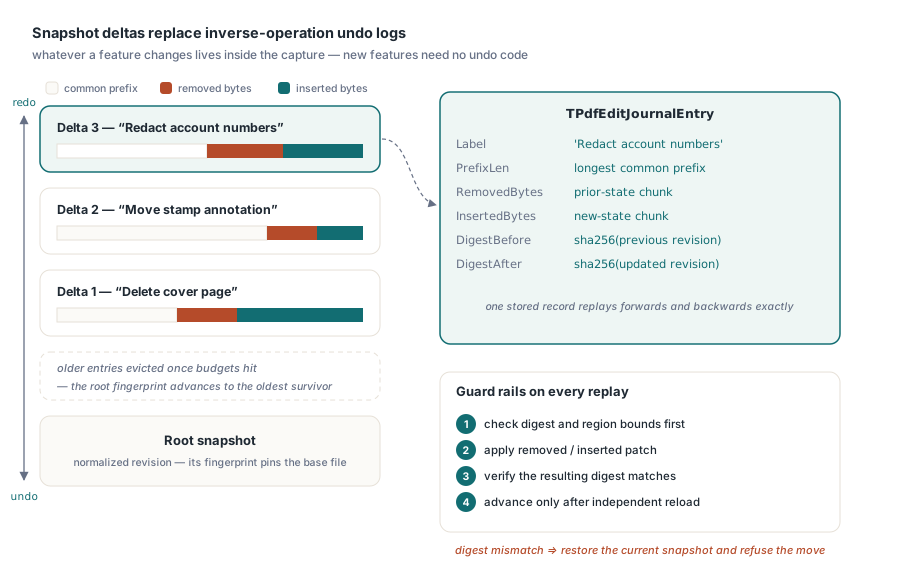
That approach depends on one prerequisite. An ordinary full save produces non-deterministic identifiers and time fields, so saving an unmodified document twice can yield different bytes. Snapshots are therefore normalized through the reproducible output path first. Without that step an empty transaction would look like a modification, and undo would fail its own verification because the digest it computed at commit would not match the document afterward
Transactions in practice
Each transaction takes an optional label, which is what an editor shows in its undo menu:
uses
  PDFium;

var
  Pdf: TPdf;
  Options: TPdfEditJournalOptions;
  Info: TPdfEditJournalInfo;
begin
  Pdf := TPdf.Create(nil);
  try
    Pdf.FileName := 'contract.pdf';
    Pdf.LoadDocument;

    Options := TPdfEditJournalOptions.Default;
    Options.MaxEntries := 50;               // undo depth
    Options.MaxStoredBytes := 256 * 1024 * 1024;
    Pdf.ConfigureEditJournal(Options);

    Pdf.BeginEditTransaction('Delete cover page');
    try
      Pdf.DeletePage(1);
      if not Pdf.CommitEditTransaction then
        raise Exception.Create('commit failed - document was reloaded');
    except
      Pdf.RollbackEditTransaction;
      raise;
    end;

    Info := Pdf.GetEditJournalInfo;
    Writeln(Format('entries=%d position=%d stored=%d bytes',
      [Info.EntryCount, Info.Position, Info.StoredBytes]));

    if Pdf.EditCanUndo then
      Pdf.UndoEdit;                          // the page comes back
  finally
    Pdf.Free;
  end;
end;
A commit that fails — because capture failed, a budget was exceeded or the delta could not be built — restores the baseline captured at BeginEditTransaction and reloads, rather than leaving an active transaction or a half-written journal behind. This is the failure mode that matters most, because a journal in an inconsistent state poisons every subsequent undo
Verification at every step
Each delta stores the SHA-256 digest of the document before and after, along with the prefix length and both payloads. Undo, redo, imported replay and reverse reconstruction all check the current digest and the region they intend to replace before touching anything, then verify the resulting digest afterward
Movement through the journal is equally cautious. The position advances only after the target PDF has been validated by an independent document object and has successfully replaced the current one. If that fails, the current snapshot is restored as a fallback, so a failed undo leaves the user where they were rather than in a broken state
The serialized format is checked as data, not trusted as input: magic number, version, entry and position values, the digest chain, label lengths, patch lengths and total storage budget are all validated. An imported journal is a file that may have been truncated, edited or produced by a different version, and treating it as hostile is the only safe posture
What happens when the journal fills up
Three limits bound growth: entry count, cumulative delta bytes and the size of a single snapshot. When capacity is reached, the oldest entry is evicted and the root fingerprint advances
That last part has a consequence worth designing around. An exported journal can only be applied to a document matching the root fingerprint it reports, or a fingerprint it recorded. Once eviction has occurred, the journal no longer reaches back to the original file. Autosave therefore has to treat the matching root snapshot and the journal as one atomic recovery unit — keeping the journal without its base is keeping something that cannot be replayed
Crash recovery packages
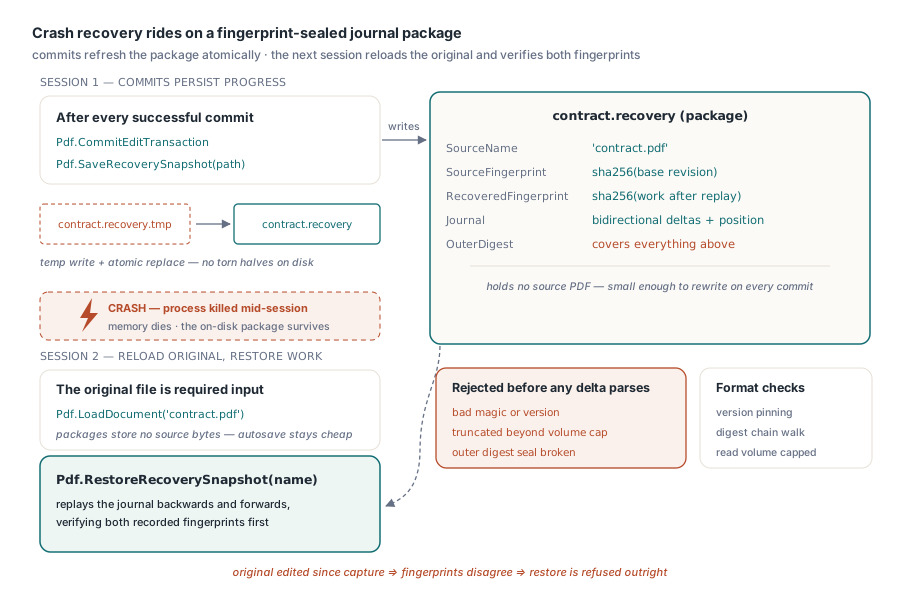
The recovery package deliberately does not embed the source PDF. It stores the source display name, SHA-256 fingerprints of the source and recovered states, and the edit journal. Recovery therefore requires the original file, which the caller loads first; the package then verifies both fingerprints by replaying the journal backwards and forwards:
// After each successful commit, refresh the recovery file
Pdf.BeginEditTransaction('Redact account numbers');
if Pdf.CommitEditTransaction then
  Pdf.SaveRecoverySnapshot('contract.recovery');

// Next session, after a crash: load the original, then restore
Pdf.FileName := 'contract.pdf';
Pdf.LoadDocument;
Pdf.RestoreRecoverySnapshot('contract.recovery');
Not embedding the source keeps recovery files small, which is what makes per-commit autosave affordable on a document of any size. An outer digest covers the header, source name and journal, so a truncated or tampered package is rejected before any delta is parsed, and total read volume is capped
File writes go to a temporary file in the target directory and are then atomically replaced, and setting the recovery path to the source PDF is explicitly refused. Autosave runs only after a successful changed commit, undo or redo. If the disk write fails, the in-memory document and journal states are already valid, so the exception reports a persistence failure rather than a data loss, and the caller can fix the path and retry
Signed documents are refused by default
A transaction snapshot is a new normalized revision, not the original signed bytes, so committing a transaction on a signed document invalidates the signature. Beginning a transaction on such a document is refused unless the caller passes AllowSignedDocument, and journal import and recovery restore default to the same refusal
This is a deliberate speed bump rather than a prohibition. Some workflows legitimately edit a signed document and re-sign it afterward, and the flag exists for them. What it prevents is the accidental case, where an editor silently strips validity from a document that a user believes is still signed. The verification side of that story is covered in inspecting PDF digital signatures and PAdES levels
For an editor, three habits make the journal pay off. Wrap each user-visible action in one labeled transaction, so the undo menu reads like the user's mental model rather than like your call stack. Size the entry limit against the document, since fifty snapshots of a 200 MB scan is not a modest setting. And write the recovery snapshot on every commit rather than on a timer, because a timer guarantees that the lost work is exactly whatever happened after the last tick. Document-level editing operations that benefit from this are covered in encrypted PDF incremental updates
Edit journalling, recovery packages and the editing primitives beneath them ship in the same component for Delphi, C++Builder and Lazarus; the full API is described on the PDFium Component for Delphi page