A PDF form field value "reverts" when the field is stored as a direct dictionary: PDFium promotes the copy in the page /Annots array to an indirect object, while /Fields keeps a second direct copy. PDFium Component for Delphi handles typed field writes by unifying both references into one indirect owner before writing
The symptom usually reads like a haunting. The write returns True, and the very next read hands back the old value. Save, reopen, and the old value is still there. Nothing threw, and the PDF looks perfectly ordinary in every viewer you own
The symptom: a successful write that does not stick
The failure pattern is narrow but very repeatable: it only shows up on forms whose field dictionaries are written inline (as direct objects) rather than as numbered indirect objects. Most authoring tools emit indirect fields, so the problem hides for months and then appears on files from one particular generator, often a hand-rolled exporter that writes the whole /AcroForm inline
Two observations together point at the cause: the write reports success, and a native read of the field through the form layer returns the previous value. When you see both, stop suspecting your string encoding and start looking at object ownership
Why does a PDF form field value revert after a successful write?
A PDF form field value reverts because two separate dictionaries both claim to be the same field, and the write updated the copy that the field tree does not consult. The value of a field lives in its /V entry, and ISO 32000-1 §12.7.3.1 defines where that entry is authoritative: on the field dictionary reached from /AcroForm /Fields, walking down through /Kids to the terminal field, with inheritable entries resolved from /Parent
The same clause allows a convenience that causes all the trouble. When a field has exactly one widget annotation, the field dictionary and the widget annotation dictionary may be merged into a single dictionary. In a well-formed file that merged dictionary is one indirect object, referenced from two places: from /Fields (or a parent's /Kids) and from the page's /Annots array. Two references, one object, one /V
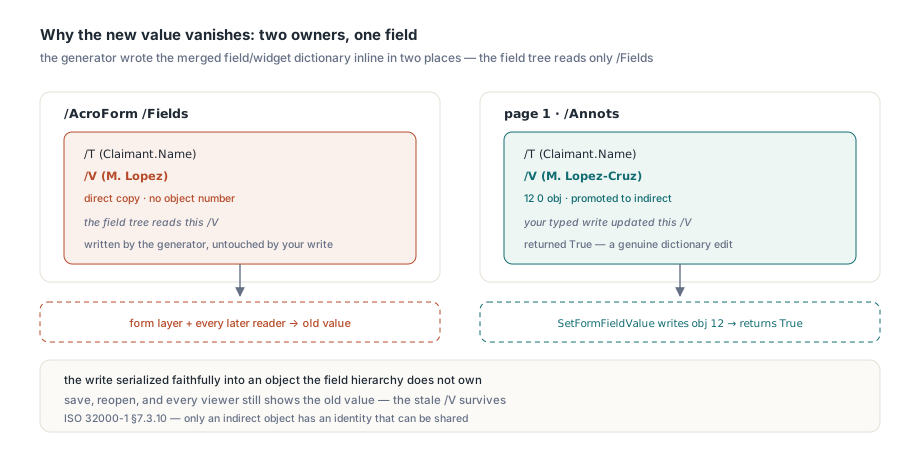
Two copies of one dictionary
ISO 32000-1 §7.3.10 is explicit that only an indirect object has an identity that can be shared. A direct dictionary has no object number, so when a generator writes the merged field/widget dictionary inline in both /Fields and /Annots, the file does not contain one object referenced twice. It contains two equal-looking dictionaries that happen to have the same keys and values
PDFium tolerates this, and in doing so makes the split permanent. When it needs a handle to the annotation, PDFium can promote the direct widget dictionary in the page /Annots array to an indirect object, yet the equivalent direct copy stays where it was inside /AcroForm /Fields (or inside the parent's /Kids). From that moment the document holds two owners for one logical field. A writer that edits /V on the page annotation gets a genuine success at the dictionary level. The field tree, which is what the form layer and every later reader treat as the source of truth, never sees the change
That is why the stale value survives a save and reopen: the new value was serialized faithfully into an object the field hierarchy does not own
How PDFium Component restores a single field owner
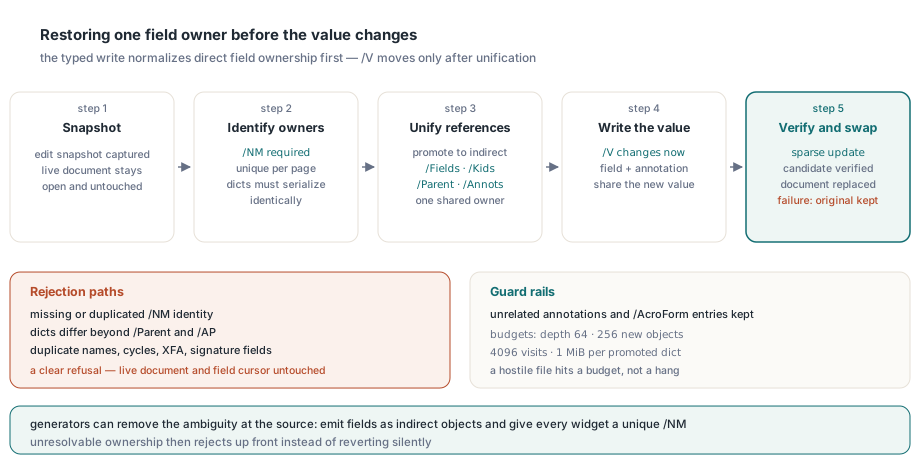
PDFium Component normalizes direct field ownership before every typed write: it promotes direct /AcroForm and field dictionaries to indirect objects, binds each direct widget to its matching page annotation, and rewrites /Fields, /Kids, /Parent and /Annots so that every reference points at the same indirect object. Only then does it change /V, so the field value, the selected widget and the saved document share one owner
The hard part is identity. Two direct dictionaries with identical content do not prove they are the same widget; a form can legitimately contain two widgets that look alike. The normalizer therefore refuses to guess, and requires an explicit, unique /NM annotation name (ISO 32000-1 §12.5.2) on each direct widget. The rules applied by the write path are strict:
- A direct widget needs a nonempty
/NMof at most 1024 UTF-16 units, and exactly one page annotation may carry the same name - The direct copy and the page annotation must serialize identically apart from
/Parentand the PDFium-regenerated/AP; any other difference rejects the write - Both parent links are checked separately, so a correct
/Parenton the page annotation cannot mask a conflicting one on the original direct copy - A missing
/Parentis supplied only when unique field-tree ownership makes the answer unambiguous, and equivalent direct parent copies are rebound to their promoted owner - Duplicate fully qualified field names, cyclic or multiply owned field trees and signature fields reject before anything is published
- Unrelated annotations, such as links on the same page, and unrelated
/AcroFormentries are retained untouched
The normalizer also runs under hard budgets: 4096 field-tree visits, pages or array members, nesting depth 64, 256 new indirect objects, 1 MiB per promoted dictionary, 4 MiB of promoted bytes in total, 128 MiB of inspected dictionary bytes, and 4096 UTF-16 units per full field name with 262144 across the form. A hostile or broken file hits a budget and fails with an error message rather than turning a form fill into a denial of service
The whole operation is transactional. TPdf.SetFormFieldValues captures a snapshot, builds an incremental update containing the normalized objects and the new values, loads that candidate, and only replaces the live document once the candidate verifies. If normalization rejects the file, or a later request in a batch fails, the original document, its values and its logical field cursor are left exactly as they were
Writing and verifying a direct field value in Delphi
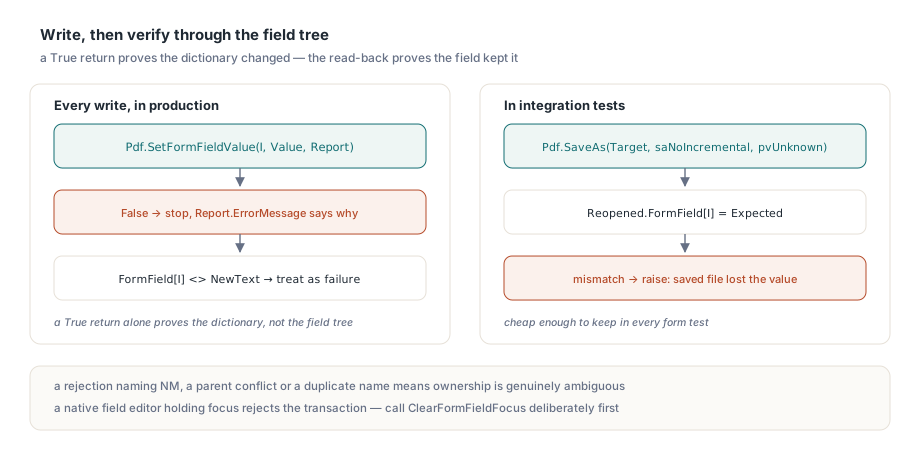
The safe pattern is write, then read back through the native form layer, and treat a mismatch as a failure even when the write returned True. TPdf.SetFormFieldValue addresses a field by index on the current page, takes a typed TPdfFormValue and fills a TPdfFormValueWriteReport; TPdf.FormField[Index] reads the value back through PDFium's form layer, which resolves the field tree rather than trusting the widget
uses
  System.SysUtils, PDFium;

procedure WriteTextField(Pdf: TPdf; PageNo, FieldIndex: Integer;
  const NewText: WString);
var
  Value: TPdfFormValue;
  Report: TPdfFormValueWriteReport;
begin
  Pdf.PageNumber := PageNo;          // SetFormFieldValue targets the current page
  Value := Default(TPdfFormValue);
  Value.Kind := fvkText;
  Value.Text := NewText;

  if not Pdf.SetFormFieldValue(FieldIndex, Value, Report) then
    raise Exception.CreateFmt('Field %d on page %d rejected: %s',
      [FieldIndex, PageNo, Report.ErrorMessage]);

  // Verify against the field tree, not against our own variable
  if Pdf.FormField[FieldIndex] <> NewText then
    raise Exception.CreateFmt('Field "%s" did not keep the new value',
      [Pdf.FormFieldInfo[FieldIndex].Name]);
end;
On a file with unresolvable ownership, for example a direct widget without /NM, SetFormFieldValue returns False, Report.UpdatedWidgets is zero and Report.ErrorMessage names the problem, such as "Direct widgets require an explicit unique NM identity". That is the behavior you want: a clear rejection instead of a silent half-write. One more precondition is worth knowing. The typed write is annotation-only and does not acquire native focus, so if a native field editor is still focused the whole transaction rejects before the snapshot is taken; call Pdf.ClearFormFieldFocus deliberately first rather than retrying in a loop
For several fields, especially across pages, use the batch form. TPdf.SetFormFieldValues accepts 1 to 256 requests, applies all of them to one candidate, and publishes all or nothing. TPdfFormValuesWriteReport.FailedRequest tells you which request broke the batch
procedure FillInvoiceHeader(Pdf: TPdf);
var
  Requests: TPdfFormValueRequests;
  Batch: TPdfFormValuesWriteReport;
begin
  SetLength(Requests, 2);
  Requests[0] := Default(TPdfFormValueRequest);
  Requests[0].Page := 1;
  Requests[0].FieldIndex := 0;
  Requests[0].Value.Kind := fvkText;
  Requests[0].Value.Text := 'ACME Tooling Inc.';

  Requests[1] := Default(TPdfFormValueRequest);
  Requests[1].Page := 2;
  Requests[1].FieldIndex := 0;
  Requests[1].Value.Kind := fvkText;
  Requests[1].Value.Text := '2026-10-27';

  if not Pdf.SetFormFieldValues(Requests, Batch) then
    raise Exception.CreateFmt('Request %d failed: %s',
      [Batch.FailedRequest, Batch.ErrorMessage]);
  // Batch.UpdatedFields = 2; Batch.UpdatedWidgets counts every synced widget
end;
Two requests addressing the same terminal field are rejected as a duplicate owner rather than letting the last write win, and the source document is preserved. Checkbox and radio values follow the same rules; the /V versus /AS split for buttons is covered in checkbox field value versus widget state in PDFium
Proving the value survives save and reopen
A read-back in the same session proves the live document is coherent. A save and reopen proves the file is, and the check is cheap enough to keep in your own integration tests
procedure SaveAndReopenCheck(Pdf: TPdf; const Target: string;
  PageNo, FieldIndex: Integer; const Expected: WString);
var
  Reopened: TPdf;
begin
  if not Pdf.SaveAs(Target, saNoIncremental, pvUnknown) then
    raise Exception.Create('Save failed');

  Reopened := TPdf.Create(nil);
  try
    Reopened.FileName := Target;
    Reopened.Active := True;
    Reopened.PageNumber := PageNo;
    if Reopened.FormField[FieldIndex] <> Expected then
      raise Exception.Create('Saved file lost the field value');
  finally
    Reopened.Free;
  end;
end;
Two more byte-level traps: Trim and the trailer /ID
Normalizing direct fields means re-reading raw dictionary bytes, which brings up two smaller traps relevant to any Delphi code that touches PDF syntax
The first is SysUtils.Trim on raw PDF bytes held in an AnsiString. A literal string such as a choice option can legitimately contain UTF-16BE text with a FE FF byte order mark and embedded NUL bytes. In Unicode Delphi, SysUtils.Trim takes a string, so the call silently converts the AnsiString to UTF-16 using the active ANSI code page and converts the result back. Depending on that code page, the round trip can rewrite high bytes, damage the BOM and even disturb the delimiter that follows. The safe approach keeps the lexer on bytes: skip PDF whitespace by position (ISO 32000-1 §7.2.2 lists NUL, tab, LF, FF, CR and space) and slice with Copy, decoding only once a value is known to be a PDF text string
// Risky on raw PDF bytes: AnsiString -> string -> AnsiString (W1057/W1058)
Token := Trim(Token);

// Byte-safe: skip PDF whitespace by position, then slice
P := 1;
while (P <= Length(Token)) and (Token[P] in [#0, #9, #10, #12, #13, ' ']) do
  Inc(P);
Token := Copy(Token, P, MaxInt);
The second trap sits in the incremental update itself. ISO 32000-1 §7.5.5 (Table 15) and §14.4 require the trailer /ID to be an array of two byte strings. The internal helper that composes the sparse update identifier returns only the contents of the two strings, without the /ID key or the array brackets, and the trailer must wrap it explicitly as /ID [ ... ]. PDFium's lenient loader, and a later full re-save, both hide a missing wrapper, so the reliable check is to parse the candidate and saved files with an independent strict parser and look for two 16-byte strings. If you write incremental updates yourself, the same trap applies; the incremental update article for encrypted PDFs covers the trailer chain in more depth
What should you do in your own Delphi form code?
- Always read the value back with
FormField[Index]after a write, and in tests also save, reopen and read again - Treat
FalseplusErrorMessageas information: a rejection namingNM, a parent conflict or a duplicate name means the file's ownership is genuinely ambiguous - If you generate PDFs, emit fields and widgets as indirect objects and give every widget a unique
/NM; that removes the ambiguity at the source - Use
SetFormFieldValuesfor multi-field or cross-page fills so a late failure cannot leave half the form updated - Never run
Trimor otherstringRTL helpers over raw PDF bytes held inAnsiString
Be clear about the boundaries, too. Signed documents, XFA forms, encrypted snapshots and files whose widget ownership cannot be resolved uniquely stay outside the declared profile and reject rather than being forced through. If your workflow moves fields between documents, the ownership questions get harder still; grafting AcroForm fields across PDF documents deals with that case
The PDFium Component brings this typed, transactional form writing to Delphi, C++Builder and Lazarus applications alongside rendering, text extraction and document editing. Version history, licensing and downloads are on the PDFium Component for Delphi product page