A table that runs across three pages of a Word export never comes closer than 72 points to the bottom of the paper. One-inch margins are 72 points, and the word processor stops placing rows at the margin. A linker that joins fragments only when they sit within 36 points of the page edges sees three unrelated tables with identical columns. The question that works is different: does anything besides a running header or footer sit between the end of one fragment and the start of the next?
That question brings two traps of its own. A form can end one table at the bottom of page 1 and open a different table with the same column widths at the top of page 2. And a ruled grid can push a single row over the break, too short for a detector that wants two rows before it calls something a table
Two edge tests in ExtractDocumentTables
PDFium Component marks continuations in TPdf.ExtractDocumentTables, the document-level counterpart of the per-page ExtractTables covered in the table detection and extraction article. With DetectContinuations set, as it is in TPdfTableExtractionOptions.Default, the method extracts every page, sorts the tables by page number and then from the top of each page downward, and checks every pair of neighbors in that list. Only neighbors are compared. A continuation candidate is therefore always the lowest table on page N paired with the highest table on page N+1, and a small table placed under a long one on page N takes the long one's place in that pairing. When a short note table sits below a long one, link those fragments in your own code from page numbers and ColumnCount
The first test is purely geometric. The earlier fragment's bottom edge must lie within ContinuationMargin points of the page bottom, and the later fragment's top edge within the same distance of the next page's top. The default is 36 points, half an inch. Reports from layout engines that fill a fixed content box pass this easily. A Word export with one-inch margins misses by at least 36 points on each side, and widening the margin until it passes goes wrong, because the same number sets the header and footer bands of the second test
That second test, the content-aware one, is what handles word-processor output. The two combine with OR: either one opens the gate
What counts as text between two fragments?
Every word on a page counts as body text unless it lies entirely inside the running header band or the footer band, and both bands are ContinuationMargin points deep. Per page, ExtractDocumentTables records the lowest bottom edge among words whose top is above the footer band and the highest top edge among words whose bottom is below the header band, the table's own cell text included. When the table is the last body content on page N, its bottom edge sits at or below the lowest word, and the test passes within AlignmentTolerance, which defaults to 3 points. The later fragment has to meet the mirror condition at the top of page N+1
Ignoring the bands has a basis in the specification. ISO 32000-1 §14.8.2.2 treats running heads, footers and page numbers as pagination artifacts, content that exists only because the document was cut into pages. A tagged file can declare them with /Artifact, as the marked-content article explains, but the exports that most need table stitching rarely carry tags, so position stands in for the tag. With the default band, a page number whose glyphs top out 30 points above the bottom edge is ignored. A disclaimer line that reaches 40 points is body text, and it blocks the link
On a page with no text layer, the stored extremes fall back to the page bounds, the content-aware test passes trivially, and the remaining gates decide. Footers drawn as images or vector outlines are invisible for the same reason and never block a link
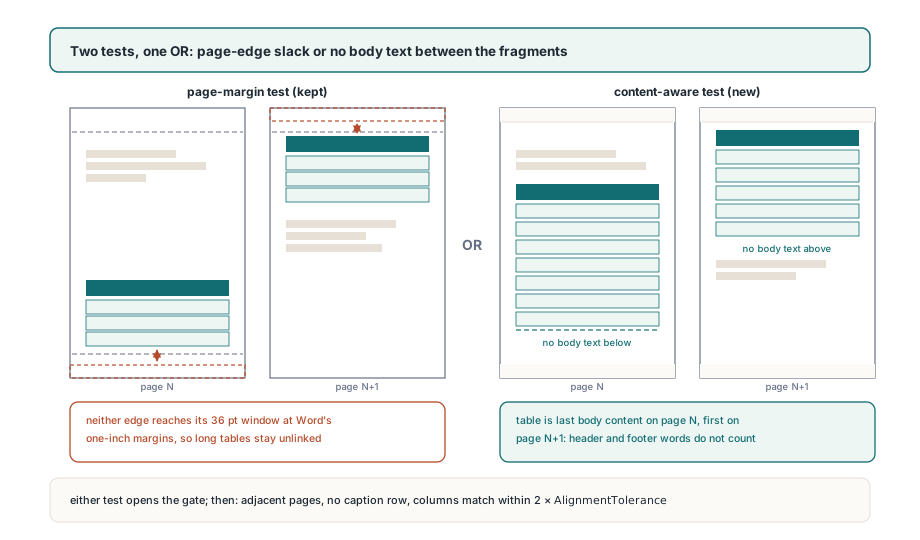
Passing an edge test only opens the gate. The pages must be consecutive, the later fragment must not open with a caption row, and the column boundaries must line up within twice AlignmentTolerance, 6 points at the defaults. When all of that holds, the earlier fragment becomes ptcStart with a fresh group number, or moves from ptcEnd to ptcMiddle if it already closed a chain, and the later fragment becomes ptcEnd in the same group. A table spread over three pages reads start, middle, end. Group numbers start at 1; group 0 with ptcNone means the table stands alone. ToJson writes the same data as "continuationGroup" and "continuation" (none, start, middle or end), so a service that receives JSON can stitch on its own
The listing below assumes a Word export with a two-line footer roughly 50 points deep, so the margin goes up to 54 to keep both lines inside the band
uses
  System.SysUtils, PDFium;

var
  Pdf: TPdf;
  Options: TPdfTableExtractionOptions;
  Tables: TPdfTables;
  I: Integer;
begin
  Pdf := TPdf.Create(nil);
  try
    Pdf.FileName := 'itinerary-from-word.pdf';
    Pdf.LoadDocument;

    Options := TPdfTableExtractionOptions.Default;  // DetectContinuations = True
    Options.ContinuationMargin := 54;               // footer assumed ~50 pt deep

    Tables := Pdf.ExtractDocumentTables(Options);
    for I := 0 to High(Tables) do
      case Tables[I].Continuation of
        ptcStart:
          Writeln(Format('group %d starts on page %d, %d rows',
            [Tables[I].ContinuationGroup, Tables[I].PageNumber,
             Tables[I].RowCount]));
        ptcMiddle, ptcEnd:
          Writeln(Format('group %d continues on page %d, %d rows',
            [Tables[I].ContinuationGroup, Tables[I].PageNumber,
             Tables[I].RowCount]));
      else
        Writeln(Format('standalone table on page %d, %d x %d',
          [Tables[I].PageNumber, Tables[I].RowCount,
           Tables[I].ColumnCount]));
      end;
  finally
    Pdf.Free;
  end;
end.
How a full-width first row keeps two tables apart
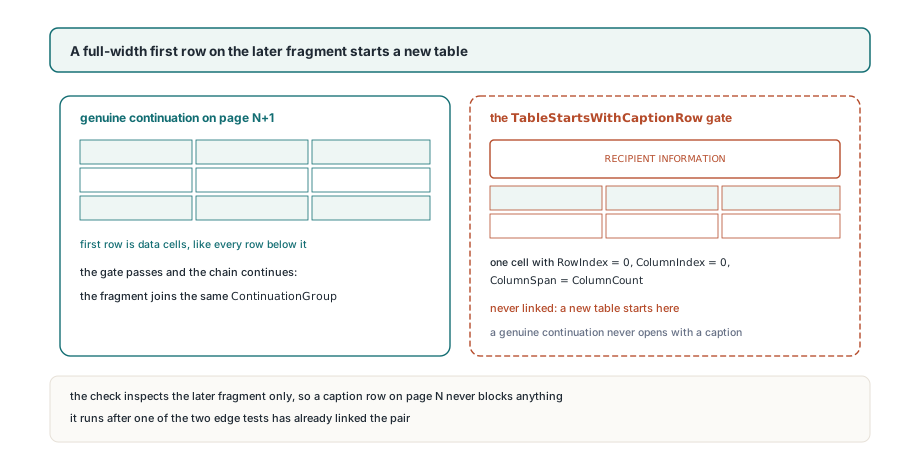
A later fragment whose first row is a single cell spanning every column is reported as a new table, even when an edge test passes and the columns match. Forms are where the content-aware test would overreach: one table ends near the bottom of page 1, the next section opens on page 2 with identical column widths, and every geometric check passes. The difference is the second table's opening row, a section caption such as RECIPIENT INFORMATION laid out as one merged cell across the full width. A genuine continuation does not open that way, because a table's caption stays on the page where the table starts
The rule reads only the later fragment's cells. That fragment needs at least two columns and a cell with RowIndex = 0, ColumnIndex = 0 and ColumnSpan = ColumnCount. The earlier fragment is never inspected, so a table whose own caption sits at the top of page N links normally to its continuation on page N+1
The column comparison that follows is stricter than an equal column count. Each fragment's boundary positions are rebuilt from its cell rectangles; a boundary hidden under a merged cell is filled in by spacing it evenly between the nearest known boundaries on either side. Then every boundary pair is compared, and a difference above 6 points rejects the link. Two four-column tables with different proportions stay apart. So does a real continuation whose generator shifted a column by 8 points between pages; raising AlignmentTolerance to accept it also loosens the clustering used during detection
One ruled row over a page break
A ruled grid that pushes a single row onto the next page keeps that row when it links into a chain and loses it when it does not. The default MinRows of 2 stops a pair of stray rules from being reported as a table. A row pushed over the break is different: it is real data, and dropping it would leave the stitched table one row short with no fragment left to explain the gap
The document scan handles it in three steps. When DetectContinuations and DetectRuledTables are both on, the ruled detector runs on every page with its row floor lowered to 1. Continuations are then marked over the whole result. Finally, every table with fewer rows than the caller's MinRows that did not end up in a chain is removed. A one-row grid in the middle of an ordinary page goes through that filter and disappears, which is exactly what MinRows is for
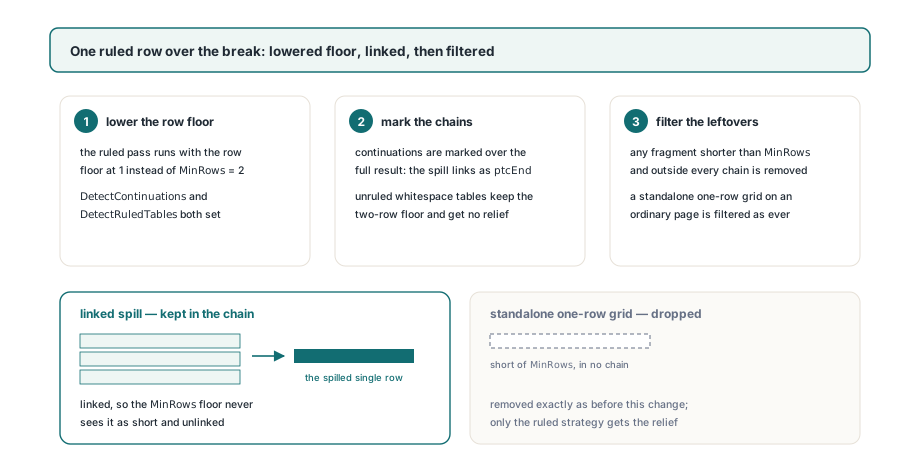
Leave MinRows at 2. Setting it to 1 yourself switches the final filter off, and every one-row ruled grid on every page comes back
The exception applies to ruled grids only. The whitespace strategy needs at least two aligned rows to recognize a table, so it keeps an internal floor of 2 whatever MinRows says; ExtractTables accepts MinRows = 1, but only ruled detection honors it. For an unruled table that spills one row, the page's word boxes or the blocks described in structured text blocks and reading order give you the positions to recover that row yourself
Stitching a chain back into one table
Chains come back contiguous. Links are only ever made between neighbors in the sorted array, so a ptcStart fragment is followed directly by its ptcMiddle and ptcEnd fragments, and a loop that resets on ptcNone or ptcStart and writes out on ptcNone or ptcEnd never has to look anything up by group number
The repeated header row is the tricky part: Word can repeat it on every page, other generators do not. The IsHeader flag on TPdfTableCell cannot settle it, because it is assigned by position, RowIndex < HeaderRowCount, separately for each fragment. Row 0 of a continuation is flagged as a header whether it repeats the header or carries data, and the one-row spill from the previous section is flagged too. The routine below compares the text of each continuation's first row with the chain's first row and drops it only on an exact match
It also builds rows from Cells instead of splitting ToCsv output into lines. A cell whose text wraps inside the cell comes back with a CR LF between its visual lines, ToCsv keeps that break inside the quoted field, and deleting the first line of the CSV text would cut a two-line header cell in half
// Reader-side helpers (not part of the library): rebuild each chain
// as one tab-separated file, dropping headers repeated on later pages
function RowText(const T: TPdfTable; Row: Integer): string;
var
  Parts: array of string;
  I: Integer;
begin
  SetLength(Parts, T.ColumnCount);
  for I := 0 to High(T.Cells) do
    if (T.Cells[I].RowIndex = Row) and (T.Cells[I].ColumnIndex >= 0) and
       (T.Cells[I].ColumnIndex < T.ColumnCount) then
      Parts[T.Cells[I].ColumnIndex] :=
        StringReplace(string(T.Cells[I].Text), #13#10, ' ', [rfReplaceAll]);
  Result := '';
  for I := 0 to High(Parts) do
  begin
    if I > 0 then
      Result := Result + #9;
    Result := Result + Parts[I];
  end;
end;

procedure ExportChains(const Tables: TPdfTables; const Folder: string);
var
  I, R, FirstRow: Integer;
  Header: string;
  Lines: TStringList;
begin
  Lines := TStringList.Create;
  try
    for I := 0 to High(Tables) do
    begin
      FirstRow := 0;
      if Tables[I].Continuation in [ptcNone, ptcStart] then
      begin
        Lines.Clear;
        Header := RowText(Tables[I], 0);
      end
      else if (Trim(Header) <> '') and (RowText(Tables[I], 0) = Header) then
        FirstRow := 1;                     // header repeated on this page
      for R := FirstRow to Tables[I].RowCount - 1 do
        Lines.Add(RowText(Tables[I], R));
      if Tables[I].Continuation in [ptcNone, ptcEnd] then
        Lines.SaveToFile(Format('%s\table%d-page%d.tsv',
          [Folder, I, Tables[I].PageNumber]));
    end;
  finally
    Lines.Free;
  end;
end;
Exact comparison is the right call. A header repeated by the word processor matches character for character, while a fuzzy match would eventually swallow a data row that resembles the header. A stray extra header is easy to spot in the output; a missing data row is not
Measuring the footer band instead of guessing
ContinuationMargin does three jobs with one number: page-edge slack for the first test, footer band depth and header band depth for the second. A footer deeper than the band leaves its upper line in the body zone, the earlier fragment looks as if text follows it, and the chain breaks at that page. A band set too deep starts swallowing real content: a short closing line just above the bottom margin falls inside it, and the table above that line can then link to whatever opens the next page
The document itself can supply the number. TPdf.PageWordBoxes returns every word on the current page with a page-space Rect whose Top is greater than its Bottom, so the highest Top among words lying below the body margin is the footer depth. The probe below takes a value just under the layout's bottom margin, 70 for a one-inch page, and keeps 36 points as a floor for documents without a footer
// Reader-side helper (not part of the library): the highest word top
// found below BodyMargin on any page, i.e. the depth of the footer zone
function MeasureFooterDepth(Pdf: TPdf; BodyMargin: Double): Double;
var
  P, I: Integer;
  Words: TPdfWordBoxes;
begin
  Result := 0;
  for P := 1 to Pdf.PageCount do
  begin
    Pdf.PageNumber := P;
    Words := Pdf.PageWordBoxes;
    for I := 0 to High(Words) do
      if (Words[I].Rect.Bottom < BodyMargin) and
         (Words[I].Rect.Top > Result) then
        Result := Words[I].Rect.Top;
  end;
end;

// uses System.Math for Max
Options := TPdfTableExtractionOptions.Default;
Options.ContinuationMargin := Max(36.0, MeasureFooterDepth(Pdf, 70) + 2);
Tables := Pdf.ExtractDocumentTables(Options);
The band is the same depth at both edges, so measure a deep running header against the page top too and use the larger value. Keep the slack to a couple of points; every extra point is a point of body text the content-aware test stops seeing
One layout defeats the caption rule by construction: a generator that writes a merged "continued" banner as the first row of every continuation fragment. Each such fragment is reported as a new table, so link them in your own code from consecutive page numbers, equal ColumnCount and the banner text in row 0
Continuation marking, the caption rule and the one-row exception all run inside ExtractDocumentTables, which behaves the same in the Delphi, C++Builder and Lazarus builds. The full set of table extraction options is listed on the PDFium Component for Delphi page