The first band held the entire drawing crushed into one strip, and the five bands after it came back blank. That was the old banded export, and PDFiumPas fixed it in v3.66.0: RenderPageBanded now passes the full-page target width and height to FPDF_RenderPageBitmap on every single band, together with a negative vertical offset, so the native clip writes only the rows of the current band while the page keeps its full-page coordinate geometry. The use case behind all of this is dull and unavoidable. Somebody hands you an E-size plot or a stitched panorama page and wants a 600 DPI raster of it. An ISO A0 sheet at 600 DPI is 19866 x 28086 pixels, and a 32-bit destination bitmap of that size is a little over 2 GB of contiguous memory. On 32-bit Delphi that allocation simply fails. On 64-bit it succeeds often enough to make the failure a customer problem rather than a test problem. Banded rendering exists so the peak allocation is one strip, not one page
Why did every band contain the whole page?
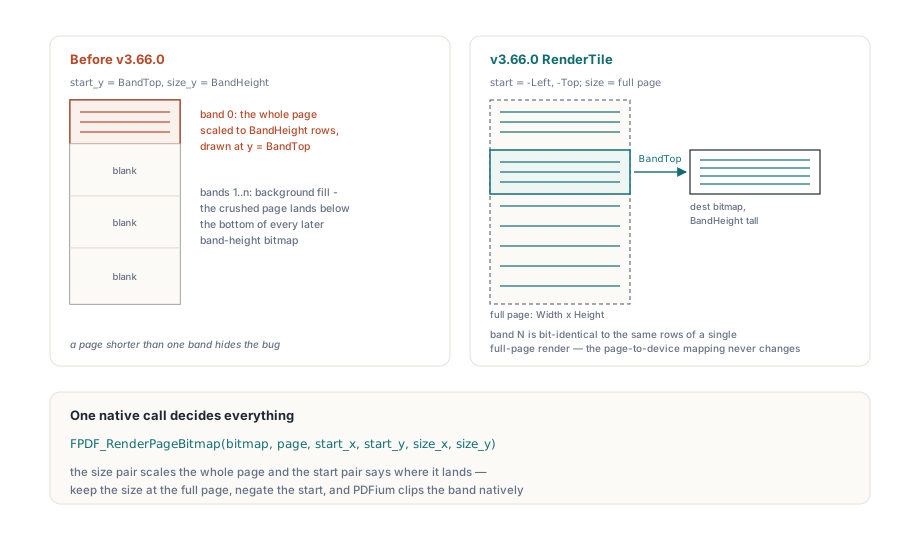
The old code confused two different pairs of arguments in the PDFium page-rendering call. FPDF_RenderPageBitmap takes start_x, start_y, size_x and size_y, where the size pair says how large the whole page should be scaled to and the start pair says where that scaled page lands inside the destination bitmap. The pre-v3.66.0 band loop called the library RenderPage helper with the band top as the destination offset and the band height as the page height. Those two numbers went straight through to the native call, so PDFium scaled the entire page into a rectangle only BandHeight rows tall and then drew it at y = BandTop inside a bitmap that was itself only BandHeight rows tall. The result was exactly what you would predict once you see it. Band zero received the whole page vertically crushed to the band height. Every later band received that same crushed page pushed below the bottom edge of its bitmap, so it came back as background fill. The bug hides in the one case most smoke tests use, a page whose render height is smaller than the band height, because then there is a single band and the wrong geometry happens to coincide with the right one. Anything taller than one band exposes it immediately
What the negative offset guarantees
The fixed implementation routes every band through RenderTile, which is the one place in the component that already understood the distinction. RenderTile takes a tile origin in full-page pixel coordinates plus a separate PageWidth and PageHeight, and it hands PDFium -Left and -Top with the page size untouched. Negating the offset slides the full-size page upward until the requested band sits at row zero of the destination bitmap; PDFium then clips natively against the bitmap bounds, so nothing outside the band is ever rasterized. The page-to-device mapping described in ISO 32000-1 clause 8.3.2 stays identical from the first band to the last, which is the whole point: band N is bit-identical to rows BandTop through BandTop + h of a single full-page render, and the regression suite asserts exactly that, pixel by pixel, against RenderPage output at the same dimensions
// One band by hand. The destination bitmap is only BandHeight tall,
// but the page target size stays at the full Width x Height
Band := Pdf.RenderTile(0, BandTop,          // tile origin in page pixels
                       Width, BandHeight,   // destination bitmap size
                       Width, Height);      // full-page target size
try
  // Band now holds rows BandTop .. BandTop + BandHeight - 1 of the page
finally
  Band.Free;
end;
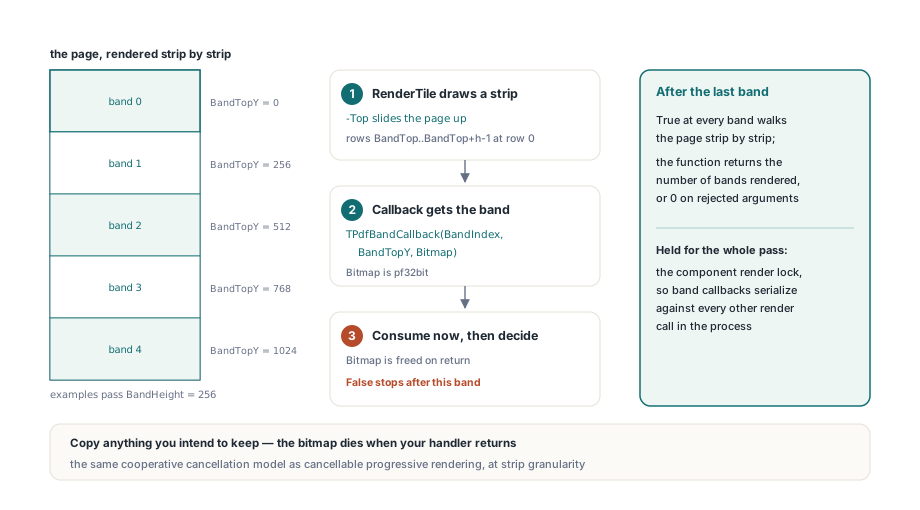
The public band API is a callback loop. RenderPageBanded(Width, Height, BandHeight, BandCallback, Rotation, Options, Color) returns the number of bands it actually rendered, or 0 when the arguments are rejected, and it holds the component render lock for the entire pass. The callback signature is TPdfBandCallback = function(BandIndex, BandTopY: Integer; Bitmap: TBitmap): Boolean of object. The bitmap is pf32bit, Width pixels wide and no taller than BandHeight, and it is freed as soon as your handler returns, so copy anything you intend to keep. Returning False stops the pass after the current band, which gives you the same cooperative cancellation model used by cancellable progressive PDF rendering in Delphi, only at strip granularity instead of PDFium continuation granularity
type
  TBandSink = class
  private
    FCancelled: Boolean;
    FRows: Integer;
  public
    function HandleBand(BandIndex, BandTopY: Integer;
      Bitmap: TBitmap): Boolean;
    property Rows: Integer read FRows;
  end;

function TBandSink.HandleBand(BandIndex, BandTopY: Integer;
  Bitmap: TBitmap): Boolean;
begin
  // Bitmap dies when this method returns - consume it here
  Inc(FRows, Bitmap.Height);
  Result := not FCancelled;
end;

// ...
Pdf.PageNumber := 1;
Bands := Pdf.RenderPageBanded(19866, 28086, 256, Sink.HandleBand);
Streaming PNG and TIFF without a full-page bitmap
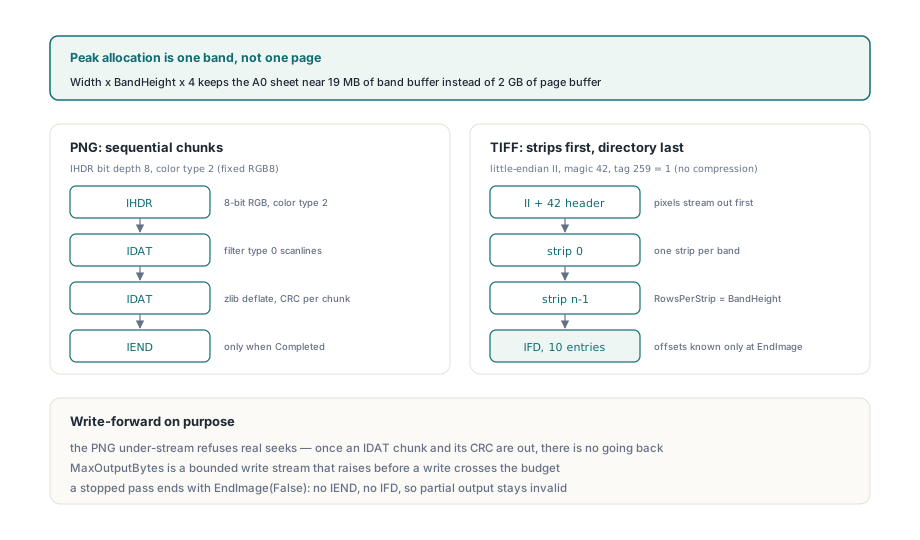
Rendering in bands only helps if the encoder is sequential too, so v3.66.0 added RenderPageBandedToStream, which writes PNG or TIFF straight into a caller stream. TPdfBandedImageStreamOptions.Default seeds a band height of 256 rows, PNG compression level 6 and a MaxOutputBytes of 0, which means unbounded. The returned TPdfBandedImageReport carries Format, Width, Height, BandsRendered, BandsEncoded, RowsEncoded, PeakBandBytes, OutputBytes and Completed. PeakBandBytes is the number you actually care about when sizing a job: it is Width * BandHeight * 4, so the A0 sheet above peaks at roughly 19 MB of band buffer instead of 2 GB of page buffer
The PNG encoder is deliberately narrow. It emits fixed RGB8, writing an IHDR with bit depth 8 and color type 2, then builds every scanline with filter type 0 (ISO/IEC 15948 filter method 0, filter type None) and pushes it through the platform zlib compression stream. The compressed bytes come back out as CRC-bearing IDAT chunks written in order. The interesting constraint is the stream sitting under the deflate layer: it answers position queries, because the compression stream asks for them, but any attempt at a real seek raises an error. That is intentional. Once an IDAT chunk and its CRC are on the wire there is no going back to fix them, and a silent seek would corrupt output that still looks structurally valid
The TIFF encoder writes little-endian classic TIFF, the II byte order mark followed by magic 42, with one strip per band. Pixels stream out first and the ten-entry IFD is generated at the end, once the strip offsets and byte counts are known. Compression is tag 259 value 1, so there is no entropy coding at all: the payload is exactly Width * Height * 3 bytes, PhotometricInterpretation is RGB, PlanarConfiguration is chunky, and RowsPerStrip records the band height while the final short strip is described by its own StripByteCounts entry. Band height therefore changes peak memory and strip count but not output size, which is worth knowing before you tune it. If you want small files rather than lossless ones, the per-page path in converting PDF pages to JPEG images with the PDFium VCL component remains the better tool
var
  StreamOptions: TPdfBandedImageStreamOptions;
  Report: TPdfBandedImageReport;
  Output: TFileStream;
begin
  StreamOptions := TPdfBandedImageStreamOptions.Default(pbifPng);
  StreamOptions.BandHeight := 512;
  StreamOptions.CompressionLevel := 6;
  StreamOptions.MaxOutputBytes := Int64(256) * 1024 * 1024;

  Output := TFileStream.Create('sheet-a0-600dpi.png', fmCreate);
  try
    Report := Pdf.RenderPageBandedToStream(Output, 19866, 28086,
      StreamOptions);
  finally
    Output.Free;
  end;

  if not Report.Completed then
    raise Exception.Create('Banded export stopped before the last row');
  // Report.PeakBandBytes = 19866 * 512 * 4, not 19866 * 28086 * 4
end;
Where does a banded export stop?
Two ceilings bound the output, and they fail in different places on purpose. The first is the caller budget: MaxOutputBytes is enforced by a bounded write stream that raises EPdfError before any write that would cross the limit, so the budget is a hard cap rather than an after-the-fact report. The second is structural. Classic TIFF stores strip offsets as 32-bit values, so BeginImage validates Width * Height * 3 plus the header and directory against that ceiling and rejects the job before a single pixel is written; the same check runs against MaxOutputBytes up front, because a TIFF whose budget cannot cover its own pixel payload is not worth starting. PNG has no equivalent limit, since IDAT chunks are purely sequential and there is no 32-bit offset table to overflow
Be clear-eyed about what a stopped export leaves behind. When the pass does not reach the last row, Completed stays False and the encoder is torn down with EndImage(False), which deliberately writes neither the PNG IEND chunk nor the TIFF IFD. The partial file is therefore invalid and every decoder will say so, instead of being a plausible-looking image with missing rows. That cleanup is wrapped so a secondary failure inside EndImage cannot replace the original exception, which is the difference between a stack trace that names the real cause and one that names the janitor. If you need progress that survives, checkpoint per band inside your own callback; the strip-level caching tactics in the PDFium Delphi render cache and zoom guide apply here too
Plugging in your own codec
When PNG and TIFF are not the target, RenderPageBandedToEncoder takes a TPdfBandedImageEncoder descendant and drives the same loop. The lifecycle is explicit and short: BeginImage(Width, Height), then WriteBand(BandIndex, BandTopY, Bitmap) once per strip in strictly ascending order, then EndImage(Completed), with GetBytesWritten feeding Report.OutputBytes. The built-in encoders reject an out-of-order band outright instead of trying to buffer it, and any encoder you write should do the same, because a codec that silently reorders strips produces a file that opens and lies. This is the seam to use for JPEG 2000 tiles, a JPEG writer fed one MCU row band at a time, or a direct feed into a print spooler
type
  TCodecBandEncoder = class(TPdfBandedImageEncoder)
  private
    FNextBand: Integer;
    FWritten: Int64;
  public
    procedure BeginImage(Width, Height: Integer); override;
    function WriteBand(BandIndex, BandTopY: Integer;
      Bitmap: TBitmap): Boolean; override;
    procedure EndImage(Completed: Boolean); override;
    function GetBytesWritten: Int64; override;
  end;

function TCodecBandEncoder.WriteBand(BandIndex, BandTopY: Integer;
  Bitmap: TBitmap): Boolean;
begin
  if BandIndex <> FNextBand then
    raise EPdfError.Create('Bands must arrive in order');
  Bitmap.PixelFormat := pf32bit;
  // Feed Bitmap.ScanLine[0 .. Bitmap.Height - 1] to the codec here
  Inc(FNextBand);
  Result := True;
end;
One cross-compiler trap worth knowing
The zlib unit is spelled differently on every supported toolchain: Delphi XE5 and later use System.ZLib, FPC uses zstream, and older Delphi uses plain ZLib. That much is routine conditional compilation. The trap is that all three export compression-level constants named clNone and clDefault, which collide head-on with the TColor members of the same name in the graphics unit. Once the zlib unit appears in the implementation uses clause, an unqualified clNone in render code can resolve to a compression level instead of a color, with no diagnostic. PDFiumPas pins this down with explicit color sentinel aliases, PdfGraphicsColorNone and PdfGraphicsColorDefault, bound once to the fully qualified graphics constants and used everywhere a render background or color-scheme sentinel is compared. Three lines of code, and symbol resolution stops drifting between compilers
Banded rendering looks like a convenience feature right up until you meet the page that will not fit in RAM, and then it is the only path that works. The corrected band geometry, the sequential PNG and TIFF encoders, and the custom encoder seam all ship as part of the PDFium Delphi component, with the full band-versus-page pixel comparison running in the regression suite across Delphi, Lazarus and C++Builder