The same PDF can report two different authors. A desktop viewer's properties dialog shows one name, an asset-management system that indexes XMP shows another, and both programs are reading the file correctly. PDF stores document metadata twice, and it keeps bookmarks, links and notes in structures that never touch the page content, so any of them can be wrong while every page renders perfectly
The object model underneath (indirect objects, the cross-reference table, the trailer) is covered in the walkthrough of PDF document structure. Here the focus stays on what hangs off the document catalog
Four entries in the catalog, four independent subsystems
Everything discussed below is reached from the document catalog, the dictionary the trailer's /Root entry points at (ISO 32000-1 §7.7.2). A catalog that wires up all of it looks like this:
1 0 obj
<< /Type /Catalog
   /Pages 2 0 R
   /Outlines 3 0 R
   /Names << /EmbeddedFiles 4 0 R /Dests 6 0 R >>
   /Metadata 5 0 R
>>
endobj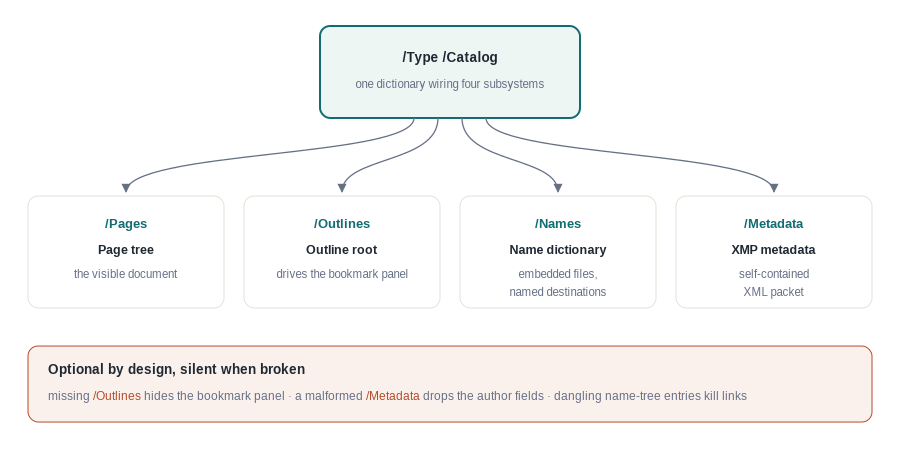
/Pages is the visible document, and the only one of the four the catalog requires. /Outlines leads to the bookmark tree, /Metadata to the XMP stream, and /Names to the name dictionary, which holds embedded files under /EmbeddedFiles and named destinations under /Dests. A reader that finds none of the optional three still shows every page, which is why this layer degrades first when a file passes through tools that only understand pages. Nothing inside a page object points back at the outline, the /Dests tree or the XMP stream. Copy the pages alone into a new file and all three stay behind
Why does a PDF carry two metadata stores?
A PDF carries two metadata stores because the format grew a second one without retiring the first. The original mechanism is the document information dictionary (ISO 32000-1 §14.3.3, Table 317), referenced by /Info in the trailer: flat text entries for /Title, /Author, /Subject, /Keywords, /Creator, /Producer, plus /CreationDate, /ModDate and /Trapped. ISO 32000-2 deprecates the whole dictionary except the two date entries and points writers at the XMP metadata stream instead
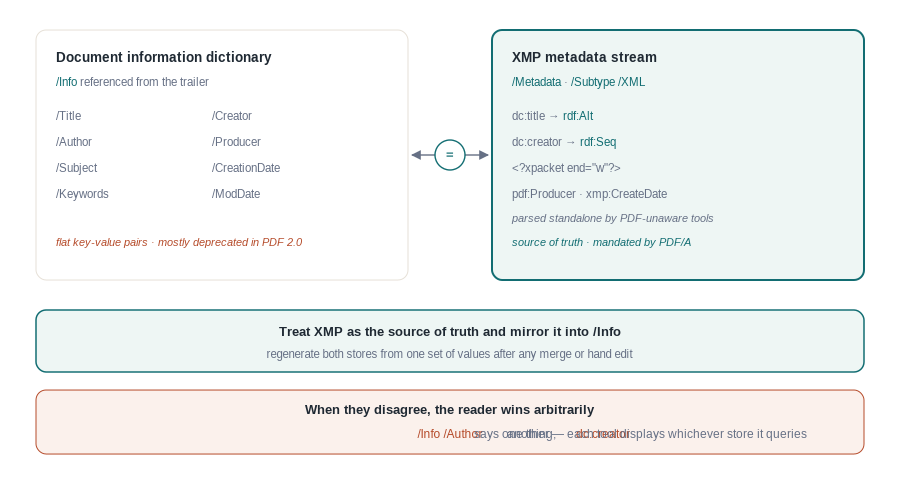
XMP (ISO 32000-1 §14.3.2) is an XML document written in RDF, stored in a stream whose dictionary carries /Type /Metadata /Subtype /XML. Unlike the Info dictionary, an XMP packet is designed to be found and parsed by tools that know nothing about PDF syntax:
5 0 obj
<< /Type /Metadata /Subtype /XML /Length 1235 >>
stream
<?xpacket begin="" id="W5M0MpCehiHzreSzNTczkc9d"?>
<x:xmpmeta xmlns:x="adobe:ns:meta/">
  <rdf:RDF xmlns:rdf="http://www.w3.org/1999/02/22-rdf-syntax-ns#">
    <rdf:Description rdf:about=""
        xmlns:dc="http://purl.org/dc/elements/1.1/"
        xmlns:xmp="http://ns.adobe.com/xap/1.0/"
        xmlns:pdf="http://ns.adobe.com/pdf/1.3/">
      <dc:title><rdf:Alt><rdf:li xml:lang="x-default">Quarterly Report</rdf:li></rdf:Alt></dc:title>
      <dc:creator><rdf:Seq><rdf:li>A. Author</rdf:li></rdf:Seq></dc:creator>
      <xmp:CreateDate>2026-06-16T10:46:27+08:00</xmp:CreateDate>
      <xmp:CreatorTool>Reporting Service 4.2</xmp:CreatorTool>
      <pdf:Producer>losLab PDF Library</pdf:Producer>
    </rdf:Description>
  </rdf:RDF>
</x:xmpmeta>
<?xpacket end="w"?>
endstream
endobj
Three details in that block decide whether the packet survives real tooling. The xpacket processing instructions frame the packet so a scanner can locate it inside an arbitrary byte stream; drop the closing <?xpacket end="w"?> and the file still opens, but scanners lose their end marker. The value types matter too: dc:title is a language alternative and needs rdf:Alt, while dc:creator is an ordered list and needs rdf:Seq. Writing either as a bare text node is an easy mistake to make. Prefixes, though, are only conventional; a parser keys off the namespace URI, so dc: bound to the wrong URI is a different property altogether
The Info keys and their XMP counterparts pair up as follows. PDF/A-1 (ISO 19005-1 §6.7.3) states the pairing as a conformance rule: when both stores are present, the values must be equivalent
| Info dictionary | XMP property |
|---|---|
/Title | dc:title (rdf:Alt) |
/Author | dc:creator (rdf:Seq) |
/Subject | dc:description (rdf:Alt) |
/Keywords | pdf:Keywords |
/Creator | xmp:CreatorTool |
/Producer | pdf:Producer |
/CreationDate, /ModDate | xmp:CreateDate, xmp:ModifyDate |
Hand edits and merges are where the two drift. A merge can inherit /Info from one input and the XMP packet from another. The safer rule is to treat XMP as the source of truth, keep /Info for older consumers, and regenerate both from one set of values whenever either changes
Writing both stores from one set of properties
HotPDF builds both stores from the same document properties. Title, Author, Subject and Keywords go into /Info; when EnableXMPMetadata is True, EndDoc also writes an XMP packet from those same values, with dc:title as an rdf:Alt and dc:creator as an rdf:Seq, and links it from the catalog's /Metadata. EnableXMPMetadata defaults to False, and it is worth switching on for anything that leaves your hands: a file with only /Info is invisible to every tool that reads XMP alone. CustomXMP replaces the generated packet with your own text when you need extra schemas
uses
  System.SysUtils, Vcl.Graphics, HPDFDoc;

procedure BuildReport(const FileName: string);
var
  PDF: THotPDF;
  Chapter: THPDFDocOutlineObject;
begin
  PDF := THotPDF.Create(nil);
  try
    PDF.AutoLaunch := False;
    PDF.FileName := FileName;
    // One set of values feeds both /Info and the XMP packet
    PDF.Title := 'Quarterly Report';
    PDF.Author := 'A. Author';
    PDF.Subject := 'Results for the third quarter';
    PDF.Keywords := 'quarterly, results';
    PDF.EnableXMPMetadata := True;
    PDF.BeginDoc;

    PDF.CurrentPage.SetFont('Arial', [fsBold], 20);
    PDF.CurrentPage.TextOut(50, 50, 0, 'Chapter 1: Results');
    Chapter := PDF.OutlineRoot.AddChild('Chapter 1: Results', 0, 50);
    Chapter.Opened := True;   // saved as a positive /Count

    PDF.AddPage;
    PDF.CurrentPage.SetFont('Arial', [fsBold], 16);
    PDF.CurrentPage.TextOut(50, 50, 0, 'Introduction');
    Chapter.AddChild('Introduction', 0, 50);

    PDF.AddPage;
    PDF.CurrentPage.SetFont('Arial', [fsBold], 16);
    PDF.CurrentPage.TextOut(50, 50, 0, 'Methodology');
    Chapter.AddChild('Methodology', 0, 50);

    PDF.EndDoc;
  finally
    PDF.Free;
  end;
end;
Editing an existing file is different. On a loaded document, SetLoadedTitle, SetLoadedAuthor, SetLoadedCreator and their siblings write the Info dictionary entry, and the XMP stream is a separate object you replace with SetLoadedXMPMetadata. Change the author with one call and not the other, and SaveLoadedDocument produces exactly the two-authors file from the opening paragraph
The outline tree behind the bookmark panel
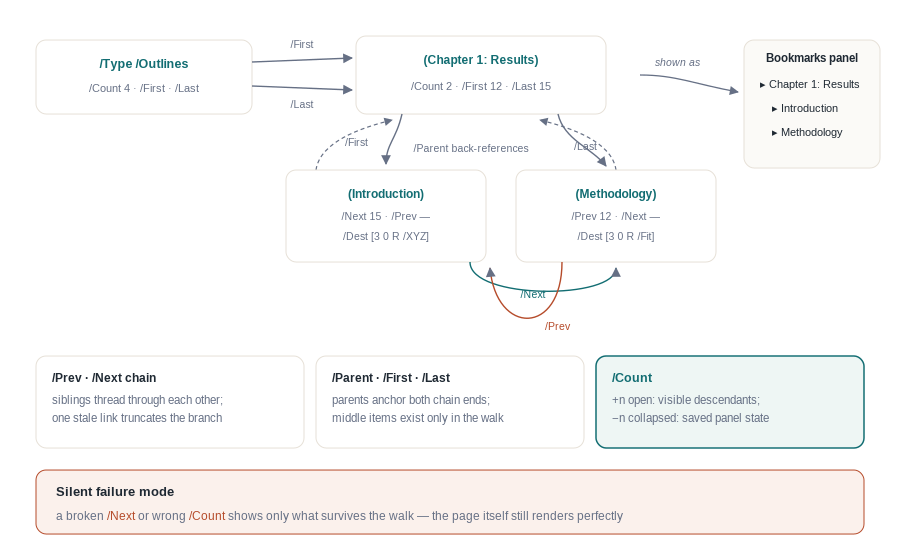
The bookmark panel is rebuilt from a doubly linked tree of dictionaries, the document outline (ISO 32000-1 §12.3.3, Tables 152 and 153). No array of bookmarks exists anywhere in the file; the viewer reconstructs the panel by following references from the catalog's /Outlines
8 0 obj                                    % the outline root
<< /Type /Outlines /Count 3 /First 9 0 R /Last 9 0 R >>
endobj
9 0 obj                                    % top-level: a chapter
<< /Title (Chapter 1: Results)
   /Parent 8 0 R /Count 2
   /First 12 0 R /Last 15 0 R
   /Dest [3 0 R /XYZ 0 792 0] >>
endobj
12 0 obj                                   % first child
<< /Title (Introduction)
   /Parent 9 0 R /Next 15 0 R
   /Dest [4 0 R /XYZ 72 720 0] >>
endobj
15 0 obj                                   % second child, last sibling
<< /Title (Methodology)
   /Parent 9 0 R /Prev 12 0 R
   /Dest [5 0 R /Fit] >>
endobj
The invariants read straight off the links. Every item points back to its /Parent. Siblings chain through /Prev and /Next; the first child has no /Prev, the last has no /Next. A parent names its two ends through /First and /Last, and anything in between exists only as a step in the sibling walk. Break one link and viewers show whatever they can still reach: a stale /Next cuts a chapter short, while a /Last that disagrees with the end of the chain leaves different viewers drawing different trees
/Count surprises people because it stores panel state. On the root it is the number of items visible at all levels. On an item, a positive value means the item is open and gives the number of visible descendants; a negative value means it is closed, and its magnitude is how many descendants would appear on expansion. In the sample the root holds 3: one chapter plus its two open children. A generator that writes every /Count as a positive total silently reopens each branch the author collapsed
In HotPDF, OutlineRoot is a THPDFDocOutlineObject, and AddChild(Title, X, Y) appends an item, wires its /Parent, /Prev, /Next, /First and /Last links, and points it at the current page as [page /XYZ left top 0]. The Opened property decides the sign, and the writer recomputes every /Count from the finished tree at EndDoc, so setting Opened after the children are added is fine. InsertBefore, InsertAfter and MoveTo restructure the tree with the same bookkeeping
Destinations: where a click actually lands
Bookmarks and link annotations both resolve to a destination (ISO 32000-1 §12.3.2, Table 151), and a destination is more than a page number. It is an array naming a page object, then a fit type that tells the viewer how to frame it. The workhorse is [page /XYZ left top zoom]. Any of the three operands may be null, meaning "keep whatever the reader had", and a zoom of 0 means the same as null. So [page /XYZ null null null] changes the page and nothing else, which is usually what a "go to page" link should do
The fit family trades exact positioning for resilience. [page /Fit] scales the whole page into the window, [page /FitH top] fits the page width with a given top edge, and [page /FitR left bottom right top] zooms a rectangle to fill the view. These compute the scale from page geometry at click time; an /XYZ with a baked-in zoom keeps it even after the page is resized. For a table of contents, /FitH at the section's top edge is the better default
The coordinates are where people get burned. Destination numbers are in default user space, origin at the bottom-left and y growing upward (§8.3.2.3), while screen layout habits measure from the top. HotPDF's canvas-style calls (TextOut, link rectangles, the X and Y of AddChild) take top-down coordinates and convert them for you. RegisterNamedDestination writes its Left and Top into the destination array as given, so they must already be in PDF user space:
// Call between BeginDoc and EndDoc, once pages 0..2 exist
procedure AddContentsLinks(PDF: THotPDF);
var
  R: TRect;
begin
  // Named destination 50 pt below the top of page 1.
  // Top is PDF user space, measured up from the bottom edge
  PDF.CurrentPageNumber := 1;
  PDF.RegisterNamedDestination('chapter-1', 1, dfmFitH,
    0, PDF.CurrentPage.Height - 50, 0, 0, 0);

  // Contents entries on page 0; rectangles use top-down coordinates
  PDF.CurrentPageNumber := 0;
  R := Rect(50, 175, 545, 209);
  PDF.CurrentPage.AddNamedDestinationLink(R, 'chapter-1', 'Chapter 1: Results');

  // YPos = -1 writes [page /XYZ null null null]: change page, keep the view
  R := Rect(50, 225, 545, 259);
  PDF.CurrentPage.AddGoToLink(R, 2, -1, 'Methodology');

  R := Rect(50, 275, 545, 309);
  PDF.CurrentPage.AddURILink(R, 'https://www.example.com', 'Project website');
end;
Pass the screen-style value 50 as Top and the link lands 50 points above the bottom edge, showing the footer instead of the heading. A named destination lives in the catalog's /Dests name tree and every link resolves through the name, so with dozens of links into the same chapters it is the right call. Move a section and you edit one entry in /Dests; every link that names it follows. The page order those destinations depend on is covered in why page tree order matters
Annotations: interactive objects outside the content stream
An annotation sits on a page without being part of its content stream (ISO 32000-1 §12.5). Links, sticky notes, highlights, form widgets, file-attachment icons and stamps all live in the /Annots array of their page. Remove an entry and the annotation disappears, while the content stream stays byte-for-byte the same
Every annotation shares a small core (Table 164): /Subtype names the kind, /Rect gives the bounding box in default user space, and /Contents holds text that doubles as the alternate description assistive technology reads out. Link annotations (§12.5.6.5, Table 173) come in two shapes:
20 0 obj                                    % link to a destination
<< /Type /Annot /Subtype /Link
   /Rect [100 200 300 250]
   /Border [0 0 0]
   /Dest [5 0 R /XYZ null null null] >>
endobj
21 0 obj                                    % link that runs an action
<< /Type /Annot /Subtype /Link
   /Rect [50 50 200 100]
   /Border [0 0 0]
   /Contents (Project website)
   /A << /Type /Action /S /URI /URI (https://www.example.com) >> >>
endobj
/Border [0 0 0] is there for a reason: the default border is [0 0 1], a one-point frame many viewers draw around every link. /Dest and /A are mutually exclusive, and the action's /S picks the behavior: /GoTo within this file (§12.6.4.2), /GoToR for a page in another PDF (§12.6.4.3), /URI for a web address (§12.6.4.7), /Launch to open an external application or file (§12.6.4.5). Leave /Launch out of documents you distribute: viewers commonly block it or put a security prompt in front of it, and PDF/A forbids it outright (ISO 19005-1 §6.6.1). The Description argument of the link calls above fills /Contents, and with HotPDF's PDFUACompliance switched on an empty description raises an exception, since PDF/UA-1 requires that entry on every link
Markup annotations such as highlights and notes, and shapes such as /Square, add a twist: their type does not fix their look. Without an appearance stream (the /AP entry, §12.5.5), each viewer draws its own rendition. ISO 32000-2 makes /AP mandatory for most annotation types, with Popup and Link among the exceptions. File attachments reuse the same machinery: an embedded file stream wrapped in a file specification (§7.11), surfaced either as a /FileAttachment annotation on a page or through the /EmbeddedFiles name tree under the catalog's /Names
How do you check this layer before a file ships?
Two checks catch most of it: click through the bookmark panel and a sample of links in a real viewer, then read the metadata back with a program, since no amount of clicking reveals an /Info that disagrees with XMP. HotPDF's loaded-document calls cover both halves. GetLoadedOutlineTitlesDeep walks the /First and /Next chain depth-first, the same walk a viewer does, so a branch cut off by a stale link is missing from its result too. FindLoadedOutlineByTitle resolves a bookmark's target page and reports -1 when the target is a named destination or does not resolve to a page
// StripXmlTags is a helper you add yourself; it is not a library call.
// GetLoadedXMPValue returns the element's inner markup, so dc:creator
// comes back wrapped in rdf:Seq and rdf:li tags
function StripXmlTags(const S: AnsiString): AnsiString;
var
  I: Integer;
  InTag: Boolean;
begin
  Result := '';
  InTag := False;
  for I := 1 to Length(S) do
    if S[I] = '<' then InTag := True
    else if S[I] = '>' then InTag := False
    else if not InTag then Result := Result + S[I];
  Result := AnsiString(Trim(string(Result)));
end;

procedure CheckNavigationLayer(const FileName: string);
var
  PDF: THotPDF;
  Title, Author, Subject, Keywords, Creator, Producer, XmpAuthor: AnsiString;
  Titles: THPDFAnsiStringArray;
  I, PageIndex: Integer;
begin
  PDF := THotPDF.Create(nil);
  try
    PDF.AutoLaunch := False;
    if PDF.LoadFromFile(FileName) <= 0 then
      raise Exception.Create('No readable pages');

    if PDF.GetLoadedDocumentInfo(Title, Author, Subject, Keywords,
      Creator, Producer) then
    begin
      XmpAuthor := StripXmlTags(PDF.GetLoadedXMPValue('dc', 'creator'));
      if (XmpAuthor <> '') and (XmpAuthor <> Author) then
        Writeln('Author mismatch: /Info="', Author, '" XMP="', XmpAuthor, '"');
    end;

    Titles := PDF.GetLoadedOutlineTitlesDeep;
    Writeln(Length(Titles), ' bookmarks reachable');
    for I := 0 to High(Titles) do
      if PDF.FindLoadedOutlineByTitle(Titles[I], PageIndex, False, True)
        and (PageIndex < 0) then
        Writeln('No direct page target: ', Titles[I]);
  finally
    PDF.Free;
  end;
end;
A bookmark count below what you wrote points at a broken sibling chain. A -1 on a bookmark that uses a named destination is expected, and FindLoadedOutlineByTitle stops at the first match, so duplicate titles report the first one's target. GetLoadedXMPValue is a plain text search on the packet, and the comparison is byte-for-byte, so with non-ASCII names look at how both values come back before trusting a mismatch
Everything in this layer is reference bookkeeping, and bookkeeping is the part worth handing to a library. The HotPDF Delphi Component for Delphi and C++Builder writes both metadata stores from one set of properties, threads the outline links as you add items, and attaches link annotations with their actions and descriptions; its loaded-document API reads the same structures back for checking