A PDF cut off mid-download can refuse to open even when nearly every page arrived, yet a 2,000-page manual jumps to page 1,500 instantly. Both follow from PDF file structure, as the HotPDF Delphi Component writes it: a header, a body of numbered objects, a cross-reference (xref) table of byte offsets, and a trailer, the last two stored at the end
ISO 32000-2 §7.5.1 lays out the same four-part anatomy for every PDF, from a one-page receipt to a scanned archive. The parts always sit in the same order down the file, and they connect in a fixed chain: the trailer names the catalog and says where the xref table starts, the xref table says where each object starts, and the objects point at each other by number. The excerpts below come from a 610-byte Hello World file whose offsets were checked byte by byte; the complete file, annotated keyword by keyword, is in what a PDF looks like inside, and what a viewer does with these parts on the way to pixels is in how a PDF works when a reader opens it
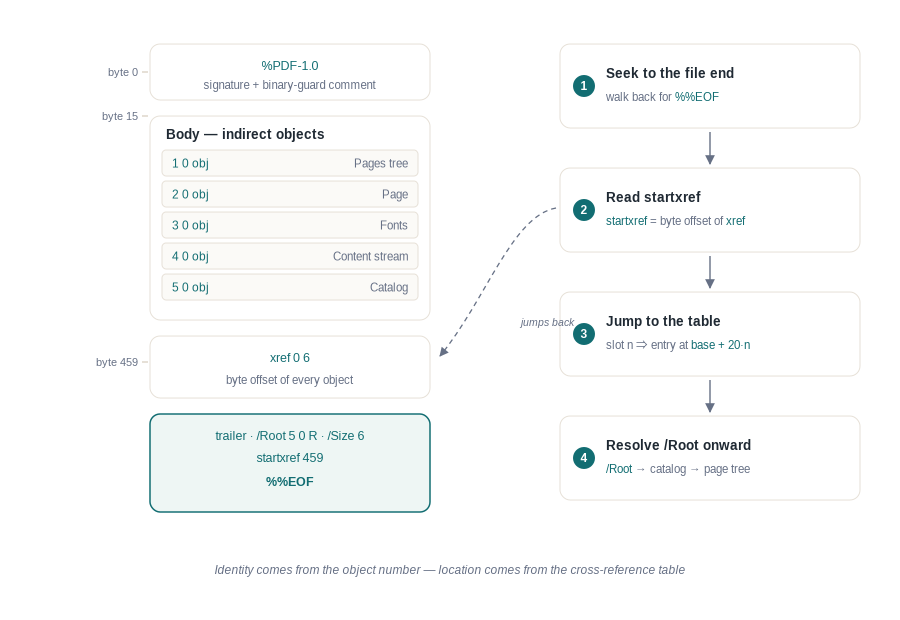
The PDF header is two lines, and the second one matters
The first line, such as %PDF-1.7, is a comment as far as the syntax goes, but readers treat it as the file signature and take the version from it; version handling is loose in practice, so treat the number as a hint about which features to expect. The second line is the one people delete by accident and then spend an afternoon debugging. Its payload is at least four bytes above ASCII 127 (ISO 32000-1 §7.5.2), there so that anything moving the file in text mode recognizes it as binary and stops rewriting line endings. Compressed streams contain bytes that match a carriage return or line feed by coincidence; rewrite those and the stream length recorded in the dictionary no longer matches the bytes on disk. Every serious writer still emits the comment because the failure it prevents is silent and total
The body: numbered objects and the eight PDF object types
The body is a flat sequence of indirect objects, each wrapped as N G obj ... endobj with an object number and a generation number. What turns that flat list into the PDF internal structure is the reference token N G R: 2 0 R means "object 2, generation 0, wherever it happens to live in the file." Any value can also be written in place as a direct object. In the excerpt, the page's /Resources dictionary is direct, while the font it names is indirect, so a hundred pages could share object 4 instead of carrying a hundred copies:
1 0 obj
<< /Type /Catalog /Pages 2 0 R >>          % catalog points at the page tree
endobj
...
3 0 obj
<< /Type /Page
   /Parent 2 0 R
   /MediaBox [0 0 612 792]
   /Resources << /Font << /F1 4 0 R >> >>   % direct dictionary, indirect font
   /Contents 5 0 R
>>
endobj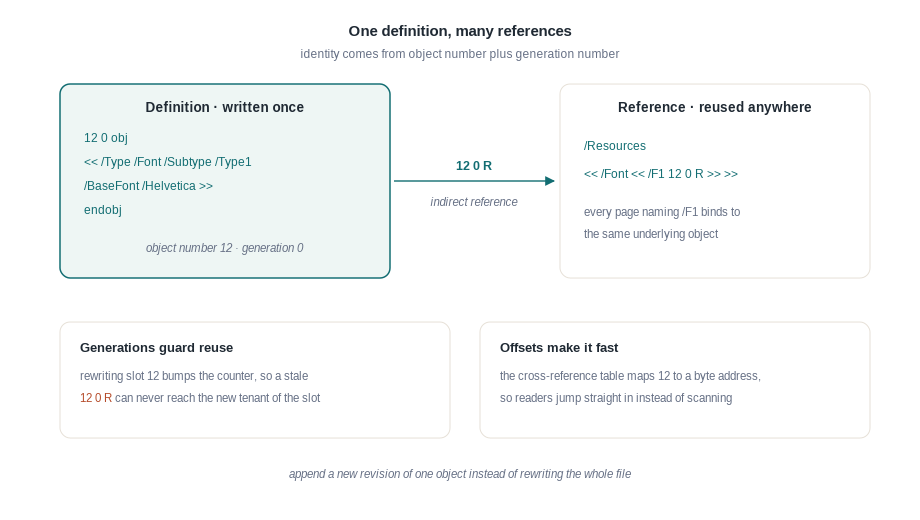
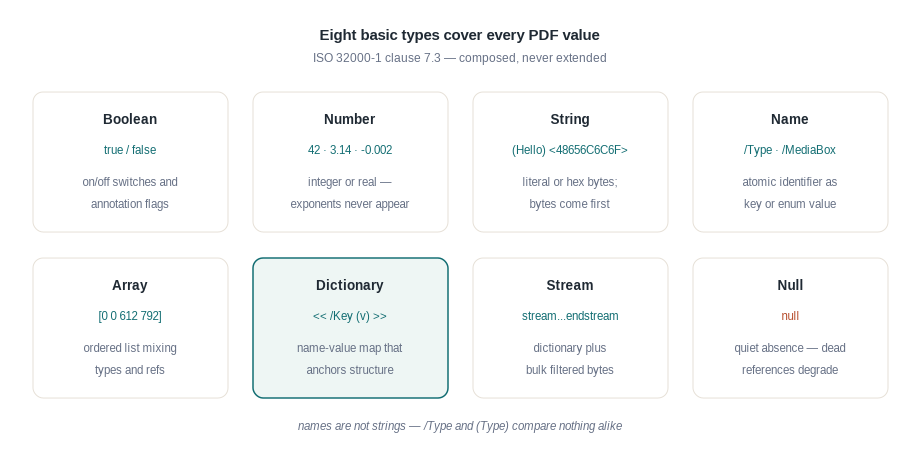
ISO 32000-1 §7.3 keeps the vocabulary short: every value in a PDF is one of eight basic types. Booleans and numbers are the scalars, and PDF has no exponent notation, so 1e6 never appears in a conforming file. Strings hold bytes, written as (Hello, World!) or in hex as <48656C6C6F>. Names such as /Type or /Helvetica are compared byte for byte, so writing (Helvetica) where /BaseFont expects a name is a type error even though the characters match. Arrays hold anything in order, like the MediaBox. Dictionaries map names to values and carry most of the structure. A stream is a dictionary plus raw bytes, home to page content, fonts, and images. The eighth type is null, and a reference to an object that does not exist resolves to it instead of raising an error, which lets a damaged file degrade instead of failing outright
The generation number exists for reuse. When an edit deletes an object, its number goes onto the free list, and if a later edit reuses the number, the generation goes up by one, so a stale 12 0 R cannot silently resolve to the new 12 1 obj. Nearly every object you meet is generation 0. Resolution starts at the catalog, object 1 in the excerpt, whose /Pages entry leads into the page tree; interior nodes collect pages in /Kids, keep a /Count, and can pass attributes such as /MediaBox down to their descendants. Why that tree, and not the physical order of objects, decides page order is covered in PDF page trees and page order
How does the xref table locate an object?
The xref table turns an object number into a byte offset by arithmetic, which is how a 2,000-page manual opens on page 1,500 without parsing the pages before it. ISO 32000-1 §7.5.4 fixes every entry at exactly twenty bytes: a ten-digit offset counted from the start of the file, a space, a five-digit generation, a space, a type letter, and a two-byte end-of-line, which with LF is a space plus the line feed. Because the rows are uniform, a reader indexes straight to the row for object n. The 0 6 line is a subsection header, and entry 0 is always free with generation 65535, heading the linked list of free object numbers. Every other offset must land on the first digit of the matching N G obj header, as in the 610-byte file:
xref
0 6                  % 6 entries, starting at object 0
0000000000 65535 f   % entry 0: head of the free list
0000000019 00000 n   % object 1 (catalog) begins at byte 19
0000000068 00000 n   % object 2 (page tree) begins at byte 68
0000000125 00000 n   % object 3 (page) begins at byte 125
0000000263 00000 n   % object 4 (font) begins at byte 263
0000000333 00000 n   % object 5 (content stream) begins at byte 333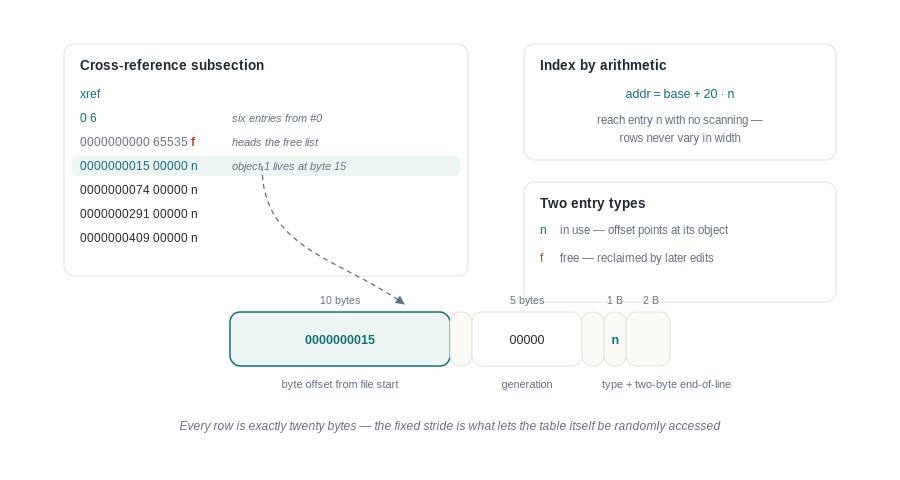
Why does a truncated PDF fail to open?
A truncated PDF fails because the two parts that tie everything together, the xref table and the trailer, are the last bytes written. The trailer dictionary carries /Root, the catalog, and /Size, the number of xref entries, one more than the highest object number because slot zero holds the free entry. Below it, startxref gives the byte offset of the xref keyword and %%EOF closes the file:
trailer
<< /Size 6 /Root 1 0 R >>   % entry count, document catalog
startxref
427                          % byte offset of the xref keyword
%%EOF
Lose the last few hundred bytes and the file has objects but no map to them. Strict readers stop there; tolerant ones scan the whole file for N G obj headers and rebuild the table, the slow path the xref exists to avoid, and a rebuilt map can still miss objects or pick the wrong copy of an edited one. A text-mode transfer does quieter damage, because rewriting line endings shifts every object. We converted the 610-byte file to CRLF endings and ran qpdf --check (qpdf 12.3.2): it reported "file is damaged" and "xref not found" at offset 427, and rebuilt the table by scanning before it would check anything
Classic xref table or cross-reference stream?
Since PDF 1.5, the xref can also be a cross-reference stream (ISO 32000-1 §7.5.8): an indirect object of /Type /XRef whose binary rows replace the text table and whose stream dictionary absorbs the trailer entries, so the trailer keyword disappears and startxref points at that object. Row types become numbers (0 free, 1 at a byte offset, 2 inside an object stream), /W gives the byte width of each column, and HotPDF compresses the rows with Flate and the PNG Up predictor. HotPDF writes the stream form when Version is pdf15 or later, so the example sets it explicitly, and UseObjectStreams builds on the same switch. We leave UseXRefStream off for files that must open in PDF 1.4 era tools, which cannot parse an xref stream at all, and turn it on for large documents where a compact index pays off. Only the tail of the file changes:
uses
  System.SysUtils, HPDFDoc;

procedure SaveWithXRef(const FileName: string; AsStream: Boolean);
var
  PDF: THotPDF;
begin
  PDF := THotPDF.Create(nil);
  try
    PDF.AutoLaunch := False;
    PDF.FileName := FileName;
    PDF.Version := pdf17;            // xref streams need PDF 1.5 or later
    PDF.UseXRefStream := AsStream;   // default False: text table plus trailer
    PDF.BeginDoc;
    PDF.CurrentPage.TextOut(72, 72, 0, 'Same page, different index');
    PDF.EndDoc;
  finally
    PDF.Free;
  end;
end;

// SaveWithXRef('table.pdf', False);
//   Expected tail: xref, 0 N, twenty-byte rows,
//   trailer << /Size /Root /Info /ID >>, startxref, %%EOF
// SaveWithXRef('stream.pdf', True);
//   Expected tail: N 0 obj << /Type /XRef /Size /Root /Info /ID /W ...
//   /Filter /FlateDecode >> stream ... endstream endobj, startxref, %%EOF
Incremental updates append a second xref instead of rewriting
A PDF can be edited without touching any byte already on disk. Changed and new objects are appended, followed by an xref section that lists only them and a trailer whose /Prev entry holds the offset of the previous table. A reader follows startxref to the newest section, walks the /Prev chain backward, and lets the newest entry for each object number win. The edit below adds a note annotation to the 610-byte file: page object 3 is rewritten with an /Annots array under the same number, and object 6 is new. With the comments removed and LF endings the offsets are exact, and qpdf --check passed on the result with no errors:
% ... original 610 bytes, unchanged ...
3 0 obj                          % replaces page 3, same object number
<< /Type /Page /Parent 2 0 R /MediaBox [0 0 612 792] /Resources << /Font << /F1 4 0 R >> >> /Contents 5 0 R /Annots [6 0 R] >>
endobj
6 0 obj                          % the new annotation
<< /Type /Annot /Subtype /Text /Rect [72 650 92 670] /Contents (Checked) >>
endobj
xref                             % two one-entry subsections
3 1
0000000610 00000 n
6 1
0000000752 00000 n
trailer
<< /Size 7 /Root 1 0 R /Prev 427 >>
startxref
843
%%EOF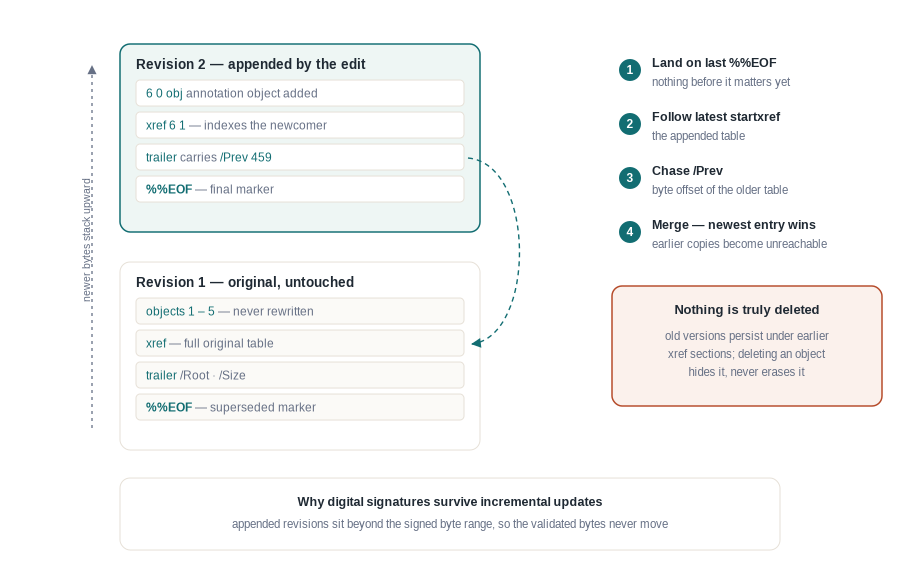
Appending is what keeps signed PDFs verifiable: a signature covers a byte range, and an incremental update never moves those bytes. It is also why a PDF carries recoverable history, since the old page 3 still sits at byte 125, unreachable but present. Files revised many times grow a long /Prev chain; qpdf revised.pdf flat.pdf reserializes the reachable objects under a single xref and drops the old revisions, which on the file above left one xref table and no /Prev, at the price of any signature over the original bytes. In HotPDF, an incremental revision looks like this:
procedure ReviseInPlace(const Original, Revised: string);
var
  PDF: THotPDF;
begin
  PDF := THotPDF.Create(nil);
  try
    PDF.AutoLaunch := False;
    PDF.BeginIncrementalUpdate(Original);   // keeps the original bytes verbatim
    PDF.SetLoadedTitle('Quarterly report, revised');
    PDF.SetLoadedAuthor('Finance');
    PDF.SaveIncrementalUpdate(Revised);      // changed objects, new xref, /Prev trailer
  finally
    PDF.Free;
  end;
end;
The four-part layout also gives a quick triage order for a PDF that misbehaves: check that the file ends in %%EOF with a plausible startxref, confirm that one or two xref offsets land on an N G obj header, then follow /Root into the catalog and page tree. The HotPDF Delphi Component for Delphi and C++Builder writes classic xref tables or cross-reference streams on request and appends incremental revisions that leave earlier bytes, and the signatures over them, intact