HotXLS writes ordinary numeric cell values and formula caches into XLSX with 17 significant digits, and on read it corrects the Delphi RTL parse with a bounded exact decimal-to-binary64 check, so a Double you store in a cell comes back bit for bit after a save and reopen. Fifteen digits, the number Excel shows on screen, is not enough to identify an IEEE 754 binary64 value, and the gap shows up exactly where finance and ID columns live: integers past 1015
The bug that forced the change looked harmless. A worksheet formula INT(-1E15-0.1) evaluates to -1000000000000001, a perfectly representable double. HotXLS computed it correctly, cached it, saved the file, and the cache on disk read -1E15. Excel would show the original value only after a recalculation, and any consumer that trusts cached values, which is most of them, silently got a number off by one. Nothing threw, nothing warned, and the file validated fine
Why are 15 significant digits not enough for a double?
Fifteen decimal digits are guaranteed to survive a trip into binary64 and back, but the reverse direction needs 17. IEEE 754 binary64 has a 53-bit significand, which works out to between 15 and 17 decimal digits depending on where the value sits. Any decimal string with at most 15 significant digits converts to a double and prints back unchanged. A double, however, needs up to 17 digits before its decimal spelling uniquely identifies it, and in the range above 253 adjacent doubles are 2 apart, while between 1015 and 253 they are 0.125 to 1 apart
Delphi's FloatToStr formats with 15 significant digits, which is the same precision Excel uses for display. That match is precisely why the defect hides so well: open the file in Excel and the cell looks exactly like it did in your Delphi program, because Excel also only shows 15 digits. The difference only becomes visible when you compare the stored double, subtract two nearby values, or feed the cache into something that does arithmetic. The value -1000000000000001 has 16 significant digits, so rounding to 15 produces -1000000000000000 and the trailing unit is gone for good
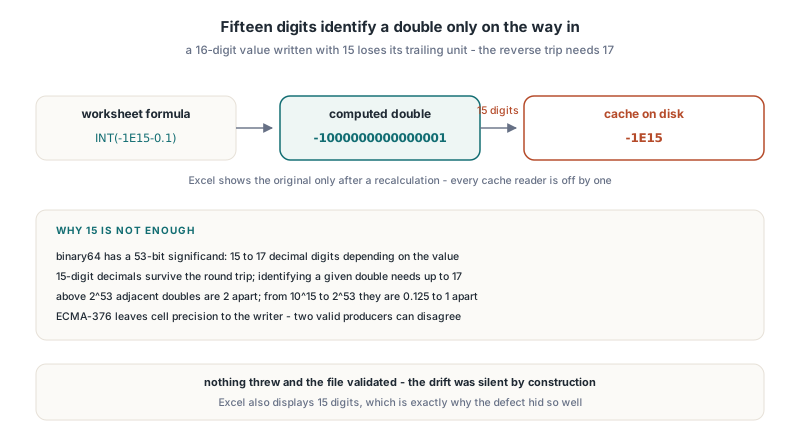
ECMA-376 Part 1 §18.3.1.96 defines the <v> element that carries a cell value as text, and nothing in the schema dictates how many digits a writer must emit for a number cell. Precision is entirely the writer's responsibility, which is why two producers can both write valid XLSX and still disagree about what number is in the cell
Writing 17 significant digits from Delphi
HotXLS now uses one invariant for numeric cells: FloatToStrF with ffGeneral, precision 17, and invariant format settings. The date branch of the cell writer already used exactly that projection, so ordinary numbers simply joined it. From the outside nothing changes in the API; you assign a Double or a formula, save, and the token that lands in <v> is precise enough to reproduce the double
var
  Book: TXLSXWorkbook;
  Sheet: TXLSXWorksheet;
begin
  Book := TXLSXWorkbook.Create;
  try
    Sheet := Book.Sheets.Add('Ledger');
    Sheet.Cells[1, 1].Value := 9007199254740991.0;   // 2^53 - 1
    Sheet.Cells[2, 1].Value := -1000000000000001.0;
    Sheet.Cells[3, 1].Formula := 'INT(-1E15-0.1)';
    if Book.Recalculate <> lxOk then
      raise Exception.Create('Recalculation failed');
    // Values and the formula cache are written with 17 significant digits
    if Book.SaveAs('ledger.xlsx') <> lxOk then
      raise Exception.Create('Save failed');
  finally
    Book.Free;
  end;
end;
Seventeen digits is a ceiling, not a padding rule. ffGeneral drops trailing zeros, so 0.5 is still written as 0.5 and small integers stay short; only values that genuinely need the extra digits get them. The cost is a few bytes on the cells that were previously being truncated, which is the cheapest correctness fix you will ever ship
Why does writing 17 digits still lose values on read?
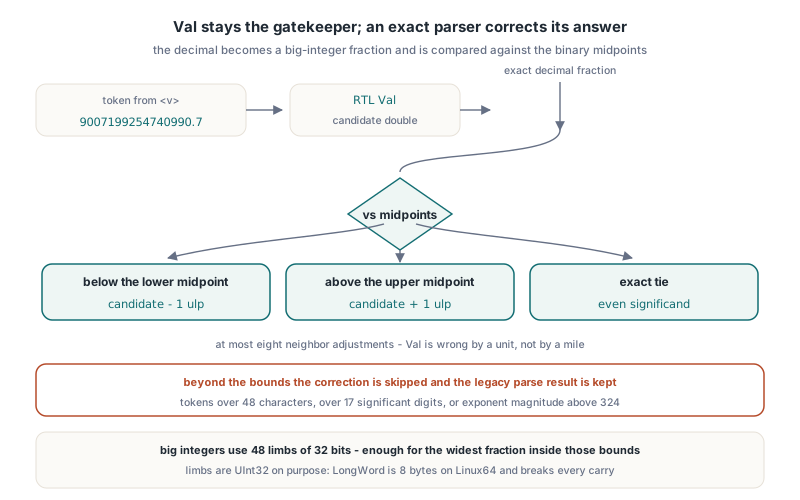
Writing enough digits only helps if the reader converts them to the nearest double, and the RTL's Val does not always do that. During verification the RTL on the test machine read both 9007199254740990.7 and the plain integer 9007199254740991 into the adjacent, wrong binary64 value. Both strings should land on 253-1; one of them is a 17-digit spelling HotXLS can produce, the other is how Excel writes the same value. A writer fixed in isolation would have shipped a file that HotXLS itself could not read back correctly
So HotXLS keeps Val as the gatekeeper and corrects its answer. After the existing numeric grammar accepts a non-date token, an exact parser builds the decimal as a big-integer fraction and compares it against the binary midpoints on either side of the RTL's candidate. If the decimal falls below the lower midpoint, the candidate steps down one ulp; above the upper midpoint, it steps up; on an exact tie the even significand wins, which is the IEEE 754 round-to-nearest-even rule. The candidate is allowed at most eight neighbor adjustments, which is plenty because Val is wrong by a unit, not by a mile
The correction is deliberately bounded. Tokens longer than 48 characters, with more than 17 significant digits, or with an exponent magnitude above 324 skip it and keep the legacy parser result, and any internal failure falls back to the same thing. The big integers use 48 limbs of 32 bits each, enough for the widest numerator and denominator inside those bounds. One portability detail matters here: the limbs are declared explicitly as UInt32. LongWord looks like the obvious choice, but it is 8 bytes on Delphi's Linux64 target, and a limb type that silently doubles in width breaks every carry and shift in the arithmetic
Verifying the round-trip bit for bit
Comparing doubles with = is fine for this test, because the goal is exact equality, but a bit-pattern comparison makes the failure report more useful: a one-ulp drift shows up as a difference of 1 in the raw 64-bit value rather than as two numbers that print identically
function SameBits(A, B: Double): Boolean;
var
  BitsA, BitsB: UInt64;
begin
  Move(A, BitsA, SizeOf(BitsA));
  Move(B, BitsB, SizeOf(BitsB));
  Result := BitsA = BitsB;
end;

procedure CheckReopen(const FileName: string);
const
  Expected: array[1..3] of Double =
    (9007199254740991.0, -1000000000000001.0, -1000000000000001.0);
var
  Book: TXLSXWorkbook;
  Row: Integer;
  Stored: Double;
begin
  Book := TXLSXWorkbook.Create;
  try
    if Book.Open(FileName) <> lxOk then
      raise Exception.Create('Open failed');
    for Row := 1 to 3 do
    begin
      Stored := Book.Sheets[1].Cells[Row, 1].Value;
      if not SameBits(Stored, Expected[Row]) then
        Writeln('row ', Row, ' drifted: ', FloatToStrF(Stored, ffGeneral, 17, 0));
    end;
  finally
    Book.Free;
  end;
end;
Row 3 is the interesting one. It reads the cached result of INT(-1E15-0.1) without recalculating, so it proves the cache itself is lossless rather than the formula engine being able to recompute the value. If you depend on cached results in a pipeline, the separate guide to reading cached formula values without recalculation covers the cache states and why a missing cache is never invented
Which other XLSX parts carry numeric caches?
Fixing the cell writer closed one path out of several, and each remaining numeric write point had to be checked on its own. The first release covered worksheet values and formula caches, including the value caches of Pivot output. Pivot source caches and Chart caches still went through the 15-digit funnel and were closed in two follow-up releases rather than by assumption
- Pivot source cache: the
sharedItemsvalues and both the inline and streamedcacheRecordswriters now use the same 17-digit invariant, and the pivot read path applies the same exact midpoint correction. Descriptive attributes such asrefreshedDatekeep their original spelling - Chart caches: the single write point that builds cached point values switched to 17 digits, and the six read points, covering trendline values and categories, error-bar validation and two rendering paths, all go through one exact-parse helper
- Everything else numeric, such as column widths and axis bounds, still goes through the defensive formatter that flushes non-finite and subnormal values to 0, because a serialized part must never contain an unparseable float
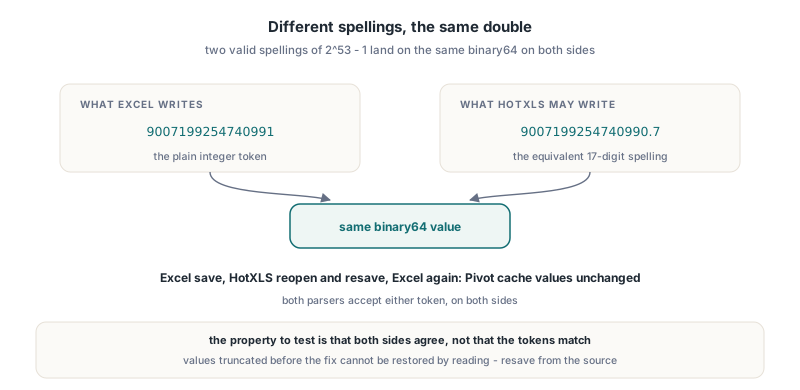
The interoperability check that mattered most was with Excel itself. Excel writes 253-1 as the integer 9007199254740991; HotXLS may write the equivalent 17-digit spelling 9007199254740990.7. Both tokens parse to the same double on both sides, so a file authored in Excel, reopened and resaved by HotXLS, then opened again in Excel, keeps the same values in its Pivot cache. Mutual recognition, not identical spelling, is the property to test for
Limits and edge cases worth knowing
Lossless here means the binary64 value is preserved, not that every value is representable. Non-finite results still save as #NUM! errors and subnormals still save as zero, exactly as before. Display is also a separate concern: Excel will keep showing 15 significant digits on screen, so a user typing 9007199254740993 into Excel still gets a different stored value, and no writer can fix that. If your workbook uses Set precision as displayed, values are deliberately rounded to their number format, which is the opposite of what this article is about; the rules for that mode are covered in how HotXLS applies Excel precision as displayed rounding
The exact reader also does not replace Val; it only corrects values that Val already accepted. A token the RTL rejects is still rejected, and a token outside the 48-character, 17-digit, exponent 324 bounds keeps whatever the legacy parser produced. For files written by HotXLS or Excel that never matters, because neither produces such tokens for cell values, but a hand-crafted XML part with 40 significant digits is read with the RTL's accuracy, not with the exact correction
FAQ
Does HotXLS change the number Excel displays for a cell?
No. HotXLS only changes how many digits go into the stored <v> token. Excel still displays 15 significant digits, so cells look the same; the difference is that the underlying double now matches what your Delphi code assigned
Why not just write 16 digits instead of 17?
Sixteen digits are not enough for every binary64 value. Some doubles need 17 significant digits before their decimal spelling is unique, so a 16-digit writer would still map two distinct doubles to the same text in rare cases, which is exactly the class of silent drift the change removes
Do files written before the fix need to be regenerated?
Only if they contain values that needed more than 15 digits. Those tokens already lost their last digits on disk and reading them more accurately cannot restore what was never written. Resaving from the original data, or recalculating formulas and saving again, produces an exact file
Seventeen-digit numeric output, the exact binary64 read correction and the matching Pivot and Chart cache handling are part of the HotXLS Delphi Spreadsheet Component for Delphi, C++Builder and Lazarus, which reads and writes XLSX without Excel or OLE automation installed