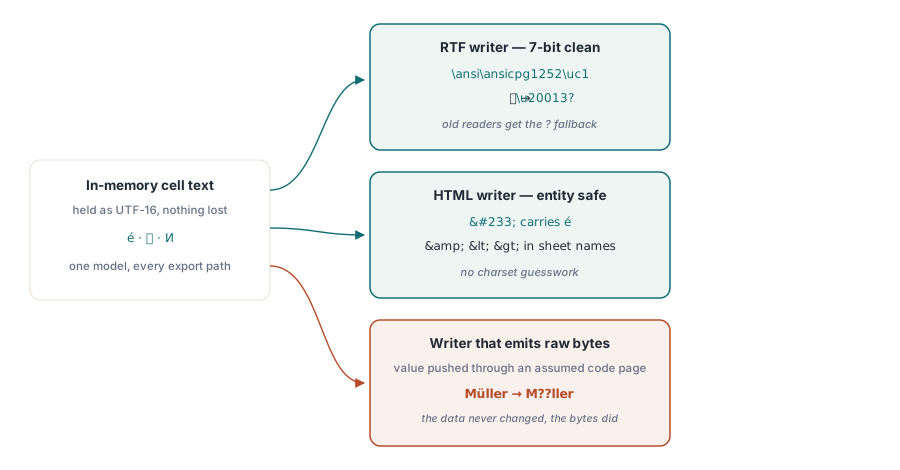
A spreadsheet holds a column of customer names. Some are in Chinese, some in Cyrillic, a few carry German umlauts or a French accent. You export it to CSV and open the result, and every character is intact. You export the same workbook to RTF for a mail-merge template, open it in a word processor, and the non-ASCII names have collapsed into rows of question marks. The data never changed. What changed is the encoding contract of the format you wrote, and each export path carries a different one
This is the trap that catches a library which looks fully Unicode-aware on the surface. The cell text is held internally as WideString, so the model never loses a character. The loss happens at the boundary, in the writer that has to serialize that text into a format with its own rules about which bytes are legal and how anything outside the legal range must be encoded. Get one writer right and you can still ship another that mangles the same text. The fix is not a global switch. It is a separate, correct decision on every path
RTF is a 7-bit-safe format by design
Rich Text Format predates Unicode and was specified to survive transports that only pass printable ASCII. A RTF document declares a code page in its header, and any character the writer cannot represent in that code page has to be emitted as an escape rather than as a raw byte. The relevant escape is \u, which carries a signed 16-bit code unit followed by an ASCII fallback character for readers too old to understand the escape at all
HotXLS writes RTF this way. The document header opens by declaring the code page, in the form \ansi\ansicpg1252\uc1, and the writer in the lxRTF unit walks every string emitting any character above plain ASCII as a \u escape so the byte stream stays 7-bit clean regardless of what the declared code page can hold. A code point such as U+4E2D becomes the literal sequence \u20013?, not a raw byte that a viewer would then try to interpret through whatever code page it happened to assume. Without that discipline, anything outside the declared code page has no legal byte representation, and a writer that emits the raw value produces the question marks that started this article
The detail to keep in mind is that the declared code page and the escapes are two halves of one contract. Declaring the code page alone does not help text that lies outside it. Emitting escapes without a declared code page leaves the fallback characters ambiguous. Both have to be correct together, which is why a writer that handles only one of them still fails on the first multilingual workbook
HTML escaping is about more than angle brackets
The HTML export produces a multi-sheet document whose navigation frames carry the sheet names as visible text. Those names are author-controlled strings that can contain any character, including the markup-significant ones. A sheet literally named Q1 & Q2 <draft> has to reach the page as escaped entities, or the angle brackets open a phantom tag and the ampersand starts an entity reference that was never intended. This is ordinary HTML escaping, and skipping it on a frame label is the kind of omission that passes every test built from ASCII-only sheet names
The encoding question sits one layer below that. When non-ASCII characters land in a context that is not guaranteed to be served as UTF-8, the safe representation is a numeric character reference, so U+00E9 is written as é rather than as a raw byte whose meaning depends on the response charset. The mirror image of this rule applies on the way in. A workbook read back from XLSX carries shared strings in which a character may already be stored as a numeric XML entity, and that entity has to be decoded into one whole character before it enters the cell model. Decode it carelessly, splitting a code point into separate bytes, and a single character re-emerges as two pieces of mojibake that no later export can repair
The XLSX container is a ZIP, and ZIP has its own name encoding
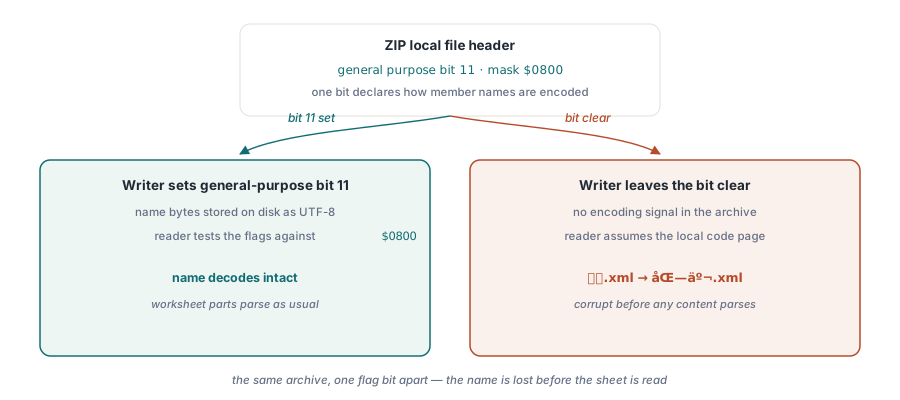
An XLSX file is a ZIP archive, and the archive stores a name for every member it holds. ZIP is old enough that its original specification said nothing about the encoding of those names, so a reader that finds no signal assumes the archive's local code page. That assumption is wrong the moment a member name contains a non-ASCII character, which happens with localized worksheet part names and with embedded media whose file names carry accents or non-Latin script
The fix is a single bit. General-purpose bit 11 in each local file header declares that the member name is encoded as UTF-8. HotXLS checks exactly that bit when it reads an archive, testing the general-purpose flags against the mask $0800, and a reader or writer that ignores it will misread a name that a correct implementation stored as UTF-8. The bit is cheap to set and cheap to honor, and it is the whole difference between a member name that survives the round trip and one that arrives corrupted before the spreadsheet content is even parsed
Case folding and number scanning hide the same hazard
Formula evaluation is where Unicode safety stops being about serialization and becomes about comparison. The SEARCH function is case-insensitive, which means it has to fold case before it looks for a substring. The wrong way to fold is through the ANSI code page, because uppercasing non-ASCII text that way routes the characters through a narrow code page and corrupts anything outside it. The right way is wide-string uppercasing, which preserves the full UTF-16 range. HotXLS folds with WideUpperCase for exactly this reason, so a search for accented or non-Latin text matches the same characters it was given rather than a code-page-mangled approximation of them
The formula tokenizer carries a related obligation that has nothing to do with letters and everything to do with where a token ends. Scientific notation such as 1E3 or 2.5E-3 is a single numeric literal, and the scanner has to recognize the E, an optional sign, and the following digits as part of the number rather than breaking the input into a name followed by a separate number. A scanner that mishandles this turns a perfectly valid constant into a parse error or, worse, a silently wrong expression. It belongs in the same discussion because both cases are about a reader making a correct character-level decision: one about how to fold a character for comparison, the other about whether a character continues the current token
Building and exporting a multilingual workbook
The public API does not ask you to think about any of this. You build the workbook from WideString cell values and call the export entry point you want. The encoding decisions happen inside each writer. The example below seeds a sheet with text in several scripts, then writes both an RTF file and an HTML file from the same workbook, so the two paths run against identical input
uses
  lxHandle;

procedure ExportMultilingualWorkbook;
var
  Book: IXLSWorkbook;
  Sheet: IXLSWorksheet;
begin
  Book := TXLSWorkbook.Create;
  try
    Sheet := Book.Sheets.Add('Customers');

    Sheet.Cells[1, 1].Value := 'Name';
    Sheet.Cells[1, 2].Value := 'City';

    // Cell text is held as WideString, so every script survives the model.
    Sheet.Cells[2, 1].Value := '王伟';          // Chinese
    Sheet.Cells[2, 2].Value := '北京';
    Sheet.Cells[3, 1].Value := 'Müller';        // German umlaut
    Sheet.Cells[3, 2].Value := 'Köln';
    Sheet.Cells[4, 1].Value := 'Иванов';        // Cyrillic
    Sheet.Cells[4, 2].Value := 'Москва';
    Sheet.Cells[5, 1].Value := 'Désirée';       // French accents
    Sheet.Cells[5, 2].Value := 'Montréal';

    // RTF: the lxRTF writer declares the code page and emits every
    // non-ASCII character as a \u escape, keeping the file 7-bit clean.
    Book.SaveAsRTF('Customers.rtf');

    // HTML: sheet names are HTML-escaped and non-ASCII text is written
    // so it does not depend on a guessed response charset.
    Book.SaveAsHTML('Customers.html');
  finally
    Book := nil;
  end;
end;
Both calls return an Integer status, and both consume the same in-memory text. Nothing in the calling code declares a code page or escapes a character, because the responsibility sits with the writer that knows its own format. The workbook-level SaveAsCSV follows the same shape if you need a delimited export from the identical source
// Same workbook, a third export path with its own encoding rules.
Book.SaveAsCSV('Customers.csv');
Unicode safety is per-path, not per-library
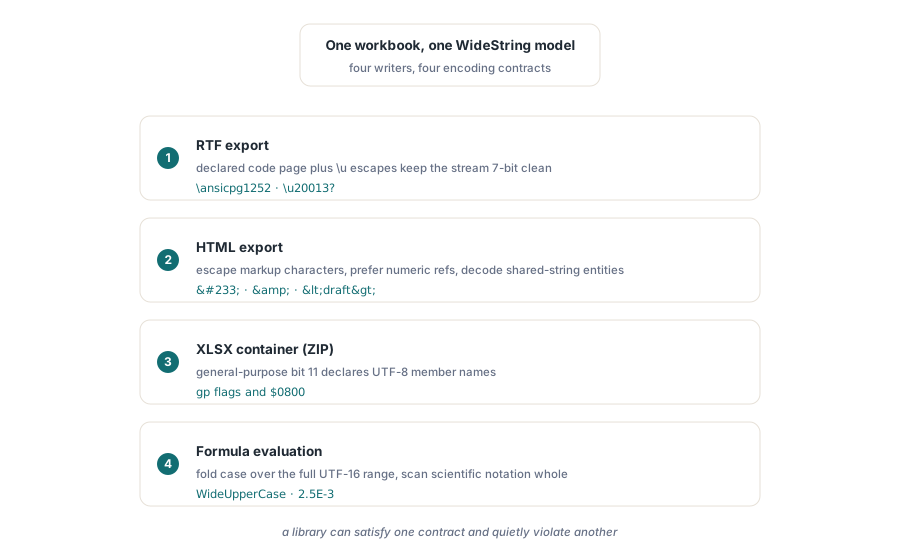
The lesson worth carrying away is that there is no single place to be Unicode-safe. RTF needs a declared code page plus \u escapes. HTML needs entity escaping for markup-significant characters and numeric references where the charset is not guaranteed, plus correct decoding of entities that arrive in shared strings. The ZIP container needs general-purpose bit 11 set so a UTF-8 member name is read as UTF-8. Formula evaluation needs wide-string case folding and a tokenizer that keeps scientific notation in one piece. Each of these is a different contract, and a library can satisfy one while quietly violating another. That is the reason a tool that gets CSV right can still hand you an RTF full of question marks
If your exports lean on the delimited formats, the trade-offs between them are covered in our walkthrough of CSV, TSV and HTML export, and when the source is a result set rather than a hand-built sheet, the patterns in database export for Delphi reports pair naturally with the encoding rules described here. All of it ships as part of the HotXLS Delphi Component for Delphi and C++Builder, alongside the reading, formula, and formatting APIs covered elsewhere on this blog