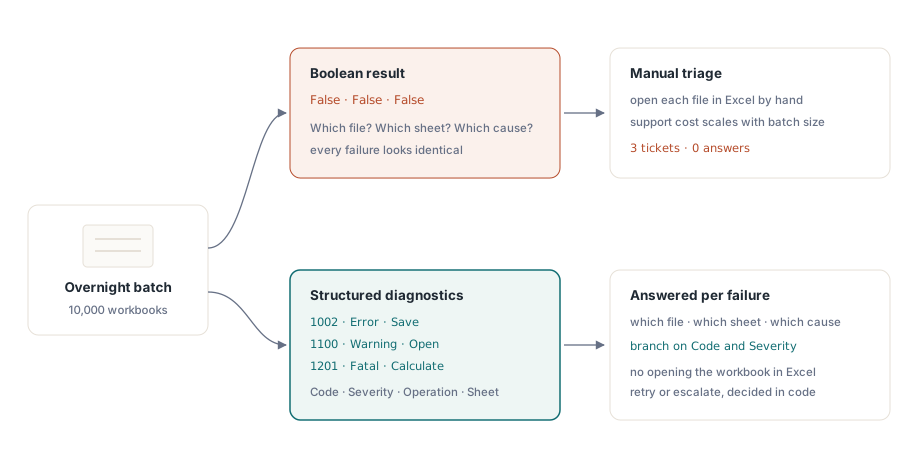
Run a batch conversion over ten thousand spreadsheets overnight, and by morning three of them come back False. That is the entire postmortem a boolean save result gives you: a count of failures, with nothing about which file, which sheet, or which of a dozen possible causes was responsible. HotXLS, losLab's native Delphi and C++Builder component for Excel files, replaces that single bit with structured diagnostics. The IXLSWorkbookProgress interface exposes a Diagnostics list and an OnDiagnostic event that report a stable numeric code, a severity level, the operation that failed, and the sheet where it happened, for every Open, SaveAs, and Recalculate call
Why does a boolean save result fail at scale?
A single failed file is not the problem a boolean result creates; a thousand of them are. When SaveAs returns something other than success for three files out of ten thousand, the next question is always the same: are these three retryable, or do they need a human? A permission error on a network share is not the same incident as a formula the calculation engine cannot evaluate, and neither is the same as a worksheet that silently exceeded a format limit. With only a pass/fail result to work with, every one of those becomes an identical support ticket, and someone has to open each file by hand, in Excel, and stare at it until the cause becomes obvious. That manual triage is the real cost of a boolean API, and it scales linearly with the size of the batch, which is exactly the property you do not want from error handling
Inside IXLSWorkbookProgress: what a TXLSDiagnostic carries
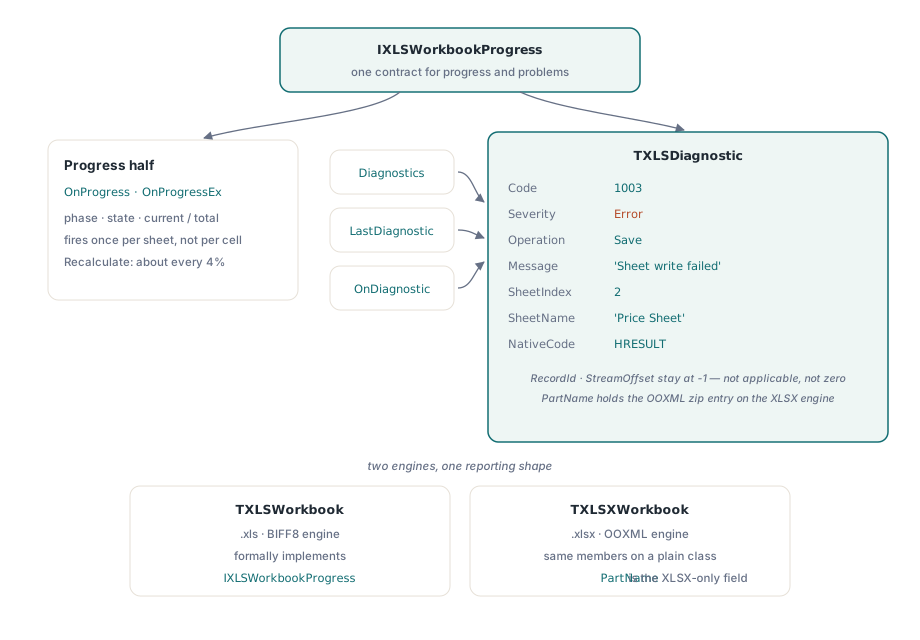
IXLSWorkbookProgress is the interface HotXLS uses to report both how an operation is going and what went wrong inside it, and the two halves share one contract for a reason: both are things a long-running Open, SaveAs, or Recalculate call needs to communicate without raising an exception mid-operation. The progress half is OnProgress and OnProgressEx, firing with a phase, a state, and a current/total pair. The diagnostics half is the one this article is about: a Diagnostics property that returns a TXLSDiagnostics list, a LastDiagnostic shortcut for the most recent entry, and an OnDiagnostic event that fires the moment each TXLSDiagnostic record is created. Each record carries a numeric Code, a TXLSDiagnosticSeverity, the TXLSDiagnosticOperation that produced it, a human-readable Message, a SheetIndex and SheetName, and a NativeCode that preserves whatever lower-level return value triggered the entry
var
  Book: TXLSXWorkbook;
  Diag: TXLSDiagnostic;
  I: Integer;
begin
  Book := TXLSXWorkbook.Create;
  try
    if Book.SaveAs('quarterly-report.xlsx') <> 1 then
      for I := 0 to Book.Diagnostics.Count - 1 do
      begin
        Diag := Book.Diagnostics[I];
        Writeln(Format('[%d] severity=%d sheet="%s": %s',
          [Diag.Code, Ord(Diag.Severity), Diag.SheetName, Diag.Message]));
      end;
  finally
    Book.Free;
  end;
end;
Reading Diagnostics like this already beats a boolean result on its own, because Code and SheetName turn a mystery into a specific, filterable fact. The TXLSDiagnostic record reaches further than what this example prints: RecordId and StreamOffset exist for byte-level forensics inside a BIFF stream, and PartName holds the OOXML zip entry, such as xl/worksheets/sheet3.xml, that a problem came from. Worth knowing before you build tooling around them: in the current release none of the built-in diagnostic call sites populate RecordId or StreamOffset, so both stay at their constructor default of -1, meaning "not applicable" rather than "zero". Treat their absence as normal, not as a bug in your handler
Two engines, one shape, one quiet difference
HotXLS ships two engines behind this same reporting model, a BIFF8 facade for legacy .xls files and an OOXML facade for .xlsx, and they do not expose IXLSWorkbookProgress identically. TXLSWorkbook, the .xls engine, formally implements IXLSWorkbookProgress, so it can be passed anywhere that interface type is expected. TXLSXWorkbook, the .xlsx engine, exposes the same Diagnostics, LastDiagnostic, OnDiagnostic, OnProgress, and OnProgressEx members with identical names and types, but as a plain class rather than a formal implementation of that interface, so it will not satisfy an IXLSWorkbookProgress parameter by itself. In practice this rarely matters, because most code works against one concrete workbook class at a time, but it does mean you cannot write a single helper typed to IXLSWorkbookProgress and hand it either engine's workbook object interchangeably. The one field difference that follows directly from the format split is PartName: only the XLSX engine populates it, because only OOXML has zip parts to name
What makes a diagnostic code something you can safely branch on?
The Code field is the only part of a diagnostic worth hardcoding a comparison against; Message is not, because prose is exactly the kind of thing that gets reworded, retranslated, or expanded with more detail in a later release without anyone treating it as a breaking change. HotXLS's built-in diagnostic codes already read like they were designed with that distinction in mind: save-related codes run 1000 through 1005, open-related codes sit at 1100 and 1101, calculate-related codes at 1200 and 1201, and an unsupported-format code at 1300, with gaps left inside each band rather than the codes running consecutively across all of them. That spacing is what lets a vendor add a new save-time failure mode at, say, 1006 without renumbering the codes your switch statement already depends on, and it is worth checking for in any diagnostics API before you commit to matching on a code in production, not just this one. Keep a default branch in your own dispatch logic regardless of how stable the numbering looks, because new failure modes are exactly what an evolving parser or writer keeps discovering. NativeCode and ExceptionClass sit one layer under Code for when you need to escalate: NativeCode preserves the underlying return value, an HRESULT from a Structured Storage call among them, and ExceptionClass records the Delphi exception type when one was involved, which is usually enough to open a precise support request without attaching a full stack trace
Severity and operation decide what your code does next
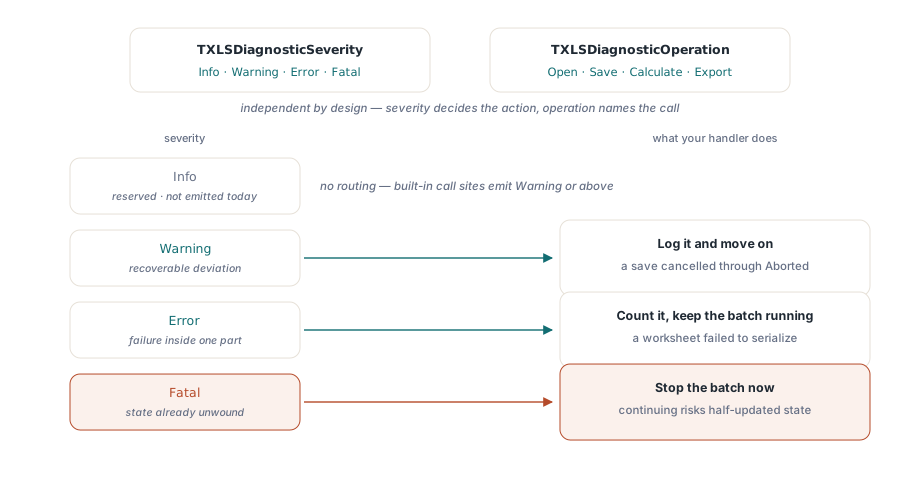
Severity and operation are what turn a diagnostic from a log line into a routing decision. TXLSDiagnosticSeverity runs Info, Warning, Error, and Fatal, and TXLSDiagnosticOperation tags every entry with the call that produced it: Open, Save, Calculate, or Export. The two axes are independent by design: xlsDiagnosticUnhandledException is one fixed code that fires with Operation set to whichever call actually raised it, so Code answers what went wrong while Operation separately answers where, rather than needing a distinct code for an exception during open versus one during save. That composability is also what makes routing mechanical: log a warning and move on, a save canceled through the Aborted flag is a typical example; count an error and keep the batch running, a worksheet that failed to serialize is a typical example; stop the batch on a fatal severity, because that level means an unhandled exception already unwound the call and continuing risks working from a half-updated state. One honest caveat: Info exists in the enum as the default a fresh TXLSDiagnostic starts with, but every diagnostic call site built into today's HotXLS release only ever raises Warning, Error, or Fatal; Info is reserved for forward use, not something the engine emits today
// same Diagnostics loop as above, routed by severity instead of printed flat:
for I := 0 to Book.Diagnostics.Count - 1 do
begin
  Diag := Book.Diagnostics[I];
  case Diag.Severity of
    xlsDiagnosticWarning:
      Writeln(Format('WARN  [%d] %s', [Diag.Code, Diag.Message]));
    xlsDiagnosticError:
      begin
        Writeln(Format('ERROR [%d] %s (sheet %s, native %d)',
          [Diag.Code, Diag.Message, Diag.SheetName, Diag.NativeCode]));
        Inc(FailedSheetCount);
      end;
    xlsDiagnosticFatal:
      raise Exception.CreateFmt('Fatal HotXLS diagnostic %d: %s', [Diag.Code, Diag.Message]);
  end;
end;
Wiring OnDiagnostic into a batch pipeline
Polling Diagnostics after every call works for a single file; it stops working once you are back to that overnight batch of ten thousand, because Diagnostics is cleared at the start of every Open, SaveAs, and Recalculate call. Read it after the third file in a loop and you see only the third file's diagnostics; whatever the first two files reported is already gone. OnDiagnostic solves that by turning the collection into a stream: subscribe once before the loop starts, and the same handler fires for every file, in order, with the file name still in scope through an instance field
type
  TBatchConverter = class
  private
    FCurrentFile: string;
    FFailedFiles: TStringList;
    procedure HandleDiagnostic(Sender: TObject; Diagnostic: TXLSDiagnostic);
  end;

procedure TBatchConverter.HandleDiagnostic(Sender: TObject; Diagnostic: TXLSDiagnostic);
begin
  if Diagnostic.Severity >= xlsDiagnosticError then
    FFailedFiles.Add(Format('%s: [%d] %s (sheet %s)',
      [FCurrentFile, Diagnostic.Code, Diagnostic.Message, Diagnostic.SheetName]));
end;

// inside the batch loop:
Book.OnDiagnostic := HandleDiagnostic;
for I := 0 to FileNames.Count - 1 do
begin
  FCurrentFile := FileNames[I];
  if Book.Open(FCurrentFile) = 1 then
    Book.SaveAs(ChangeFileExt(FCurrentFile, '.xlsx'));
end;
What the callback actually costs
OnDiagnostic is cheap for a structural reason: it only fires when something is already wrong, and wrong is rare compared to the number of cells, rows, or worksheets a workbook holds. Contrast that with OnProgress and OnProgressEx, which report routine progress and had to be designed around call frequency from the start. HotXLS fires worksheet-level progress once per sheet during Open and SaveAs, not once per cell or row, which is what keeps the per-call overhead small even on workbooks with millions of cells; Recalculate goes further and throttles its own progress event to roughly every four percent of the dependency graph, so a full recalculation gives you a heartbeat instead of flooding your UI thread with events. Diagnostics needed none of that throttling, because the event count is bounded by the number of actual problems, not by the size of the file
The one place performance still depends on you is inside the handler itself. OnDiagnostic fires synchronously, on the thread running Open, SaveAs, or Recalculate, so a handler that blocks, a synchronous write to a remote logging service for instance, becomes part of that call's wall-clock time. For a single file that is invisible. Multiplied across a ten-thousand-file batch it is the difference between a job that finishes overnight and one that is still running at lunch, so buffer what the handler needs to do and flush it asynchronously rather than doing the slow part inline
Structured diagnostics are most valuable exactly where a boolean result is weakest, in workflows that touch many files instead of one. A workbook audit and conversion pipeline is the clearest example: instead of recording a bare pass/fail per file, attach each file's Diagnostics list to its audit record, and the report tells you not just what failed but why, which is most of what our article on building a workbook audit and conversion workbench is trying to get right in the first place. The same pairing of progress and diagnostics also belongs in any workflow that already needs progress reporting for its own sake, which is exactly the territory covered in our guide to large workbook performance in HotXLS, where a long Open or SaveAs call is common enough that OnProgress is already wired in and OnDiagnostic is a natural, nearly free addition next to it
None of this requires Excel installed anywhere in the pipeline, and none of it requires catching a generic exception and guessing what it meant. IXLSWorkbookProgress and its Diagnostics, LastDiagnostic, and OnDiagnostic members are part of the standard HotXLS Delphi Component for Delphi and C++Builder, alongside the full diagnostic code reference and the rest of the Open, SaveAs, and Recalculate surface this article has been walking through