HotXLS reads .xls, .xlsx, .xlsm, .ods, CSV and TSV sources through a single pull row cursor, TXLSRowCursor, whose FindFirst and FindNext advance one logical row at a time while only that row stays in memory. A six-value state machine separates before-first from EOF, canceled and faulted, and the older callback reader is now an adapter over the same cursor
The scenario is familiar to anyone who has shipped an import feature. A 200 MB .xlsx arrives, you wire up an OnCell handler, and the first requirement after "read it" is "stop after the first hundred reversed postings". Now the shape of your code fights you: the loop lives inside the library, your handler has to raise a flag, every subsequent callback still fires until the parser notices, and the accumulated state — how many hits so far, which column matched, what to do next — has to live in fields on a class that exists only to give the callback somewhere to sit. Nothing about that is a parsing problem. It is a control-flow problem, and it is the one a pull cursor removes
What a push callback actually costs at 200 MB
Push inverts control, and inversion is exactly what a filtering or joining caller cannot afford. With a callback API the library owns the loop, so the caller cannot use Break, cannot interleave two sources, cannot hand the reader to a routine that expects to be driven, and cannot express "peek at the next row before deciding" without buffering. The cost is not throughput — a well-written SAX callback path streams fine — it is that every non-trivial consumer grows a small state machine of its own to simulate the loop it was not allowed to write. Multiply that by four file formats, each historically with its own scanning entry point, and the filtering, formula and error semantics start to drift apart between them, which is precisely the drift HotXLS set out to close
How does a pull cursor change your calling code?
It gives the loop back to you, and with it ordinary Pascal control flow. TXLSRowCursor.Open accepts a file name or a TStream, detects the format, loads shared strings and date-style metadata once, and selects sheet 1. SelectSheet (1-based) or SelectSheetByName re-targets another worksheet and resets the cursor to before-first. FindFirst and FindNext then position on the next populated row — rows with no decodable cells are skipped, so RowIndex can jump — and the current row is exposed as CellCount, Cells[] and ValueByCol[], all 1-based on the column axis. Leaving the loop is a Break
var
  Cursor: TXLSRowCursor;
  Hits: Integer;
begin
  Cursor := TXLSRowCursor.Create;
  try
    Cursor.FirstRow := 2;        // skip the header band
    Cursor.IncludeColumn(1);     // decode only these two columns
    Cursor.IncludeColumn(7);
    if not Cursor.Open('postings-200mb.xlsx') then
      Exit;
    if not Cursor.SelectSheetByName('Ledger') then
      Exit;

    Hits := 0;
    if Cursor.FindFirst then
      repeat
        if VarToStr(Cursor.ValueByCol[7]) = 'REVERSED' then
        begin
          Inc(Hits);
          if Hits = 100 then
            Break;               // ordinary Break; no abort flag, no sentinel
        end;
      until not Cursor.FindNext;
  finally
    Cursor.Free;                 // the destructor ends the pass
  end;
end;
Projection and range are set before the pass, not filtered afterward. FirstRow, LastRow, IncludeColumn, ClearColumnProjection, IncludeFormulaText, DetectDates and DetectTextTypes are all honored inside the backends, so an unselected column never allocates its value, formula string or rich-text payload in the first place — the regression suite proves this with 16 KiB formulas and cached strings that are never materialized when their column is not projected. Those options are deliberately frozen while a pass is active and become writable again at EOF, on SelectSheet, or after Close, so one scan can never mix two decoding contracts. If you only need the sheet inventory rather than the rows, metadata-only and selective sheet loading is the cheaper entry point
One backend per format, one scanning loop each
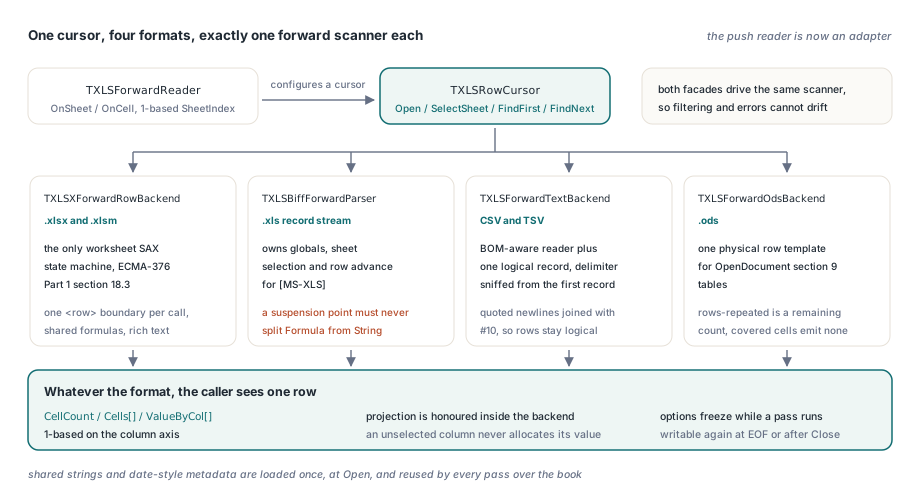
Every format has exactly one forward scanner inside HotXLS, and both the pull cursor and the callback reader drive that same scanner. TXLSXForwardRowBackend is the only worksheet SAX state machine for ECMA-376 Part 1 §18.3 sheet parts, holding the XML reader, the shared-formula table and the rich-text parser, and it advances to exactly one physical <row> boundary per call. TXLSBiffForwardParser owns the globals, sheet selection and row advance for the [MS-XLS] record stream; making it pausable produced the sharpest constraint in the whole design, because a cached string formula is a Formula record immediately followed by a String record, so a per-row suspension point must never land between the two. TXLSForwardTextBackend keeps a BOM-aware reader, the active delimiter and one logical record — CSV sniffs comma, semicolon, tab or pipe from the first record while ignoring quoted characters, and multi-line quoted fields are joined with #10 so the row number tracks logical records rather than physical newlines. TXLSForwardOdsBackend keeps a single physical row template for OpenDocument §9 tables, treats table:number-rows-repeated as a remaining-count rather than an expansion, and advances past covered cells without emitting values. The streaming direct reader shares the same shared-string and date-style loader
Why six states instead of one Eof flag?
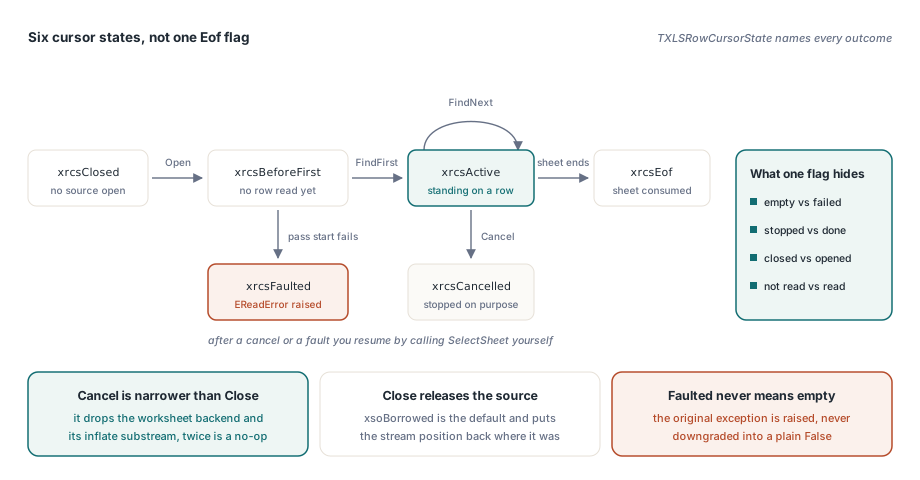
Because a single boolean makes four different situations indistinguishable, and callers guess wrong about all of them. TXLSRowCursorState names them explicitly
xrcsClosed— no source is openxrcsBeforeFirst— opened or re-targeted, no row read yetxrcsActive— standing on a valid rowxrcsEof— the sheet was consumed to the endxrcsCancelled— the caller stopped the pass deliberatelyxrcsFaulted— the pass failed and the original exception was raised
That last distinction is the one that matters in production. A missing worksheet part or a failed pass start keeps its EReadError and moves the cursor to xrcsFaulted; it is never downgraded into a plain False that a caller would read as "this sheet was empty". Cancel is deliberately narrower than Close: it closes the current worksheet backend and its inflate substream and invalidates the current row, but it does not release the ZIP archive or the source stream, and calling it twice is a no-op. After a cancel you resume by calling SelectSheet explicitly — the cursor will not quietly restart a pass on your behalf. Stream ownership follows the same defensive rule: xsoBorrowed is the default and restores the stream position on close, xsoOwned transfers ownership only after Open has already succeeded, so a failed open never frees a stream the caller still holds
var
  Cursor: TXLSRowCursor;
  Src: TFileStream;
begin
  Src := TFileStream.Create('quarter.ods', fmOpenRead or fmShareDenyWrite);
  try
    Cursor := TXLSRowCursor.Create;
    try
      // xsoBorrowed: the cursor never frees Src, and Close restores the
      // position the stream had when Open was called
      if not Cursor.Open(Src, xffAuto, xsoBorrowed) then
        Exit;

      if Cursor.FindFirst then
        repeat
          if UserPressedStop then
          begin
            Cursor.Cancel;   // closes the worksheet backend and its
            Break;           // inflate substream only; idempotent
          end;
        until not Cursor.FindNext;

      case Cursor.State of
        xrcsEof:       Log('sheet consumed to the end');
        xrcsCancelled: Log('stopped by the operator');
        xrcsFaulted:   Log('pass failed; the EReadError was already raised');
      end;
    finally
      Cursor.Free;
    end;
  finally
    Src.Free;                // still ours, still valid, position restored
  end;
end;
Borrowing the current row without copying it
IXLSRowCursorView hands a row to another routine without duplicating the cell array. The view stores a shared guard holding the cursor pointer plus a UInt64 generation counter; advancing, selecting a sheet, canceling, closing and destroying the cursor all increment that generation, and destruction additionally clears the guard owner. So a stale view cannot read freed memory: Valid is an exception-free probe you can call at any time, while every other member validates first and raises EXLSRowCursorViewInvalidated. Be honest about what this contract is — it is lifetime fail-fast, not a thread-safety guarantee, and it does not license reading a row from a second thread while the first advances the cursor
var
  View: IXLSRowCursorView;
  Cell: TXLSRowCursorCell;
  I: Integer;
begin
  if Cursor.FindFirst then
    repeat
      View := Cursor.CurrentRowView;      // borrows; no cell array is copied
      for I := 0 to View.CellCount - 1 do
      begin
        Cell := View.Cells[I];
        if Cell.HasFormula and not Cell.FormulaTextAvailable then
          UseCachedResult(Cell.Value)     // BIFF forward reads keep the
        else if Cell.Kind = xdkEmpty then //   cached result, not the tokens
          UseStyleOnly(Cell.StyleIndex)   // Blank / MulBlank are real cells
        else
          UseValue(Cell.Col, Cell.Value);
      end;
    until not Cursor.FindNext;

  // The interface outlives the loop, but the row behind it does not
  if not View.Valid then    // Valid never raises; Cells[] now would raise
    View := nil;            // EXLSRowCursorViewInvalidated
end;
PeakRowBufferedBytes, and what it is allowed to prove
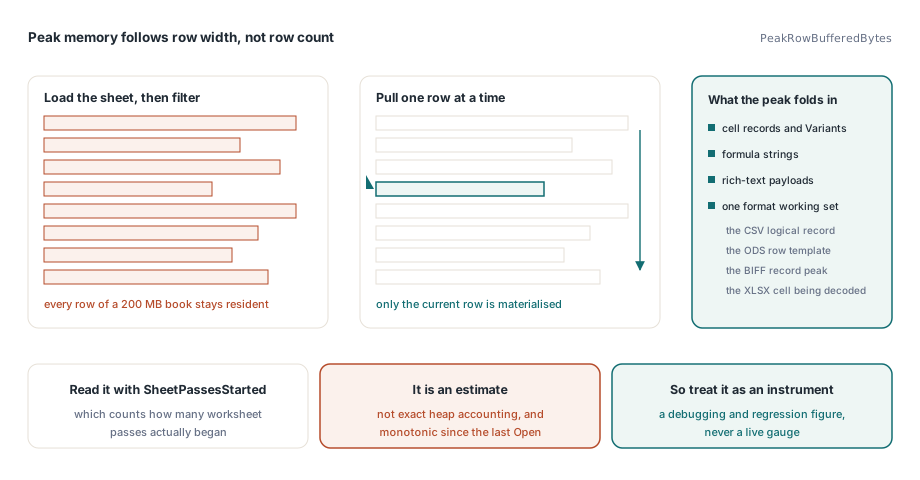
PeakRowBufferedBytes exists to demonstrate that memory tracks row width rather than row count. It accumulates the cell records, Variants, formula strings and rich-text payloads of the current output row and folds in the format-specific working set — the CSV logical record, the ODS physical row template, the BIFF record peak, or the XLSX raw cell currently being decoded. Read it together with SheetPassesStarted, which counts how many worksheet passes actually began. Two caveats keep this honest: the figure is an estimate, not exact heap accounting, and it is monotonic since the most recent Open, so it is a debugging and regression instrument rather than a live gauge. For the wider picture of where time and bytes go on very large books, see large workbook performance in Delphi
The push reader became an adapter, and what the cursor will not do
TXLSForwardReader no longer carries separate XLSX, BIFF and text scanning entry points. It configures a cursor, walks it, and translates the current row into OnSheet and OnCell events, which is why the two façades cannot drift apart on filtering, formula state or error handling any more. Two consequences are worth knowing before you upgrade: the callback SheetIndex is now uniformly 1-based on TXLSForwardReader (TXLSDirectReader keeps its existing 0-based event contract), and OnSheet fires before SelectSheet, so setting SkipSheet means the worksheet part is never opened or decompressed at all. The boundaries are equally explicit: the workbook must not be modified while a pass is active, canceling requires an explicit restart, and the BIFF forward path never decompiles formula tokens, so classic formula cells report HasFormula true with FormulaTextAvailable false and hand you the cached result instead of inventing an empty formula string. The row cursor and its adapter passed 1,298 checks on Delphi Win32 and Win64 plus the C++Builder 37.0 Win64 static package
If you are weighing a pull cursor against the loader you have now, the question to ask is not which one parses faster but which one lets you write the exit condition you actually need. Full component details, supported IDE versions and licensing are on the HotXLS Delphi spreadsheet component page