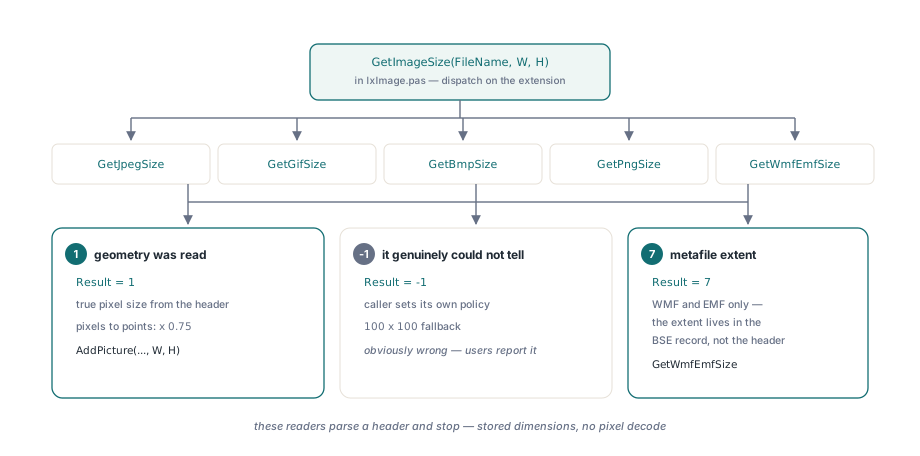
HotXLS reads a picture's real pixel geometry out of the image file's own header before any drawing geometry is written. GetImageSize in lxImage.pas dispatches on the file extension to GetJpegSize, GetGifSize, GetBmpSize, GetPngSize or GetWmfEmfSize, converts pixels to points with a factor of 0.75, and returns -1 when it genuinely cannot tell
That last clause is the part that took the longest to get right. A size reader that cannot fail is a size reader that lies, and a lie about image geometry does not surface at insert time. It surfaces weeks later, when someone opens the workbook and the company logo is a squashed rectangle
Why does a picture need its real geometry before it goes into the drawing?
Because the spreadsheet format stores the extent, not the image. When AddPicture or Images.AddFromFile places a picture, the drawing part records an explicit width and height for the shape — in DrawingML that is the a:ext element's cx and cy attributes, in English Metric Units, per ECMA-376 Part 1 §20.4. Nothing in that record says "use the image's natural size", so the natural size has to come from somewhere, and the only place it exists is the image bytes. Get it wrong by a factor of three and the picture is stretched by a factor of three, in every application that opens the workbook, forever. The unit conversion from those pixel dimensions down to EMU is a separate concern, covered in the EMU units and scaling article; this piece is about the step before it, where the pixel numbers are obtained at all. The fallback when a reader fails is 100 by 100, and that number is deliberately, obviously wrong. It is not a guess at a plausible size, it is a marker that means "nobody could read this file", and it is far better than a plausible-looking wrong number because a user reports it immediately
GIF: the descriptor that was never parsed
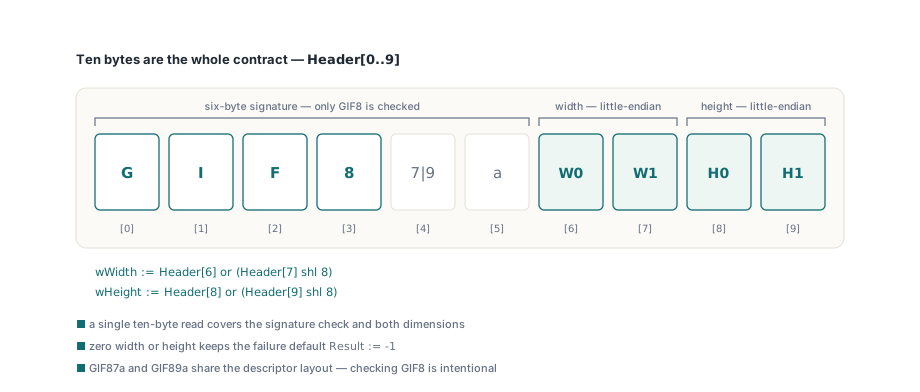
GetGifSize is new, and before it existed every GIF inserted into a worksheet came out at exactly 100 by 100 — there was no GIF branch at all, so the extension fell through to the default arm of GetImageSize and returned -1. This is the cheapest header in the set to parse, which makes the omission slightly embarrassing and very easy to fix. The GIF89a specification puts the Logical Screen Descriptor immediately after the six-byte signature, and §18 defines its first two fields as the logical screen width and height, each an unsigned 16-bit value stored little-endian. In file terms that is bytes 6 and 7 for width, bytes 8 and 9 for height, so a single ten-byte read covers the signature check and both dimensions
function GetGifSize(const AFileName: WideString; var AWidth, AHeight: Double): Integer;
var
  f: TWFileStream;
  Header: array [0.. 9] of Byte;
  wWidth, wHeight: Word;
begin
  Result:= - 1;
  AWidth:= 100;
  AHeight:= 100;
  f:= TWFileStream.Create(AFileName, fmOpenRead);
  try
    // Signature "GIF8", then the Logical Screen Descriptor with the width and
    // height as little-endian words at offsets 6 and 8
    if (f.Read(Header[0], SizeOf(Header))= SizeOf(Header))and
      (Header[0]= Ord('G'))and (Header[1]= Ord('I'))and
      (Header[2]= Ord('F'))and (Header[3]= Ord('8')) then
    begin
      wWidth:= Header[6]or (Header[7] shl 8);
      wHeight:= Header[8]or (Header[9] shl 8);
      if (wWidth> 0)and (wHeight> 0) then
      begin
        AWidth:= wWidth* 0.75;
        AHeight:= wHeight* 0.75;
        Result:= 1;
      end;
    end;
  finally
    f.Free;
  end;
end;
Note the shape of it: the failure values are assigned first, and the success path is the only thing that overwrites them. Every reader in lxImage.pas follows that ordering, because it makes "I could not read this" the default rather than something that has to be remembered on each early exit. Checking only GIF8 rather than the full GIF87a or GIF89a string is intentional — the descriptor layout is identical in both revisions, and there is no benefit to rejecting a file whose geometry is readable
What does a BMP header size of 12 actually change?
GetBmpSize reads the four bytes at offset 14 as the DIB header size and branches on the value, because a BMP with a header size of 12 stores its dimensions in a completely different field width from every other BMP. [MS-WMF] §2.2.2 lays out the family: BITMAPCOREHEADER is 12 bytes and carries 16-bit width and height, while BITMAPINFOHEADER, BITMAPV4HEADER and BITMAPV5HEADER all begin with 32-bit signed biWidth and biHeight. Reading four bytes where the file has two does not fail loudly; it pulls in the plane count and bit depth as the high half of a number and reports a bitmap several hundred thousand pixels wide. The second trap in the same header is the sign of biHeight: a negative value does not mean a negative height, it means the DIB rows are stored top-down instead of bottom-up, which is a pixel-order statement with nothing to do with geometry
  f.Seek(14, soFromBeginning);
  if f.Read(HeaderSize, 4)= 4 then
  begin
    if HeaderSize= 12 then
    begin
      // BITMAPCOREHEADER stores 16-bit dimensions
      if (f.Read(wWidth, 2)= 2)and (f.Read(wHeight, 2)= 2) then
      begin
        lWidth:= wWidth;
        lHeight:= wHeight;
        Result:= 1;
      end;
    end
    else if (f.Read(lWidth, 4)= 4)and (f.Read(lHeight, 4)= 4) then
      Result:= 1;
  end;
  // ...
  // A negative biHeight only marks a top-down DIB; the magnitude is the size
  if (Result= 1)and (lWidth> 0)and (lHeight<> 0) then
  begin
    AWidth:= lWidth* 0.75;
    AHeight:= Abs(lHeight)* 0.75;
  end
  else
    Result:= - 1;
The final guard is worth reading closely. Height is tested against <> 0 rather than > 0, because negative is legal and zero is not, and Abs is applied only at the point of conversion. Width has no equivalent case — a negative biWidth is not defined by the format, so it is treated as a corrupt file and demoted to -1. Passing a raw negative value upward instead would produce a negative extent in the drawing record, which is clamped, ignored or rendered as a flipped shape depending on which application opens the workbook
JPEG: which markers are actually frame headers?
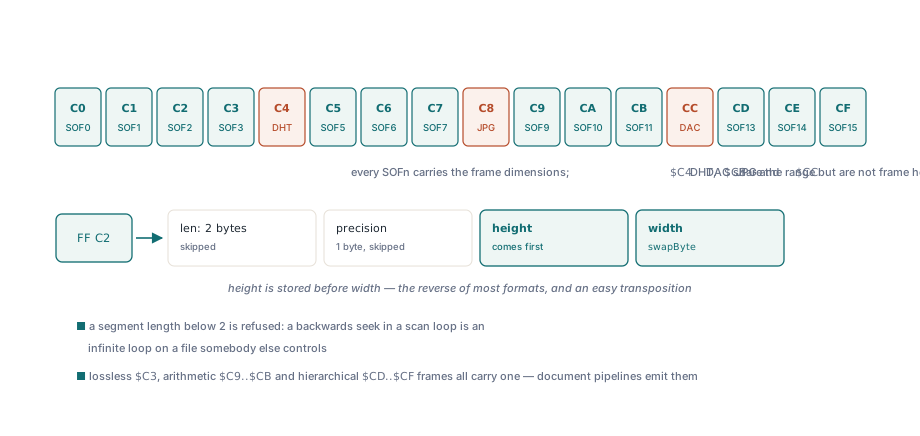
GetJpegSize accepts the marker set [$C0..$C3, $C5..$C7, $C9..$CB, $CD..$CF], and the three gaps in that range are the entire point. ITU-T T.81 §B.2.2 defines the frame header as SOFn, and the frame header is where the number of lines and samples per line live, in every frame type rather than just the common ones. The markers that fall inside the same numeric span but are not frame headers are $C4 (DHT, define Huffman tables), $C8 (JPG, reserved) and $CC (DAC, define arithmetic coding conditioning). A reader that recognizes only baseline, extended sequential and progressive — $C0, $C1 and $C2 — works on almost every JPEG a camera or a screenshot tool produces, and then quietly fails on the ones that matter to document workflows: lossless JPEG ($C3), the arithmetic-coded variants ($C9 through $CB) and the hierarchical frame types ($CD through $CF) all scan past the frame header, run off the end of the file, and land in the fallback. Medical imaging and scanned-document pipelines produce exactly those files
// Any SOFn marker carries the frame dimensions; $C4 (DHT), $C8 (JPG)
// and $CC (DAC) share the range but are not frame headers
if Seg in [$C0.. $C3, $C5.. $C7, $C9.. $CB, $CD.. $CF] then
begin
  ReadLen:= f.Read(Dummy[0], 3);
  ReadLen:= f.Read(wHeight, 2);
  wHeight:= swapByte(wHeight);
  ReadLen:= f.Read(wWidth, 2);
  wWidth:= swapByte(wWidth);
  found:= True;
  Break;
end
Two details in those seven lines. The three skipped bytes are the segment length word plus the sample precision byte, so the read lands on the line count; JPEG stores height before width, which is the reverse of most formats and an easy transposition to make. And the values go through swapByte because JPEG is big-endian throughout, the same reason GetPngSize runs its 32-bit IHDR values through lswapByte. The segment walk has its own guard: when a marker is not parameterless, the reader takes the two-byte length, byte-swaps it, and refuses to seek if the value is below 2 — a length shorter than its own field would translate into a backwards seek, and a backwards seek in a scan loop is an infinite loop on a file somebody else controls
Returning minus one beats returning a plausible number
The common thread across all five readers is that GetImageSize distinguishes three outcomes rather than two. 1 means the geometry was read from the file. -1 means it was not, and the caller should use its default. 7 is returned by GetWmfEmfSize and means something else entirely: it tells AddPicture to take the size from the metafile BSE record instead, because a WMF or EMF carries its extent in the workbook's own picture record rather than at a fixed offset in the file header. Metafile handling in general is covered in the bounded EMF and WMF decoder article. GetJpegSize shows why that distinction needs an explicit flag rather than an inference: the scan loop can terminate three ways — it found a frame header, it hit the end of the file, or it bailed on a corrupt segment length — and only the first assigns wWidth and wHeight. Without the found Boolean, the other two paths would convert whatever those locals happened to contain and hand the result upward as a success. Uninitialized locals are frequently zero, and zero is the worst possible answer here: it survives every validity check downstream and produces an invisible picture that nobody can select or delete
var
  W, H: Double;
begin
  case GetImageSize(FileName, W, H) of
    1: Sheet.AddPicture(FileName, Row, Col, W, H);
    7: Sheet.AddPicture(FileName, Row, Col);  // metafile: size from the BSE record
  else
    // W and H are 100 x 100; decide policy rather than accepting a placeholder
    LogWarning('unreadable image geometry: ' + FileName);
  end;
end;
Where the honest limits are
These readers deliberately parse a header and stop. They do not decode pixels, so they report the stored dimensions and nothing more, and there are cases where the stored dimensions are not the whole story. An animated GIF whose frames are smaller than the logical screen still reports the logical screen, which is correct for layout and may not match what a viewer shows. A JPEG carrying an EXIF orientation tag that specifies a 90-degree rotation reports the unrotated frame dimensions, so a portrait photo shot on a phone can come back as landscape. A DIB with a non-square pixel aspect ratio reports raw pixel counts, and the 0.75 factor assumes 96 DPI throughout. None of those are bugs in the header reading and none are fixable without decoding the image, which is not what this layer is for — they are documented boundaries, so if your pipeline handles phone photos, read the orientation tag yourself and swap the values before calling AddPicture. Everything else about picture placement, anchoring and the drawing object model is covered in the charts, images and drawings article
HotXLS reads and writes XLS, XLSX, ODS and CSV natively in Delphi and C++Builder with no Excel installation required, and picture insertion goes through this header path in every one of them. Format support and licensing details are on the HotXLS Delphi spreadsheet component product page