HotXLS stores Excel document property timestamps as UTC inside the file and exposes them as local time through the API: TXLSWorkbook.CreatedDate and LastSavedDate for .xls, TXLSXWorkbook.Created and Modified for .xlsx. Since v2.384.48 both engines convert local time to UTC on write and back on read, using the daylight saving rules that apply on the stamp's own date. Getting there took two fixes, and both bugs had survived for the same embarrassing reason: every automated round trip passed, while Excel's File > Info pane showed the wrong day or the wrong hour. If you have read our overview of setting Excel document properties in Delphi, this is the part where the dates stop being simple values
Why did a save-and-reopen test hide a one-day error?
A self round trip hid the error because the writer and the reader shared the same wrong constant, so the mistake cancelled itself. An OLE property-set date is a FILETIME, a 64-bit count of 100-nanosecond ticks since 1601-01-01 UTC ([MS-DTYP] §2.3.3), while a Delphi TDateTime counts days from 1899-12-30, the same serial origin covered in Excel date serials in Delphi and the 1900 vs 1904 systems. The gap between the two epochs is 109205 days, which you can check without a calendar: 25569 (the Unix epoch as a TDateTime) plus 109205 gives 134774, the Unix epoch counted in FILETIME days. HotXLS builds before v2.384.17 used 109206, so every creation and save stamp was written one day late and read one day early. The test suite saw the value it had assigned; Excel saw tomorrow
const
  // days from the FILETIME epoch (1601-01-01) to the TDateTime epoch (1899-12-30)
  // check: 25569 + 109205 = 134774, the Unix epoch in FILETIME days
  FileTimeDayBias = 109205;

function UtcDateTimeToFileTimeTicks(UtcStamp: TDateTime): Int64;
begin
  // Round to whole milliseconds first, then scale to 100 ns ticks.
  // Scaling the Double straight to ticks turns 04:00 into 03:59:59.9999
  Result := Round((UtcStamp + FileTimeDayBias) * 86400000.0) * 10000;
end;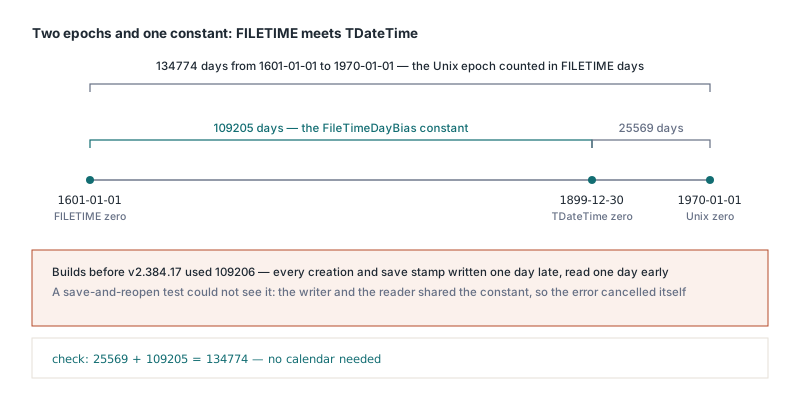
The rounding comment in that sketch is the second, smaller lesson from the same code. Multiplying a fractional TDateTime directly by 864,000,000,000 ticks per day lets binary floating-point error leak into the bottom digits, and a stamp of exactly 04:00 came back as 03:59:59.9999. HotXLS v2.384.48 rounds to whole milliseconds before scaling, so on-the-hour values survive the trip intact. The same release added the time zone step that this sketch deliberately leaves out, because the input here is already UTC
Which SummaryInformation property IDs hold the dates?
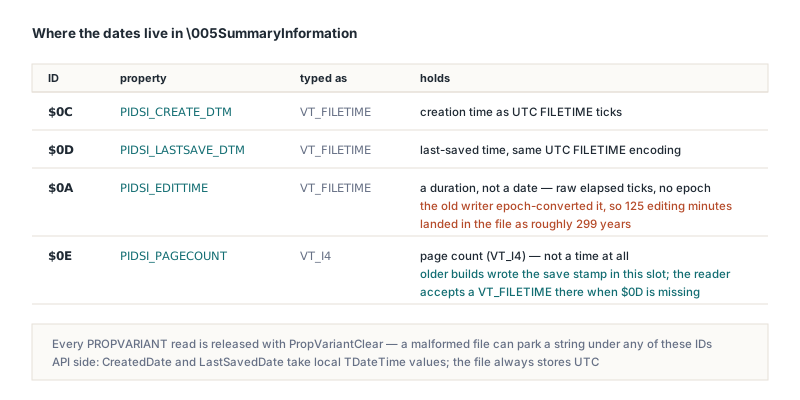
In the \005SummaryInformation property set defined by [MS-OLEPS], the creation time lives under property ID $0C (PIDSI_CREATE_DTM), the last-saved time under $0D (PIDSI_LASTSAVE_DTM), and the total editing time under $0A (PIDSI_EDITTIME). Older HotXLS builds wrote the last-saved stamp to $0E, which is PIDSI_PAGECOUNT, so Excel had no save date to show and a page count property holding a timestamp. Since v2.384.17 the reader also honors that legacy layout: when $0D is absent and $0E carries a VT_FILETIME, the value is taken as the last-saved time. Every PROPVARIANT read is also released with PropVariantClear now, because a malformed file can park a string under any of these IDs. If you want to see those streams with your own eyes, the walk-through on reading OLE2 compound files in Delphi without COM IStorage shows how to reach them
PIDSI_EDITTIME is the trap inside the trap. The property is typed VT_FILETIME but holds a duration, the raw number of elapsed 100 ns ticks with no epoch added. The old writer treated it like a date, dividing EditTimeMinutes by 1440 and pushing the result through the epoch conversion, so 125 minutes of editing landed in the file as roughly 299 years. The current reader recognizes that encoding by its size: no real editing session spans three centuries, so any value of 109206 days or more has the legacy offset subtracted before EditTimeMinutes is filled in
var
  Book: TXLSWorkbook;
begin
  Book := TXLSWorkbook.Create;
  try
    Book.Title := 'Q3 settlement';
    // API values are local time; the file stores UTC FILETIMEs
    Book.CreatedDate := EncodeDate(2026, 1, 15) + EncodeTime(9, 30, 0, 0);
    Book.LastSavedDate := Now;     // HotXLS writes what you assign, it does not stamp Now
    Book.RevisionNumber := 7;
    Book.EditTimeMinutes := 125;   // a duration, stored as raw ticks
    if Book.SaveAs('settlement.xls') <> 1 then
      raise Exception.Create('Save failed');
  finally
    Book.Free;
  end;
end;
Why were XLSX dates off by exactly the time zone offset?
XLSX dates were off by the zone offset because dcterms:created and dcterms:modified in docProps/core.xml are W3CDTF values tagged with Z, which means UTC under the core properties model of ECMA-376 Part 2, and HotXLS used to stamp local time with that Z attached. A workbook created at 09:30 on a machine in UTC+8 carried 09:30:00Z, and Excel on that same machine converted it to 17:30. The classic engine had the identical flaw in its FILETIME values, and custom date properties added through TXLSXWorkbook.CustomProperties.AddDate (written as vt:filetime) shared it too. Since v2.384.48 all three paths convert before writing and convert back on read whenever the stamp carries a Z, and since v2.384.59 the read side also honors fractional seconds and explicit +hh:mm / -hh:mm offsets
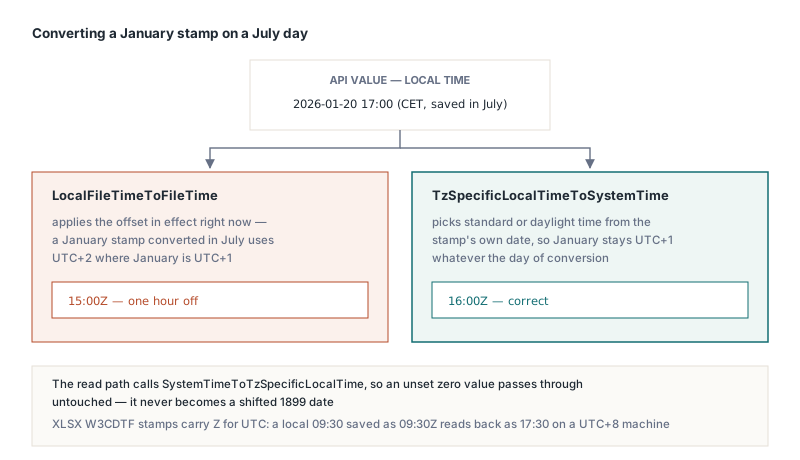
The conversion itself is where a naive fix goes wrong. LocalFileTimeToFileTime applies the offset in effect right now, so a January stamp converted in July comes out an hour off in any zone with daylight saving. HotXLS calls TzSpecificLocalTimeToSystemTime and SystemTimeToTzSpecificLocalTime instead, which pick standard or daylight time from the date being converted, and an unset value of zero passes through untouched so it never turns into a 1899 date shifted by a few hours
var
  Book: TXLSXWorkbook;
begin
  Book := TXLSXWorkbook.Create;
  try
    if Book.Open('report-template.xlsx') <> 1 then
      raise Exception.Create('Template not available');
    Book.Created := EncodeDate(2026, 7, 1) + EncodeTime(9, 30, 0, 0);
    Book.Modified := Now;
    Book.CustomProperties.AddDate('ApprovedOn',
      EncodeDate(2026, 1, 20) + EncodeTime(17, 0, 0, 0));
    Book.SaveAs('report.xlsx');
    // On a machine set to Central European Time, core.xml now holds
    // <dcterms:created xsi:type="dcterms:W3CDTF">2026-07-01T07:30:00Z</dcterms:created>
    // (UTC+2 in July), while ApprovedOn is written as 16:00Z (UTC+1 in January)
  finally
    Book.Free;
  end;
end;
What does HotXLS not convert when reading timestamps?
The HotXLS W3CDTF reader converts every zone-tagged form of the profile since v2.384.59, and the one case it still leaves alone is a time without a zone. Before that release the parser took the first 19 characters and converted from UTC only when character 20 was Z, so a stamp with fractional seconds (01:30:00.5Z) or an explicit offset (+08:00) was read as local time with no adjustment and ended up off by the zone offset. Since HotXLS 2.384.59, Created, Modified and date-valued custom properties parse fractional seconds of any length, Z, and +hh:mm / -hh:mm offsets, convert the instant to UTC and then to local time, and read a date-only stamp such as 2026-07-01 as that date. A stamp with a time but no zone marker, which the W3CDTF profile does not allow and ECMA-376 Part 2 gives no rule for, is still read as local time unchanged, and a stamp that does not parse at all comes back as zero. Workbooks that pass through Excel are fine; packages produced by other generators that drop the zone deserve a spot check
Files written by older HotXLS builds are the other honest boundary. An XLSX stamp written before v2.384.48 was local time wearing a Z, and nothing in the file distinguishes it from a correct one, so the current reader shifts it by the zone offset. Classic FILETIME stamps from those builds take the same shift, and a creation date written before v2.384.17 additionally reads back one day late, because the extra day of the old constant cannot be detected either; only the edit-time encoding and the $0E placement have a recognizable signature. Keep in mind too that the API value is local to the machine doing the reading, so a service running in UTC and a desktop in Tokyo will report different CreatedDate values for the same file, both correct
How should you test document timestamps?
Test document timestamps against something your own code did not write. Both of these bugs passed a save-then-reopen check, because a symmetric mistake is invisible to a symmetric test. Compare against a workbook saved by Excel, or assert the raw bytes and XML text after saving, and run the suite on a machine set to a non-UTC zone with a test date on each side of a daylight saving change. A build agent that runs in UTC will happily pass the old, broken code
Document timestamps are small, but they are what records systems, search indexes and audit trails sort by, and a date that is off by a day or by eight hours is worse than a missing one because nobody questions it. The HotXLS Delphi spreadsheet component handles the epoch math, the property IDs and the UTC conversion for both .xls and .xlsx, so your code can assign plain local TDateTime values and leave the file format to the library