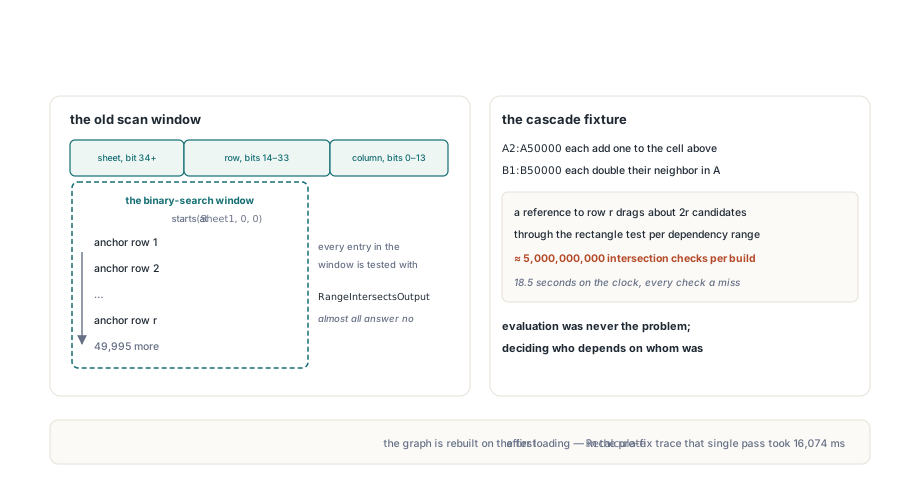
A sheet with 50,000 formulas in column A, each adding one to the cell above, and another 50,000 in column B doubling their neighbor is about as plain as a spreadsheet model gets. Evaluating it costs 100,000 additions and multiplications. Working out the evaluation order costs far more if the edge builder is written the obvious way: search every formula from the top of the referenced sheet down to the referenced row, test each one for overlap, and keep the hits. For this one sheet that comes to roughly five billion rectangle tests, and almost every one of them answers no
The five billion is arithmetic, not a stopwatch reading. A reference to row r drags about 2r candidates into the search window, one per column for every row above it, and summing that over 100,000 references lands in the billions. The interesting part is that the window really does have to start at the top of the sheet, for a reason that has nothing to do with laziness
Where a dependency rebuild spends its time
The HotXLS recalculation engine rebuilds its formula dependency graph whenever formula topology changes: the first Recalculate after a workbook is loaded or generated, and the first one after formulas are rewritten, sheets are added or removed, or a block of cells is cloned. Both workbook classes, TXLSWorkbook and TXLSXWorkbook, build a TXLSDepGraph from the unit lxDepGraph for this. Each formula cell becomes one node with an anchor (Row, Col) and an output rectangle that runs to (OutRow2, OutCol2). For an ordinary formula the rectangle is the anchor cell itself
Nodes are ordered by a packed 64-bit key from XLSDepMakeKey: the column sits in bits 0–13, the row in bits 14–33, and the sheet index from bit 34 upward. Sorting by that key gives sheet-major, row-major order, so finding the last formula that could matter for a reference is a single binary search on (Sheet2, Row2, 16383). The first one is the problem. The lower bound has to be (Sheet1, 0, 0), the very top of the referenced sheet, and everything between the two bounds becomes a candidate
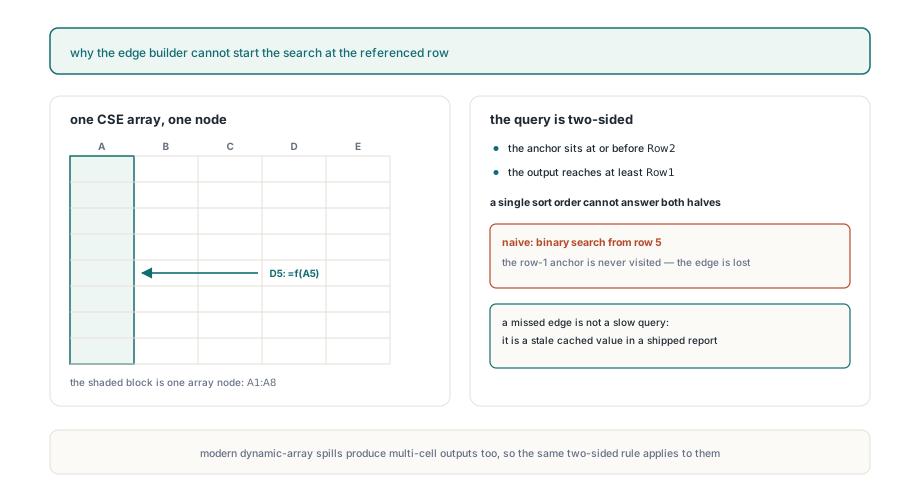
Why can't the search start at the referenced row?
An array formula anchored above a range can own cells inside it. In a TXLSXWorkbook, a CSE array entered in A1:A8 is a single node whose anchor is A1 and whose output reaches down to row 8, as the article on incremental recalculation and the dependency graph describes. A formula in D5 that reads only A5 still needs an edge from that node. Start the binary search at row 5 and the anchor at row 1 is never visited, the edge is never recorded, and D5 can be evaluated before the array it depends on. The symptom is a stale cached value in the saved workbook, which is much harder to notice than a slow recalculation
So the real query has two sides. A node is a candidate when its anchor is at or before Row2 and its output reaches at least Row1, on a sheet inside the reference and with overlapping columns. A sort by anchor answers the first half. Nothing about anchor order says anything about the second half, because a formula on row 3 might output one cell or a thousand rows. What-if data tables have the same shape: TXLSXWorkbook registers each data table as one node covering its whole result area. Dynamic-array formulas take a different route and are marked volatile, so they are recomputed on every pass; the article on dynamic array spill formulas covers how spilled ranges behave
TXLSDepGraph is a public class, so the case is easy to reproduce without a workbook. Sheet indexes are 1-based and rows and columns are 0-based, matching the calculator's coordinates. The probe below registers the array root and the reader, builds the edges, and also runs a reversed point-reference chain through the same graph type to show the counter that the next sections rely on
uses
  System.SysUtils, lxDepGraph;

function PointRef(ASheet, ARow, ACol: Integer): TXLSDepRange;
begin
  Result.Sheet1 := ASheet;
  Result.Sheet2 := ASheet;
  Result.Row1 := ARow;
  Result.Row2 := ARow;
  Result.Col1 := ACol;
  Result.Col2 := ACol;
  Result.LookupScan := False;
end;

procedure ProbeOutputIndex;
const
  N = 100000;
var
  G: TXLSDepGraph;
  Deps: TXLSDepRangeList;
  Reader, Row: Integer;
begin
  Deps := TXLSDepRangeList.Create;
  G := TXLSDepGraph.Create;
  try
    // CSE array: anchor A1 (row 0, col 0), output down to A8 (row 7)
    G.AddNode(1, 0, 0, 7, 0, False, nil);
    // D5 (row 4, col 3) reads only A5
    Deps.Add(PointRef(1, 4, 0));
    Reader := G.AddNode(1, 4, 3, 4, 3, False, Deps);
    G.BuildEdges;
    Writeln('D5 precedents: ', G.Nodes[Reader].PrecedentCount);  // 1, the A1 root
    Writeln('rectangles tested: ', G.EdgeCandidateChecks);       // 2: A1 root and D5 itself
  finally
    G.Free;
  end;

  // Chain A1..A100000, each cell reading the one above, added bottom-up
  G := TXLSDepGraph.Create;
  try
    for Row := N - 1 downto 0 do
    begin
      Deps.Clear;
      if Row > 0 then
        Deps.Add(PointRef(1, Row - 1, 0));
      G.AddNode(1, Row, 0, Row, 0, False, Deps);
    end;
    G.BuildEdges;
    Writeln('chain checks: ', G.EdgeCandidateChecks);  // N - 1 = 99999
  finally
    G.Free;
    Deps.Free;
  end;
end;
Pruning subtrees by their largest output row
TXLSDepGraph.BuildEdges keeps the anchor sort for the upper bound and answers the lower bound with a max-augmented segment tree laid over the sorted order. Each tree entry stores the largest OutRow2 of all nodes beneath it. The query walks down only inside the key window and drops any subtree whose stored maximum is above Row1, because no formula in that subtree can reach the referenced rows. Nodes that survive still get the full rectangle test, so sheet span and columns are checked exactly as before
The technique is small enough to show whole. The sketch below is a minimal version written for this article, with names of its own; none of them are HotXLS API, and the arrays are the reader's to fill from a list of output rows already sorted by anchor key
uses
  System.Math, System.Generics.Collections;

// Sketch only: a max-augmented segment tree over nodes sorted by anchor key.
// OutRow2[i] is the last output row of the i-th node in sorted order.
type
  TOutputIndex = record
    OutRow2: TArray<Integer>;
    MaxRow: TArray<Integer>;   // SetLength(MaxRow, 4 * Length(OutRow2))
  end;

procedure BuildMax(var Ix: TOutputIndex; Node, L, R: Integer);
var
  M: Integer;
begin
  if L = R then
  begin
    Ix.MaxRow[Node] := Ix.OutRow2[L];
    Exit;
  end;
  M := (L + R) shr 1;
  BuildMax(Ix, Node * 2, L, M);
  BuildMax(Ix, Node * 2 + 1, M + 1, R);
  Ix.MaxRow[Node] := Max(Ix.MaxRow[Node * 2], Ix.MaxRow[Node * 2 + 1]);
end;

// Collects, left to right, every node in [Lo, Hi) whose output reaches Row1
procedure Query(const Ix: TOutputIndex; Node, L, R, Lo, Hi, Row1: Integer;
  Hits: TList<Integer>);
var
  M: Integer;
begin
  if (R < Lo) or (L >= Hi) or (Ix.MaxRow[Node] < Row1) then
    Exit;                        // outside the window, or nothing reaches Row1
  if L = R then
  begin
    Hits.Add(L);                 // the caller still runs the full rectangle test
    Exit;
  end;
  M := (L + R) shr 1;
  Query(Ix, Node * 2, L, M, Lo, Hi, Row1, Hits);           // left first
  Query(Ix, Node * 2 + 1, M + 1, R, Lo, Hi, Row1, Hits);   // keeps scan order
end;

// Build once with BuildMax(Ix, 1, 0, Count - 1),
// then per reference call Query(Ix, 1, 0, Count - 1, Lo, Hi, Row1, Hits)
Per reference, the work drops from the size of the window to O((k + 1) log n), where k is the number of nodes whose output actually reaches the referenced rows. Back on the opening model, a reference from Br to Ar now tests two rectangles, Ar and Br itself, and a reference from Ar to the cell above tests the two nodes on that row. By hand that is about 200,000 tests for the full build instead of five billion
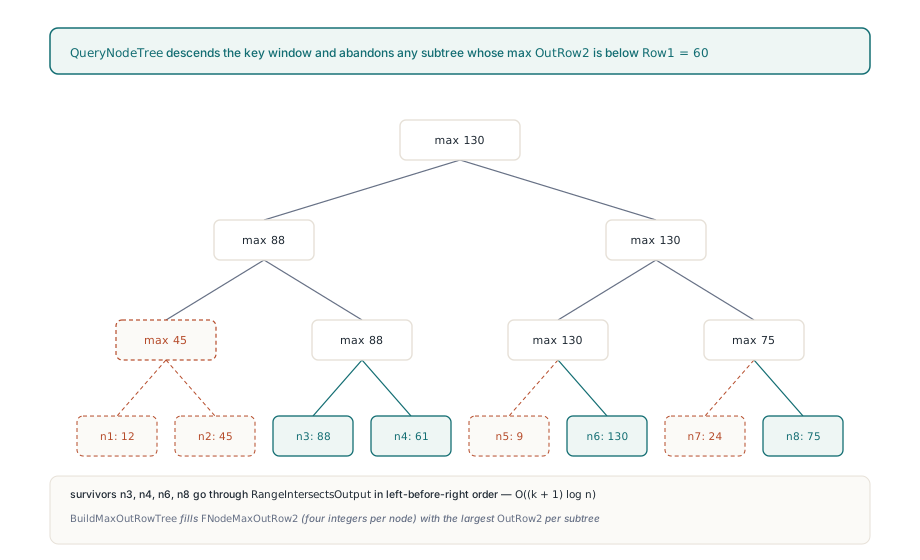
Same edges, in the same order
The left-before-right recursion matters more than it looks. Surviving nodes are visited in exactly the order a plain loop over the window would visit them, so each node's Dependents and Precedents arrays fill in the same sequence, and the topological order built from them comes out the same on every run. That order is not only internal bookkeeping: when the graph is current, the XLSX writer emits xl/calcChain.xml in the order FullTopoOrder returns, so a nondeterministic visit order would show up as noisy diffs between two saves of an unchanged workbook
Edge kinds keep their rules too. References that sit in the lookup-array argument of VLOOKUP, MATCH, XLOOKUP and similar functions produce lookup-scan edges, which propagate dirtiness but stay out of cycle detection. When a node has both a hard reference and a lookup reference to the same precedent, a hard edge recorded first suppresses the later scan edge, and a scan edge recorded first keeps its slot while the hard edge is still added. That ordering is what keeps lookup ranges from producing false circular references, and it only holds if the pruned walk visits candidates in scan order
The EdgeCandidateChecks property makes the pruning observable. It counts the output rectangles the most recent BuildEdges call actually tested and resets at the start of every build. In the probe above the reversed chain reports 99,999, one test per reference, even though the nodes were added bottom-up and the sort had to reorder all of them. AddNode marks both the sort and the edges as stale, so the next BuildEdges or NodeIndexOf rebuilds the index rather than patching it
Where the remaining cost sits
The tree prunes on rows only, and that choice shapes what a large model still pays for
- Column misses are paid at the leaves: the 2,626 formulas filling
A100:Z200all reach row 100, so a reference toAA100:AA200tests each of them before rejecting it on columns - Whole-column and other wide references genuinely have many precedents; the index removes wasted tests, and building the real edges stays proportional to how many there are
- A reference that spans several sheets opens a window covering the whole first sheet, so formulas there with deep outputs reach the leaf test; the edges come out the same and only the pruning is weaker
- The tree takes four integers per node, about 1.6 MB for 100,000 formulas, and any topology change pays a full O(n log n) re-sort plus an O(n) tree build on the next edge build
Rows are the right single dimension to index. Generated reports, ledgers and financial models grow downward, so row distance is where almost all of the wasted candidates come from, while a column miss is rejected by the rectangle test in a handful of integer comparisons. A second dimension in the tree would complicate every query to save tests that are already cheap
On the calling side, the expensive step is the rebuild, and value edits do not trigger it. Recalculate builds the graph on its first call; later calls re-evaluate only formulas downstream of changed values, plus volatile ones. Writing all formulas first and recalculating once is the pattern to aim for. The harness below times both kinds of pass on the classic engine, where Recalculate returns the number of formula cells it could not evaluate; run it on the hardware that will host the batch job, because absolute times depend heavily on the machine
uses
  System.SysUtils, System.Diagnostics, lxHandle;

procedure TimeCascadeRecalc;
var
  Wb: TXLSWorkbook;
  Sh: TXLSWorksheet;
  I, Failed: Integer;
  Watch: TStopwatch;
begin
  Wb := TXLSWorkbook.Create;
  try
    Sh := Wb.Sheets.Add;
    Sh.Cells[1, 1].Value := 1;
    for I := 2 to 50000 do                     // 49,999-link chain in column A
      Sh.Cells[I, 1].Formula := '=A' + IntToStr(I - 1) + '+1';
    for I := 1 to 50000 do                     // 50,000 dependents in column B
      Sh.Cells[I, 2].Formula := '=A' + IntToStr(I) + '*2';

    Watch := TStopwatch.StartNew;
    Failed := Wb.Recalculate;                  // builds the graph, evaluates all
    Writeln(Format('first pass: %d not evaluated, %.1f ms',
      [Failed, Watch.Elapsed.TotalMilliseconds]));

    Sh.Cells[1, 1].Value := 10;                // value edit: graph is reused
    Watch := TStopwatch.StartNew;
    Failed := Wb.Recalculate;                  // dirty subgraph only
    Writeln(Format('value pass: %d not evaluated, %.1f ms',
      [Failed, Watch.Elapsed.TotalMilliseconds]));
  finally
    Wb.Free;
  end;
end;
In this model the value pass still re-evaluates all 99,999 formulas, since the whole of column A hangs off A1; what it skips is the graph build. Overwriting a formula cell with a plain value is a different matter, because that changes topology and the next Recalculate rebuilds the graph from scratch
The same quadratic shape in cloned defined names
Report bands hide the same pattern in a different place. TXLSXWorksheet.CloneRangeTo copies defined names that point directly at a range inside the cloned block, and every copy needs a name that is unique in its scope: Total_2, Total_3, and so on. A search that restarts at _2 for each copy probes one more candidate every time, so a sheet built from hundreds of cloned bands spends a quadratic number of name lookups on naming alone
TXLSXDefinedNames avoids that with a suffix hint kept in its name index, one per base name and scope. The next search starts from the suffix returned last time and rechecks it first, because the caller is free not to add that name. Deleting a name, renaming it through Name, moving it with SheetIndex, or clearing the collection drops the index together with every hint, so the next clone goes back to the first free suffix and fills any hole the change opened
For Delphi and C++Builder applications that generate or recalculate large spreadsheets, the HotXLS Excel component for Delphi and C++Builder uses this indexed dependency graph in the recalculation engine of both its classic and XLSX workbook classes