The exported PDF puts each column boundary half a character to the left of where Excel draws it, and every wrapped cell now breaks in a different place. Excel column width is not measured in characters or points. It is measured in Max Digit Width (MDW) units of the workbook Normal font, and HotXLS measures that font with GDI before every pagination build. The failure mode is quiet: nothing throws, the stored widths round-trip byte-for-byte, and the geometry is still off by a few percent per column until the accumulated drift pushes a one-page table onto two
What unit is Excel column width in?
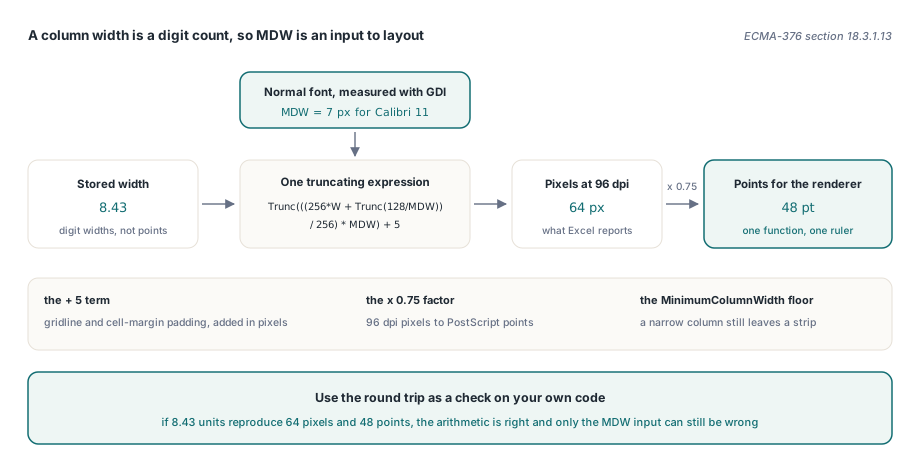
A column width in a worksheet is a count of digit characters of the workbook Normal font, not an absolute measurement. ECMA-376 §18.3.1.13 defines the width attribute of <col> in terms of the Maximum Digit Width of that font at 96 dpi, and gives the conversion from a stored width back to pixels as a truncating expression over MDW. For Calibri 11, which is what Excel ships as the Normal style, MDW measures 7 pixels. Feed the default width of 8.43 units through the specification formula with MDW 7 and you get exactly 64 pixels, which is 48 points at 96 dpi. Those are the numbers Excel itself reports, so they make a useful check: if your conversion reproduces 8.43 units to 64 pixels, the arithmetic is right and only the MDW input can still be wrong
const
  // Maximum digit width (MDW) of the default body font in pixels at 96 dpi.
  // Calibri 11 measures 7 px, which reproduces the exact pixel widths
  // Excel stores (8.43 units -> 64 px -> 48 pt).
  DefaultMDW = 7;
  MinimumColumnWidth = 24.0;

function ColumnWidthToPointsMdW(Value: Double; MdW: Integer): Double;
var
  Pixels: Integer;
begin
  if Value <= 0 then
    Value := 8.43;
  if MdW <= 0 then
    MdW := DefaultMDW;
  Pixels := Trunc(((256 * Value + Trunc(128 / MdW)) / 256) * MdW) + 5;
  Result := Pixels * 0.75; // 96 dpi pixels -> points
  if Result < MinimumColumnWidth then
    Result := MinimumColumnWidth;
end;
HotXLS keeps that arithmetic in exactly one function, in the lxPagination unit, so there is a single place where the ruler can be wrong. The + 5 is the padding Excel adds for gridlines and cell margins, the * 0.75 converts 96 dpi pixels to PostScript points, and the floor at MinimumColumnWidth exists so a pathologically narrow column still leaves a strip the renderer can draw a border into. The public entry point ColumnWidthToPoints keeps its old single-argument signature and forwards a measured MDW to this function, which is what let the behavior change land without touching a single call site
Why a non-Calibri Normal font moves every boundary
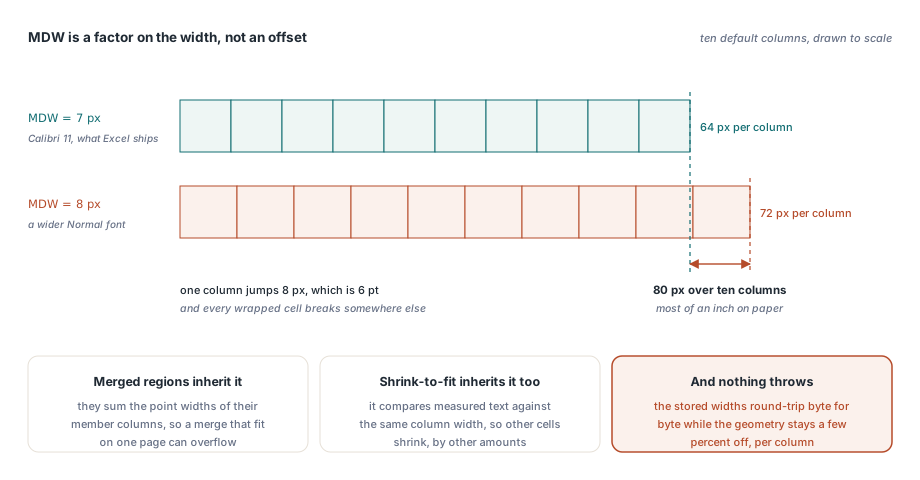
The drift is multiplicative, which is why it reads as a rendering bug rather than a units bug. MDW is a factor on the width, not an offset. Push MDW from 7 to 8 and the default 8.43-unit column goes from 64 pixels to 72, a jump of 8 pixels or 6 points on one column. Ten columns of that and the right edge of the table has moved most of an inch. Workbooks that trip this are entirely ordinary: anything generated by a reporting tool that stamps Arial or Segoe UI into the Normal style, anything saved out of an ERP export template, anything a customer restyled once and forgot about
Two related layout systems inherit the error rather than causing it. Merged regions sum the point widths of their member columns, so a merge that fit on one page in Excel can overflow after MDW drift, which is worth remembering when you build merged-cell report templates. Shrink-to-fit compares measured text width against the same column width, so the wrong MDW also changes which cells shrink and by how much. The same family of unit confusion turns up in drawing anchors, where image geometry and EMU scaling has its own conversion chain to get wrong
How HotXLS measures MDW at run time
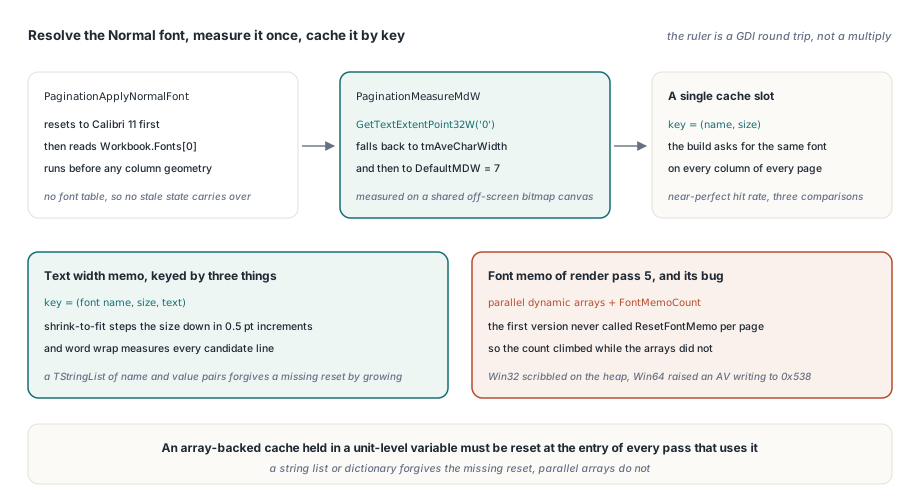
HotXLS resolves MDW from the workbook itself rather than assuming a constant, and two procedures do the work. PaginationApplyNormalFont reads the Normal style font off the workbook and runs at the top of the pagination build, before any column geometry is computed; it resets to Calibri 11 first, so a workbook without a font table cannot inherit stale state from a previous build. The Normal style font is fonts[0] in styles.xml, exposed by the component as Workbook.Fonts[0]
// Reads fonts[0] (the Normal style font) off the worksheet workbook.
// Classic worksheets without a font table keep the Calibri 11 default.
procedure PaginationApplyNormalFont(Worksheet: TObject);
var
  Sh: TXLSXWorksheet;
  Fnt: TXLSXFont;
begin
  PaginationNormalFontName := 'Calibri';
  PaginationNormalFontSize := 11;
  if not (Worksheet is TXLSXWorksheet) then
    Exit;
  Sh := TXLSXWorksheet(Worksheet);
  if (Sh.Workbook = nil) or (Sh.Workbook.Fonts.Count < 1) then
    Exit;
  Fnt := Sh.Workbook.Fonts[0];
  if Fnt.Name <> '' then
    PaginationNormalFontName := Fnt.Name;
  if Fnt.Size > 0 then
    PaginationNormalFontSize := Fnt.Size;
end;
The second procedure, PaginationMeasureMdW, asks GDI for the extent of the single character '0' through GetTextExtentPoint32W on a shared off-screen bitmap canvas, falls back to tmAveCharWidth from GetTextMetricsW when the extent call fails, and falls back to DefaultMDW when neither is available. Its cache is a single slot keyed by (name, size), which sounds crude until you look at the access pattern: a pagination build asks for the same Normal font on every column of every page, so one slot has a near-perfect hit rate and costs three comparisons per call
What happens with no font table, no GUI, or a missing font?
HotXLS degrades to the Calibri 11 constant in every case where the real Normal font cannot be determined, and it does so silently by design. Classic BIFF worksheets are the common one: the legacy formats carry no XLSX font pool for fonts[0] to refer to, so the type guard exits early and the default MDW of 7 stands. That is not a fix, it is the previous behavior preserved deliberately, so that adding measurement to the XLSX path could not regress classic-format output
The GDI dependency is the honest caveat. Measurement runs against a Windows device context, so the path assumes a Windows host with the font installed. In a service or a headless build agent, GDI text metrics generally still resolve, but a font that is not installed on that machine gets substituted by the font mapper and you measure the substitute instead. It never fails loudly; it returns a plausible number for the wrong typeface. If server-side exports must match a desktop reference, install the fonts your templates name on the export host, or pin the Normal font before invoking the worksheet PDF export path
var
  Book: TXLSXWorkbook;
  Exporter: TXLSPDFExport;
begin
  Book := TXLSXWorkbook.Create;
  Exporter := TXLSPDFExport.Create;
  try
    Book.Open('quarterly-report.xlsx');

    // Pin the Normal font so the MDW measured on this host is the one
    // the layout was designed against, not a font-mapper substitute.
    if Book.Fonts.Count > 0 then
    begin
      Book.Fonts[0].Name := 'Calibri';
      Book.Fonts[0].Size := 11;
    end;

    Exporter.UseWorksheetPageSetup := True;
    Exporter.SaveAsPDF(Book, 'quarterly-report.pdf');
  finally
    Exporter.Free;
    Book.Free;
  end;
end;
Measurement caches, and the one that crashed on Win64
Once text measurement is a GDI round trip rather than a multiply, it has to be cached, and caching inside a render pass is where this work drew blood. The shrink-to-fit loop steps the font size down in 0.5 pt increments and re-measures after each step, so one cell can call PaginationMeasureTextWidth a dozen times with the same string, and word wrap calls it again per candidate line. A memo keyed by font name, size, and text collapses that to one GDI call per distinct string, stored in a TStringList as name/value pairs
The other cache added alongside it was not so tidy. Render pass 5 resolves the font pool per cell by FontIndex, and its memo used parallel dynamic arrays with a hand-maintained FontMemoCount. The first version forgot to call ResetFontMemo at the start of each page, so the count kept climbing across pages while the arrays did not, and the code wrote past the end of all of them. On Win32 that quietly scribbled into adjacent heap and finished; on Win64 it raised an access violation on a write to 0x538 immediately. The generalizable lesson: an array-backed cache held in a unit-level variable must be reset at the entry of every pass that uses it, because a string list or dictionary forgives a missing reset by growing and parallel arrays do not
Checking your own conversion
You do not need the component to verify any of this. Take a workbook whose Normal font is not Calibri 11, read a width from <col width="..."/>, and run it through the specification formula twice, once with MDW 7 and once with the MDW your renderer actually measures for that font; if the answers differ and your output matches the first, you have found the drift. Column geometry is one of those parts of a spreadsheet engine that is either invisible or the only thing anyone notices, and getting it right means treating the Normal font as an input to layout rather than a styling detail. If you build Delphi or C++Builder applications that read, write, render, and print Excel workbooks without Office installed, the HotXLS Delphi Excel component handles the MDW measurement, the pagination model, and the PDF pipeline behind one set of VCL classes