HotXLS writes Excel waterfall and treemap charts as standalone cx:chartSpace parts — xl/charts/chartExN.xml carrying the content type application/vnd.ms-office.chartex+xml — and anchors them through an mc:AlternateContent wrapper so Excel 2016 and later render the chart while older readers get a fallback shape. Pick xlsxChartWaterfall or xlsxChartTreemap and the whole part pipeline follows
The way this problem usually announces itself is a support ticket. A customer sends a workbook their finance team built in Excel 2019, your reporting tool opens it, saves it, and the waterfall chart is gone. No exception, no warning, nothing in the log — the chart simply is not in the output. If you go looking for it in the classic chart code path you will look for a long time, because the chart was never there to begin with
Why are waterfall and treemap charts not in c:chartSpace?
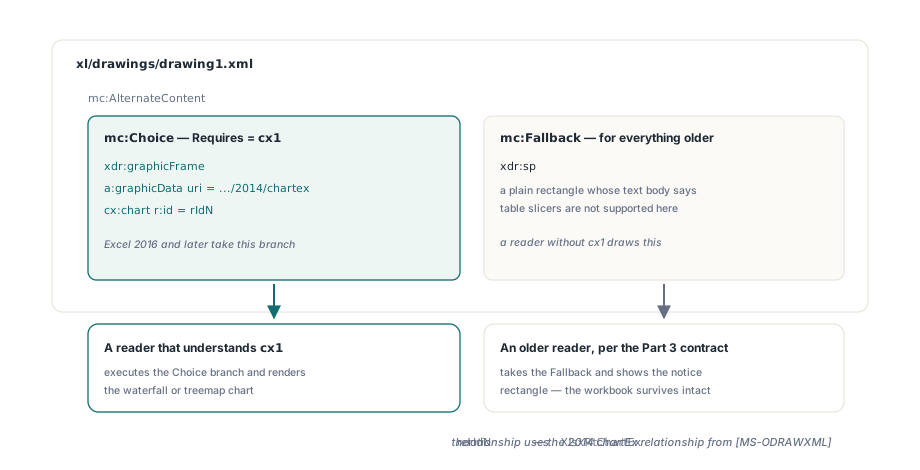
Because Microsoft could not put them there. The DrawingML chart schema in ECMA-376 Part 1 §21.2 enumerates its chart elements — c:barChart, c:lineChart, c:pieChart and the rest — as a closed choice, so adding waterfall, treemap, sunburst and funnel in Excel 2016 would have meant breaking a schema every existing reader depends on. The new types went into a parallel document instead: a cx:chartSpace part in the 2014 chartex namespace, http://schemas.microsoft.com/office/drawing/2014/chartex, stored beside the classic charts but structurally unrelated to them. The drawing side stitches the two worlds together with mc:AlternateContent, the compatibility mechanism from ECMA-376 Part 3: the mc:Choice branch declares Requires="cx1" and holds an xdr:graphicFrame whose a:graphicData/@uri is the chartex namespace and whose payload is a bare <cx:chart r:id="rIdN"/> reference, while mc:Fallback holds a rectangle with the notice Excel itself writes there. A reader that does not understand cx1 is required by the Part 3 contract to take the fallback
The relationship type is the other giveaway. A classic chart hangs off the drawing part with the standard OOXML chart relationship; a chartEx part uses http://schemas.microsoft.com/office/2014/relationships/chartEx instead, documented in [MS-ODRAWXML]. HotXLS exposes both worlds as constants — XlsxRtChartEx for that relationship, XlsxCtChartEx for the content type, XlsxNsMsChartEx and XlsxNsMsChartEx2015 for the two namespaces the anchor needs — and the predicate XlsxChartIsChartEx is what routes a chart down the extended path on save. Combination charts and preserved classic chart XML go down the other one, described in the article on preserved chart XML and combination charts
Four schema rules that decide whether Excel opens the file
The chartex schema is stricter than the classic one in four specific places, and every one of them produces the same unhelpful repair prompt when you get it wrong. BuildChartExKnownXml and BuildChartExRelsXml in HotXLS bake all four in, but they are worth knowing if you ever hand-inspect the XML
- Order.
cx:chartDatamust come beforecx:chartin the document. That is the reverse of the intuition you build from classic charts, where the caches live inside the series inside the plot area; in a chartEx part the data sits up front in its own block and the chart body only references it by id - Cardinality.
cx:plotAreamay contain exactly onecx:plotAreaRegion. Not zero, not two. There is no combination-chart story here — one region, and the series inside it - Type placement. The chart type is not an element name at all. It is the
layoutIdattribute oncx:series, taking a token from theST_SeriesLayoutenumeration in the Microsoft chartex schema.XlsxChartExLayoutIdmaps the HotXLS enum onto that token and returns'waterfall'or'treemap';XlsxChartExLayoutIdToTyperuns the mapping backwards on read - The relationship classic charts never need.
cx:chartDataholds a<cx:externalData r:id="rId1"/>element, and that relationship has to exist inxl/charts/_rels/chartExN.xml.relspointing back at the worksheet that owns the data, because Excel uses it to resolve thecx:frange formulas. Omit the rels part and the chart opens empty with nothing explaining why
How do you add a waterfall or treemap chart in Delphi?
The same way you add any other chart in HotXLS — the extended types are members of TXLSXChartType, so TXLSXWorksheet.AddChart takes them directly and everything downstream keys off the enum value. There is no separate chartEx API to learn
var
  Book: TXLSXWorkbook;
  Sheet: TXLSXWorksheet;
  Chart: TXLSXChart;
begin
  Book := TXLSXWorkbook.Create;
  try
    Book.Open('cashflow.xlsx');
    Sheet := Book.Sheets[0];

    // Anchor rectangle in row/col coordinates, same as a classic chart
    Chart := Sheet.AddChart(xlsxChartWaterfall, 'Q3 Cash Flow',
      2, 5, 20, 12);
    Chart.AddSeries('Movement', 'Sheet1!$A$2:$A$9', 'Sheet1!$B$2:$B$9');

    Book.SaveAs('cashflow-waterfall.xlsx');
  finally
    Book.Free;
  end;
end;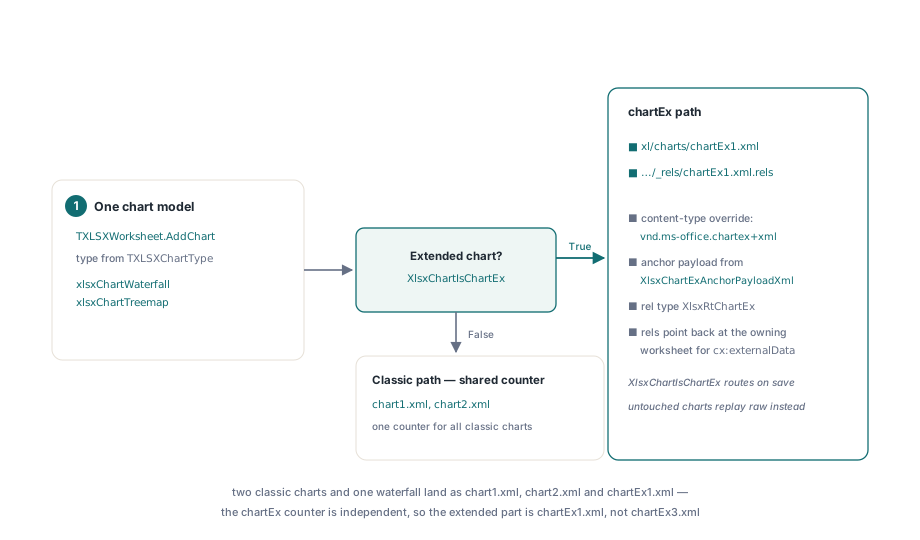
On save, HotXLS sees XlsxChartIsChartEx return True, allocates a part name from a separate chartEx counter, and writes xl/charts/chartEx1.xml, its rels file, the content-type override, and the mc:AlternateContent anchor produced by XlsxChartExAnchorPayloadXml. The independent counter matters: a workbook with two classic charts and one waterfall gets chart1.xml, chart2.xml and chartEx1.xml, not chartEx3.xml. Treemaps then differ from waterfalls in two details, both handled by the same builder. The numeric dimension changes type — cx:numDim type="val" for a waterfall becomes type="size" for a treemap, because a treemap rectangle encodes magnitude as area rather than as a plotted value — and treemaps usually want a category hierarchy, which the model expresses through TXLSXChartSeries.CategoriesMultiLevel. Set that flag and S.ResolveCategoryLevels reads the range out of the worksheet at write time, splits it into one TXLSXChartDataCache per level behind S.CategoryLevelCount and S.CategoryLevels[], and BuildChartExLevelXml emits one cx:lvl per level inside a single cx:strDim, leaf level first — the same physical ordering ECMA-376 Part 1 §21.2 uses for c:multiLvlStrCache, so that convention carries over even though none of the markup does
Chart := Sheet.AddChart(xlsxChartTreemap, 'Revenue by Region',
  2, 8, 24, 16);
S := Chart.AddSeries('Revenue',
  'Sheet1!$A$2:$B$40',   // two columns: leaf label, then parent group
  'Sheet1!$C$2:$C$40');
S.CategoriesMultiLevel := True;
The cache shape that breaks every assumption from classic charts
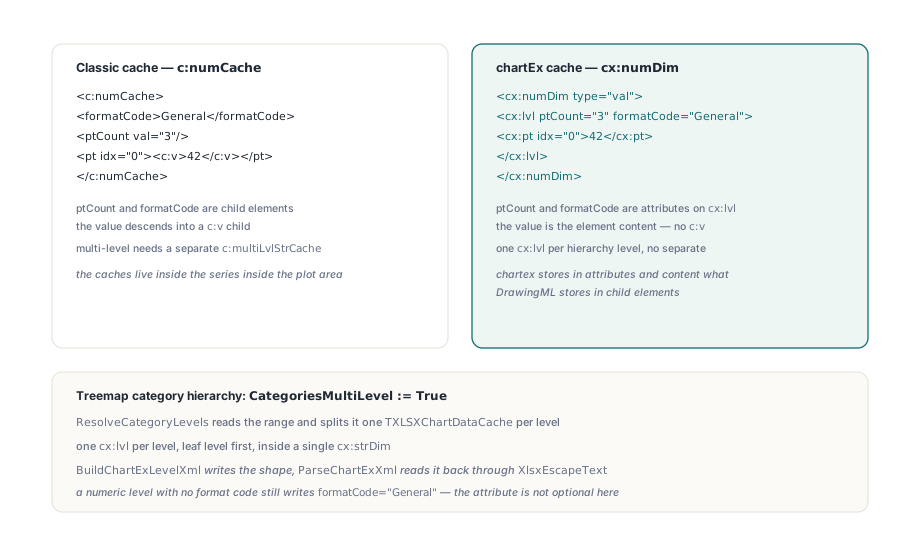
If you have written a classic chart cache reader, three habits will betray you on a chartEx part, and all three come from one design decision: chartex stores in attributes and element content what DrawingML stores in child elements
- A cached point is
<cx:pt idx="0">42</cx:pt>. The value is the element content. There is noc:vchild to descend into, so a parser that walks looking forvnodes finds nothing and reports an empty cache ptCountandformatCodeare attributes oncx:lvl. In a classicc:numCacheboth are child elements- Multiple hierarchy levels are multiple
cx:lvlelements inside onecx:strDim. There is no separate multi-level cache element the wayc:multiLvlStrCacheis separate fromc:strCache
BuildChartExLevelXml writes that shape and ParseChartExXml reads it back, running every value through XlsxEscapeText on the way out so a category label containing an ampersand or an angle bracket survives the round trip. Worth noting what the builder does when a numeric level carries no format code: it writes formatCode="General" rather than dropping the attribute, because here the attribute is not optional the way its classic counterpart is
The namespace prefix that made type read-back fail
The first version of the HotXLS chartEx parser wrote perfectly good files and read every one of them back as a column chart. The root cause was one line, and the lesson generalizes to any OOXML parser you will ever write: TXMLReader.Name returns the name as written in the document, prefix included. In a classic chart part most elements arrive unprefixed, so SameText(Reader.Name, 'series') works and you stop thinking about it. In a chartEx part every element is prefixed — the reader hands you 'cx:series', the comparison silently fails on all of them, and you get no exception and no malformed XML, just an empty series list and a chart type that falls back to the default. The fix is to compare on the local name, in one place rather than at every call site
// Reader.Name carries its namespace prefix: 'cx:series', not 'series'
function IsEl(const LocalName: string): Boolean;
var
  NodeName: string;
begin
  NodeName := String(Reader.Name);
  Result := SameText(NodeName, LocalName) or
            EndsText(':' + LocalName, NodeName);
end;
ParseChartExXml uses that helper for every element test and an equivalent AttrVal helper for attributes, since cx:autoUpdate and friends are prefixed too. Once the series elements are actually being seen, the type comes back from the first layoutId encountered, and each cx:series is wired to its cx:data block by matching cx:dataId/@val against cx:data/@id. Charts opened but never modified take the older path instead: the original bytes replay from FRawChartXml, so an untouched customer file comes back out as it went in — the same conservative-writer discipline that governs sheet-level extensions in the sparkline extension article
What HotXLS deliberately does not do with these charts
Two boundaries are worth stating plainly, because both are choices rather than gaps waiting to be filled. The built-in PDF and SVG renderers do not draw waterfall or treemap series: the types match no drawing branch, so series rendering is skipped and the rest of the sheet exports normally — faking a plausible-looking treemap in an exported PDF would be worse than drawing nothing, since it would silently disagree with what Excel shows for the same file. And xlsxChartWaterfall and xlsxChartTreemap are the only two extended layouts HotXLS builds from the model; ST_SeriesLayout also defines sunburst, funnel, box-and-whisker and histogram, and a workbook containing any of them still round-trips through the raw-XML replay path, you just cannot author one from Delphi code today. Rendering of the classic chart types is unchanged and covered in the article on charts, images and drawings, and the chartEx pipeline ships alongside it in the HotXLS Delphi Excel Component for Delphi and C++Builder