HotXLS reproduces Excel trendline equation and R-squared labels in Delphi through XLSTrendlineEquationLabel in the lxStandard unit. The function fits the owning series' points for linear, exponential, logarithmic, polynomial (order 2 to 6), power and moving average trendlines, and returns the same text Excel reports in DataLabel.Text, code point for code point, or False when the fit is undefined
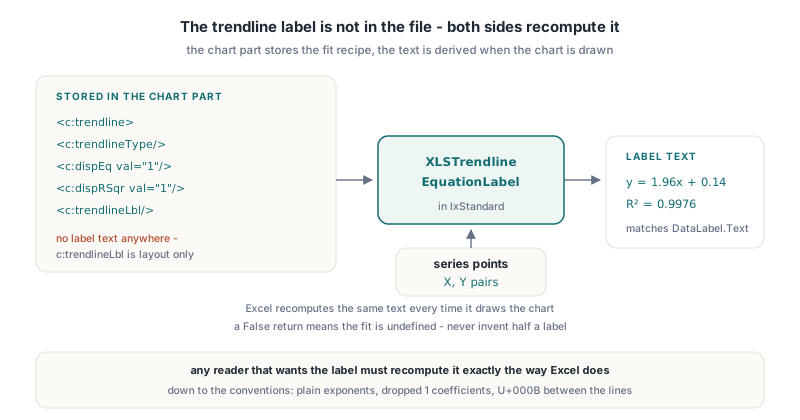
The reason this needs a function at all is that the label is not in the file. An XLSX chart stores a c:trendline element with a c:trendlineType, the c:dispEq and c:dispRSqr switches and an optional c:trendlineLbl for position and formatting, but ECMA-376 DrawingML Charts gives the label no text of its own. Excel recomputes y = 1.96x + 0.14 every time it draws the chart. Any Delphi code that wants to show, export, search or compare that text without starting Excel has to recompute it too, and recompute it the way Excel does, down to the spacing around the minus sign
Why can't you just format the regression coefficients yourself?
Hand-formatted coefficients almost never match the Excel label, because the label follows several small conventions that are easy to miss and easy to verify against. HotXLS froze those conventions from live Excel COM readbacks of DataLabel.Text on a scatter chart, then wrote the formatter against that oracle rather than against intuition
The conventions that bite in practice:
- Exponents are plain characters in the label text. The polynomial label reads
x2, notx², and the power label readsx0.9732; the raised look is a rendering attribute of the chart, not part of the string - The only non-ASCII character is the U+00B2 superscript two in the
R² =prefix - A coefficient of exactly 1 or -1 is dropped, so Excel writes
y = x + 3, noty = 1x + 3 - Terms join through their signs with spaces (
+and-), while a leading negative coefficient takes a bare minus, as iny = -0.0429x2 + 2.2171x - 0.16 - When Excel shows both lines,
DataLabel.Textjoins them with U+000B, a vertical tab, not a CR/LF pair
Number formatting is bounded as well. XLSTrendlineEquationLabel prints zero as 0, switches to one-digit scientific notation such as 2E+06 when the magnitude is below 0.0001 or at least 1000000, and otherwise uses fixed notation with four decimals up to 99.9999, one fewer for each further integer digit, and trailing zeros trimmed. That is why 1.96 appears as 1.96 and not 1.9600
Calling XLSTrendlineEquationLabel from Delphi
XLSTrendlineEquationLabel takes the trendline kind as an integer ordinal of TXLSXChartTrendlineType, a polynomial order, an open array of TXLSTrendlineLabelPoint records with X and Y fields, and the two display switches. It returns the equation and R-squared strings through out parameters as WideString, leaving a string empty when its switch is off. The order argument only matters for xlsxTrendPolynomial; pass 0 for the other kinds
uses
  lxStandard, lxHandleX;

procedure ShowFiveTrendlines;
const
  YS: array[0..4] of Double = (2.1, 3.9, 6.2, 8.1, 9.8);
var
  Points: array[0..4] of TXLSTrendlineLabelPoint;
  Eq, R2: WideString;
  I: Integer;
begin
  for I := 0 to 4 do
  begin
    Points[I].X := I + 1;
    Points[I].Y := YS[I];
  end;

  // Linear: Eq = 'y = 1.96x + 0.14', R2 = 'R' + #$00B2 + ' = 0.9976'
  if XLSTrendlineEquationLabel(Ord(xlsxTrendLinear), 0, Points,
    True, True, Eq, R2) then
    Writeln(Eq, ' | ', R2);

  // Polynomial order 2: 'y = -0.0429x2 + 2.2171x - 0.16', R2 0.9983
  if XLSTrendlineEquationLabel(Ord(xlsxTrendPolynomial), 2, Points,
    True, True, Eq, R2) then
    Writeln(Eq, ' | ', R2);

  // Exponential: 'y = 1.6767e0.3812x', R2 0.9386
  if XLSTrendlineEquationLabel(Ord(xlsxTrendExponential), 0, Points,
    True, True, Eq, R2) then
    Writeln(Eq, ' | ', R2);

  // Same text Excel puts in DataLabel.Text when both lines are shown
  Eq := Eq + #$000B + R2;
end;
The five values in that sample are the frozen Excel oracle that the HotXLS test suite checks for every family. The logarithmic fit comes back as y = 4.7635ln(x) + 1.4589 with R² = 0.9519, and the power fit as y = 2.0719x0.9732 with R² = 0.9978. If your output differs from Excel on the same data, the library and the oracle disagree, and that is a bug worth reporting, not a rounding preference
How does Excel compute R-squared for exponential and power trendlines?
For the trendline label, R-squared is the squared Pearson correlation between the fitted values and the actual Y values in the original data space, and XLSTrendlineEquationLabel computes it the same way. The coefficients of an exponential, logarithmic or power fit still come from ordinary least squares on log-transformed data: ln(y) against x for exponential, y against ln(x) for logarithmic, and ln(y) against ln(x) for power. Only the goodness-of-fit number is measured back in the natural domain
This is the detail most reimplementations get wrong, because the textbook approach measures R-squared in the transformed space where the line was fitted. On the oracle population the difference already shows in the second decimal. The exponential fit in transformed space gives 0.9477, while Excel's label, read back live, says R² = 0.9386, which is the natural-domain correlation. A label generator that reuses its transformed-space regression statistics would print the wrong number on the first chart a user compares
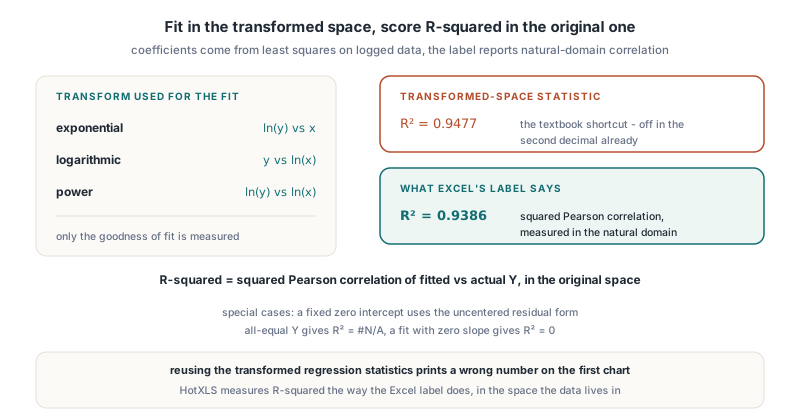
Two special cases change the formula. A linear trendline with a fixed intercept of zero uses the uncentered residual form, 1 minus the residual sum of squares over the sum of squared Y values, which matches what Excel shows for that configuration. A population whose Y values are all equal has no variance to explain, so the result is R² = #N/A next to a constant equation such as y = 5. A nonconstant population whose fit happens to have zero slope gets R² = 0 instead
Fixed intercepts and the second overload
The second XLSTrendlineEquationLabel overload adds InterceptSet: Boolean and Intercept: Double before the output parameters, which mirrors the c:intercept element of the trendline and the InterceptSet and Intercept properties of TXLSXChartTrendline. Excel only offers a fixed intercept for linear, exponential and polynomial trendlines, and the function enforces the same rule: a fixed intercept on a logarithmic or power fit returns False, and an exponential fit needs a positive intercept because the fit works with its logarithm
procedure LabelForTrendline(Trend: TXLSXChartTrendline;
  const Points: array of TXLSTrendlineLabelPoint);
var
  Eq, R2: WideString;
begin
  if not XLSTrendlineEquationLabel(Ord(Trend.TrendlineType), Trend.Order,
    Points, Trend.DispEq, Trend.DispRSqr, Trend.InterceptSet,
    Trend.Intercept, Eq, R2) then
  begin
    // Undefined fit: do not invent a label
    Writeln('No label for this trendline');
    Exit;
  end;
  if Eq <> '' then Writeln(Eq);
  if R2 <> '' then Writeln(R2);
end;

procedure AddQuadraticThroughOrigin(Series: TXLSXChartSeries);
var
  Trend: TXLSXChartTrendline;
begin
  Trend := Series.AddTrendline(xlsxTrendPolynomial);
  Trend.Order := 2;
  Trend.DispEq := True;
  Trend.DispRSqr := True;
  Trend.InterceptSet := True;
  Trend.Intercept := 0;
end;
Feeding the trendline's own properties straight into the overload keeps the label in step with what the workbook will tell Excel to draw. When InterceptSet is False, the Intercept value is ignored, so passing the property unconditionally is safe. A fixed intercept also lowers the point requirement by one: a polynomial of order n normally needs n + 1 points, but only n when the constant term is pinned
Which X values does a Line chart trendline actually use?
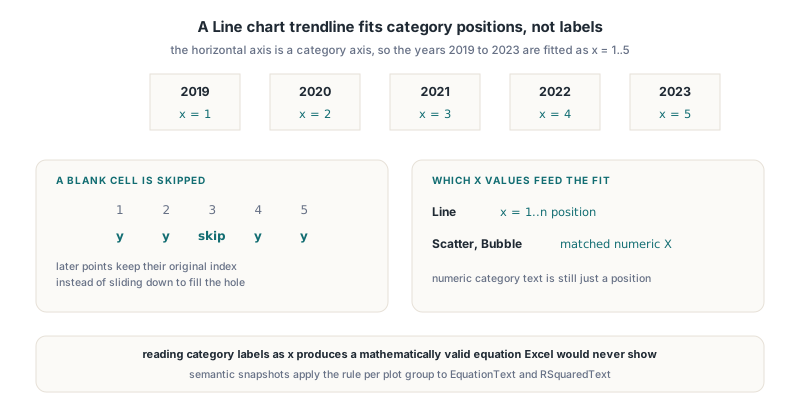
A trendline on an ordinary Line chart fits against the 1-based category position, not the category label, even when the labels are numbers. Excel treats a Line chart's horizontal axis as a category axis, so a series plotted over the years 2019 to 2023 is fitted as x = 1..5 and the equation's intercept reflects that. Scatter and Bubble charts are different: they fit against the matched numeric X values of each point
HotXLS learned this the hard way. The first version of the semantic snapshot projection read numeric category text as the actual x, which produced a mathematically valid equation that Excel would never show. The follow-up fix moved Line fits to the original category position for every category, numeric or not, and also settled what happens with gaps: a blank Y cell is left out of the fit, but later points keep their original index instead of sliding down to fill the hole. The same distinction between category positions and real values is behind the calendar-accurate date axis ticks in HotXLS charts
uses
  Math, lxStandard, lxHandleX;

// Values holds a Line series in category order; NaN marks a blank cell
function LinePointsFromCategories(const Values: array of Double):
  TArray<TXLSTrendlineLabelPoint>;
var
  I, N: Integer;
begin
  SetLength(Result, Length(Values));
  N := 0;
  for I := 0 to High(Values) do
  begin
    if IsNan(Values[I]) then
      Continue;                  // skip the blank, keep later indices
    Result[N].X := I + 1;        // 1-based category position
    Result[N].Y := Values[I];
    Inc(N);
  end;
  SetLength(Result, N);
end;
Get this step wrong and every other convention in this article is wasted, because the label will be correctly formatted text for the wrong regression. Workbook semantic snapshots in HotXLS already apply the rule per plot group when they emit the EquationText and RSquaredText properties, so a snapshot of an imported chart carries the label text Excel would display alongside the rest of the preserved ChartML for imported Excel charts
When does XLSTrendlineEquationLabel return False?
XLSTrendlineEquationLabel returns False and leaves both strings empty whenever the fit is undefined, rather than publishing a partial or guessed label. The function never emits half an equation, so a True result always means both requested strings are complete
- Fewer than two points, a trend kind outside 0..5, or a polynomial order outside 2..6
- A non-positive X for logarithmic or power fits, or a non-positive Y for exponential or power fits, since both need a logarithm
- NaN or infinite inputs, or any X, Y or intercept with a magnitude above 1E50
- Too few points for the polynomial order, all X values equal for a non-polynomial fit without a fixed intercept, or a singular polynomial system
- Fitted values that leave the finite range (above 1E100) or exponents that would overflow
Moving average is the deliberate exception. Excel exposes no equation or R-squared text for a moving average trendline even when the stored dispEq and dispRSqr switches are on, so the function returns True with both strings empty, which correctly tells the caller there is nothing to draw
Numerical stability and current limits
Polynomial trendlines are where naive code loses digits. Raw normal equations for a sixth-order fit over X values in the thousands are badly conditioned, so HotXLS centers and scales X before building the system, solves it with Gauss-Jordan elimination and partial pivoting, and only then expands the coefficients back to the original variable. Linear fits and the R-squared correlation use incremental mean and variance accumulation for the same reason, and an intercept that is merely floating-point noise relative to the data is snapped to zero so the label does not end in + 4E-17
The honest limits are in the formatting. The function produces Excel's default label numbers; a custom LabelNumberFormat on the trendline label is persisted by TXLSXChartTrendline but not applied to the computed text. Superscript styling of exponents in rendered output and automatic label placement are separate work, and very high-degree fits over large-offset or near-collinear data can still be rejected as singular rather than solved. For a library that is meant to agree with Excel, refusing is the safer failure
FAQ
Does the XLSX file store the trendline equation text
No. The c:trendline element stores the fit type, order or period, the optional intercept, forecasts and the c:dispEq and c:dispRSqr switches, and c:trendlineLbl stores label layout and formatting. Excel computes the equation and R-squared text at render time, which is why HotXLS computes it with XLSTrendlineEquationLabel
Why does the polynomial label show x2 instead of a superscript
Because that is what Excel's DataLabel.Text contains. The exponent is a plain digit in the string and Excel applies the raised formatting when it draws the chart. The U+00B2 character only appears in the R² = prefix of the R-squared line
Can I compute labels for charts built with the classic XLS engine
XLSTrendlineEquationLabel lives in lxStandard and is shared by both HotXLS engines, so it works with any point set you can extract. Automatic projection of the label text into semantic snapshots currently covers OOXML charts; for other sources, build the TXLSTrendlineLabelPoint array yourself and follow the category-position rule for Line charts
Trendline label computation, chart authoring and the rest of the Excel object model ship in HotXLS, the native Delphi spreadsheet component for XLS and XLSX, with no Excel installation required at run time