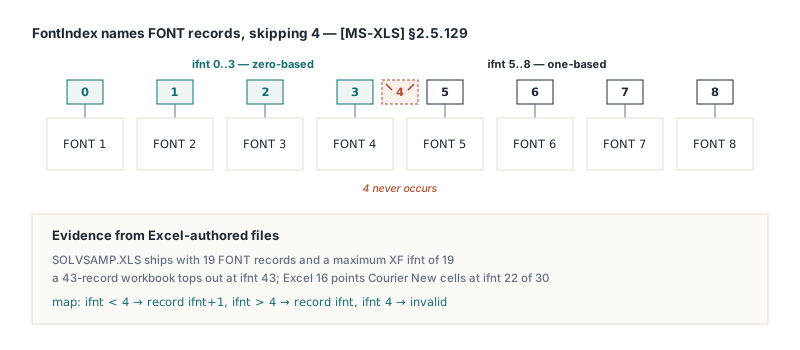
A BIFF8 workbook with eight FONT records contains an XF record whose font field reads 8. Count from zero and that is one slot past the end of the table, yet Excel renders the cell in the eighth font without complaint. The value is legal: [MS-XLS] §2.5.129 numbers the first four FONT records 0 to 3, skips 4 entirely, and numbers every later record by its one-based position
So the fifth FONT record is ifnt 5, and a well-formed file never needs a value larger than its FONT record count. The rule reads like a typo in the spec, which is exactly why people "correct" it, and because cell formats, shared-string rich text and comment runs all carry the same FontIndex type, a reading that differs between paths binds some fonts correctly and others one record off. It belongs to the same family as the length and encoding quirks in decoding BIFF8 XLUnicodeString cch and fHigh — the file is fine, the reading of it is not
What [MS-XLS] §2.5.129 says, and how to check it on a real file
[MS-XLS] §2.5.129 defines FontIndex as a record position with a hole in it. Values below 4 are zero-based, values above 4 are one-based, and the value 4 MUST NOT be used. XF records point at fonts with it, the FormatRun entries of a rich shared string use it, and so do the TXO formatting runs described in §2.5.272
You do not have to take the spec's word for it. Dump an .xls that Excel itself saved with any BIFF record viewer, count the FONT records (record type $0031), then scan the font field at the start of every XF record ($00E0). The highest value stays within the record count and the number 4 is missing from the list. If you find a 4, or a value above the FONT count, the file was written by something other than Excel and its font numbering deserves a closer look. For a diagnostic tool or a test, the whole mapping fits in two functions
// Your own helpers, not part of any library
// [MS-XLS] 2.5.129 FontIndex: 0..3 zero-based, > 4 one-based, 4 invalid
function FontIndexToRecordNo(Ifnt: Word): Integer;  // 1-based FONT record
begin
  if Ifnt < 4 then
    Result := Ifnt + 1
  else if Ifnt > 4 then
    Result := Ifnt
  else
    Result := -1;  // 4 must not occur
end;

function RecordNoToFontIndex(RecordNo: Integer): Word;
begin
  if RecordNo <= 4 then
    Result := RecordNo - 1
  else
    Result := RecordNo;
end;
How HotXLS numbers fonts in XF records and rich text runs
HotXLS reads and writes every BIFF8 font reference in spec numbering. On save the font table is compacted to the fonts that something actually references, and each surviving font's position becomes a FontIndex: positions 1 to 4 are written as 0 to 3, position 5 and above go out unchanged. Loading reverses it, so any value of 5 or more moves down by one to find the font in memory and anything below 5 stays put. The same conversion is applied to XF records, to rich text runs in the shared string table, to comment and text box runs, and to the font references inside classic chart records
For application code the visible part is TextRuns on TXLSComment and TXLSTextBox. TextRuns.FontIndex[I] returns the file numbering exactly as read, with 4 skipped. Run indexes are 1-based, and CharIndex[I] is the character offset where run I starts. Exposing the file number instead of a zero-based table slot is the better default here: what the API reports matches what a record dump shows. The cost is one call to the helper above before you treat the value as a table position
var
  Book: IXLSWorkbook;
  Note: TXLSComment;
  I: Integer;
  Ifnt: Word;
begin
  Book := TXLSWorkbook.Create;
  if Book.Open('review-notes.xls') <> 1 then
    raise Exception.Create('Cannot open review-notes.xls');
  Note := Book.Sheets[1].Range['C2', 'C2'].Comment;
  if Note <> nil then
    for I := 1 to Note.TextRuns.Count do
    begin
      Ifnt := Note.TextRuns.FontIndex[I];   // file numbering, 4 skipped
      // your own sanity check: 4 means the file breaks 2.5.129
      if Ifnt = 4 then
        raise Exception.CreateFmt('Run %d uses invalid ifnt 4', [I]);
      Writeln(Format('run %d at char %d: ifnt %d = FONT record #%d',
        [I, Note.TextRuns.CharIndex[I], Ifnt, FontIndexToRecordNo(Ifnt)]));
    end;
end;
After a save, the number stored for a run may differ from the one you read or set. The save renumbers runs together with the compacted font table, so the number changes and the font it points at does not
Why a zero-based fix shifts every custom font
The trap usually starts with a reasonable-looking bug report. Someone dumps a workbook with eight FONT records, sees an XF pointing at font 8, concludes that the writer produced an out-of-range index, and switches both the writer and the reader to plain zero-based arithmetic. The round-trip test still passes, because the patched writer and the patched reader agree with each other. Excel does not agree. A file written that way stores the first custom font as ifnt 4, which Excel resolves to the default font, and every later custom font lands one record early. Reading Excel's own files goes the other way: each font binds one record late
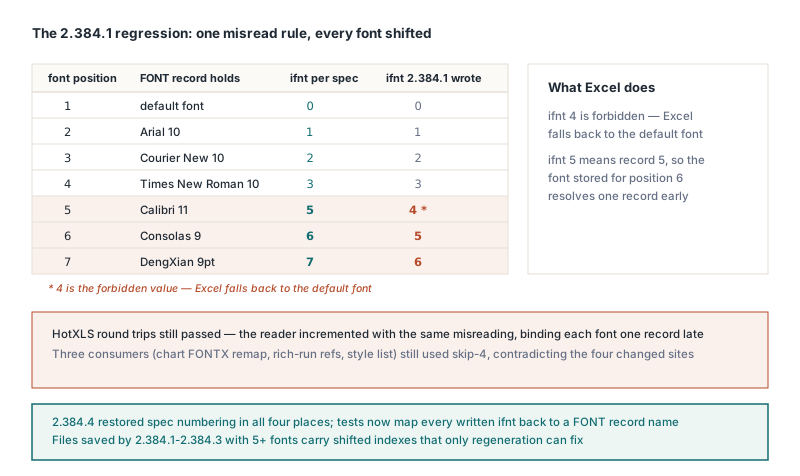
Two signals give the misreading away before it ships. One is a test that asserts ifnt < FontCount. It looks like a bounds check, and it actually writes the misreading down as a requirement. A test that maps each written ifnt back to a FONT record name through the spec formula catches the shift on its first run
The other signal is code that disagrees with itself. A complete BIFF8 reader and writer applies the skip-4 rule in several places: XF output, XF input, shared-string run remapping, comment runs, chart font records. When a change moves some of those to zero-based numbering and leaves the rest alone, the untouched sites are evidence, so suspect the change before you suspect them. A partial change can hide for a long time, because fonts used in rich text are usually also referenced by some cell format
Why do comment font runs break only on the second save?
Comment and text box runs can survive one save and break on the next when two writer habits meet. The first habit is asymmetric pruning: keep the first N-1 FONT records in place unconditionally and drop only the last one when no XF references it. The second is writing the TXO formatting runs ([MS-XLS] §2.4.329) back byte for byte without renumbering them. Each habit passes a single-save test on its own. Together they set up a font loss that waits one generation
The reason is in what Excel writes. Excel-authored .xls files commonly end with an unreferenced trailing font; on a Chinese-locale system it is a 9 pt DengXian. On the first save, the font that only a comment run uses is therefore never last, and nothing visibly moves. That save drops the trailing font, though, and promotes the comment-only font to the last position. The second save finds a last font with no XF reference and discards it. The run's ifnt now points past the end of the table, and Excel falls back to the default font. If the workbook gained a font in between, the run binds to the newcomer instead. Notes that get opened, annotated and saved again and again, like the ones in building a comments and hyperlinks review workflow, are where this shows up first
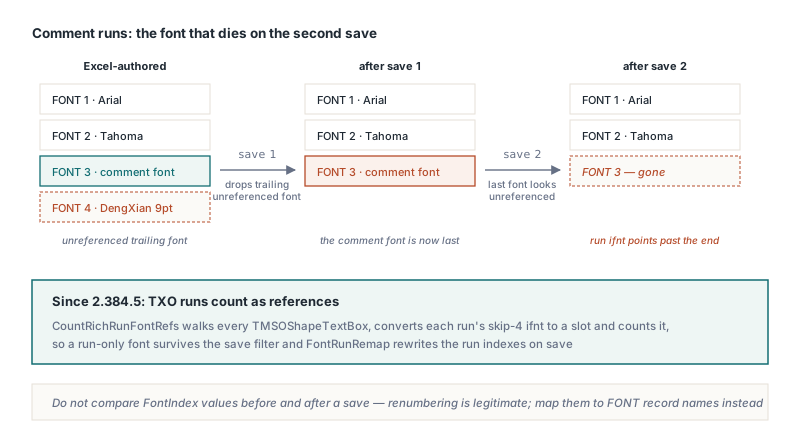
HotXLS handles comment and text box runs the same way it handles shared-string runs. Before the font table is compacted, every run on every worksheet is converted from its skip-4 FontIndex to a table slot and counted as a reference, which keeps a font that only a run uses. On the way out, the runs go through the same slot-to-saved-index table that renumbers the XF records. The closing TxOLastRun entry carries no font and is written as it was read. Because of that renumbering, comparing FontIndex values before and after a save tells you nothing; compare the font names they resolve to
Copies, row inserts and runs that cross workbooks
In the classic engine, Range.Copy, CopyRange, Sheets.AddCopy and the cell shifts behind Range.Insert and Range.Delete all go through one cell-copy path, and a shift is just a copy followed by a clear. A copy that carried only the comment text and author would turn a two-run note into a one-font note after a single row insert, without the user touching the comment at all
HotXLS copies each run's start offset and font along with the text. Inside one workbook the FontIndex is reused as is. Across workbooks the font moves by value: the skip-4 number is converted to a slot, the font is matched or added in the destination font table by its attributes, and the resulting slot is converted back to file numbering. Rich text in shared strings goes through the same conversion when Sheets.AddCopy copies a sheet into another workbook, so the two kinds of runs cannot drift apart. The font-table side follows the same by-value approach as the formula side covered in cross-workbook copy and formula rebinding
Two edge cases are worth knowing when you write tests for this:
- An in-place paste, where source and destination resolve to the same comment, keeps its runs; nothing is cleared before it has been read
Sheets.AddCopyalso copies comments anchored on cells that have no stored cell record, which a loop over stored cells alone would miss
On the XLSX engine, copies clone comment runs by value, and the comments part is read and written with rFont, strike, u and vertAlign. A run's font name, strikethrough, underline and superscript or subscript setting therefore come back intact after save and reopen
A regression test that survives renumbering
Every trap in this article passes an in-memory test. The zero-based misreading lives in a matched writer and reader, the comment-font loss needs two saves, and lost comment runs on XLSX only show after a reopen. So the test has to reopen from disk, run at least two save generations, and check run structure instead of raw font numbers. Start from a workbook that Excel itself saved, with a two-run comment on C2 whose second run uses a font nothing else in the file references; that is the font the second save would otherwise drop
procedure CheckNoteAcrossTwoSaves(const SrcFile, Out1, Out2: string);
var
  Book: IXLSWorkbook;
  Note: TXLSComment;
  RunCount: Integer;
  SecondRunAt: Word;
begin
  // Assert calls are your own test checks
  Book := TXLSWorkbook.Create;
  Assert(Book.Open(SrcFile) = 1);          // Excel-saved, C2 has two runs
  Note := Book.Sheets[1].Range['C2', 'C2'].Comment;
  Assert(Note <> nil);
  RunCount := Note.TextRuns.Count;
  SecondRunAt := Note.TextRuns.CharIndex[2];

  Book.Sheets[1].Range['C2', 'C2'].Copy(Book.Sheets[1].Range['E5', 'E5']);
  Book.Sheets[1].Range['C1', 'C1'].Insert(xlShiftDown);   // C2 moves to C3
  Assert(Book.SaveAs(Out1) = 1);

  Book := TXLSWorkbook.Create;               // generation two
  Assert(Book.Open(Out1) = 1);
  Assert(Book.SaveAs(Out2) = 1);

  Book := TXLSWorkbook.Create;               // reopen, never trust memory
  Assert(Book.Open(Out2) = 1);
  Note := Book.Sheets[1].Range['C3', 'C3'].Comment;
  Assert((Note <> nil) and (Note.TextRuns.Count = RunCount));
  Assert(Note.TextRuns.CharIndex[2] = SecondRunAt);
  Assert(Note.TextRuns.FontIndex[2] <> 4);
  Note := Book.Sheets[1].Range['E5', 'E5'].Comment;
  Assert((Note <> nil) and (Note.TextRuns.Count = RunCount));
end;
The run count and start offsets catch flattened notes. The font itself needs one more step outside the test: open Out2 in a record viewer, run each run's ifnt through FontIndexToRecordNo, and confirm the FONT record it lands on carries the same font name as in the source file. In Excel, a lost font shows up as the default typeface on the second run of the C3 note
Classic XLS still shows up in plenty of Delphi and C++Builder projects, and every font consumer in a BIFF8 file has to agree on §2.5.129 for the output to open correctly in Excel. HotXLS, the Delphi spreadsheet component applies the skip-4 numbering across cell formats, shared strings, comments, text boxes and charts, renumbers runs on every save and moves them by value between workbooks, and reads and writes both XLS and XLSX without Excel or OLE automation