An amount column holds 250, 730 and 1,040. A generated .xls applies an AutoFilter of >=100 to that column, Excel opens the file without a repair prompt, the header dropdown shows that a filter is set, and every data row disappears. The bytes are valid BIFF8. The whole problem is one type byte: the operand 100 was stored as a string, Excel compares a string operand as text, and no numeric cell passes a text comparison against "100". Store the operand as an IEEE double and the same filter keeps all three rows
Where a BIFF8 AutoFilter keeps its criteria
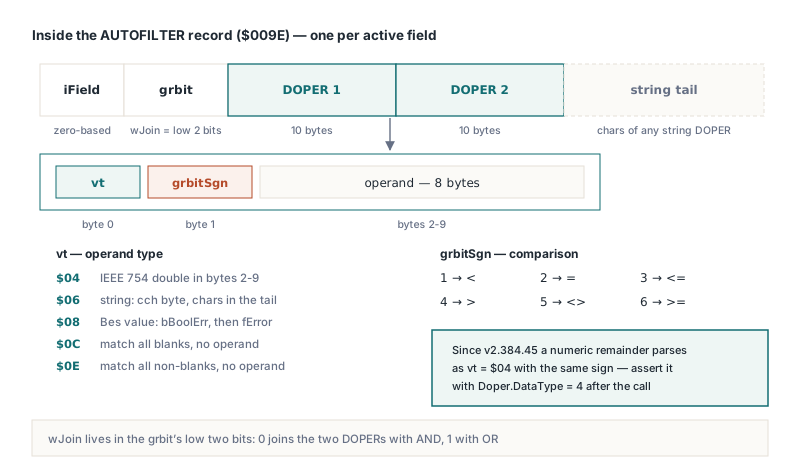
A BIFF8 AutoFilter is spread over three record types, and only one of them carries criteria. AUTOFILTERINFO ($009D, [MS-XLS] §2.4.8) records how many columns the filter range spans. FILTERMODE ($009B) is a marker with no body, and HotXLS emits it only when at least one field has an active criterion. Each active field then gets its own AUTOFILTER record ($009E, §2.4.6): a field index, a grbit word whose low two bits are wJoin, two DOPER structures of exactly 10 bytes each, and an optional tail holding the characters of any string operand. The field index on disk is zero-based, while TXLSWorksheet.ApplyAutoFilter numbers fields from 1, so the third column of your range shows up as 02 00 at the start of the record body in a hex dump
The first byte of each DOPER, vt, says what kind of operand follows:
$04is an IEEE 754 double in the remaining 8 bytes, the form Excel uses for a numeric comparison$06is a string whose length sits in a singlecchbyte, with the characters pushed out to the record tail$08is a Bes value, a Boolean or error code packed into two bytes$0Cand$0Ecarry no operand at all and mean match all blanks and match all non-blanks
The second byte, grbitSgn, is the comparison: 1 through 6 stand for <, =, <=, >, <> and >=. In HotXLS both bytes stay inspectable after you set a criterion. TXLSWorksheet.AutoFilterColumns returns a TXLSAutofilter, its Find method returns the item for a 1-based field, and that item exposes Criteria1 and Criteria2 as TXLSAutofilterDOPER objects with read-only DataType, grbitSgn and Value properties. That is what will be written, byte for byte, when the workbook is saved
Why does a '>=100' filter match no rows in Excel?
The filter matches nothing because a text operand forces a text comparison. The natural first writer strips the >= prefix correctly, sets the sign to 6, and then emits a vtString DOPER holding the characters 100, since every criterion arrives as a string anyway, both in Excel's own dialog and in VBA's AutoFilter call. Excel accepts that record and evaluates it exactly as written. A number cell holding 250 is never "greater than or equal to" the text "100" in that comparison, so the column empties out
TXLSWorksheet.ApplyAutoFilter and TXLSAutofilter.SetFieldCriteria convert criteria the same way. A string that starts with one of the six operators, followed by text that parses as a number, becomes a vtIEEENumber DOPER with that operator as its sign. A numeric Variant (Integer, Int64, Double, Currency and the other ordinal and float types) becomes a number DOPER with sign 2, an equality test. A Boolean Variant becomes a Bes DOPER. A bare string without an operator stays a string DOPER, because that is how Excel itself stores an item picked from the dropdown list
var
  Wb: IXLSWorkbook;
  Sh: TXLSWorksheet;
  Doper: TXLSAutofilterDOPER;
begin
  Wb := TXLSWorkbook.Create;
  Sh := Wb.Sheets.Add;
  Sh.Cells[1, 1].Value := 'Region';
  Sh.Cells[1, 2].Value := 'Amount';
  Sh.Cells[2, 1].Value := 'North';
  Sh.Cells[2, 2].Value := 250;

  // Field 2 = second column of A1:B100 (fields are 1-based in the API)
  Sh.ApplyAutoFilter('A1:B100', 2, '>=100');

  Doper := Sh.AutoFilterColumns.Find(2).Criteria1;
  // Expected: DataType = 4 (IEEE number), grbitSgn = 6 (>=)
  // The Assert is a check you add yourself, not part of the library
  Assert((Doper.DataType = 4) and (Doper.grbitSgn = 6));

  Wb.SaveAs('orders.xls');
end;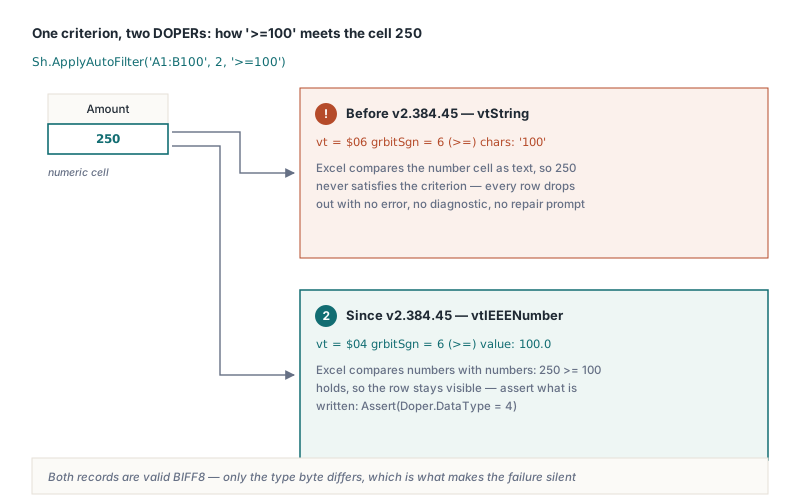
The bare-string rule is the one that catches people. In Delphi, '100' and 100 look interchangeable as Variant arguments, yet the first produces a text match and the second a numeric equality. Guessing would be worse. A part-number column that holds 00100 as text would get a number DOPER for 100 and match none of its own cells. Literal bare strings mirror what Excel writes for a list pick, and when you mean a number you pass a number or write '=100', which gives an IEEE DOPER with sign 2
Decimal separators, dates and the 1904 date system
The number test after the operator always uses a period as the decimal separator, whatever the Windows regional settings say. '>=1.5' becomes a number DOPER; '>=1,5' does not parse, stays a string DOPER and empties a numeric column on a German or French machine just as reliably as on an American one. Grouping separators fail the same way, so '>=1,000' is text. Whitespace between the operator and the digits is trimmed, so '>= 100' is fine. Fixing the separator in one place keeps a report from behaving differently depending on which server generated it, and that is the right default for a file format
Dates are the same trap in a different costume. '>=2026-01-01' is not a number, so it is written as text, while Excel holds date cells as serial numbers and compares them numerically. Pass the serial instead. A Delphi TDateTime has the same integer part as the Excel 1900-system serial for any date from 1 March 1900 on. A workbook switched to the 1904 date system counts from 1 January 1904, so its serials run 1462 lower, and IXLSWorkbook.Date1904 tells you which system the file uses. The details of that offset are in how 1900 and 1904 date serials interact with number formats
var
  Fmt: TFormatSettings;
  Serial: Integer;
begin
  Fmt := TFormatSettings.Create;
  Fmt.DecimalSeparator := '.';

  // Threshold with a fraction: format it with a period, never the locale
  Sh.ApplyAutoFilter('A1:D500', 3, '>' + FloatToStr(1499.5, Fmt));

  // Dates: compare against the serial number Excel stores in the cell
  Serial := Trunc(EncodeDate(2026, 1, 1));
  if Wb.Date1904 then
    Dec(Serial, 1462);
  Sh.AutoFilterColumns.SetFieldCriteria(4, '>=' + IntToStr(Serial),
    xlAnd, Unassigned);
end;
A numeric Variant would be simpler than string concatenation, but a Variant number always means equality. Any other comparison has to travel as operator plus text, so the formatting step cannot be skipped
How do AND and OR join two conditions?
The wJoin bits of the AUTOFILTER grbit are 0 for AND and 1 for OR, and reversing them is easy and expensive. Swap them and a range filter such as at least 100 and below 500 is saved as at least 100 or below 500, which matches every number and looks as though the filter never applied. HotXLS writes 0 for xlAnd and 1 for xlOr, and when equality criteria are involved it also sets the fSimple1 and fSimple2 bits next to wJoin, which mark a DOPER with sign 2
The public constants bring a porting hazard of their own. In HotXLS, xlAnd is 0 and xlOr is 1, while Excel automation numbers them 1 and 2. XlAutoFilterOperator is declared as a plain Byte, so a VBA macro translated with literal numbers compiles without a warning. A literal 1 that meant AND under COM now means OR. A literal 2 that meant OR collides with xlBottom10Items, and because HotXLS treats every operator value other than xlOr as AND when it builds the two DOPERs, that criterion is joined with AND. Both literals flip. Named constants avoid the whole issue:
// Amount from 100 (inclusive) up to 500 (exclusive)
Sh.ApplyAutoFilter('A1:D500', 3, '>=100', xlAnd, '<500');

with Sh.AutoFilterColumns.Find(3) do
begin
  // Checks you add yourself: confirm what will be written
  Assert(Operator = xlAnd);            // wJoin = 0 on disk
  Assert(Criteria2.DataType = 4);      // IEEE number
  Assert(Criteria2.grbitSgn = 1);      // 1 = less than
end;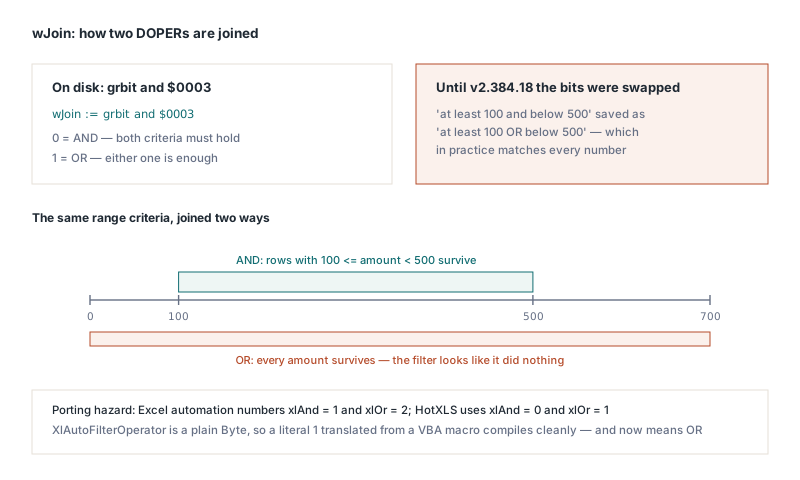
Booleans, blanks and the 255-character ceiling
A Boolean criterion is stored as a Bes value ([MS-XLS] §2.5.10), and Bes puts the value byte bBoolErr first and the fError flag second. Write them in the opposite order and a filter for TRUE puts 1 into the error flag, so Excel reads the criterion as an error code. The nasty part is that a reader with the same swap round-trips its own files perfectly. A library that only ever reads what it wrote proves nothing about conformance here; opening the file in Excel and checking the filter dialog does. HotXLS writes bBoolErr first and fError as 0, so passing True produces a DOPER whose DataType is 8 and whose Value is 1
Blank tests need no operand. The string '=' on its own produces a match-all-blanks DOPER ($0C), and '<>' on its own a match-all-non-blanks DOPER ($0E). Both are full criteria, so the field counts as active and FILTERMODE is written
String operands hit a hard limit in the DOPER layout. The cch field is one byte, so a string operand can hold at most 255 characters, the same cap Excel's own filter dialog enforces. HotXLS strips the operator first and then truncates anything longer to 255 characters, which keeps the length byte from wrapping around and throwing the record tail out of step. A filter on a long description column can therefore match on a prefix of what you passed. Case is left alone: Excel matches filter text without regard to case when it applies the filter, and rewriting the stored criterion would only change the user's data. In BIFF8 the tail stores each string as a one-byte flag followed by UTF-16 code units, and the declared record size has to count exactly those bytes, the same bookkeeping covered in how BIFF record length declarations drift in a Delphi XLS writer
Filtering several columns and checking the saved file
Each ApplyAutoFilter call redefines the whole filter range, so after two calls only the criterion from the second survives. The method goes through the public TXLSWorksheet.SetAutoFilter, which clears every field before rebuilding the range. That is correct for a single column and surprising the first time you filter two. For several columns, call ApplyAutoFilter once to establish the range and the first criterion, then add the rest with AutoFilterColumns.SetFieldCriteria, which touches one field and leaves the range and the other fields alone. Both paths ignore a field number outside the range without raising an exception, so the check worth having reads the criteria back from the reopened file
Sh.ApplyAutoFilter('A1:D500', 1, 'North');                       // range + field 1
Sh.AutoFilterColumns.SetFieldCriteria(3, '>=100', xlAnd, Unassigned);
Sh.AutoFilterColumns.SetFieldCriteria(4, True, xlAnd, Unassigned);
Wb.SaveAs('orders.xls');

Wb := TXLSWorkbook.Create;
Wb.Open('orders.xls');
with Wb.Sheets[1].AutoFilterColumns do
begin
  // Checks you add yourself after reopening the file
  Assert(Find(1).Active and (Find(1).Criteria1.DataType = 6));   // text 'North'
  Assert(Find(3).Criteria1.DataType = 4);                          // number 100
  Assert(Find(4).Criteria1.DataType = 8);                          // Boolean TRUE
end;
The AUTOFILTER record is a stored definition. On a classic XLS worksheet HotXLS writes the criteria for Excel to evaluate when the file opens, and row-level evaluation on the server side lives in the XLSX object model, as shown in HotXLS data validation, AutoFilter and tables in Delphi. Once Excel does hide rows, any totals below the range depend on how SUBTOTAL and AGGREGATE treat hidden and filtered rows, and a numeric filter stored as text shows up there as a total of zero
The criteria conversion, Bes layout and join bits described above are what HotXLS writes into every BIFF8 workbook it saves, alongside native XLSX support for Delphi and C++Builder. Editions, the full feature list and a trial download are on the HotXLS Delphi spreadsheet component page