HotXLS, the native Excel spreadsheet component for Delphi and C++Builder, shipped two related AGGREGATE fixes in September 2026. Version 2.382.0 corrected the options argument so that codes 1/3/5/7 ignore hidden rows, 2/3/6/7 ignore errors, and 0 through 3 ignore nested SUBTOTAL and AGGREGATE cells, exactly as Microsoft documents. Version 2.382.3 then stopped those selection flags from leaking into the evaluation of the very cells the function references. The first defect is embarrassing in the way table-transcription bugs always are: the bit positions were swapped, so every formula that used a nonzero options code got a policy its author did not ask for. The second is more interesting, because it is a shape you will meet in any evaluator that uses a transient field to pass context into a recursive walk. An outer aggregation arms a flag, walks a range, and pulls a cell whose formula has not been computed yet. That formula runs on the same calculator, sees the same armed flag, and quietly aggregates the wrong rows, producing a number that is off by an amount nobody can explain from the formula text alone
What do the AGGREGATE options 0 through 7 actually select?
The options argument of AGGREGATE is a three-bit matrix, and the three bits are independent. Bit 0 (value 1) means ignore hidden rows, bit 1 (value 2) means ignore error values, and bit 2 (value 4) means stop ignoring nested SUBTOTAL and AGGREGATE cells, because skipping them is the default for the low codes. Two things about this are easy to get backwards. The hidden-row bit is the low bit, not the middle one, so AGGREGATE(9,1,...) is the filtered-total form and AGGREGATE(9,2,...) is the error-tolerant one. And the nested-aggregate policy is inverted relative to the other two: only codes 4 through 7 treat a cell whose own formula is a SUBTOTAL or AGGREGATE as an ordinary value. ECMA-376 Part 1 §18.17.7 defines SUBTOTAL with the same include-or-exclude hidden-row split across codes 1-11 and 101-111, and AGGREGATE, stored in OOXML files under the _xlfn. prefix, generalizes that split into the options argument, so the table Microsoft publishes for the AGGREGATE function is the contract an engine has to meet rather than a convenience
| Option | Hidden rows | Error values | Nested SUBTOTAL / AGGREGATE |
|---|---|---|---|
| 0 | included | propagated | ignored |
| 1 | ignored | propagated | ignored |
| 2 | included | ignored | ignored |
| 3 | ignored | ignored | ignored |
| 4 | included | propagated | included |
| 5 | ignored | propagated | included |
| 6 | included | ignored | included |
| 7 | ignored | ignored | included |
Why did HotXLS have the AGGREGATE options backwards?
Because the original TXLSCalculator.CalcAggregateFunc was written from a paraphrase of the table rather than the table. It computed ignoreErrors := (optCode >= 4) and (optCode <= 7) and armed the hidden-row gate for codes 2, 3, 6, and 7, while the nested-aggregate policy was not implemented at all. The earlier article on SUBTOTAL and AGGREGATE hidden rows listed that gap as an open limit and described the old mapping as it then shipped; the description was accurate about the code and wrong about Excel, and nobody noticed for a long time because the two policies most people combine, hidden plus errors, land on codes 3 and 7 under both tables. Only a single-bit code exposed the swap: AGGREGATE(9,1,A1:A4) returned the unfiltered sum, and AGGREGATE(9,2,...) skipped hidden rows while still propagating #DIV/0!. The defect surfaced from a static review of lxCalc.pas, logged as HXLS-008 in the project known-issues register, not from a customer file, which says something about how rarely the single-bit codes appear in production workbooks. Version 2.382.0 rewrote the decode as three set-membership tests and added a second gate for the nested policy, wired through a new TXLSIsSubtotalCell callback that the workbook provides alongside TXLSIsRowHidden
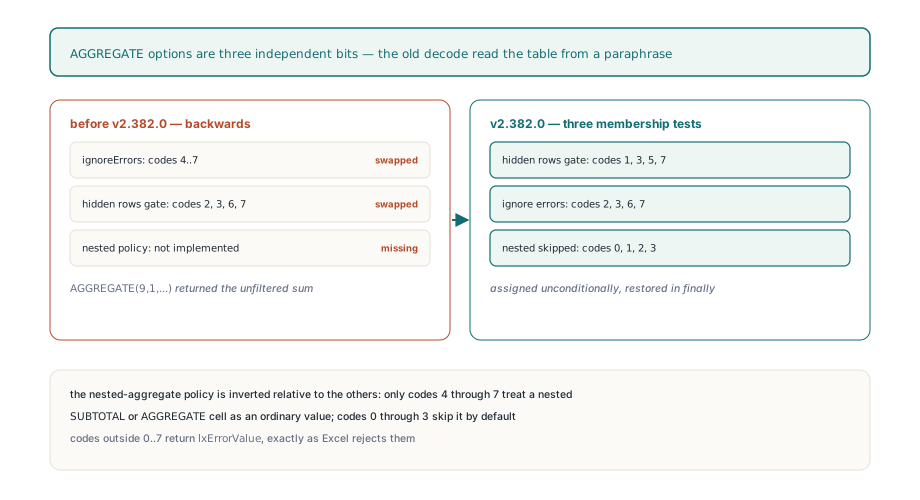
// TXLSCalculator.CalcAggregateFunc, v2.382.3 form
if (optCode < 0) or (optCode > 7) then
begin
  Result := lxErrorValue;            // Excel rejects codes outside 0..7
  Exit;
end;
ignoreErrors := optCode in [2, 3, 6, 7];
prevIgnoreHidden := FIgnoreHiddenRows;
prevIgnoreSubtotal := FIgnoreSubtotalCells;
FIgnoreHiddenRows := (optCode in [1, 3, 5, 7]) and Assigned(FIsRowHidden);
FIgnoreSubtotalCells := (optCode in [0, 1, 2, 3]) and Assigned(FIsSubtotalCell);
try
  // ... map function_num to the inner iftab, walk ref1..refN ...
finally
  FIgnoreHiddenRows := prevIgnoreHidden;
  FIgnoreSubtotalCells := prevIgnoreSubtotal;
end;
Notice that the two flags are assigned unconditionally rather than only set when the option asks for them. The v2.382.0 version still used if ... then FIgnoreHiddenRows := True, which meant an AGGREGATE with code 4 nested inside a SUBTOTAL(109, ...) inherited the outer hidden-row gate instead of clearing it. Assigning the decoded value on entry and restoring the previous value in the finally block makes each AGGREGATE call own its policy for the duration of its walk and nothing more. Version 2.382.0 also made the array form honest: when an argument evaluates to a one- or two-dimensional Variant array, CalcAggregateFunc now walks every element and applies the error policy per element, where the old code tested only for a NaN double and otherwise handed the whole array to ExcelSum
Why does an outer AGGREGATE leak into the formulas it references?
Because FIgnoreHiddenRows and FIgnoreSubtotalCells are fields on the calculator, and the calculator is shared by every formula evaluated during one recalculation. The gates were designed as scratch fields precisely so that six cell-walk loops could consult them without threading a parameter through every signature, and that design is sound as long as everything that runs while a gate is armed belongs to the aggregation that armed it. The assumption breaks at one specific point: FGetValue. When a walker asks the workbook for a cell value and that cell holds a formula with no cached result, the workbook compiles the formula and evaluates it on the spot, on the same TXLSCalculator, with the outer gates still set. The regression fixture in HotXLS.WorkbookApiTests.pas shows the failure with four cells. A1 holds 10, A2 holds 20 on a hidden row, A3 holds =1/0, and A4 holds =SUBTOTAL(9,A1:A2), whose correct value is 30. Now evaluate =AGGREGATE(9,7,A1:A4): ignore hidden rows, ignore errors, count the nested subtotal as a value. Excel returns 10 + 30 = 40. With A4 uncached, the pre-2.382.3 engine armed the hidden-row gate, walked to A4, triggered its evaluation, and CalcSubtotalFunc for code 9 inherited the armed gate, because it only ever sets the flag for codes 101 through 111 and never clears it. A4 evaluated to 10 instead of 30, and the outer total came back as 20. Nothing in either formula mentions hidden rows on the path that produced the wrong number
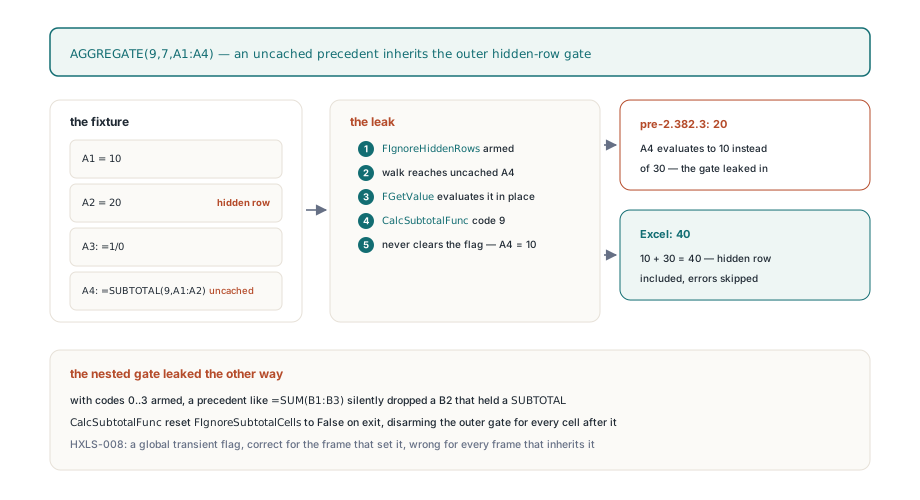
The nested-aggregate gate leaked the same way in the other direction. With codes 0 through 3, FIgnoreSubtotalCells is armed, and the generic range walker in GetValueItemRange honors it, so a precedent whose formula is =SUM(B1:B3) would silently drop B2 if B2 happened to contain a SUBTOTAL. Worse, CalcSubtotalFunc resets FIgnoreSubtotalCells to False on exit rather than restoring the previous value, so an uncached SUBTOTAL precedent reached mid-walk disarmed the outer gate for every cell after it. The project known-issues register files this under HXLS-008 as nested selection state leakage, and that is the right name for the class of bug: a global transient flag that is correct for the frame that set it and wrong for every frame that inherits it
How AggregateGetCellValue and AggregateGetItemValue insulate the walk
The fix in v2.382.3 puts a boundary around every point where AGGREGATE reads a value it did not compute itself. TXLSCalculator.AggregateGetCellValue wraps the raw FGetValue call: it saves both flags, clears them, performs the fetch, and restores them in a finally block. The outer aggregation still applies its own policy to the cell it just fetched, because the hidden-row and nested-cell tests happen in the walker around the fetch, but the precedent formula itself runs with no policy at all, which is what Excel does
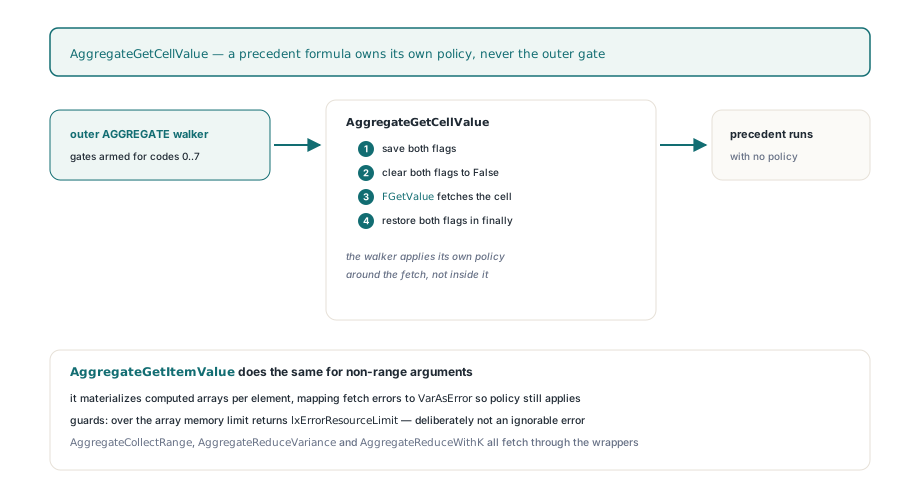
function TXLSCalculator.AggregateGetCellValue(SheetIndex, Row, Col: Integer;
  var Value: Variant; var OutOfRange: Boolean): Integer;
var
  Hidden, Nested: Boolean;
begin
  Hidden := FIgnoreHiddenRows;
  Nested := FIgnoreSubtotalCells;
  FIgnoreHiddenRows := False;        // a precedent formula owns its own policy
  FIgnoreSubtotalCells := False;
  try
    Result := FGetValue(SheetIndex, Row, Col, Value, OutOfRange);
  finally
    FIgnoreHiddenRows := Hidden;
    FIgnoreSubtotalCells := Nested;
  end;
end;
AggregateGetItemValue does the same for non-range arguments, and it has to do more than clear flags, because an argument such as A1:A4/(B1:B4-20) is a computed array whose element shape has to survive. The wrapper materializes a plain range into a two-dimensional Variant array through AggregateGetCellValue, mapping a cell that returned an error code to VarAsError so the error policy can still be applied per element, and it recurses through the binary and unary operator nodes (SA_ADD, SA_DIV, SA_UNARMINUS, and the rest) with ApplyArrayBinaryOp and ApplyArrayUnaryOp; anything else falls through to the normal GetValueItem. Two guards sit in front of the materialization: a range larger than EffectiveFormulaArrayMemoryLimit returns lxErrorResourceLimit, and a multi-sheet or inverted range returns #VALUE!. A resource-limit code is deliberately not treated as an ignorable cell error even under options 2/3/6/7, since an engine that swallowed its own out-of-memory signal because the user asked to skip #N/A would be lying. All three AGGREGATE walkers, AggregateCollectRange for the SUM family, AggregateReduceVariance for STDEV, VAR, and PRODUCT, and AggregateReduceWithK for MEDIAN and the quantile forms, were switched from FGetValue and GetValueItem to the two wrappers, and each gained the nested-cell test through FIsSubtotalCell
Which error does AGGREGATE return when it does not ignore errors?
The original one, since v2.382.3. Version 2.382.0 detected error cells correctly but collapsed every one of them into lxErrorValue, so AGGREGATE(9,4,A1:A3) over a #DIV/0! cell returned #VALUE!, where Excel propagates the first error it meets unchanged. The replacement helper AggregateErrorCode maps a Variant to the matching lxError* code, whether the Variant is a genuine varError or one of the seven error strings, and AggregateValueIsError is now just a test for a nonzero result. Each walker records the first error code it sees and returns that code, which also means a cell whose formula was never calculated, and whose error therefore arrives as a return code from FGetValue rather than as a cached Variant, propagates the same way as a cached one. Two counting functions get special treatment inside AggregateCollectRange, and the treatment matches SUBTOTAL rather than SUM. For inner function 0, COUNT, an error cell is never counted and never propagated regardless of the options code, because COUNT only counts numbers. For inner function 169, COUNTA, an error cell is a non-empty value and counts as 1 unless the options code ignores errors, in which case it is skipped. That asymmetry is how Excel treats COUNT and COUNTA outside AGGREGATE too, and it is the kind of detail a generic "if error then propagate" rule quietly gets wrong
What the eight-option regression matrix verifies
The fixture described above is exercised as a full matrix in AggregateFunc_OptionMatrixCoversHiddenErrorsAndNestedAggregates: for each options code from 0 to 7 it evaluates both the SUM form and the MEDIAN form over A1:A4 and checks the result against a hand-derived expectation. Codes 0, 1, 4, and 5 must propagate the #DIV/0! from A3, since none of them ignores errors. Code 2 gives SUM 30 and MEDIAN 15, from 10 and 20 with the nested A4 skipped. Code 3 gives 10 and 10. Code 6 gives 60 and 20, because the 30 in A4 now counts. Code 7 gives 40 and 20, which is the case that returned 20 before the leak fix. The wider acceptance run recorded in the known-issues register covers all nineteen function numbers against all eight codes, with every precedent both cached and uncached, for 304 scenarios on Win32 and Win64
var
  Book: TXLSXWorkbook;
  Sheet: TXLSXWorksheet;
begin
  Book := TXLSXWorkbook.Create;
  try
    Sheet := Book.Sheets.Add('Data');
    Sheet.Cells[1, 1].Value := 10;
    Sheet.Cells[2, 1].Value := 20;
    Sheet.Cells[3, 1].Formula := '=1/0';
    Sheet.Cells[4, 1].Formula := '=SUBTOTAL(9,A1:A2)';   // group subtotal = 30
    Sheet.RowHidden[2] := True;

    Sheet.Cells[6, 1].Formula := '=AGGREGATE(9,1,A1:A4)'; // #DIV/0!  hidden skipped, error propagates
    Sheet.Cells[7, 1].Formula := '=AGGREGATE(9,3,A1:A4)'; // 10       hidden + error + nested skipped
    Sheet.Cells[8, 1].Formula := '=AGGREGATE(9,6,A1:A4)'; // 60       only errors skipped
    Sheet.Cells[9, 1].Formula := '=AGGREGATE(9,7,A1:A4)'; // 40       was 20 before v2.382.3
    Book.Recalculate;
    Book.SaveAs('aggregate-options.xlsx');
  finally
    Book.Free;
  end;
end;
Where the boundary still is
Three limits are worth knowing before you build on this. First, the nested-aggregate predicate is textual. TXLSXWorkbook.GetCalcIsSubtotalCell and its classic-engine twin answer True when a cell's formula starts with SUBTOTAL(, AGGREGATE(, or _xlfn.AGGREGATE(, with or without the leading equals sign, so a formula such as =IF(C1,SUBTOTAL(9,B1:B9),0) or =SUBTOTAL(9,B1:B9)*2 is not recognized as nested and will be double-counted by codes 0 through 3 where Excel would skip it; a generator that emits computed subtotals should keep the aggregation call at the head of the formula. Second, the insulation lives in the three AGGREGATE walkers. CalcSubtotalFunc still walks through GetValueItemRange, CollectRangeValues, and SubtotalReduceVariance, which call FGetValue directly, so a SUBTOTAL(109, ...) whose range contains an uncached precedent formula can still pass its hidden-row gate into that precedent. A full Recalculate evaluates precedents before dependents, so the cached path is taken and the gate is never inherited; the exposure is limited to ad hoc evaluation through Calculate and to workbooks loaded without cached values, and if you rely on incremental recalculation over the dependency graph to keep large models responsive, the same ordering guarantee is what keeps this leak dormant. Third, both gates are conditioned on Assigned(FIsRowHidden) and Assigned(FIsSubtotalCell). Both workbook facades wire the callbacks in their constructors, but code that builds a TXLSCalculator by hand with only the two original arguments gets the legacy include-everything behavior for every options code, silently. When a total looks wrong and the formula text looks right, tracing the evaluation step by step is the quickest way to see whether a precedent was evaluated under an inherited gate or whether a callback was simply never attached
The calculation engine described here, the option decoder, the insulated fetch wrappers, and the regression matrix that pins them down all ship as source with the HotXLS Delphi spreadsheet component, which reads, writes, and recalculates XLS, XLSX, and ODS workbooks in Delphi and C++Builder without an Excel installation