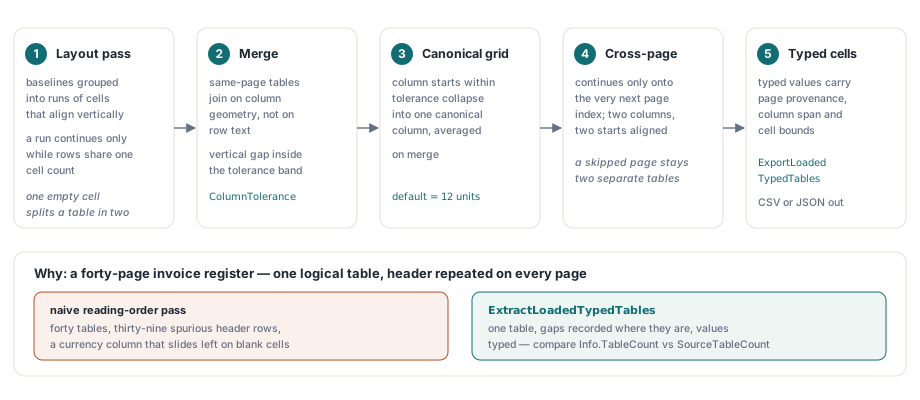
HotPDF recovers tables from an existing PDF through ExtractLoadedTypedTables, a Delphi API that merges the row fragments the layout pass produces, builds one canonical column grid per table, continues that table across a page break when the geometry supports it, and returns every cell as a typed value carrying page provenance, column span and bounds. ExportLoadedTypedTables writes the same result straight to CSV or JSON. The scenario that makes this worth building is dull and extremely common. A forty-page invoice register, one table logically, printed with its header repeated at the top of every page. Run a naive reading-order pass over it and you get forty tables, thirty-nine spurious header rows, and a currency column that slides one position left on every row where the middle cell happened to be blank. Cleaning that up downstream, inside the calling application, is where document-import projects go to die
Why does a PDF page hand you fragments instead of a table?
Because a PDF page carries no table semantics at all unless the document is tagged. The content stream holds text-showing operators and positioning matrices (ISO 32000-1 §9.4.3) and nothing more; the ruled box you see on screen is unrelated path painting that no extractor is obliged to correlate with the text. Structure element types Table, TR, TH and TD live only in the logical structure hierarchy of a tagged PDF (ISO 32000-1 §14.8.4), and the overwhelming majority of business documents in circulation are not tagged. Everything described below is geometric recovery, not parsing, and that is worth saying out loud before anyone builds a reconciliation report on top of it
HotPDF therefore runs a semantic layout analysis over the extracted glyphs first, the same pass that backs structure-order text extraction from a loaded PDF and the structured HTML and XML exports. That pass groups baselines into runs whose cells align vertically, and it will only continue a run while consecutive rows have the same cell count. For a layout engine that rule is correct and cheap. For a caller it is the wrong shape: a single row with an empty interior cell splits one visual table into two source tables. The typed table layer sits above that pass precisely to put the pieces back together
Canonical column grids and the ColumnTolerance knob
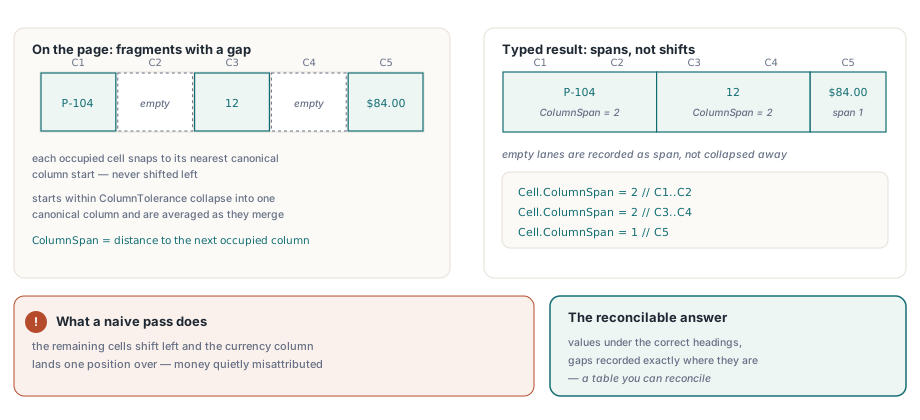
ExtractLoadedTypedTables merges same-page fragments before it does anything else, and it merges on column geometry rather than on row text. Two adjacent source tables on one page join when both have at least two columns, when the vertical gap between the last row of the first and the first row of the second stays inside the tolerance band, and when their column start positions line up. Column starts within ColumnTolerance of each other collapse into one canonical column and are averaged as they merge. The default tolerance is 12 user-space units, which suits ordinary business typography and wants raising for wide-tracked or deeply indented layouts
What happens to a row missing an interior value is the part that matters. HotPDF snaps each cell to its nearest canonical column start and then sets ColumnSpan to the distance from that column to the next occupied one, rather than shifting the remaining cells left. A three-cell row in a five-column grid keeps its values under the correct headings and records exactly where the gaps are. That is the difference between a table you can reconcile and one that quietly misattributes money
var
  Pdf: THotPDF;
  Options: THPDFTypedTableExtractionOptions;
  Tables: THPDFTypedTables;
  Info: THPDFTypedTableExtractionInfo;
begin
  Pdf := THotPDF.Create(nil);
  try
    if Pdf.LoadFromFile('register.pdf', '') <= 0 then
      Exit;
    Options := THPDFTypedTableExtractionOptions.Default;
    Options.ColumnTolerance := 12;           // user-space units
    Options.MinimumTableConfidence := 0.55;  // below this, tables are dropped
    Options.DateOrder := ttdoDMY;            // 03/04/2026 is 3 April
    Options.DecimalSeparator := ',';
    Options.ThousandsSeparator := '.';
    if Pdf.ExtractLoadedTypedTables([0, 1, 2, 3], Options, Tables, Info) then
      // Info.TableCount vs Info.SourceTableCount shows how much was merged
      ProcessTables(Tables)
    else if Info.Status = ttesBudgetExceeded then
      Log(string(Info.Diagnostic));
  finally
    Pdf.Free;
  end;
end;
What does cross-page merging actually guarantee?
It guarantees conservatism, on purpose. HotPDF joins two tables across a page boundary only when MergeAcrossPages is enabled, when the second table starts on exactly the page index after the first one ends, when both have at least two columns, and when at least two canonical column starts align inside ColumnTolerance. The consecutive-page condition is the load-bearing one. Callers pass PageIndices as an open array in any order they please, and without that check a request for pages 3, 9 and 14 could weld three unrelated tables into one entirely plausible-looking result. The cost is that a genuine continuation which skips a page, an interleaved appendix or a duplex scan with a blank verso, comes back as two tables and no option loosens it. Rejoining those is a policy call only the calling application can make, so the API exposes FirstPageIndex, LastPageIndex, SourceTableCount and a per-row PageIndex and leaves the decision where it belongs

Repeated headers are labeled, never deleted
ExtractLoadedTypedTables never removes a repeated header row from the result. When a cross-page merge finds that the incoming table opens with header text identical to the accumulated table, compared after trimming and case folding, it marks those rows IsHeader and IsRepeatedHeader and appends them in source order anyway. Deletion is a lossy, irreversible choice, and different consumers want different answers: a CSV import wants the repeats gone, an audit trail wants them present with their page numbers, a diffing tool wants source order preserved byte for byte. So the library reports and the caller decides
var
  T, R, C: Integer;
  Row: THPDFTypedTableRow;
  Total: Double;
begin
  Total := 0;
  for T := 0 to High(Tables) do
    for R := 0 to High(Tables[T].Rows) do
    begin
      Row := Tables[T].Rows[R];
      if Row.IsRepeatedHeader then
        Continue;                    // keep the first header block only
      for C := 0 to High(Row.Cells) do
        if Row.Cells[C].ValueKind = ttvkCurrency then
          Total := Total + Row.Cells[C].NumberValue;
    end;
end;
Typed values, and the separators you must supply
Type inference runs in a fixed order that resolves the ambiguities in the only sane direction: boolean first, then date, then percentage, then currency, then plain number, with anything unmatched staying a string. Order is what stops 2026 in a date column from being decided by a number parser before the date parser sees it. Currency is recognized from a leading $, £, ¥ or €, or from a three-letter ISO 4217 code followed by a space, and the code is preserved in CurrencyCode. Crucially, HotPDF does not guess your locale. DecimalSeparator, ThousandsSeparator and DateOrder come from options, because 1.234 is either one number or one thousand two hundred and thirty-four depending on a fact the PDF does not contain. The raw Unicode Text is retained on every cell alongside the typed value, so a wrong guess is always recoverable without a second extraction pass
var
  Stream: TFileStream;
  Info: THPDFTypedTableExtractionInfo;
begin
  Stream := TFileStream.Create('tables.json', fmCreate);
  try
    if not Pdf.ExportLoadedTypedTables([0, 1, 2], ttefJSON,
      Stream, Options, Info) then
      case Info.Status of
        ttesInvalidOptions:   ReportBadConfiguration;
        ttesBudgetExceeded:   ReportOversizedDocument;
        ttesCancelled:        ReportUserCancelled;
        ttesWriteFailed:      ReportDestinationProblem;
      else
        ReportExtractionFailure;
      end;
  finally
    Stream.Free;
  end;
end;
The two export formats answer different questions and are deliberately not equivalent. CSV writes the continuation columns of a merged span as empty fields, which is what a spreadsheet or a bulk loader expects. JSON keeps everything the extraction knew: the typed value under its own kind, columnSpan, per-cell and per-row confidence, the cell bounds, and the page and source-table provenance. Both formats stage the whole document into a bounded in-memory buffer and only then publish to your destination stream, restoring the original bytes, length and position if the write fails partway, so a failed export never leaves you a half-written file. Budgets for pages, glyphs per page, tables, rows, cells, characters and output bytes are all accounted separately, and rows are counted before allocation because a per-row SetLength degenerates into quadratic copying long before the million-row default ceiling
Where geometric table recovery gives up
Being explicit about the failure modes is more useful than a feature list, because each of these is a place where a caller needs its own policy rather than a better option value
- Vertical merges are not recovered. HotPDF reports
ColumnSpanfor horizontal spans and leavesRowSpanat 1, so a cell spanning three rows in the printed table arrives as one cell plus two gaps - Header detection is data-driven, not visual. The header block is the run of rows before the first row containing a non-string typed value, so a table whose body is entirely text reports
HeaderRowCountas zero no matter how it is styled - Tables below
MinimumTableConfidenceare dropped from the result without an error. CompareInfo.TableCountagainstInfo.SourceTableCountwhen you need to know that something was discarded - A run needs at least two rows and at least two columns before the layout pass will call it a table at all, so a one-line pseudo-table or a two-column layout of long prose is correctly, and unhelpfully, not a table
- Scanned pages contain no text operators, so there is nothing to recover geometrically until an OCR text layer exists on the page
If your PDFs come out of your own reporting stack, the cheapest fix for all of this is upstream: emit tagged tables, or keep the source data, and treat extraction as a fallback for documents you did not produce. For everything else the pipeline is worth learning in this order, since each layer builds on the one below it: start with plain text extraction from a loaded PDF, move up to the typed table API when the geometry has to be preserved, and look at rendering a data table into a new PDF when you are on the generating side and get to decide how recoverable the output will be
ExtractLoadedTypedTables and ExportLoadedTypedTables ship as part of the native HotPDF Delphi PDF Component for Delphi and C++Builder, with no external DLL and no runtime dependency; the product page carries the full option, status and record reference for the typed table API