A feathered drop shadow that is only five percent opaque at its edge, painted with Multiply over a page whose gray value is 0.8, should leave that pixel at about 0.776. Run the same pixel through a renderer that blends the group's composited output instead of the group's own color and alpha, and it lands near 0.62. That is darker than the correctly rendered core of the shadow, where opacity is six times higher. The shadow grows a dark halo and, on a colored background, takes on that background's hue
The file behind that picture is ordinary. A design tool exports a catalog page with a product photo sitting on a soft shadow. The shadow itself is a Form XObject drawn as a transparency group with /BM /Multiply, and its fade-out comes from a luminosity soft mask. Two different problems stack up in that one object. The first is how a group with a non-Normal blend mode gets composited. The second is what number a luminosity mask should produce for a mid-gray, and on that point ISO 32000-1 and the viewers people actually use disagree
Why does a Multiply drop shadow render too dark?
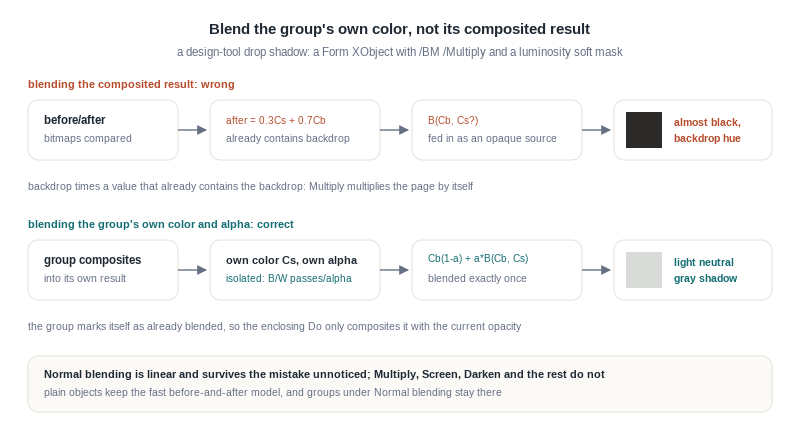
A Multiply shadow renders too dark when the renderer treats the group's composited result as an opaque source and blends it with the backdrop a second time. Wherever the group is partly transparent, that result already contains the backdrop, so Multiply ends up multiplying the page by itself
The mistake comes from a model that is perfectly sound for ordinary objects. Before an object is painted, the renderer snapshots the affected pixels; after painting, it compares the two bitmaps, treats the new color as an opaque source Cs, computes B(Cb, Cs) and composites the result with the current opacity. For a filled path, a glyph or an opaque image this is exact, because the source really is opaque inside its shape and the shape is where the pixels changed. HotPDF keeps that per-object model for plain objects
A transparency group breaks the assumption. ISO 32000-1 §11.4 says a group is first composited into its own result, with its own color and its own alpha, and only then blended with the backdrop as a single object. The arithmetic from the opening shows what goes wrong. Suppose the shadow color is 0.4 and the backdrop 0.8. At the 30 percent core, the group's composited pixel is 0.3 × 0.4 + 0.7 × 0.8 = 0.68; multiplying that by the backdrop gives 0.544, while the correct 0.8 × 0.7 + 0.3 × 0.8 × 0.4 is 0.656. At the five percent edge the composited pixel is 0.78 and the wrong answer is 0.624, against a correct 0.776. The thinner the shadow, the worse the error, the opposite of what a faint edge should do
Normal blending with an opacity is linear, so it survives this mistake with no visible trace. Multiply, Screen, Darken and the other non-linear modes all expose it
Letting the group do its own blending
HotPDF moves the blend for a group painted under a non-Normal blend mode out of the generic per-object path and into the group renderer itself. The group computes Cb(1 − α) + α·B(Cb, Cs) from its own color, its own alpha and the backdrop the surrounding Do paints against, then flags the result as already blended. The enclosing Do only composites it with the current opacity, so the backdrop is multiplied exactly once
Getting α is the hard part. A group that composites straight onto the page has no alpha plane of its own, and even for an isolated group (/I true), watching which pixels changed cannot measure black paint or an object painted twice in the same color. HotPDF therefore draws the group twice, once on black and once on white:
- On black, each channel ends up as
α·Cs - On white, the same channel ends up as
α·Cs + (1 − α) - Subtracting gives
α = 1 − (white − black), and dividing givesCs = black / α
The trick depends on linearity. Every Normal composite the renderer performs, including GDI AlphaBlend for images with soft masks and anti-aliased edges, is linear in the backdrop, so the two passes differ by a clean 1 − α term. A blend mode inside the group would break that, which is why the renderer first looks through the ExtGState entries in the group's own resources. If one of them sets a non-Normal /BM, an isolated group falls back to the alpha plane it tracks while painting, and a non-isolated group goes through the per-object path. Non-isolated knockout groups (/K true) also stay on the per-object path. The scan covers the group's own resources only; nested forms are not inspected
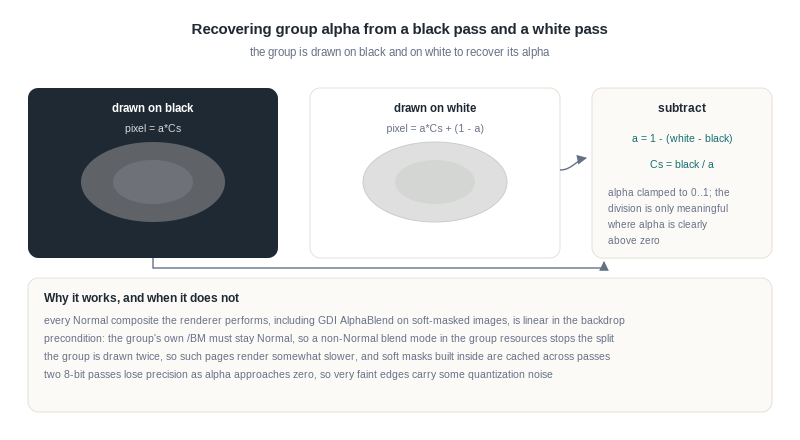
Drawing a group twice costs time, and pages full of blended shadows render more slowly because of it. The cost is deliberate: a shadow that is fast and wrong is the first thing a customer notices on a product page. The slower path only runs for groups that carry a non-Normal blend mode or are isolated. Soft masks built inside the group are kept until both passes of a tile finish, so the white pass reuses them instead of rebuilding
The per-pixel math is short enough to write out. This is not a HotPDF API, just the same arithmetic as plain Delphi so you can check a pixel by hand:
// Illustration of the per-channel math (values 0..1); not a HotPDF API.
// Black = group drawn on a black backdrop, White = on a white backdrop.
procedure RecoverGroupPixel(Black, White: Double;
  out Alpha, Source: Double);
begin
  Alpha := 1.0 - (White - Black);
  if Alpha < 0.0 then Alpha := 0.0;
  if Alpha > 1.0 then Alpha := 1.0;
  if Alpha > 0.0 then
    Source := Black / Alpha   // un-premultiply
  else
    Source := 0.0;            // fully transparent: color is irrelevant
end;

// Multiply, then the group composite Cb(1 - a) + a * B(Cb, Cs)
function CompositeMultiply(Backdrop, Source, Alpha: Double): Double;
begin
  Result := Backdrop * (1.0 - Alpha) + Alpha * (Backdrop * Source);
end;

// CompositeMultiply(0.8, 0.4, 0.05) = 0.776
// CompositeMultiply(0.8, 0.4, 0.30) = 0.656
Inside the renderer the passes are 8-bit, and the three channel alphas are averaged into one value per pixel. Alpha recovered from 8-bit data gets coarse as it approaches zero, so the faintest edge pixels carry some quantization noise. The division is only trustworthy where alpha is clearly above zero, and a fully transparent pixel is simply left alone
The blend mode resets to Normal inside the group
Blend mode, constant alpha and soft mask all apply to the transparency group as a whole, so the content inside the group starts from Normal blending (ISO 32000-1 §11.6.6). A renderer that resets opacity and soft mask on group entry but forgets the blend mode produces a striking failure. Inside an isolated group the content multiplies itself into the group's empty initial backdrop, which is black. The entire group paints black. HotPDF resets all three when it enters a group
Soft masks need the same treatment. A single ExtGState may set both /BM /Multiply and /SMask, and the mask group must still be drawn with Normal blending. Multiply a white mask group onto a black starting surface and it stays black — the mask hides the very area it was supposed to reveal. Simple test documents rarely combine these keys in one graphics state; exported artwork with shadows combines them constantly
What value should a luminosity soft mask give mid-gray?
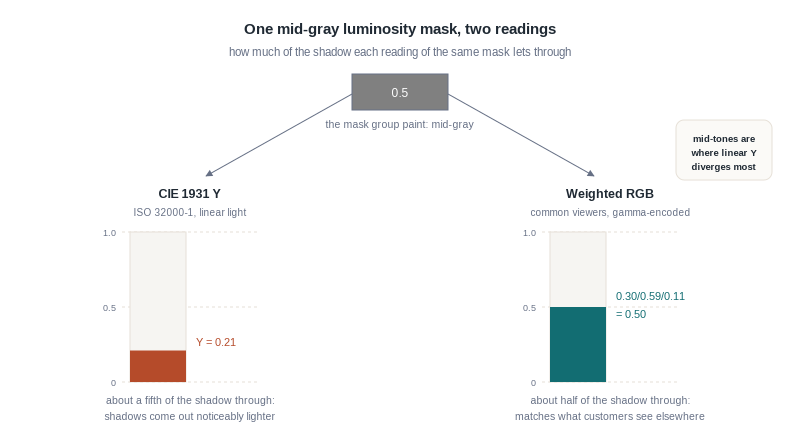
Under ISO 32000-1 §11.5.3, a luminosity soft mask whose group uses a CIE-based blending space should take CIE 1931 Y, and for an sRGB mid-gray of 0.5 that is only about 0.21, because Y is measured in linear light. Common PDF viewers resolve the group color to RGB and weight the encoded values 0.30 / 0.59 / 0.11 instead, which gives 0.5 for the same gray. HotPDF uses the viewer weighting by default, and THotPDF.RenderColorimetricLuminosityMasks switches to the specification reading
The gap shows up on real files. A fade in a design-tool export is usually a gradient in an ICCBased or calibrated group, and mid-tones are where linear Y and gamma-encoded gray drift furthest apart. Under CIE Y a mid-gray mask lets through about a fifth of the shadow instead of half, so drop shadows and vignettes come out visibly lighter than in the viewers your customer is likely to open the file in. A default that follows the standard while contradicting what everyone sees on screen just moves the complaint from the file to the renderer, which is why the property ships as False and the strict reading stays one assignment away
uses
  Vcl.Graphics, HPDFDoc;

procedure RenderCatalogPage;
var
  Pdf: THotPDF;
  Bmp: TBitmap;
begin
  Pdf := THotPDF.Create(nil);
  try
    if Pdf.LoadFromFile('catalog-page.pdf') > 0 then
    begin
      // False (default): weight the mask colors like DeviceRGB,
      // which is what common viewers show.
      // True: take CIE Y when the mask group has a CIE-based space.
      Pdf.RenderColorimetricLuminosityMasks := False;
      Bmp := Pdf.RenderLoadedPageToBitmap(0, 150);
      if Bmp <> nil then
      try
        Bmp.SaveToFile('catalog-page-viewer.bmp');
      finally
        Bmp.Free;
      end;
    end;
  finally
    Pdf.Free;
  end;
end;
The property only changes pixels when the mask group's blending space is CIE-based: CalGray, CalRGB, Lab or ICCBased. A mask group in DeviceGray, DeviceRGB or DeviceCMYK renders the same either way, since the device-space conversion to gray is identical in both modes. In colorimetric mode the renderer linearizes the sRGB result and weights it 0.2126 / 0.7152 / 0.0722, which is where the 0.21 for mid-gray comes from
Broken mask groups: /CS, /BC and spot colors
A luminosity mask is only as consistent as its backdrop. The /BC color fills the mask area outside the group's shape, and it has to be converted with the same rule as the paint inside the group. HotPDF runs both through the same conversion, in either mode. Mix the two, weighted RGB for the paint and CIE Y for the backdrop, and a visible seam appears where the group's bounding box ends, because the area just outside the box suddenly reads a different gray
Malformed files trip up the mask before any of that. The blending space comes from the group's /CS entry, and /BC must carry exactly one number per component of that space: three for an RGB-based space, four for CMYK, one for gray. A producer can get this wrong by omitting /CS or by writing an RGB backdrop for a gray group. When that happens HotPDF drops the mask and draws the paint unmasked — guessing a backdrop would produce a fade nobody designed. Separation, DeviceN and NChannel are not legal blending spaces either, so a mask group declaring one is dropped the same way. Spot-color paint inside a valid mask group is a different case: it goes through its tint transform to the alternate space before luminosity is computed
A dropped mask shows up as a hard-edged shadow, which looks like a rendering bug rather than a file problem. The renderer records the reason, and you can read it back after the render:
uses
  System.SysUtils, Vcl.Graphics, HPDFDoc, HPDFPageRenderer;

procedure ReportDroppedMasks(Pdf: THotPDF; PageIndex: Integer);
var
  Bmp: TBitmap;
  Diags: THPDFRenderFallbackDiagnostics;
  I: Integer;
begin
  // rfpReport collects diagnostics; rfpStrict raises an exception instead
  Pdf.RenderFallbackPolicy := rfpReport;
  Bmp := Pdf.RenderLoadedPageToBitmap(PageIndex, 96);
  Bmp.Free;
  Diags := Pdf.GetLastRenderFallbackDiagnostics;
  for I := 0 to High(Diags) do
    if Pos('SMask', string(Diags[I].ObjectName)) = 1 then
      // e.g. "SMask/G/Group/CS: luminosity soft-mask blending colour
      // space is unavailable" or "SMask/BC: soft-mask backdrop does not
      // match the blending colour space"
      Writeln(string(Diags[I].ObjectName), ': ', string(Diags[I].Reason));
end;
The default policy, rfpIgnore, records nothing, so switch to rfpReport while you investigate a file and keep the default in production unless you want the list
Proofing both readings with the render cache
Because RenderColorimetricLuminosityMasks changes pixels, it is part of the render cache key. Bitmaps rendered with the property on and off are stored under separate keys in both the in-memory cache and the disk cache, so toggling it between calls to THotPDF.RenderLoadedPageToBitmapCached never hands back a bitmap from the other mode. That makes a side-by-side proof cheap to build:
// Side-by-side proofing: render the same page in both modes.
// Each mode is cached under its own key, so repeated calls are cheap.
Pdf.RenderColorimetricLuminosityMasks := False;
ViewerBmp := Pdf.RenderLoadedPageToBitmapCached(PageIndex, 96);

Pdf.RenderColorimetricLuminosityMasks := True;
StrictBmp := Pdf.RenderLoadedPageToBitmapCached(PageIndex, 96);

try
  // ... show both in the proofing UI
finally
  // cached calls return caller-owned copies
  ViewerBmp.Free;
  StrictBmp.Free;
end;
On a page with no luminosity masks in CIE-based groups, the two bitmaps come out identical, which is itself a quick way to confirm that a complaint about shadow brightness lies somewhere else. RenderFallbackPolicy is part of the key as well, so cached bitmaps rendered under different policies are kept apart
For DPI choice, the page cache and the rest of the rendering API, see rendering a PDF page to a Delphi TBitmap with HotPDF. If your job runs the other way, removing transparency from a file for print or archiving instead of drawing it, soft masks and transparency flattening in PDFlibPas covers that side
Group compositing, luminosity mask handling and the cached page renderer all ship in the HotPDF Delphi Component. The component is a native VCL library for Delphi and C++Builder; it creates, edits and renders PDF documents without any external DLL