The HotPDF Delphi Component page renderer now advances text by computing each glyph displacement in text space, tx = ((w0 − Tj/1000) × Tfs + Tc + Tw) × Th as ISO 32000-1 §9.4.4 defines it, and then moving the text matrix through its linear part with HPDFTranslateTextMatrix. Clipping is saved per q frame and restored on Q, but a GDI region is captured only when that frame actually changes the clip. Both fixes landed in HotPDF 2.754.0, and both came from real-world pages that rendered with collapsed words or clip regions leaking past their Q. The first bug is arithmetic that looks right until a producer writes its font size into the matrix. The second is a correctness fix that almost cost us the parallel render speedup, and the way we got the speed back is worth knowing if you write any GDI-backed PDF device
Why does text collapse into a clump when a PDF uses Tf 1?
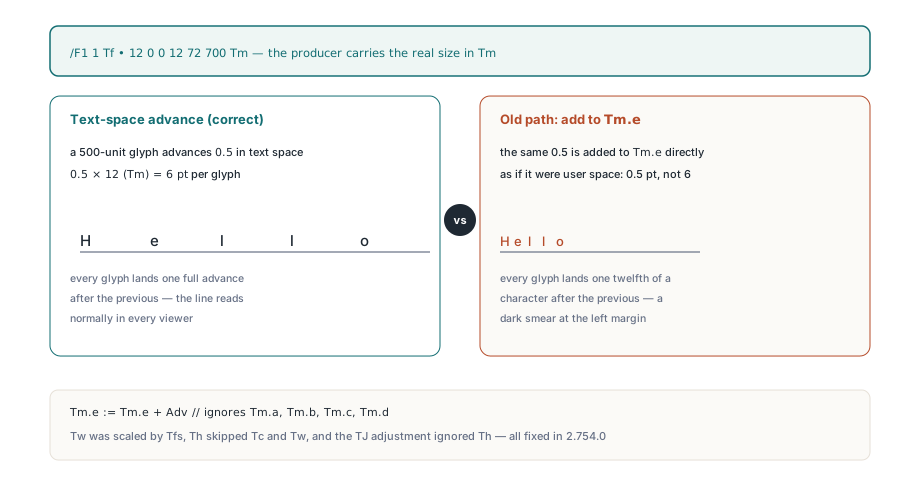
Because the old advance code added a text-space distance straight to the translation component of Tm, as if text space and user space always had the same scale. Plenty of real-world producers set the font size to 1 with Tf and carry the real size in the text matrix. With /F1 1 Tf and 12 0 0 12 72 700 Tm, a glyph 500 units wide advances 0.5 in text space, which is 6 points on the page once Tm scales it. The old renderer executed Tm.e := Tm.e + Adv and moved the pen 0.5 points. Every glyph landed one twelfth of a character after the previous one, so a line of body text rendered as a dark smear at the left margin while the same file looked perfect in every other viewer
// Content stream from a producer that encodes size in Tm, not Tf:
//   BT
//   /F1 1 Tf
//   12 0 0 12 72 700 Tm
//   [(Hel) 30 (lo) -250 (world)] TJ
//   ET

// Old advance (simplified): distance added to Tm.e as if it were user space
Adv := W * FontSize / 1000;                  // 0.5 for a 500-unit glyph
if (HorizScale <> 0) and (HorizScale <> 100) then
  Adv := Adv * HorizScale / 100;             // Th on the width only
Adv := Adv + CharSpace;                      // Tc not scaled by Th
if Code = 32 then
  Adv := Adv + WordSpace * FontSize / 1000;  // Tw wrongly scaled by Tfs
Tm.e := Tm.e + Adv;                          // ignores Tm.a, Tm.b, Tm.c, Tm.d

// Old TJ adjustment: no Th, and again only Tm.e
Tm.e := Tm.e - NumValue * FontSize / 1000;
The Tm.e shortcut was not the only defect in that block. Word spacing Tw is expressed in unscaled text space units, yet the old code multiplied it by FontSize / 1000, so under Tf 12 a justified line lost almost all of its inter-word gap. Horizontal scaling Th applied to the glyph width but not to Tc or Tw, and the TJ kerning adjustment skipped it entirely. The non-painting path that advances render mode 3 invisible text, the kind OCR text layers use, and text inside hidden optional content carried a private copy of the same arithmetic, so anything drawn after an invisible run started from the wrong position. Text state bugs in a renderer rarely fail loudly: like the operand index and resource name bugs that once zeroed Tc, Tw and Tz without a single error, these produced plausible pages on the library's own output and only broke on files from other producers
How does ISO 32000-1 §9.4.4 define the glyph advance?
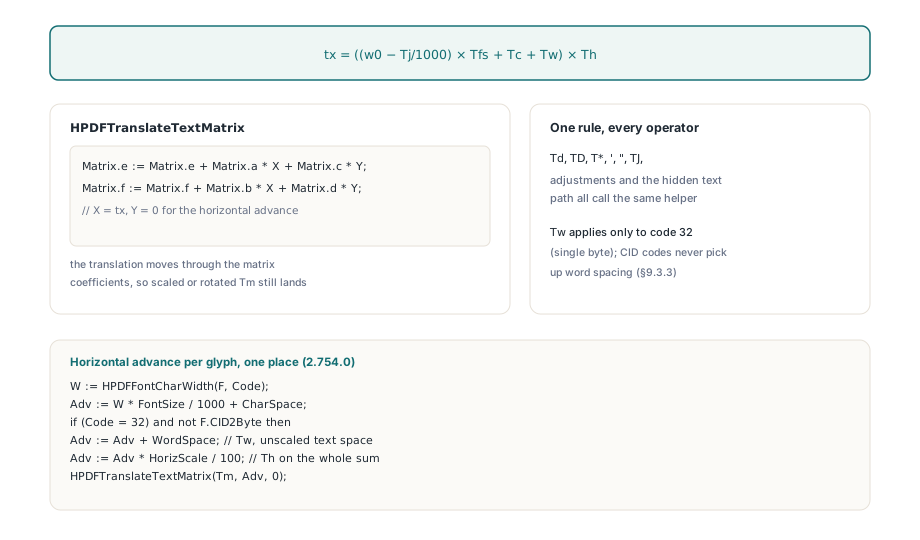
ISO 32000-1 §9.4.4 defines the advance entirely in text space and applies it to the text matrix as a translation matrix, so the answer is to compute tx first and let Tm do the scaling, rotation and skew. For horizontal writing, tx equals ((w0 − Tj/1000) × Tfs + Tc + Tw) × Th, where w0 is the glyph width in thousandths of an em, Tj is the TJ adjustment, and Th is Tz divided by 100. The new Tm is [1 0 0 1 tx 0] × Tm, which in HotPDF is the helper HPDFTranslateTextMatrix: it adds X and Y through the matrix coefficients a, b, c and d instead of writing to e and f directly. Per §9.3.3, Tw applies only to the single-byte character code 32, so multibyte CID codes never pick up word spacing on the horizontal path. The same helper now drives Td, TD, T*, the ' and " operators, TJ adjustments and the hidden text path, which means a single function owns the rule
procedure HPDFTranslateTextMatrix(var Matrix: THPDFAffineMatrix; X, Y: Double);
begin
  Matrix.e := Matrix.e + Matrix.a * X + Matrix.c * Y;
  Matrix.f := Matrix.f + Matrix.b * X + Matrix.d * Y;
end;

// Horizontal glyph advance, ISO 32000-1 9.4.4
W   := HPDFFontCharWidth(F, Code);
Adv := W * State.Text.FontSize / 1000 + State.Text.CharSpace;
if (Code = 32) and not F.CID2Byte then
  Adv := Adv + State.Text.WordSpace;         // Tw in text space, unscaled
Adv := Adv * State.Text.HorizScale / 100;    // Th applies to the whole sum
HPDFTranslateTextMatrix(Tm, Adv, 0);

// TJ number element: same space, same Th
Adjustment := -Items[I].NumValue * State.Text.FontSize / 1000;
HPDFTranslateTextMatrix(State.Text.Tm, Adjustment * State.Text.HorizScale / 100, 0);
Glyph placement had to follow the same logic. When no embedded outline is available and the renderer falls back to GDI TextOutW, it now builds the full glyph matrix from CTM × Tm × rise × em scale, including Th, and installs it with SetWorldTransform in GM_ADVANCED mode inside a SaveDC / RestoreDC pair. The GDI font is created at a fixed 1000-unit height and the transform does the sizing, so rotated and skewed text keeps its orientation instead of being drawn upright at a transformed origin point. Vertical writing mode is the one deliberate asymmetry: a WMode 1 font advances down the y axis by its vertical metric, and horizontal scaling does not apply to that axis
What does q/Q actually save in a PDF graphics state?
ISO 32000-1 §8.4.2 lists the current clipping path as part of the graphics state, so Q must restore the clip exactly as it was at the matching q, not only the numeric parameters. HotPDF already kept a graphics state stack with the CTM, colors, line parameters and text state, but GDI keeps the clip in the device context, outside that stack. A copy of the numeric state therefore restored everything except the clip, and a clip installed with W n inside a q ... Q block kept cropping every later operation on the page. Form XObjects added a second route to the same failure, because §8.10 gives a form an implicit save and restore around its content, and real-world form content sometimes leaves its own q operators unbalanced even though the specification requires them to pair up. The renderer now calls CaptureClipBeforeChange and SaveDC before running a form, then after the form finishes it discards any saved regions deeper than the entry depth and calls RestoreDC, so each saved HRGN has exactly one release path
Lazy clip capture with THPDFSavedClipState
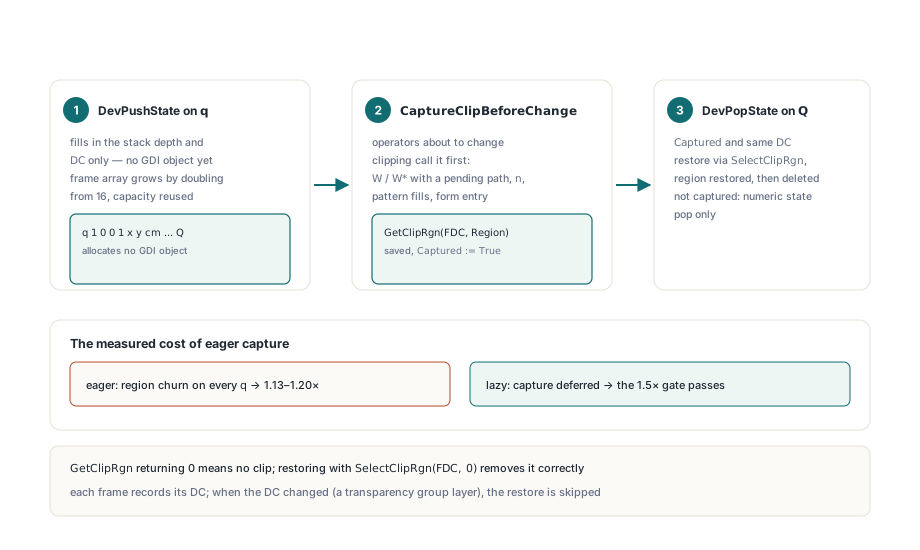
The fix that shipped saves one THPDFSavedClipState record per q, but defers the expensive part until the frame first modifies the clip. The record holds the region handle, the stack depth it belongs to, the device context it was taken from and a Captured flag. DevPushState only fills in the depth and DC and grows the frame array by doubling from 16, so a content stream full of q 1 0 0 1 x y cm ... Q allocates no GDI object at all. Operators that are about to change clipping, meaning path painting with a pending W or W*, the n operator, pattern fills and form entry, call CaptureClipBeforeChange first
procedure THPDFPageRenderer.CaptureClipBeforeChange;
var
  Index, ClipResult: Integer;
  Region: HRGN;
begin
  ClearSavedClipRegions(FGSStack.Count);
  Index := FSavedClipCount - 1;
  if (Index < 0) or FSavedClips[Index].Captured or
     (FSavedClips[Index].StackDepth <> FGSStack.Count) or
     (FSavedClips[Index].DC <> FDC) then Exit;   // already saved, or not ours
  Region := CreateRectRgn(0, 0, 0, 0);
  if Region = 0 then RaiseLastOSError;
  ClipResult := GetClipRgn(FDC, Region);         // 0 means no clip at all
  if ClipResult <= 0 then
  begin
    DeleteObject(Region);
    Region := 0;
    if ClipResult < 0 then RaiseLastOSError;
  end;
  FSavedClips[Index].Region := Region;
  FSavedClips[Index].Captured := True;
end;

procedure THPDFPageRenderer.DevPopState;
var
  Index: Integer;
begin
  ClearSavedClipRegions(FGSStack.Count);
  Index := FSavedClipCount - 1;
  if (Index >= 0) and (FSavedClips[Index].StackDepth = FGSStack.Count) then
  begin
    if FSavedClips[Index].Captured and (FSavedClips[Index].DC = FDC) then
      SelectClipRgn(FDC, FSavedClips[Index].Region);  // Region 0 removes the clip
    if FSavedClips[Index].Region <> 0 then
      DeleteObject(FSavedClips[Index].Region);
    Dec(FSavedClipCount);
  end;
  FGSStack.Pop;
end;
The measured cost of the eager version is the reason this design exists. The first correct implementation created and read a GDI region on every q, and on pages made mostly of numeric transforms the renderer threads spent their time contending for GDI region objects instead of rasterizing. The parallel render pipeline fell from its expected gain to roughly 1.13 to 1.20 times single-threaded throughput and failed the 1.5 times speedup gate in the benchmark suite. With lazy capture and reused frame capacity, the same benchmark passes the original 1.5 times gate again. Small TrueType glyph antialiasing landed in the same release and was the obvious suspect, but the regression traced back to region allocation, which is a good reminder to measure before blaming the newest feature
Where are the limits of this approach?
The saved clip is a GDI region in device pixels, so it is exact for the bitmap being rendered and meaningless for any other target. That is why each frame records its device context and DevPopState skips the restore when the DC has changed, for example while a transparency group renders into its own layer bitmap. GetClipRgn returning zero is a legitimate result meaning no clip, and restoring it with SelectClipRgn(FDC, 0) is what correctly removes a clip that did not exist at the matching q. On the text side, the fix corrects where each glyph goes, but it does not invent widths: if a font omits its /Widths array and the embedded program is unavailable, the advance is still only as good as the width fallback. When you regression-test this area, keep at least one fixture with Tf 1 and a scaled Tm, one with nonzero Tz and Tw, and one with a clip inside q ... Q followed by content outside it, because none of those show up in documents generated by the library itself
If you drive the renderer from application code, nothing changes in the calling pattern described in rendering a PDF page to a bitmap, and pages that previously showed smeared lines or cropped content should simply render correctly on 2.754.0 and later. Details on the component, supported Delphi and C++Builder versions and licensing are on the HotPDF Delphi PDF Component product page