HotPDF loads a PDF from any random-access source you implement, and THPDFCoalescingRandomAccessSource wraps that source so the parser's scattered small reads become a bounded set of cached block ranges with asynchronous prefetch. On a document served over HTTP range requests, this is the difference between a few hundred round trips and a few dozen
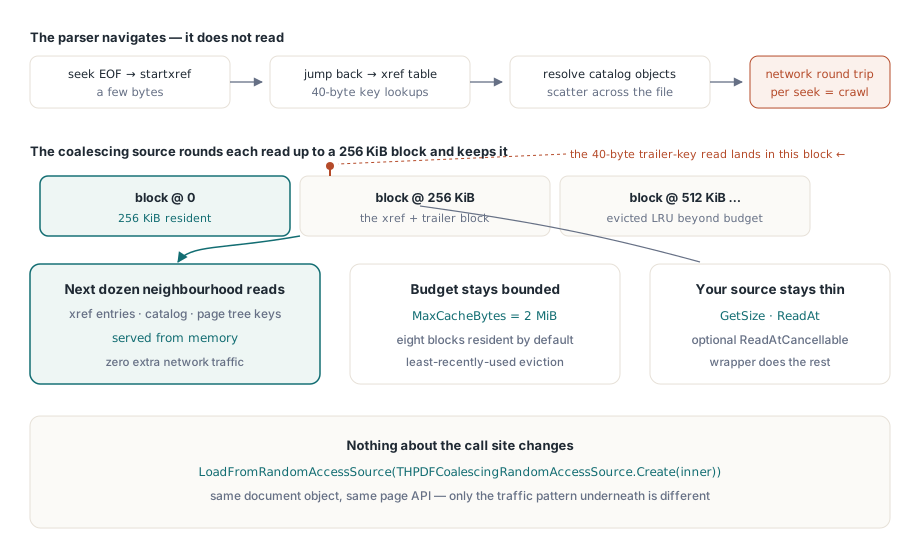
Nothing about the parser changes. You still call LoadFromRandomAccessSource, the same document object comes back, and the same page API works. What changes is the traffic underneath
Why does the same PDF load instantly locally and crawl over the network?
Because a PDF parser does not read a file, it navigates one. It seeks to the end for startxref, jumps back to the cross-reference table, resolves the trailer dictionary, follows a reference to the Catalog, then to the page tree root, then to a page node, then to its resource dictionary. Each of those steps reads tens of bytes from a different offset
On a local file that pattern is nearly free: the operating system already has the surrounding 4 KiB page cached, so the second read costs a memcpy. Over a network transport there is no such locality. Each read is a request with its own latency, and 300 sequential requests at 40 ms each is twelve seconds spent almost entirely waiting. The fix is not to read less; the parser needs exactly what it asks for. The fix is to make each physical read cover more of what the next logical read will want
What coalescing changes
The coalescing source rounds every read up to a block and caches the block. BlockSize defaults to 262,144 bytes and MaxCacheBytes to 2,097,152, so eight blocks are resident by default and are evicted by least-recently-used order against a hard byte budget. The parser's 40-byte read of a trailer key pulls in the 256 KiB around it, and the next dozen reads in that neighbourhood, which is where cross-reference and catalog data lives, are served from memory
Your own source stays simple. Implement GetSize and ReadAt, override ReadAtCancellable if your transport can abort in flight, and let the wrapper handle caching, coalescing and prefetch
type
  THttpRangeSource = class(THPDFRandomAccessSource)
  private
    FClient: TMyHttpClient;
    FUrl: string;
    FSize: Int64;
  public
    function GetSize: Int64; override;
    function ReadAt(Offset: Int64; var Buffer; Count: Longint): Longint; override;
    function ReadAtCancellable(Offset: Int64; var Buffer; Count: Longint;
      CancellationToken: THPDFCancellationToken): Longint; override;
  end;

var
  Raw: THttpRangeSource;
  Cached: THPDFCoalescingRandomAccessSource;
  Pdf: THotPDF;
begin
  Raw := THttpRangeSource.Create('https://files.example.com/contract.pdf');
  // OwnsSource=True: the wrapper frees Raw with itself
  Cached := THPDFCoalescingRandomAccessSource.Create(Raw, True, 262144, 8388608);
  Pdf := THotPDF.Create(nil);
  try
    Cached.AsyncPrefetchEnabled := True;
    Cached.AdaptiveReadAheadEnabled := True;
    Cached.MaxReadAheadBlocks := 8;

    if Pdf.LoadFromRandomAccessSource(Cached, True) = 1 then
      RenderFirstPage(Pdf);
  finally
    Pdf.Free;
  end;
end;
How far ahead should it read?
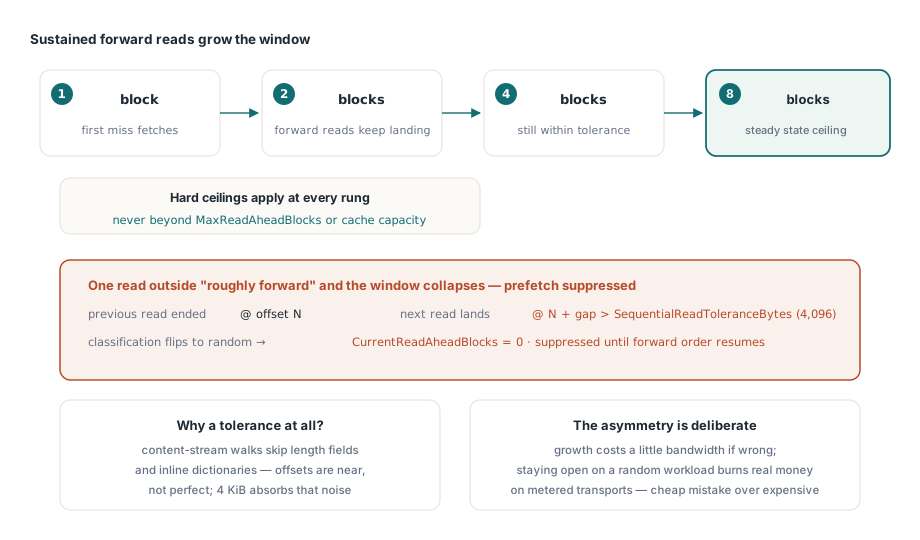
Adaptive read-ahead answers that question per document instead of forcing you to guess. With AdaptiveReadAheadEnabled set, the window grows through 1, 2, 4 and 8 blocks as sustained forward reads accumulate, and it never exceeds MaxReadAheadBlocks or the configured cache capacity. The moment a read arrives that is not roughly where the previous one ended, the window collapses and prefetch is suppressed
SequentialReadToleranceBytes, default 4,096, defines "roughly". Reads that land within that distance of the previous read's end still count as sequential, which matters because a PDF parser walking a content stream does not produce perfectly contiguous offsets; it skips a length field here, an inline dictionary there. Set the tolerance too low and a normal forward scan is classified as random, so read-ahead never engages. Set it too high and genuine random access looks sequential, so you fetch megabytes nobody wants. The default is calibrated for content-stream traversal, and the statistics will tell you if your transport disagrees
This asymmetry is deliberate: growth is gradual, collapse is immediate. Over-fetching on a random-access workload costs real bandwidth and real money on metered transports, so the cheap mistake is preferred over the expensive one
Cancellation that actually stops the transfer
The base class declares ReadAtCancellable, and the coalescing source honors it end to end. When a foreground read arrives for a range that an in-flight prefetch is not serving, the prefetch is canceled rather than left to finish, so the user's page request is not queued behind speculative traffic. The default implementation on THPDFRandomAccessSource falls back to a plain ReadAt, which means the feature is opt-in per transport: HTTP clients that support request abort get genuine cancellation, and simpler sources keep working unchanged
Combine that with a cancellation token threaded through your UI and a user closing a document actually stops the network traffic instead of waiting for it to drain. The same token model underpins the queueing described in background rendering with a request queue, so one token can cover the whole path from the viewport to the socket
Reading the range cache statistics
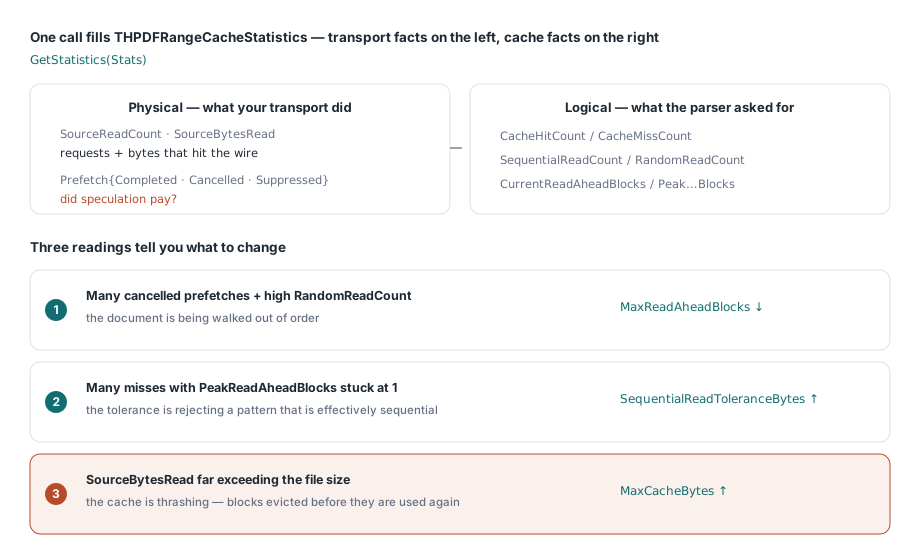
GetStatistics fills a THPDFRangeCacheStatistics record that separates what your transport did from what the cache did. SourceReadCount and SourceBytesRead are physical traffic. CacheHitCount and CacheMissCount are logical traffic. SequentialReadCount and RandomReadCount show how the access pattern was classified, CurrentReadAheadBlocks and PeakReadAheadBlocks show how far the window opened, and PrefetchRequestCount, PrefetchCompletedCount, PrefetchCancelledCount and SuppressedPrefetchCount show whether speculation paid off
var
  S: THPDFRangeCacheStatistics;
begin
  Cached.GetStatistics(S);
  Log(Format('physical %d reads / %d bytes, hits %d, misses %d',
    [S.SourceReadCount, S.SourceBytesRead, S.CacheHitCount, S.CacheMissCount]));
  Log(Format('pattern: %d sequential, %d random, peak window %d blocks',
    [S.SequentialReadCount, S.RandomReadCount, S.PeakReadAheadBlocks]));
  Log(Format('prefetch: %d issued, %d completed, %d cancelled, %d suppressed',
    [S.PrefetchRequestCount, S.PrefetchCompletedCount,
     S.PrefetchCancelledCount, S.SuppressedPrefetchCount]));
end;
Three readings tell you what to change. Many canceled prefetches with a high random-read count means the document is being accessed out of order, so lower MaxReadAheadBlocks and stop paying for bandwidth you discard. Many misses with a peak window still at 1 means the tolerance is rejecting a pattern that is effectively sequential, so raise SequentialReadToleranceBytes. And bytes read far exceeding the file size means the cache is thrashing, so raise MaxCacheBytes before touching anything else
Linearized files change the arithmetic
If you control the producer, linearizing the document changes the problem rather than optimizing it. A linearized PDF places the first page's objects and a hint table at the front of the file, so a viewer can render page one from the opening megabyte without seeing the rest. HotPDF exposes that path directly through GetProgressiveLinearizedLoadInfo and ReadProgressiveLinearizedFirstPageSection, and the writing side is covered in generating linearized PDFs with hint tables
Both techniques compose. Coalescing makes any document tolerable over a slow link; linearization makes the first page arrive fast on documents you produce yourself. For files that live on a local disk but are too large to hold in memory, the mapped-file and lazy-stream paths described in the direct file API workflow are usually the better tool, since there is no round-trip latency to amortize in the first place
HotPDF is a native VCL PDF component for Delphi and C++Builder, with no external DLL for the parser and full source available. The random-access source API, the coalescing wrapper and the progressive loading entry points are documented on the HotPDF Delphi PDF component page