HotPDF exposes the memory profile of a loaded PDF as a graph you can query: BuildLoadedObjectDependencyGraph returns one node per indirect object with an estimated shallow size, a dominator-based retained size, and a flag for whether the object is still reachable from the document Catalog. That turns "this file uses 800 MB" into "object 4173, an image XObject, exclusively retains 612 MB", which is a fact you can act on
The distinction between those two sentences is the whole point. Shallow size tells you how big one object is. Retained size tells you how much memory would actually be released if that object went away, which is the number that decides whether a fix helps
Why is total memory usage not an actionable fact?
Because in a PDF almost nothing is owned by exactly one thing. A single embedded CID font is referenced from the resource dictionary of every page that uses it. An ICC profile stream backs a color space that ten different content streams share. A Form XObject used as a stamp appears on all 400 pages. If you naively add up object sizes per page, you count that font 400 times and conclude every page is enormous; if you divide it by 400, you conclude nothing is expensive and the memory came from somewhere else
Dominator analysis resolves the ambiguity in the only way that survives contact with real documents. An object X is attributed to the nearest object that exclusively retains it, meaning every reference path from the Catalog to X passes through that dominator. A font shared by all pages is not attributed to any page; it is attributed to the nearest node that all those paths pass through, which is usually the Catalog itself. A font used by exactly one page is attributed to that page. The result is that EstimatedRetainedBytes sums correctly instead of double counting, and the objects at the top of the list are objects whose removal would genuinely free memory
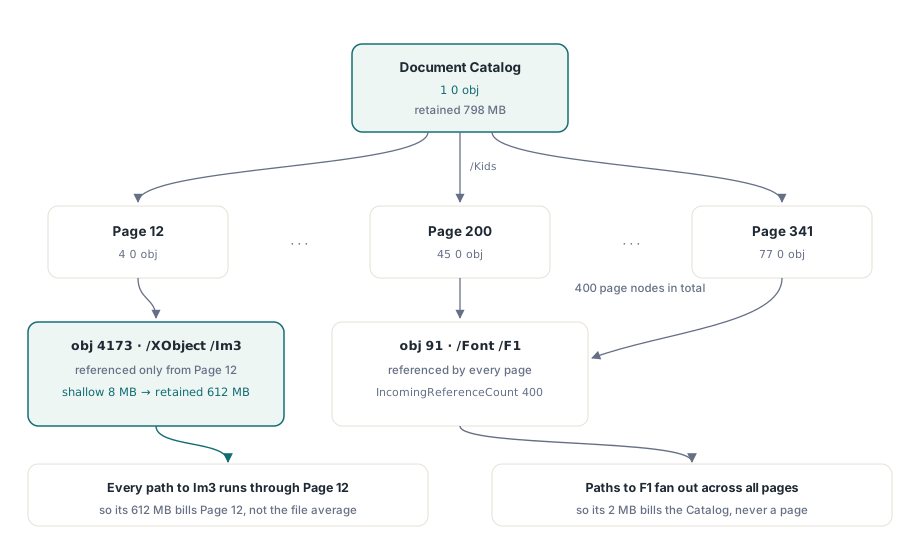
What the graph actually contains
Each THPDFObjectDependencyNode carries the object identity as ObjectNumber and GenerationNumber, plus ObjectType, LifecycleState, EstimatedShallowBytes, EstimatedRetainedBytes, IncomingReferenceCount, OutgoingReferenceCount, the identity of its immediate dominator, and ReachableFromCatalog. Each THPDFObjectDependencyEdge records source, target, the dictionary Path the reference was found under, and whether it Resolved
That Path field is the one people underuse. It is the difference between knowing object 91 points at object 4173 and knowing it does so through /Resources/XObject/Im3, which tells you immediately whether you are looking at page content, an annotation appearance stream, or an optional-content group nobody ever renders
var
  Pdf: THotPDF;
  Nodes: THPDFObjectDependencyNodeArray;
  Edges: THPDFObjectDependencyEdgeArray;
  Info: THPDFObjectDependencyGraphInfo;
  I: Integer;
begin
  Pdf := THotPDF.Create(nil);
  try
    if Pdf.LoadFromFile('report-800mb.pdf') <> 1 then Exit;

    if not Pdf.BuildLoadedObjectDependencyGraph(Nodes, Edges, Info) then Exit;

    if Info.LimitExceeded then
      Log('Graph truncated: raise MaxObjects / MaxEdges');

    Log(Format('%d objects, %d edges, %d reachable, catalog retains %d bytes',
      [Info.ObjectCount, Info.EdgeCount, Info.ReachableObjectCount,
       Info.CatalogRetainedBytes]));

    SortByRetainedDescending(Nodes);
    for I := 0 to Min(9, High(Nodes)) do
      Log(Format('%d %d obj: shallow %d, retained %d, dominator %d',
        [Nodes[I].ObjectNumber, Nodes[I].GenerationNumber,
         Nodes[I].EstimatedShallowBytes, Nodes[I].EstimatedRetainedBytes,
         Nodes[I].ImmediateDominatorObjectNumber]));
  finally
    Pdf.Free;
  end;
end;
Both bounds are explicit parameters with defaults of 250,000 objects and 2,000,000 edges. When a document exceeds either, LimitExceeded is set and the returned graph is a truncated prefix rather than a lie: partial results with a flag, not silently wrong totals. Raise the limits deliberately for a forensic run, and remember that the analysis walks the entire object graph, so it belongs in a diagnostic path, not in your render loop
What does an unreachable object tell you?
An object with ReachableFromCatalog set to False is memory the document is carrying but the viewer will never show. In practice it comes from three places: incremental updates that superseded an earlier version of an object and left the original behind, a producer that wrote objects it then failed to link, or a damaged file whose cross-reference table was rebuilt and picked up definitions that nothing references
The first case is normal and expected, and it is precisely what incremental updates and object streams are designed to do. The second and third are worth investigating. When a large fraction of retained bytes sits in unreachable nodes, you have found a concrete argument for rewriting the file rather than appending to it, and you have the byte count to justify the extra processing time to whoever asks
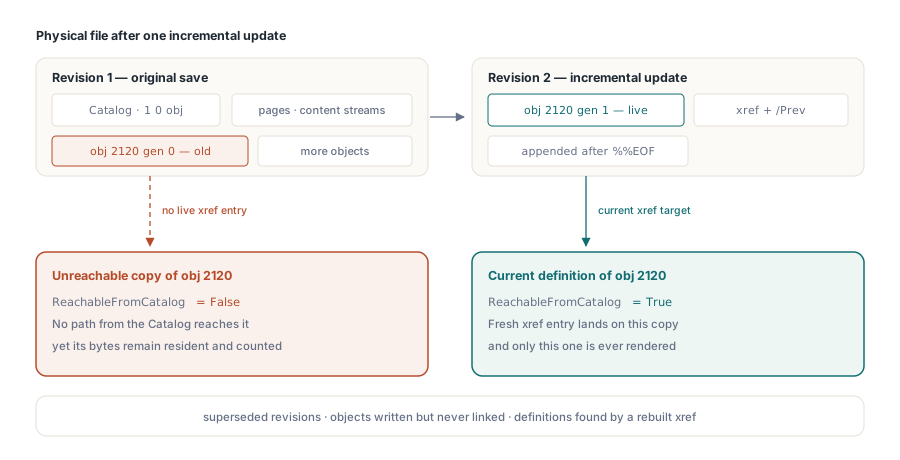
Two allocator counters worth reading first
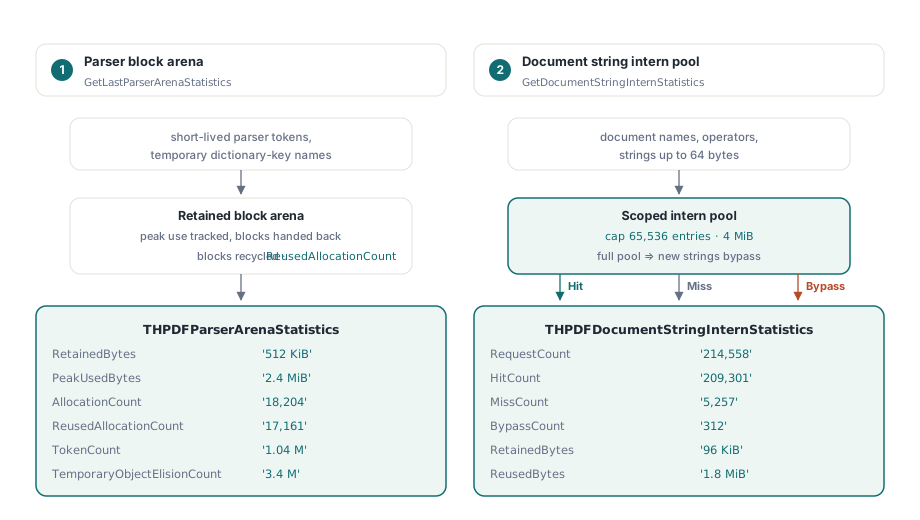
Before you conclude that a document is inherently large, check whether the parser itself is the cost. HotPDF exposes two counters that describe how loading behaved rather than what the document contains
GetLastParserArenaStatistics reports the retained block arena used for short-lived parser tokens and buffers: RetainedBytes, PeakUsedBytes, AllocationCount, ReusedAllocationCount, TokenCount and TemporaryObjectElisionCount. That last field counts dictionary keys parsed directly into the arena instead of through a temporary name object, which is the allocation that used to dominate parsing of dictionary-heavy files
GetDocumentStringInternStatistics reports the document-scoped intern pool that deduplicates repeated PDF names, content-stream operators and immutable strings up to 64 bytes. It gives you RequestCount, HitCount, MissCount, BypassCount, RetainedBytes and ReusedBytes, along with the caps in force. The pool is deliberately bounded at 65,536 entries and 4 MiB, so a hostile document that generates a million unique names cannot turn a memory optimization into a memory amplifier; once the cap is reached, further strings bypass the pool and BypassCount climbs
var
  Arena: THPDFParserArenaStatistics;
  Intern: THPDFDocumentStringInternStatistics;
begin
  if Pdf.GetLastParserArenaStatistics(Arena) then
    Log(Format('arena: peak %d, reused %d of %d allocations, %d tokens',
      [Arena.PeakUsedBytes, Arena.ReusedAllocationCount,
       Arena.AllocationCount, Arena.TokenCount]));

  if Pdf.GetDocumentStringInternStatistics(Intern) then
    Log(Format('intern: %d/%d hits, %d bypassed, %d bytes reused',
      [Intern.HitCount, Intern.RequestCount, Intern.BypassCount,
       Intern.ReusedBytes]));
end;
A high ReusedBytes value with a low BypassCount means the document has the repetitive vocabulary most real PDFs have and the pool is earning its keep. A BypassCount approaching RequestCount means something unusual: either a genuinely enormous document, or one generating unique names on purpose, which is a mild signal worth logging on an untrusted intake path
A triage order that works
Start with CatalogRetainedBytes from the graph info. If that number is close to your process growth, the memory is in the document and the graph will show you where. If it is far below, the memory is in your own caches, in rendered bitmaps, or in the parser, and the arena counters will say which
Then take the top ten nodes by EstimatedRetainedBytes and look at their ObjectType. Image XObjects at the top mean the file is scan-heavy and downsampling is the fix. Font descriptors at the top mean full faces were embedded where subsets would do. Content streams at the top usually mean generated vector graphics, often maps or CAD exports. Only after that does it pay to look at unreachable objects and allocator behavior. Working in that order, you will usually find the answer in the first two steps, and for very large documents the streaming approach described in the direct file API workflow is frequently the structural fix rather than any per-object optimization
All of these diagnostics are plain Pascal calls returning plain records, so they drop straight into an existing logging or telemetry path. HotPDF is a native VCL PDF component for Delphi and C++Builder with full source; the API reference and a trial build are on the HotPDF Delphi PDF component page