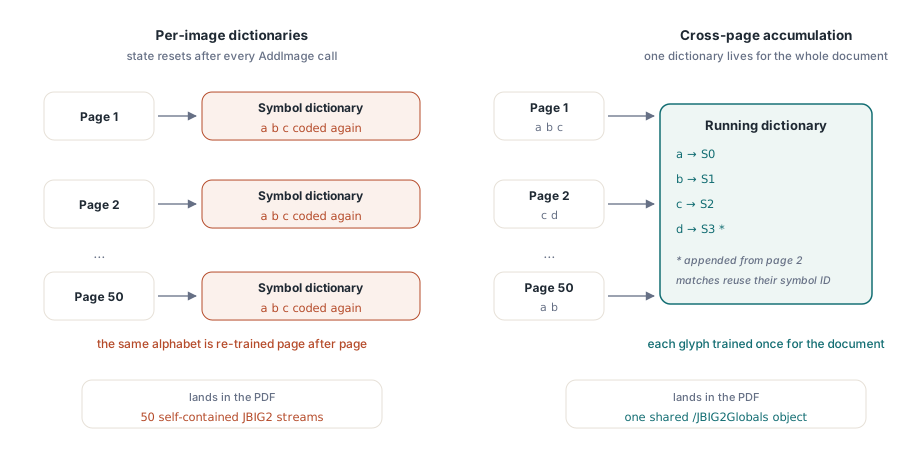
A fifty-page scanned contract repeats the same alphabet on every page, but a JBIG2 encoder that builds one symbol dictionary per image re-trains that alphabet fifty separate times. HotPDF, the native Delphi and C++Builder PDF component, can instead accumulate one shared symbol dictionary across the whole document and promote it to a single document-level /JBIG2Globals stream, so each page's own JBIG2 stream just references symbol IDs instead of storing its own copy of the alphabet
This piece stays narrow on purpose and covers only how HotPDF builds that cross-page sharing internally — JBIG2 fundamentals, the CCITT comparison, and the Lossless versus LossyLevel trade-offs already live in the companion article on native JBIG2 bilevel compression in Delphi, which this piece assumes you have read
Why does per-page JBIG2 compression still repeat the same cost?
The answer is that nothing carries state between calls. Every time HotPDF's encoder builds a symbol dictionary for one image, that dictionary is scoped to that single AddImage call: the shape-matching pass starts from zero, every glyph on the page gets classified as new, and the resulting bitmaps get arithmetic-coded and stored fresh. Feed the same encoder fifty pages set in the same typeface and it happily repeats that whole training pass fifty times, because from its point of view each page is an unrelated image that happens to look similar. Per-page UseSymbolDictionary already beats a flat generic-region encode by a wide margin on a single page, but it caps out well before the ceiling a real multi-page scan leaves on the table
How does HotPDF share a single symbol dictionary across pages?
Enable AccumulateGlobalsAcrossPages on THPDFJBIG2Options and HotPDF keeps one symbol dictionary alive in memory for the life of the document instead of discarding it after each image. Every subsequent page's glyphs get checked against that running dictionary before anything gets re-coded: a shape that already exists is reused by its symbol ID, and only a shape nobody has seen before gets appended and coded into the dictionary. The comparison reuses the same tolerance logic that LossyLevel applies on a single page — a slightly noisy scan of the same letter still counts as a match — so the accumulator does not silently balloon into one dictionary entry per pixel-level variation of the same glyph. Extraction happens first and feeds that comparison: HotPDF walks each page's bitmap and pulls out connected shapes through flood fill against the black pixels, the same idea as tracing ink blobs by hand, and it is those extracted shapes, not raw pixel blocks, that get compared against the running dictionary
How the shared dictionary sits inside a /JBIG2Globals stream
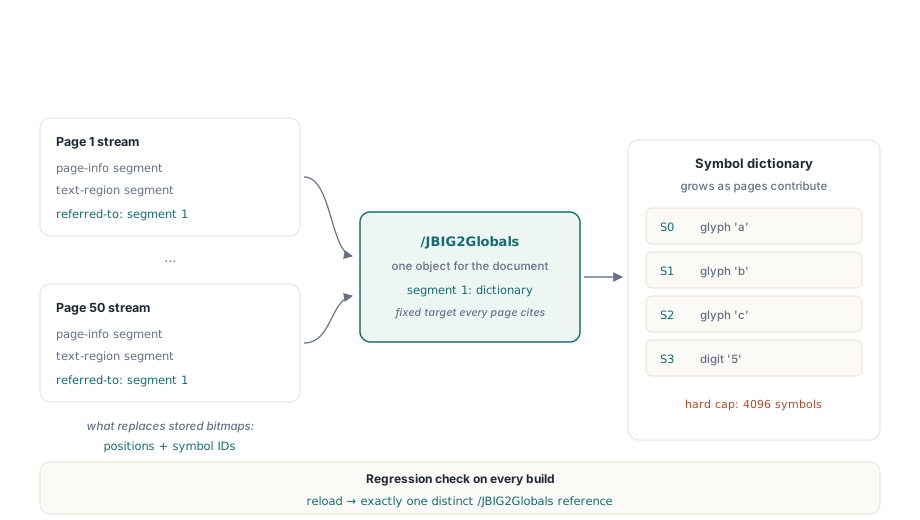
The accumulated dictionary is written as one symbol-dictionary segment inside the /JBIG2Globals stream, held at a fixed segment number so every page can point at the same target. Inside the embedded JBIG2 organization that ISO 32000-1 §7.4.7 defines, a text-region segment can name another segment as its symbol source through the referred-to-segment field in the segment header, and that is the exact mechanism HotPDF leans on: the globals stream carries the one big symbol dictionary, and each page's own JBIG2 stream shrinks down to a page-info segment plus a text-region segment whose referred-to list points back at the globals segment. What used to be a self-contained bitstream per page becomes a short list of positions and symbol IDs, and every page built this way references the identical indirect /JBIG2Globals object rather than a copy of it. HotPDF's own regression coverage checks precisely that: encode a short document where each page has a different glyph layout, reload it, and count how many distinct /JBIG2Globals object references show up in the file — one document, one object reference, no matter how many pages contributed symbols to it
Turning on cross-page symbol dictionary accumulation
The switch sits on the same options record covered in the companion article, and it takes four settings agreeing with each other before accumulation actually engages
var
  Pdf: THotPDF;
  Bmp: TBitmap;
  PageIdx, ImgIdx: Integer;
begin
  Pdf := THotPDF.Create(nil);
  try
    Pdf.JBIG2Options.Lossless := True;
    Pdf.JBIG2Options.UseSymbolDictionary := True;
    Pdf.JBIG2Options.UseGlobalSegments := True;
    Pdf.JBIG2Options.AccumulateGlobalsAcrossPages := True;  // opt-in, default False
    Pdf.JBIG2Options.UseExternalEncoder := False;            // accumulation needs the native path
    Pdf.JBIG2Options.UseNativeArithmeticFallback := True;
    Pdf.BeginDoc;
    for PageIdx := 0 to ScannedPages.Count - 1 do
    begin
      if PageIdx > 0 then
        Pdf.AddPage;
      Bmp := ScannedPages[PageIdx];             // 1-bit TBitmap for this page
      ImgIdx := Pdf.AddImage(Bmp, icJBIG2);
      Pdf.CurrentPage.ShowImage(ImgIdx, 0, 0, Bmp.Width, Bmp.Height, 0);
    end;
    Pdf.EndDoc;                                  // the shared /JBIG2Globals stream is finalized here
  finally
    Pdf.Free;
  end;
end;
That pairing is not optional decoration. The external encoder seam described in the bilevel-compression article — the one you register through RegisterJBIG2EncoderBackend for production-grade ratios — is built around per-image encoding, and HotPDF's own accumulation demos and regression tests always pair AccumulateGlobalsAcrossPages with UseExternalEncoder := False. Treat that as a hard requirement rather than a suggestion: cross-page sharing is a native-encoder feature, and a registered external backend simply is not part of the path that builds the shared dictionary
How much smaller does a multi-page scan actually get?
The honest answer starts with what did not move the needle first. An earlier release added a content-addressed cache for /JBIG2Globals streams — a lookup keyed by a 64-bit FNV-1a hash of the stream bytes, so two images that happened to produce byte-identical globals data could share one PDF object. Measured against real output, that cache barely helped, because HotPDF's existing whole-image duplicate detection was already collapsing byte-identical images before the cache ever got a chance to run. The lesson was that stream-level deduplication only pays off once two genuinely different page images can still share one growing dictionary, which is what true cross-page accumulation delivers
For that harder case, HotPDF's own engineering estimate puts the additional saving at roughly 30 to 60 percent smaller than stream-level deduplication alone achieves, for a typical multi-page scan built from one recurring font — the range moves with how much of the document's visual vocabulary actually repeats, since a page full of unique diagrams gives the dictionary nothing to reuse. Treat that as a design target rather than a guarantee for any specific input, and measure your own documents rather than trusting a single number. The JBIG2Benchmark demo that ships with HotPDF exists for exactly that purpose: it encodes the same multi-page scan four different ways and prints the resulting file size for each configuration, so the comparison runs against your own scan mix instead of a synthetic one
procedure RunScenario(const Title: string; AccumulateGlobals: Boolean);
var
  Pdf: THotPDF;
begin
  Pdf := THotPDF.Create(nil);
  try
    Pdf.JBIG2Options.Lossless := True;
    Pdf.JBIG2Options.UseSymbolDictionary := True;
    Pdf.JBIG2Options.UseGlobalSegments := True;
    Pdf.JBIG2Options.AccumulateGlobalsAcrossPages := AccumulateGlobals;
    Pdf.JBIG2Options.UseExternalEncoder := not AccumulateGlobals;
    // ... encode the same three-page scan here, then compare file sizes.
  finally
    Pdf.Free;
  end;
end;

begin
  RunScenario('Per-image lossless baseline', False);
  RunScenario('Cross-page accumulated globals', True);
end.
Where cross-page accumulation hits its limits
The accumulated dictionary is capped at 4096 symbols, the same ceiling the per-image native encoder already enforces on a single page. Cross that limit mid-document and HotPDF does not raise an exception or abort the run: the accumulator declines the new glyph, and the page that introduced it falls back to independent per-image encoding automatically, so the document still comes out correct — you just stop getting the cross-page saving for whichever pages pushed past the ceiling. A second safeguard watches total size rather than symbol count: once the accumulated dictionary's combined symbol width crosses 131071 pixels, HotPDF spills the current batch to disk and starts a fresh globals group automatically, rather than letting one in-memory structure grow without bound. Neither limit needs any code on your side, since both are automatic fallbacks rather than exceptions you need to catch
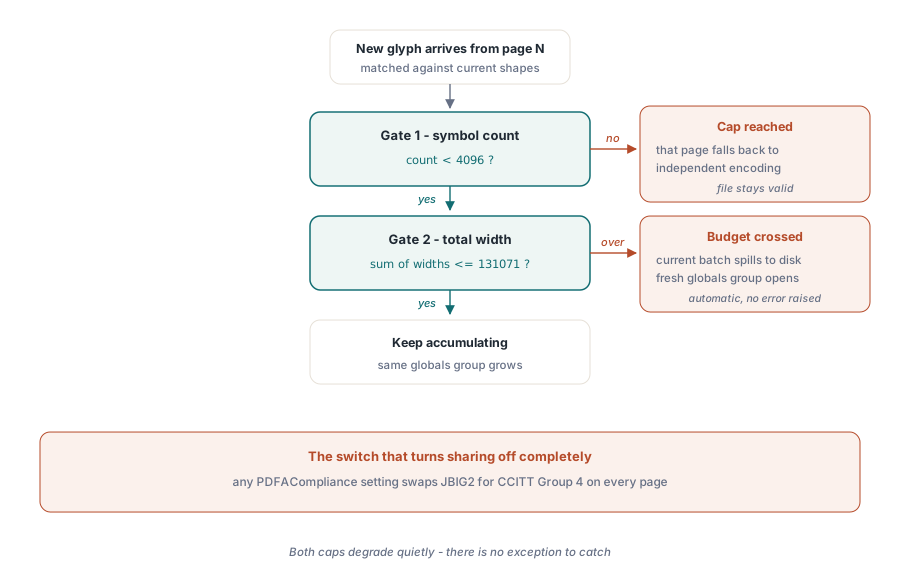
PDF/A conformance is the one setting that turns the whole mechanism off rather than just capping it. HotPDF quietly substitutes CCITT Group 4 for JBIG2 the moment PDFACompliance is non-empty, on every page, independent of AccumulateGlobalsAcrossPages or anything else on JBIG2Options — a deliberate conformance choice, not a bug, but it means an archival profile and cross-page symbol sharing are mutually exclusive today. Whichever configuration you land on, decode what you wrote before trusting it: load the file back with LoadFromFile and pull each page through ExtractLoadedImage, which resolves the shared globals for you the same way any conforming reader would, and compare the result against your source bitmaps
var
  Loaded: THotPDF;
  PageBmp: TBitmap;
  PageIdx: Integer;
begin
  Loaded := THotPDF.Create(nil);
  try
    Loaded.LoadFromFile('scanned-contract.pdf');
    for PageIdx := 0 to Loaded.PagesCount - 1 do
    begin
      PageBmp := Loaded.ExtractLoadedImage(PageIdx);   // resolves the shared globals for you
      try
        // Compare PageBmp against the source bitmap for this page.
      finally
        PageBmp.Free;
      end;
    end;
  finally
    Loaded.Free;
  end;
end;
Cross-page dictionary sharing only touches the bilevel image side of a document. If the same pipeline also emits generated text pages alongside the scans — cover sheets, index pages, an OCR text layer — object streams and xref streams attack the other half of the file size budget by compressing the document structure those pages add. Cross-page JBIG2 globals ships as part of the HotPDF Delphi Component for Delphi and C++Builder, alongside the per-image JBIG2 options and the rest of the compression pipeline