Every real number that reaches a PDF file must be written with a period, whatever the operating system thinks the decimal separator is. The HotPDF Delphi Component routes all of them through one invariant conversion layer in HPDFTypes, so a German, French, or Brazilian workstation emits 0.5 0 0 0.5 5.5 7.25 cm and not the comma-separated variant that no conforming reader will parse
That sounds like a two-line fix. It was not. The defect had been camouflaged for years by a side effect, it reappeared in three subsystems nobody thinks of as number-formatting code, it vanished under one compiler and survived under another, and the last layer of it had nothing to do with the decimal separator at all
Why does a decimal-comma locale corrupt a PDF content stream?
Because ISO 32000-1 §7.3.3 defines a numeric object as an optional sign, decimal digits, and at most one period. A comma is not part of that production, and under §7.2.2 it is not a delimiter either, so the reader does not see two operands where you meant one. It sees a token that fails to lex, and the operator that contained it is discarded. A single 0,5 in a graphics-state matrix takes out the whole q ... Q block around it. The failure also has a distinctive shape in the field: it never reproduces on the developer machine, it arrives as a support ticket from one country, and it reads as a rendering bug rather than a syntax error, because most viewers drop the malformed operator silently and render the rest of the page
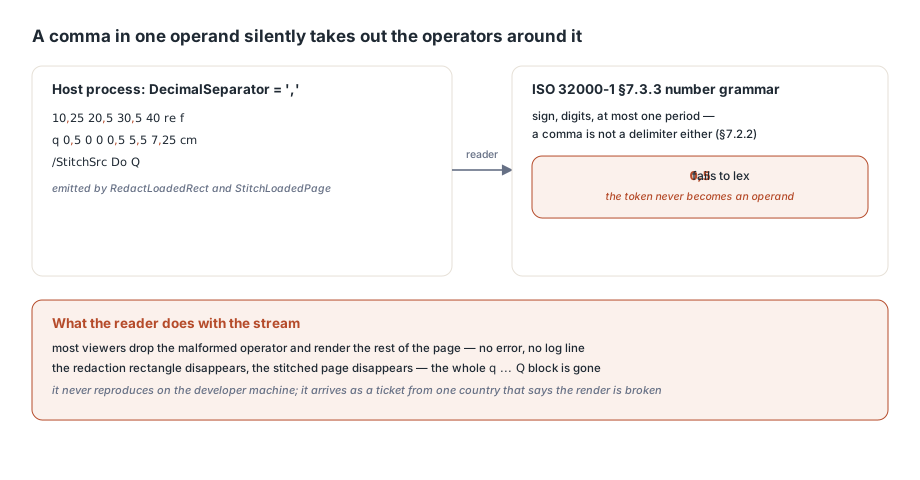
// Host process running with DecimalSeparator = ','
Doc.LoadFromFile('invoice.pdf');
Doc.RedactLoadedRect(0, 10.25, 20.5, 40.75, 60.5, 0.5, 0.25, 0.125);
Doc.StitchLoadedPage(0, 1, 5.5, 7.25, 0.5);

// What the appended /Contents used to carry:
//   0,5 0,25 0,125 rg 10,25 20,5 30,5 40 re f
//   q 0,5 0 0 0,5 5,5 7,25 cm /StitchSrc Do Q
//
// ISO 32000-1 7.3.3 has no production for "0,5", so the redaction
// rectangle and the stitched page both disappear without an error
The side effect that hid the defect for years
HotPDF writes most creation-path numbers through _CutFloat, and early revisions of that function did something quietly hostile: on every single call it assigned '.' to the global FormatSettings.DecimalSeparator of the host process. That corrupts the locale state of the application hosting the component and it is not thread safe, but the interesting consequence is the third one. Once any content had been generated, the process separator was a period, so every bare FloatToStr and StrToFloat elsewhere in the library became accidentally correct. The create-then-edit order that almost every sample uses therefore passed, and what it masked was every path that runs before the first _CutFloat call: the loaded-document editors StitchLoadedPage and RedactLoadedRect, the text and image stamps, composite watermarks, barcode drawing through Format('%.2f'), the /DA default-appearance parser, and the entire Type 1 font subsystem
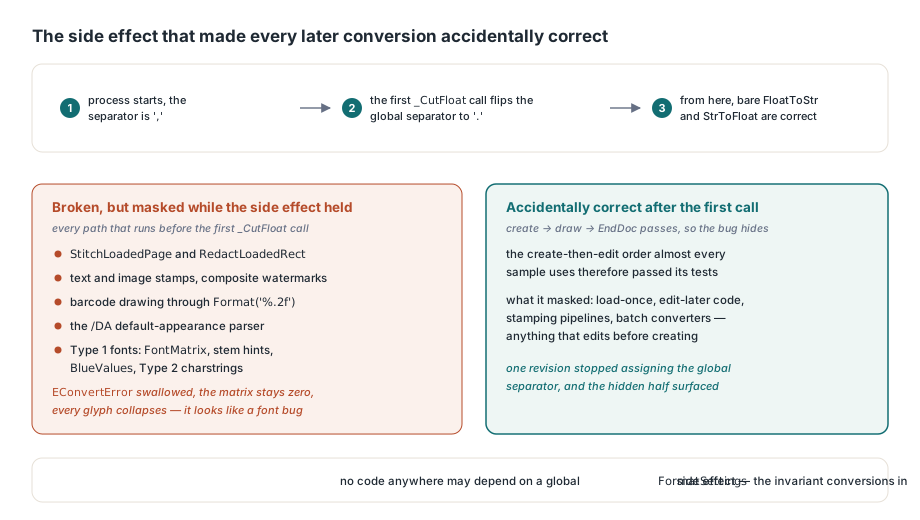
Type 1 parsing failed in the ugliest way of the lot. FontMatrix, BlueValues, stem hints, and the real numbers inside Type 2 charstrings are PostScript reals written with periods, per the Adobe Type 1 Font Format specification. Parsing 0.001 under a comma locale raises EConvertError, an enclosing try/except swallowed it, and the font matrix stayed at zero. Every glyph from that font then collapsed, which looks like a font problem rather than a locale problem and sends you off debugging embedded glyph rendering for an afternoon
One conversion layer instead of scattered patches
The rule HotPDF now follows is blunt: any number written into or read out of PDF, PostScript, JSON, or JavaScript syntax goes through an explicit invariant conversion, and no code anywhere depends on a global FormatSettings side effect. HPDFTypes owns the four conversions, plus the settings record they share and one fixed-precision helper for the barcode path
// Lib/HPDFTypes.pas - the single invariant conversion surface
function HPDFInvariantFormatSettings: TFormatSettings;

function HPDFFloatToInvariantStr(Value: Extended): string;
function HPDFTryInvariantStrToFloat(const S: string;
  out Value: Extended): Boolean;
function HPDFInvariantStrToFloat(const S: string): Extended;
function HPDFInvariantStrToFloatDef(const S: string;
  const Default: Extended): Extended;

function HPDFFormatInvariant2(Value: Extended): string;
Two units already carried a private InvariantFormatSettings function of their own, HPDFContentStream and HPDFTextExtraction, and both were reduced to a one-line forward rather than left as parallel implementations. The Type 1 subsystem is the deliberate exception: it carries no VCL dependency and does not reference HPDFTypes, so it keeps a local mirror named HPDFType1Core.Type1StrToFloat with identical semantics, on the theory that a duplicated ten-line function is a smaller liability than dragging the graphics layer into a font parser. Two other places were left alone on purpose. HPDFHTMLImport parses CSS lengths by deliberately swapping the period for the locale separator and then parsing with the locale, which is right for that input, and HPDFType1CB.GlyphCommands together with the FontBBox strings is public API that callers read back with their own StrToFloat, where producing and consuming in the same locale is self-consistent and invariant output would break every caller in a comma region
What does HPDF_HAS_FORMAT_SETTINGS guarantee across compilers?
It guarantees that the invariant path actually compiles in every supported toolchain, which the obvious version gate did not. Delphi XE2 introduced TFormatSettings.Create and the FloatToStr / TryStrToFloat overloads that take a TFormatSettings, so the first instinct is to write {$IFDEF XE2+}, InvariantFormatSettings{$ENDIF} at each call site. That instinct has a blind spot: HotPDF.inc defines D2009+ under Free Pascal but never defines XE2+, because XE2+ answers a question about Delphi version numbers, while Free Pascal 3.2.2 ships those overloads regardless. Every one of those gates therefore degraded to the locale-dependent branch in FPC builds, silently, on exactly the platforms where the original reports came from. HPDF_HAS_FORMAT_SETTINGS is defined in both the FPC block and the XE2+ block of HotPDF.inc, and it is the only symbol the number helpers test
{$IFDEF HPDF_HAS_FORMAT_SETTINGS}
function HPDFInvariantFormatSettings: TFormatSettings;
begin
{$IFDEF FPC}
  Result := DefaultFormatSettings;   // no TFormatSettings.Create in FPC
{$ELSE}
  Result := TFormatSettings.Create;
{$ENDIF}
  Result.DecimalSeparator := '.';
  Result.ThousandSeparator := ',';
end;
{$ENDIF}
One compiler branch survives inside the function, because Free Pascal has no TFormatSettings.Create and you have to start from DefaultFormatSettings. Only the two number separators feed the conversions, so the date and currency fields keep whatever the current locale supplies. Pre-XE2 Delphi has no overloads at all, and there the helpers fall back to converting with the process locale and then rewriting the separator character in the resulting string, which is ugly but never touches global state
The third layer: exponents that SVG allows and PDF does not
Fixing the decimal separator is necessary and not sufficient. W3C SVG 1.1 §4.2 admits an exponent in its number production and XPS markup does the same, so 1E-6 is a perfectly valid coordinate on the way in, while ISO 32000-1 §7.3.3 admits no exponent at all. A value that survives invariant formatting can still land in a content stream as 1E-6 and be rejected, and FloatToStrF in fixed format can itself fall back to exponent form once the value leaves the RTL digit range. HPDFSafeSVG.SVGFloat therefore does its own work after the invariant conversion: it flushes anything under 1.0E-7 to zero, then, if an E survives, strips the exponent and moves the decimal point by hand, padding with zeros on whichever side the shift requires. SVGFinite guards the entrance by rejecting NaN and anything outside ±1.0E30 before it reaches the formatter, and SVGReadNumber with SVGSkipSeparators handles the inbound direction character by character instead of deferring to the RTL
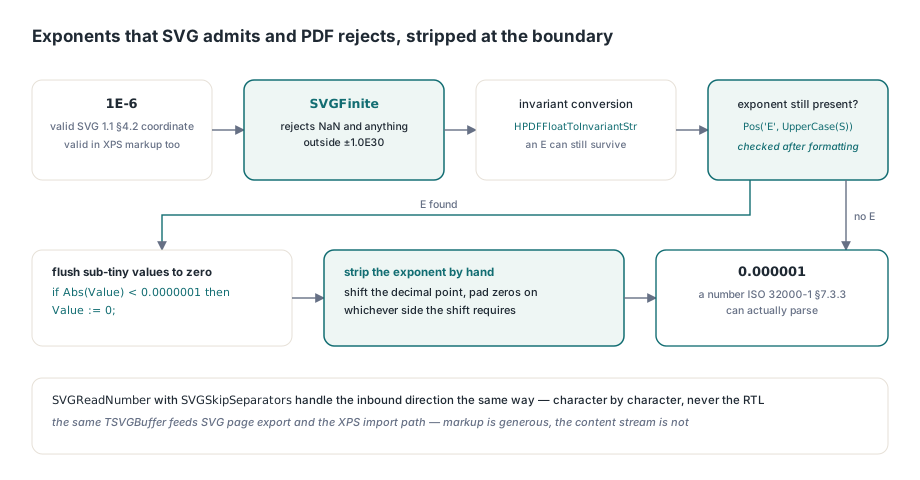
// Lib/HPDFSafeSVG.pas - decimal notation for PDF operands
if Abs(Value) < 0.0000001 then
  Value := 0;
S := HPDFFloatToInvariantStr(Value);
ExponentAt := Pos('E', UpperCase(S));
if ExponentAt > 0 then
begin
  ExponentValue := StrToInt(Copy(S, ExponentAt + 1, MaxInt));
  SetLength(S, ExponentAt - 1);
  // ... shift the decimal point by ExponentValue, padding with '0'
  // on the left or the right, then reattach the sign
end;
That is the same TSVGBuffer that feeds SVG page export and its graphics-state handling, and the same numeric discipline applies on the import side when converting XPS and OXPS documents to PDF through HPDFCreateXPSDocumentHandler and the hdfXPS member of THPDFHandledDocumentFormat. Markup formats are generous about number syntax. The PDF content stream is not, and the conversion boundary is where that difference has to be resolved
Regression tests that reproduce the locale instead of assuming it
A locale bug that only appears on somebody else machine is worth pinning with tests that set the locale themselves, and HotPDF carries two. LoadedEditsEmitInvariantNumbersUnderCommaLocale assigns a comma to FormatSettings.DecimalSeparator before the first edit, runs RedactLoadedRect, StampLoadedPageText, StitchLoadedPage, and a composite stamp, then reads the page content bytes back and asserts both that the exact operator strings are present and that the buffer contains no comma anywhere. DocumentCreationEmitsInvariantNumbersAndKeepsHostLocale covers the other half and the original sin: it drives the creation path under the same comma locale, including DirectDrawBarcode with its fixed two-decimal formatting, then asserts that the content stream carries no comma and that FormatSettings.DecimalSeparator is still a comma when EndDoc returns
That second assertion is the one that would have caught the original defect the day it was written, because it tests what the library does to its host rather than only what it writes to disk. The lesson generalizes past PDF: any format with a fixed lexical grammar, PostScript and JSON and JavaScript included, needs an explicit invariant conversion at the boundary. Reaching for a global setting to get the right answer works until somebody calls your code in a different order, on a different thread, or from a different compiler, and by then the failure looks like anything except a formatting problem
The number-formatting layer described here ships as part of the HotPDF Delphi Component for Delphi and C++Builder, along with the loaded-document editing, barcode, SVG export, and XPS conversion paths that depend on it