HotPDF renders HTML tables through its HTML5 paged-media profile using a real occupancy grid for rowspan and colspan, measured row heights rather than character-count estimates, and header rows repeated on every continuation page. Two situations make it decline to repeat a header, and knowing them up front is cheaper than debugging a duplicated cell later
The class of document that forces this is the one every reporting team eventually ships: an invoice or a compliance report where the source of truth is HTML, the table runs across four pages, and the header has to be legible on every one of them. Anything less than a real table layout produces the two failures readers notice immediately, a header that appears once on page one and rows whose heights were guessed from character counts
Why did the table capability move into the HTML renderer?
Because the alternative loses rich text, and rich text is the reason the content is HTML in the first place. The obvious plan looks like reuse: HotPDF already has a layout DOM table object with a proper grid, so bridge the HTML parser into it and get spanning for free. The problem is what that table object draws with. Its cells carry text and a style, and its drawing path emits plain text output, so anything the HTML actually contained beyond a font and a color, links, superscripts, inline size changes, per-run color, is gone by the time it reaches the page
The direction that survives contact with real documents is the reverse one. Move the capabilities of the table engine, the occupancy grid, real measurement, header repetition and column weighting, into the HTML renderer, and leave rich-text rendering where it already works. That is a larger change than the bridge, and it is the change that keeps a hyperlink inside a table cell a hyperlink
Rowspan without a union-find
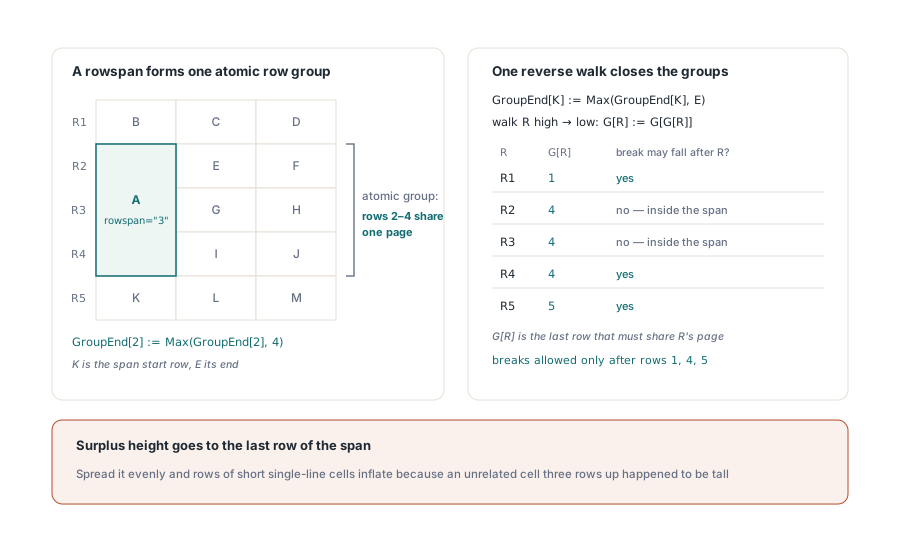
Spanning cells create atomic row groups, but the closure over those groups needs no general disjoint-set structure, because the occupancy is always a contiguous interval. A cell with rowspan="3" starting at row K occupies rows K through K+2 and nothing else, so the group information reduces to a per-row end marker
The algorithm is two lines of intent. When you place a spanning cell that starts at K and ends at E, record GroupEnd[K] := Max(GroupEnd[K], E). Then walk the rows once in reverse and apply G[R] := G[G[R]], which propagates each row end backward through overlapping spans and yields the transitive closure in a single pass. What you get is, for every row, the last row that must stay on the same page with it, which is exactly what the pagination step needs to decide where a break may fall
Distributing height is the other half. When a spanning cell needs more vertical space than the rows it covers currently provide, the surplus goes to the last row of the span, not spread evenly across them. Process spanning cells after ordinary row heights are settled, then top up the final row of each span. Spreading the surplus evenly seems fairer and produces visibly wrong output: rows that contain only short single-line cells get inflated because some unrelated cell three rows up happened to be tall
var
  Pdf: THotPDF;
  Importer: THPDFHTMLImporter;
  Stats: THPDFHTMLImportStatistics;
begin
  Pdf := THotPDF.Create(nil);
  try
    Pdf.FileName := 'audit-report.pdf';
    Pdf.BeginDoc;
    Importer := THPDFHTMLImporter.Create(Pdf);
    try
      Importer.Margin := 48;
      Importer.BaseFontName := 'Arial';
      Importer.BaseFontSize := 10;
      Importer.MaxDOMNodes := 200000;
      Importer.MaxLayoutOperations := 2000000;
      if Importer.RenderHTML5(SourceHtml, PrintStyleSheet) then
      begin
        Stats := Importer.Statistics;
        Writeln('tables ', Stats.TableCount,
                '  page breaks ', Stats.PageBreakCount);
      end;
    finally
      Importer.Free;
    end;
    Pdf.EndDoc;
  finally
    Pdf.Free;
  end;
end;
RenderHTML5 takes an optional author style sheet as its second argument, which is where print rules belong. Keep the screen style sheet out of it. The profile is versioned, and HTML5ProfileMilestones reports which capability groups the current build implements, himParserCascade, himPagedLayout, himTablesForms and himBoundedResources, so an application can degrade deliberately instead of discovering a gap in production
Measurement has to agree with drawing, exactly
Row height is only correct when the code that measures wrapped lines wraps them by the same rule as the code that draws them. This sounds obvious and is the single most common source of tables whose borders do not line up with their contents. HotPDF measures with a greedy line counter, and that counter has to match the wrapping semantics of the rich-text output path in three specific respects: it breaks only at spaces, it never splits a word, and a word wider than the column gets a line of its own
The second requirement is the font. Measurement must run with the cell own font, set through SetFont with the actual name, style set and size before calling the width function, not with whatever font happened to be active. Bold text is routinely more than ten percent wider than regular at the same size, which is enough to change a three-line cell into a four-line cell. A table where header cells are bold and body cells are not, measured with a single font, will be wrong in exactly the rows readers look at first
Getting this right changes what you can assert in a test. The observable effect of accurate measurement is line spacing, not glyph counts: a single-line row is about 20 points tall while a character-count estimate of the same content predicts two lines and roughly 35. Assert on the vertical distance between rows. And remember that PDF user space has Y increasing upward, so a header sitting above a body row means the header Y value is the larger one, which is the opposite of what screen-coordinate instinct writes
When does HotPDF refuse to repeat a header?
In two cases, both of which would produce visibly wrong output if it went ahead. The first is a header block containing a spanning cell that extends past the header into body rows. Repeating the header would draw that cell content a second time in a position where it no longer belongs, so the header is drawn once and the table continues without it. The second is a header taller than 90 percent of the usable page height, where repetition would leave almost no room for data and the table would make no forward progress
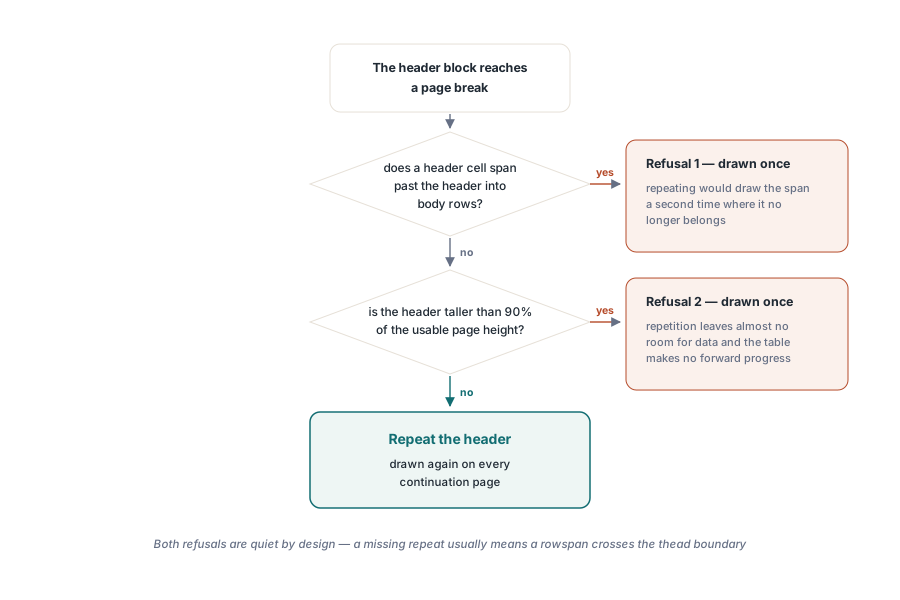
Both refusals are deliberate and quiet by design, because the alternative is worse. If your header does not repeat and you expected it to, check the markup for a rowspan crossing the thead boundary before you suspect the engine. That single markup pattern accounts for most of the surprise
// Column weights come from the markup, so the print style sheet is the
// place to control them. Widths are treated as weights, not as pixels
const
  PrintStyleSheet =
    'table { width: 100%; }' +
    'thead th { font-weight: bold; background: #eee; }' +
    'td.amount { text-align: right; }';

// A header row that carries a rowspan crossing into the body suppresses
// header repetition. Keep spans inside one section:
//   <thead><tr><th rowspan="2">Item</th>...</tr></thead>  ok
//   <tr><th rowspan="3">Item</th>...  spanning into tbody, no repeat
Column widths behave as weights rather than absolute measurements, which is the behavior that keeps a table usable when the content does not match the author estimate. A column declared at 30 percent gets roughly 30 percent of the available width, but the distribution respects the minimum width each column actually needs, so a narrow column holding a long unbreakable token does not overflow the table box silently
Where this fits in a document pipeline
The table work sits inside the broader paged-media profile, and the pagination rules, resource budgets and CSS handling described in the HTML5 paged-media import path apply unchanged to documents that contain tables. If your data does not start as HTML, the direct construction route in building tables straight into a PDF avoids the parsing layer entirely and gives you the same grid behavior through an API. And because row height ultimately depends on where lines break, the measurement discussion in text justification and line breaking is the companion piece for anyone tuning dense tabular output
The reusable lesson here is not about tables at all. When a new subsystem needs a capability an old subsystem already has, ask which of the two owns the thing that is hardest to reimplement. Grid arithmetic is a few dozen lines and moves easily. Rich-text rendering with inline links, superscripts and per-run styling is not, so the grid moved and the text stayed. HotPDF ships both paths as part of the HotPDF Delphi PDF component, so the choice between HTML input and direct construction is a project decision rather than a library one