Two Chinese characters set in SimSun and passed through an ordinary TrueType subsetter still leave about 25 KB of embedded font data in the PDF. The outlines of those two ideographs are a sliver of that. The rest is slot bookkeeping: the subset kept the original glyph numbering, so it still carries a location entry and a width entry for every glyph ID up to the highest one it retained, and in a CJK face the ideographs sit deep in a very large table. Renumber the survivors from zero, let a /CIDToGIDMap stream translate, and the same two characters fit in about 3 KB
Where the bytes go in a sparse font subset
A sparse subset stays heavy because it refuses to move any glyph. HotPDF writes Unicode text as a Type 0 font over a CIDFontType2 descendant, and the content stream shows each glyph by its original glyph ID used as a CID. With /CIDToGIDMap /Identity, ISO 32000-1 §9.7.4.2 tells the viewer to treat that CID as the glyph index directly. Renumber the glyphs inside the font program and leave everything else alone, and every character on the page points at the wrong outline. Keeping the numbering is the cheap, safe answer. Its price is that loca and hmtx must cover every slot up to the highest GID kept, empty or not
Suppose a CJK face declares 28,000 glyphs and one of your two characters sits near the end. A long-format loca table spends 4 bytes per slot, roughly 112 KB, and full horizontal metrics spend another 4 bytes per slot. That is over 200 KB of tables before compression, nearly all of it zeros and repeated offsets. Flate shrinks runs like that very well, but it cannot make them disappear, which is where most of those 25 KB come from. A Latin face with a few thousand glyphs carries the same structure at a tenth of the scale, so the cost really lands on documents that mix in Chinese, Japanese or Korean text
Which glyphs survive in the first place (composite components, alternates pulled in by shaping) is decided earlier, by the font subset closure rules for shaped glyphs. Compaction only changes what the survivors cost once that set is fixed
Compact font subsets behind a CIDToGIDMap stream
THotPDF.CompactFontSubsetting renumbers the kept glyphs into a dense range starting at zero, rebuilds the glyph tables for those glyphs only, and writes an explicit /CIDToGIDMap stream on the CIDFont. ISO 32000-1 §9.7.4.2 defines that stream as an array of two-byte, big-endian glyph IDs indexed by CID: the GID for CID n sits at byte offset 2n. Content streams, the /W widths array and the ToUnicode CMap all keep the original numbers as CIDs. Only the step from CID to glyph moves into the map, so nothing already written to a page has to be touched
The property works on its own. You do not need the rest of the compression machinery to get smaller fonts, and for a report that is mostly CJK text this pair of settings does most of the work:
Pdf.EnableFontSubsetting := True;
Pdf.CompactFontSubsetting := True;   // usable without CompressDocument
Pdf.BeginDoc;
Pdf.CurrentPage.SetFont('SimSun', [], 12);
Pdf.CurrentPage.TextOut(40, 40, 0, WideString('Total: '#$4E2D#$6587));
Pdf.EndDoc;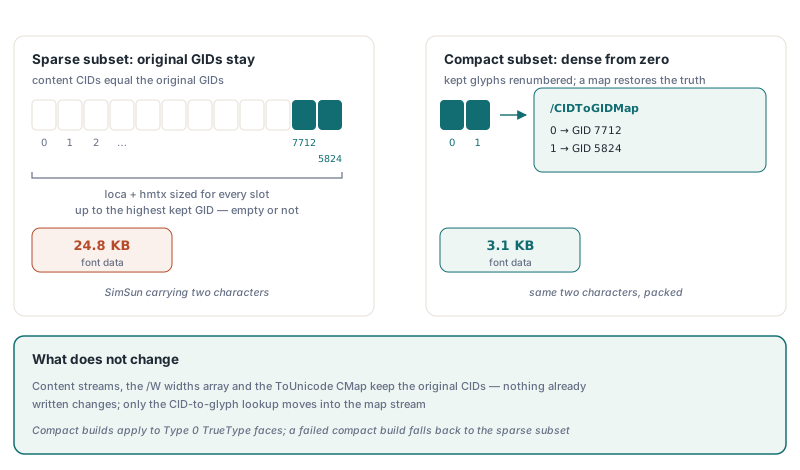
Compaction applies to a specific kind of font. HotPDF builds compact subsets for Type 0 TrueType faces: those set through SetFont while EnableFontSubsetting is on, and the face registered through RegisterUnicodeTTF. A simple TrueType font is located through the cmap inside its own font program, and renumbering would leave that cmap pointing at the wrong glyphs, so simple fonts keep the sparse subset. OpenType-CFF faces keep it too. If the compact build fails for a particular font, HotPDF writes the sparse subset for that font and carries on with the document. The property is off by default, so existing output stays byte-identical until you opt in; under PDF/A the registered Unicode face always gets a compact subset
One trap sits on the reading side. A /CIDToGIDMap stream looks like it belongs next to the CMaps, but it is raw binary with no begincidchar blocks, and handing it to a CMap tokenizer yields an empty mapping with no error at all. If your own tooling extracts text or measures glyphs from these files, read the map as plain 16-bit pairs
What does CompressDocument change for one document?
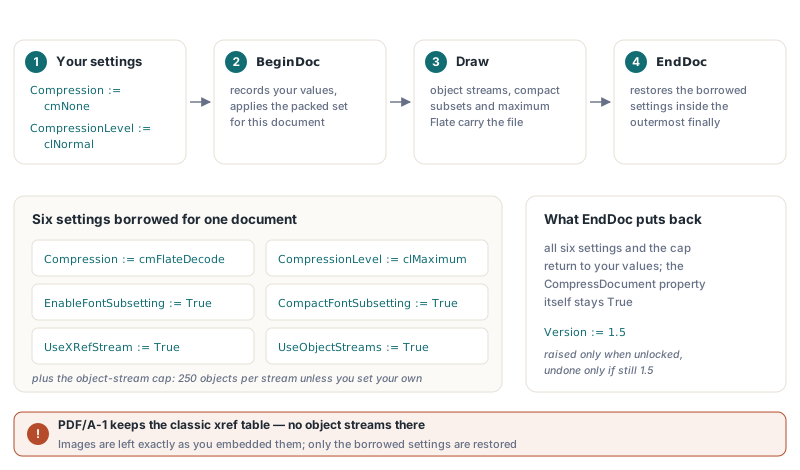
THotPDF.CompressDocument borrows six writer settings plus the object-stream cap at BeginDoc and hands every one of them back at EndDoc. Before the PDF version is settled, HotPDF records your values and then sets:
CompressiontocmFlateDecodeandCompressionLeveltoclMaximumEnableFontSubsettingandCompactFontSubsettingtoTrueUseXRefStreamandUseObjectStreamstoTrue, per ISO 32000-1 §7.5.7 and §7.5.8- The objects-per-container cap to 250 instead of the usual 100, unless you already set your own through
ConfigureAdaptiveObjectStreamPacking
Object streams need PDF 1.5, so an older Version is raised to 1.5 when the version is not locked. PDF/A-1 forbids cross-reference and object streams outright, so a PDF/A-1 document keeps its classic cross-reference table and gets only the Flate and font work. Images are written exactly as you embedded them; nothing is resampled or recompressed with loss
var
  Pdf: THotPDF;
begin
  Pdf := THotPDF.Create(nil);
  try
    Pdf.AutoLaunch := False;
    Pdf.FileName := 'invoice-2026-1042.pdf';
    Pdf.CompressDocument := True;    // applied by BeginDoc, undone by EndDoc
    Pdf.BeginDoc;
    Pdf.CurrentPage.SetFont('Arial', [], 12);
    Pdf.CurrentPage.TextOut(40, 40, 0, 'Invoice 2026-1042');
    Pdf.CurrentPage.SetFont('SimSun', [], 12);
    Pdf.CurrentPage.TextOut(40, 60, 0, WideString(#$5408#$8BA1));
    Pdf.EndDoc;
  finally
    Pdf.Free;
  end;
end;
The restore runs in the outermost finally of EndDoc. That matters for a component that lives in a data module and writes hundreds of reports a day: an exception halfway through one report does not leave the next job running at maximum compression with subsetting forced on. The CompressDocument property itself stays True, so the next document gets the same treatment, and only the borrowed settings go back
The version gets more careful handling. HotPDF reverses its own raise to 1.5 only if the document still ends at 1.5. When another feature pushes the file higher during the run (an embedded OpenType font that needs 1.6, say), the higher version stays, which is exactly the result you would get without compression. For a long-lived component this is a safer design than setting the six properties by hand once at startup, because hand-set values stick around for every later job, including the editable ones
Trimming syntax, offsets and object-stream packing
Once fonts and streams are small, the dictionaries and the cross-reference data become the largest remaining cost, and the object-stream writer used by CompressDocument trims those too. The container format itself is covered in the object streams and incremental updates guide. On top of it, the compression path adds four refinements:
- Compact syntax per ISO 32000-1 §7.2.2: a space is written only where two tokens would otherwise run together as regular characters, so
/Type /Pagebecomes/Type/Page - Cross-reference stream fields use any width §7.5.8.2 allows, so a file under 16 MB stores each offset in 3 bytes instead of 4
- Up to 250 objects go into each object stream; fewer, larger containers give Flate more repetition to work with
- In an unencrypted file the Catalog and the Info dictionary are packed into object streams too, while encrypted output keeps them at the top level
Compact syntax runs into anything that patches a file by searching its text. Signing is the obvious case. The signature value is filled in after the file is written, by locating the literal placeholders /ByteRange ( and /Contents < in the output bytes. Spelled compactly, those become /ByteRange( and /Contents<, and a literal search never finds them. HotPDF therefore writes signature dictionaries (Type Sig or DocTimeStamp, or FT Sig) and the encryption dictionary with the spaced layout. Any post-save script of your own that greps for /Type /Page or similar spaced tokens needs a pattern that tolerates the missing space
Can you compress a PDF that is already loaded?
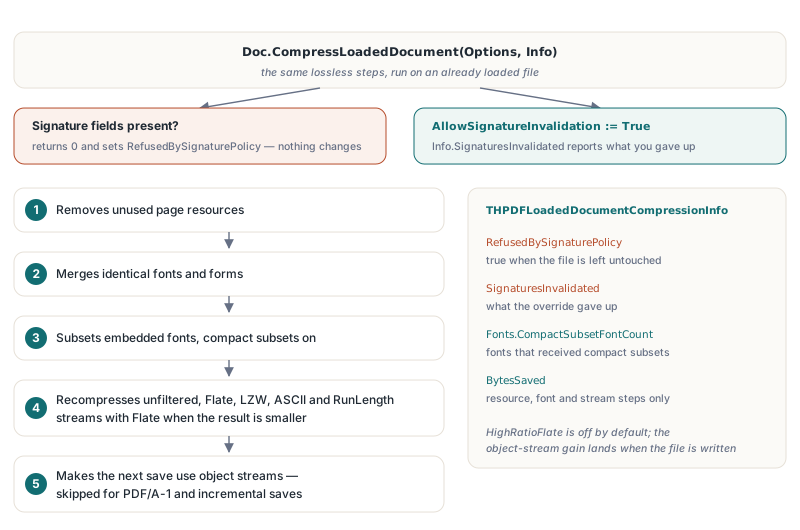
Yes. The options overload CompressLoadedDocument(Options, AInfo) runs the same lossless steps on an existing file. With THPDFLoadedDocumentCompressionOptions.Default it removes unused page resources, merges identical fonts and form XObjects, subsets embedded fonts with compact subsets on, recompresses unfiltered, Flate, LZW, ASCII85, ASCIIHex and RunLength streams with Flate whenever the result is smaller, and switches the next save to object streams. HighRatioFlate is off by default, and object streams are skipped for PDF/A-1 and for incremental saves. The parameterless CompressLoadedDocument overload is the narrower call: it only Flate-compresses streams that are stored uncompressed
var
  Doc: THotPDF;
  Options: THPDFLoadedDocumentCompressionOptions;
  Info: THPDFLoadedDocumentCompressionInfo;
begin
  Doc := THotPDF.Create(nil);
  try
    Doc.AutoLaunch := False;
    Doc.LoadFromFile('quarterly-report.pdf');
    Options := THPDFLoadedDocumentCompressionOptions.Default;
    // Options.AllowSignatureInvalidation := True;  // only if losing signatures is acceptable
    Doc.CompressLoadedDocument(Options, Info);
    if Info.RefusedBySignaturePolicy then
      Writeln(Format('Left untouched: %d signature fields', [Info.SignatureCount]))
    else
    begin
      Writeln(Format('Compact fonts: %d, bytes saved before object streams: %d',
        [Info.Fonts.CompactSubsetFontCount, Info.BytesSaved]));
      Doc.SaveLoadedDocument('quarterly-report-compact.pdf');
    end;
  finally
    Doc.Free;
  end;
end;
Signed files are handled as a single decision. Every step rewrites bytes that a signature covers, so a document with signature fields is refused as a whole: the call returns 0, sets RefusedBySignaturePolicy and changes nothing. Setting AllowSignatureInvalidation lets the work go ahead, and Info.SignaturesInvalidated then records that the signatures no longer verify. Leave that option off in batch jobs. A folder of contracts compressed overnight is a poor place to discover that half of them carried signatures
Compaction on the loaded path is stricter than on the creation path, for a reason that comes straight from the file format. By the time fonts are subset, the decoder has already turned every CID into a GID through whatever /CIDToGIDMap the file carried, but a new compact map has to be indexed by CID. The two only line up when CID equals GID. HotPDF therefore compacts a font program only when every font using it is a CIDFontType2 with an Identity /CIDToGIDMap. Programs that already have a map stream, simple TrueType fonts and fonts with a /CIDSet get the sparse subset. So do faces with color glyph tables (COLR, sbix, CBDT or SVG), because the compact rebuild keeps only outline tables and would drop the color layers
Read Info.BytesSaved for what it is. It sums the resource, font and stream steps, while the object-stream gain appears only when SaveLoadedDocument writes the file, so compare file sizes on disk for the full figure
Final copies versus documents that still change
The gains track how much of a file is uncompressed structure and oversized font data, and page count has little to do with it. For a three-page document of mixed English and Chinese text in Arial and SimSun with both fonts fully embedded, the uncompressed file runs to about 10 MB; generated with CompressDocument it comes to roughly 20 KB, most of the drop from font subsetting, and CompressLoadedDocument lands in the same range for the uncompressed original. A PDF that is already compact barely moves. Photo-heavy files gain little, because neither path touches image data
The cost is editability. A subset font can only show the characters the document already uses, so an AcroForm that someone fills in later, or an incremental edit that adds new text in the same font, can hit missing glyphs. Packed object streams also stop being readable in a text editor, which slows down any debugging session that starts with opening the PDF in Notepad. Turn CompressDocument on for final copies: archived invoices, statements, anything that is generated once and only read afterward. For templates and forms that someone downstream will fill, leave it off and keep the full fonts
If you generate the same CJK reports every night, pair compact subsets with the persistent font subset cache on disk so the subsetting work is not redone on each run. And when you compare two nightly outputs, diff them by object content. One changed field re-Flates its whole object stream, so a byte diff shows far more change than actually happened
Property, record and option details for everything above are in the reference on the HotPDF Delphi PDF component product page