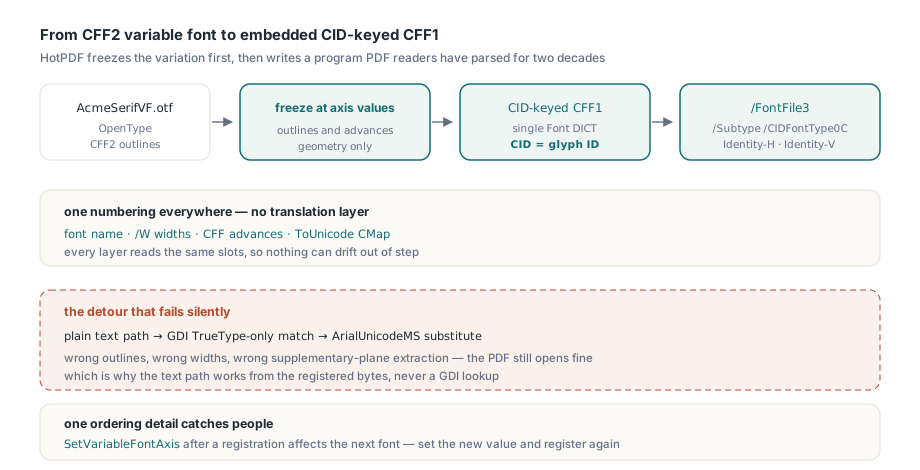
A variable OpenType font with CFF2 outlines can be parsed correctly, cmap and hmtx and all, and still end up in a PDF set in Arial Unicode MS. Ask Windows GDI for a TrueType-only match on that family and it does not recognize CFF2 outlines, so it hands back ArialUnicodeMS instead. Every glyph outline, every width and the extracted text for characters above U+FFFF then come from the substitute. Getting the real font onto the page takes two things: drawing from the font file's own bytes, and turning the CFF2 program into a format a PDF reader is actually required to parse
Why can't a PDF embed a CFF2 font directly?
The PDF specification simply has no slot for a CFF2 program. ISO 32000-2 §9.9 lists the embedded font program types a conforming reader must handle: Type 1 under /FontFile, TrueType under /FontFile2, and under /FontFile3 either a bare CFF program (Type1C or CIDFontType0C) or an OpenType wrapper around TrueType or CFF outlines. Each CFF flavor in that list means CFF version 1, the format readers have parsed for two decades
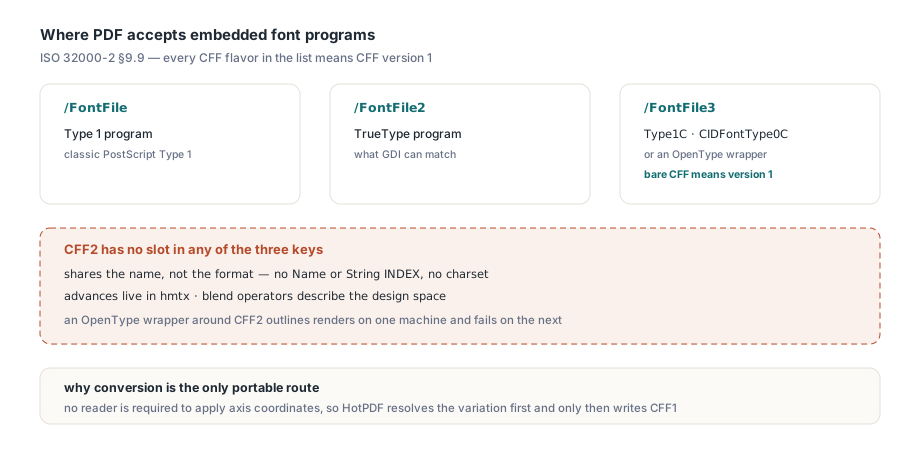
CFF2 shares the name and very little else. It drops the Name INDEX and String INDEX, drops the charset, moves glyph advances out of the CharStrings and into hmtx, and adds blend operators so a single outline can describe an entire design space. A CFF1 parser that runs into a CFF2 table has nothing to go on. Wrapping the font in a /Subtype /OpenType stream anyway produces the kind of file that renders on the developer's machine and fails on a customer's, and HotPDF does not write it
The conversion also has to be static. A PDF font is a fixed set of outlines with fixed metrics, and no reader is obliged to apply axis coordinates, which the article on variable font static instancing covers in more depth. So the order is fixed: resolve the variation at the selected axis values first, then write CFF1 from the resulting static outlines
Drawing CFF2 text from the registered font bytes
From application code, a CFF2 font looks like any other Unicode font registered with HotPDF: set the axis values, call RegisterUnicodeTTF, select the face by name and draw. At registration HotPDF keeps its own copy of the font's name table, so SetFont matches the family name, full name, PostScript name or typographic family name and picks the frozen static instance. The font does not need to be installed in Windows, and GDI is never asked to find it
var
  Pdf: THotPDF;
begin
  Pdf := THotPDF.Create(nil);
  try
    Pdf.FileName := 'brochure.pdf';
    Pdf.BeginDoc;
    // Axis values are read when a font is registered, so set them first
    Pdf.SetVariableFontAxis('wght', 650);
    Pdf.RegisterUnicodeTTF('C:\Fonts\AcmeSerifVF.otf');
    // Family, full, PostScript or typographic family name from the name table
    Pdf.CurrentPage.SetFont('Acme Serif VF', [], 12, DEFAULT_CHARSET);
    Pdf.CurrentPage.UnicodeTextOut(72, 100, 0, 'Variable weight 650, CFF2 outlines');
    Pdf.EndDoc;
  finally
    Pdf.Free;
  end;
end;
Glyph IDs come from the registered cmap and advances from the registered hmtx. A glyph whose advance really is zero keeps a zero advance; there is no fallback to a GDI measurement that would invent one. A UTF-16 surrogate pair produces exactly one advance. BMP characters, supplementary-plane characters and synthetic shaping carriers all keep per-font Unicode mappings, so switching to a second embedded font mid-page, or starting a new page, cannot make one font borrow another font's glyph IDs
Measurement reads the same bytes. THPDFPage.GetWideTextWidth and THPDFPage.GetWideCharAdvances return metrics from the selected byte-backed font, which means line breaking and right alignment computed in your layout code agree with what lands in the content stream
One ordering rule trips people up. SetVariableFontAxis stores a selection that is applied when the next font is registered; changing it afterwards does nothing to an instance that is already frozen. Calling SetVariableFontAxis('wght', 400) after the code above and drawing more text still gives you weight 650. A second weight means setting the new value and registering again. The setter itself is strict: the tag must be exactly four printable ASCII bytes and the value must be finite, otherwise it raises immediately
What the converted font program looks like inside the PDF
HPDFConvertCFF2ToCFF produces a raw CID-keyed CFF1 program with a single Font DICT in which every CID equals the original glyph ID, including empty and unused slots. That identity is the core of the design. The font name, the PDF /W widths, the CFF advances and the ToUnicode CMap all address the same numbering, so no layer renumbers glyphs and no two tables can disagree about which glyph is which
In the PDF, the descendant font is a CIDFontType0 with Identity-H or Identity-V encoding, and the program stream sits under /FontFile3 with /Subtype /CIDFontType0C. Because CID already equals GID, the descendant has no /CIDToGIDMap entry at all. An OpenType-wrapped CFF font forces the output up to PDF 1.6; the converted stream carries no such requirement, so adding a CFF2 font does not by itself raise the version of the output file
Widths needed some arithmetic. A Type 2 CharString stores the glyph advance as an optional first operand relative to the Private DICT's nominalWidthX, and integer operands live in the signed 16-bit range. OpenType advances are unsigned 16-bit, up to 65535. With the obvious nominalWidthX of 0, anything above 32767 would have to be clamped, and a clamped advance shifts every following glyph on the line. HotPDF sets nominalWidthX to 32768 and defaultWidthX to 0, then writes each advance explicitly as advance - 32768
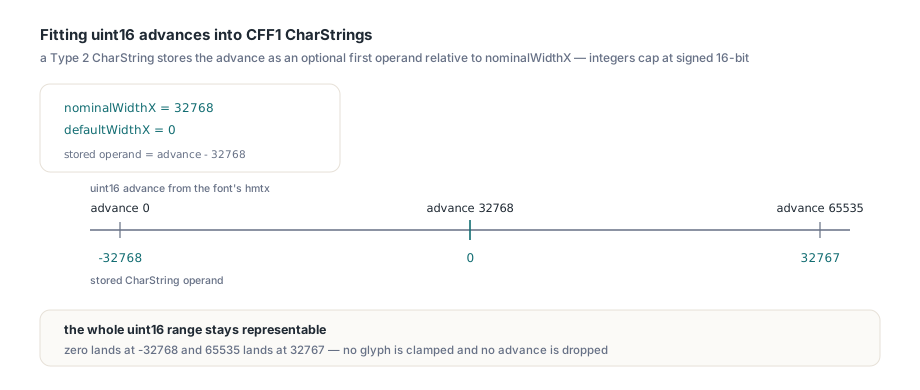
A zero advance is stored as -32768 and a 65535 advance as 32767. The whole uint16 range fits
Geometry gets the same treatment. The FontMatrix is [1/UnitsPerEm 0 0 1/UnitsPerEm 0 0], so a font with 2048 units per em keeps its native coordinates instead of being rescaled to the CFF default of 1000. Relative moves and lines too long for one operand are split into representable steps, and cubic curves are subdivided in a way that keeps their shape. The original copyright and license strings, the original name table and the embedding flags are carried along in the CFF Notice string, so anyone inspecting the embedded program can still see whose font it is and under what terms
Calling HPDFConvertCFF2ToCFF on its own
The converter is a public function in the HPDFOpenTypeAdvanced unit, written in Pascal, with no HarfBuzz dependency and no font installation step. You can call it outside any document, for example to pre-convert a font at build time or to inspect exactly what the PDF writer will embed
uses
  System.SysUtils, System.IOUtils, HPDFOpenTypeAdvanced;

procedure ConvertWeight650;
var
  Source, Cff: TBytes;
  Axes: THPDFVariableFontAxisValueArray;
begin
  Source := TFile.ReadAllBytes('C:\Fonts\AcmeSerifVF.otf');
  SetLength(Axes, 1);
  Axes[0].Tag := 'wght';
  Axes[0].Value := 650;
  Cff := HPDFConvertCFF2ToCFF(Source, Axes);
  // An empty result is the normal way the converter says no
  if Length(Cff) = 0 then
    raise Exception.Create('Not convertible: not CFF2, embedding restricted or bad axes');
  TFile.WriteAllBytes('AcmeSerif-650.cff', Cff);
end;
A variable font goes through geometry-only static instancing at the given coordinates, which covers both outlines and advances. A static CFF2 font accepts only an empty axis array; passing axis values to a font that has no variation tables is treated as a caller error and returns nothing. The output is a bare CFF1 program with no sfnt table directory around it, so code that expects an OpenType file will reject it
The expected refusals all return an empty TBytes: input that is not CFF2, input larger than 128 MiB, an axis selection the instancer rejects, NaN or infinite axis values, and fonts whose OS/2 fsType sets restricted-license embedding (0x0002) or bitmap-only embedding (0x0200). Test the length every time. Inside EndDoc the writer does that check itself and raises StoreFont: CFF2 outline conversion failed. That is the correct behavior for a document library. A PDF that ships with a blank font program looks fine in the build log and broken in the customer's viewer, while an exception stops the job where someone can see it
Budgets and cancellation on a server
The optional third parameter, a THPDFVariableFontControl, caps memory and lets you cancel a long conversion. Without one, the converter applies its defaults: 128 MiB for font input and output, a 1 GiB cumulative working budget, and the CFF1 ceiling of 65535 bytes per CharString. The constructor takes the output limit, the working limit and a cancellation callback of type THPDFVariableFontCancellationCheck, a parameterless method that the converter calls between steps
type
  TFontJob = class
  private
    FCancelled: Boolean;
    procedure CheckCancel;
  public
    function Convert(const Source: TBytes): TBytes;
    property Cancelled: Boolean read FCancelled write FCancelled;
  end;

procedure TFontJob.CheckCancel;
begin
  if FCancelled then
    Abort;  // EAbort propagates out of HPDFConvertCFF2ToCFF
end;

function TFontJob.Convert(const Source: TBytes): TBytes;
var
  Control: THPDFVariableFontControl;
begin
  Control := THPDFVariableFontControl.Create(
    32 * 1024 * 1024,           // maximum output bytes
    Int64(256) * 1024 * 1024,   // cumulative working budget
    CheckCancel);
  try
    // nil selection: default instance of a variable font, or a static CFF2 font
    Result := HPDFConvertCFF2ToCFF(Source, nil, Control);
  finally
    Control.Free;
  end;
end;
The constructor validates its own arguments: a non-positive limit, or an output limit above MaxInt, raises before any conversion starts. It also calls the cancellation check once on creation, so a job that was cancelled while queued stops right there
Budget overruns and cancellation arrive as exceptions, deliberately apart from the empty-result path. An empty array means this font cannot be converted. An exception means this particular attempt was stopped. Retrying the first case with a bigger budget is wasted work, so route the two to different branches in your job queue
How much does an embedded CFF2 font add to file size?
All of it. HotPDF embeds the complete converted glyph set of a CFF2 font whether EnableFontSubsetting is on or off. A font with several thousand glyphs adds every one of them to each document that uses it, even when the page shows a single headline. For a brochure or a catalog that cost is easy to accept. For a report server writing thousands of two-page invoices, measure the font's converted size first. Suppose it comes out at 1 MB: across 10,000 files that is 10 GB of mostly unused outlines, and a TrueType cut of the same typeface may be the better choice there
The related size features follow the same rule. Converted CFF2 fonts are embedded whole, so neither the compact font subsets enabled by CompressDocument nor the persistent font subset cache applies to them. TrueType fonts in the same document are still subset and cached as usual, and a mixed document gets both behaviors side by side
The resource limits are real limits. A glyph whose converted CharString would exceed 65535 bytes, or a font that runs through the working budget, makes the conversion fail rather than writing that glyph with an empty outline. We would rather see an exotic display font rejected at EndDoc than find a missing letter in a printed run, and that is how the writer behaves
Native CFF2 text, the portable CFF1 converter and the variable font instancing it builds on are part of HotPDF, the PDF component for Delphi and C++Builder, together with font subsetting for TrueType faces and color glyph support