Dump the first strip of a TIFF from a CT workstation or a 1990s document archive and the JPEG frame marker can be FFC1 with a precision byte of 0C, or FFC3, or FFC9. ITU-T T.81 defines all of those. The PDF DCTDecode filter covers only 8-bit baseline and progressive JPEG, so these strips have to be decoded to samples and embedded as an ordinary 8- or 16-bit image
That means 12-bit DCT (SOF1, SOF2), Huffman lossless (SOF3), arithmetic coding (SOF9, SOF10), and the old-style TIFF 6.0 JPEG whose tables live at file offsets. Each needs its own decoder, and the lossless one hides a trap that only bites in Pascal
Why can't a 12-bit JPEG go straight into a PDF?
A 12-bit JPEG cannot be copied into a PDF because no PDF filter is required to decode it. ISO 32000-1 §7.4.8 defines DCTDecode around the JPEG baseline format, with the progressive extension added in PDF 1.3. It says nothing about 12-bit precision, the lossless process of T.81 Annex H or the arithmetic coder of Annex D, so a reader that meets an SOF1 12-bit frame or an SOF9 marker in a DCTDecode stream may draw nothing. Most viewers do exactly that
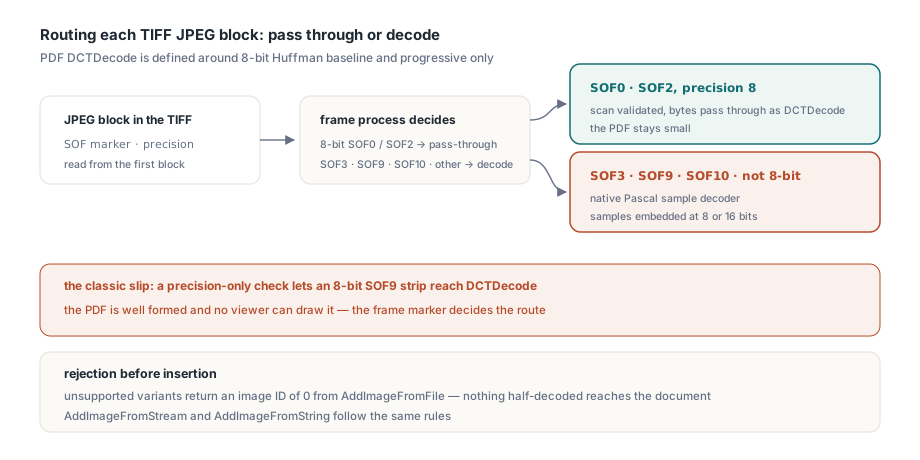
PDFlibPas, the PDF Library for Delphi, splits TIFF JPEG data into two routes. The 8-bit Huffman baseline and progressive strips that make up most JPEG-in-TIFF files are validated scan by scan and passed through as DCTDecode, which keeps the PDF small. Everything else is decoded in native Pascal. The decision is made from the frame marker and the sample precision of the first JPEG block: SOF3, SOF9, SOF10 or any precision other than 8 sends the page to the decoder
Reading the frame marker matters more than it sounds. A route chosen on precision alone handles every 12-bit file, yet sends an 8-bit SOF9 strip to DCTDecode, since 8-bit arithmetic coding has the same precision byte as baseline. The PDF is well formed. No viewer can draw the image
What ends up in the PDF: 8- or 16-bit image samples
Each decoded JPEG block becomes an ordinary image XObject with BitsPerComponent 8 or 16, set by the JPEG process:
- 12-bit Huffman JPEG (sequential SOF1, progressive SOF2) is dequantized, inverse transformed and widened to 16-bit samples
- Arithmetic-coded JPEG (sequential SOF9, progressive SOF10) becomes 8-bit samples at 8-bit precision and 16-bit samples at 12-bit precision
- Huffman lossless JPEG (SOF3) becomes 8-bit or 16-bit samples, matching its declared precision exactly
Widening 12 bits to 16 is where a quick implementation goes slightly wrong. Shifting left by four maps 4095 to 65520, so white turns into a very light gray. PDFlibPas uses bit replication instead, (V shl 4) or (V shr 8), which copies the top four bits into the vacated low bits: 4095 becomes 65535 and 0 stays 0
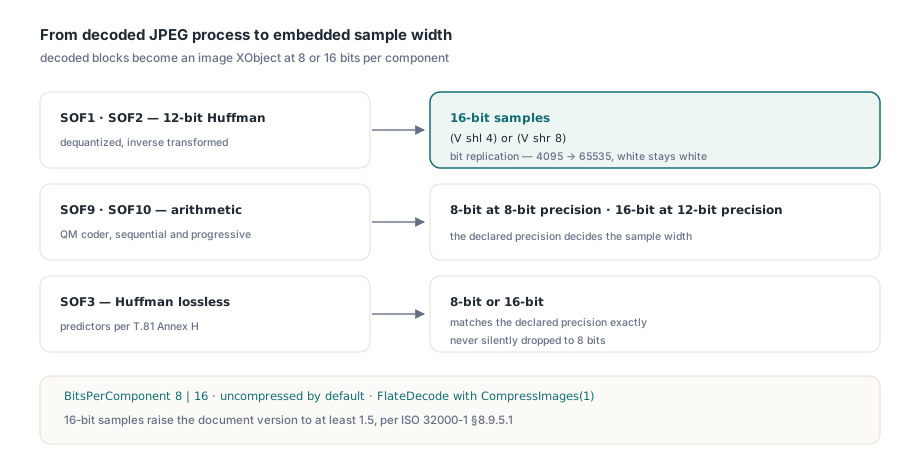
ISO 32000-1 §8.9.5.1 allows 16 bits per component from PDF 1.5, so the AddImage* calls raise the document version to at least 1.5 whenever an image with 16-bit samples is added. That includes multi-strip and tiled pages, where the drawn image is a Form XObject with no BitsPerComponent of its own to inspect
Decoded samples are stored uncompressed by default, as with BMP data; call CompressImages(1) first and they are written with FlateDecode. For these TIFFs we would turn it on every time. For a 300 dpi A4 scan in 16-bit RGB, 2480 × 3508 pixels × 6 bytes works out to about 52 MB uncompressed, and Flate costs no precision. Compressed 16-bit samples still outweigh the DCT data they came from; the guide to reducing PDF file size in Delphi shows where the other bytes go
Importing the TIFF pages with TPDFlib
The calling code is the same as for any other TIFF. TPDFlib.AddImageFromFile(Const FileName: WideString; Options: Integer): Integer takes the 1-based TIFF page number in Options and returns an image ID, or 0 when the page cannot be imported; a rejected page leaves nothing half-decoded in the document. The loop sizes each PDF page from the TIFF resolution tags:
uses
  PDFlibrary;

function TiffToPdf(const TiffName, PdfName: WideString): Boolean;
var
  Lib: TPDFlib;
  Page, PageCount, ImageID: Integer;
  DPI, W, H: Double;
begin
  Result := False;
  Lib := TPDFlib.Create;
  try
    Lib.SetMeasurementUnits(0);   // default user space, 1/72 inch
    Lib.SetOrigin(1);             // top-left origin for DrawImage
    Lib.CompressImages(1);        // Flate for decoded 8- and 16-bit samples
    PageCount := Lib.GetImagePageCount(TiffName);
    if PageCount = 0 then
      Exit;
    for Page := 1 to PageCount do
    begin
      ImageID := Lib.AddImageFromFile(TiffName, Page);  // Options = TIFF page
      if ImageID = 0 then
        Exit;                     // unsupported or damaged image data
      Lib.SelectImage(ImageID);
      case Lib.ImageResolutionUnits of
        2: DPI := Lib.ImageHorizontalResolution;          // dots per inch
        3: DPI := Lib.ImageHorizontalResolution * 2.54;   // dots per cm
      else
        DPI := 0;
      end;
      if DPI <= 0 then
        DPI := 300;
      W := Lib.ImageWidth * 72 / DPI;
      H := Lib.ImageHeight * 72 / DPI;
      if Page > 1 then
        Lib.NewPage;
      Lib.SetPageDimensions(W, H);
      Lib.DrawImage(0, 0, W, H);
    end;
    Result := Lib.SaveToFile(PdfName) = 1;
  finally
    Lib.Free;
  end;
end;
There is no branch per JPEG process in that loop. Keep Options positive, though: a negative value hands the TIFF to GDI+ and its own decoding rules. AddImageFromStream and AddImageFromString take the same page number for TIFF data in memory
Old-style JPEG: tables at offsets, strips without headers
Old-style JPEG TIFFs (Compression = 6) keep their tables outside the strips: TIFF 6.0 Section 22 put them behind the JPEGQTables, JPEGDCTables and JPEGACTables offset tags, or in a tables-only stream at JPEGInterchangeFormat. TIFF Technical Note 2 replaced the scheme with Compression = 7 and a shared JPEGTables tag, but scanners kept writing the old layout for years
The strips hold bare entropy-coded data with no SOI, frame header or scan header, so a strip copied into a PDF as DCTDecode is not a JPEG at all. PDFlibPas rebuilds a valid stream for every Compression 6 page, whatever its photometric interpretation. Each table-offset tag points at a raw 64-byte quantization table, or at a Huffman table of 16 counts plus values, and those become DQT and DHT segments in a synthesized JPEGTables stream. Each strip then gets SOI, a frame marker carrying its own row count, DRI when JPEGRestartInterval is set, SOS, the entropy data and EOI. Gluing the strips into one scan would be wrong, because old-style JPEG restarts DC prediction at every strip boundary
Two details are easy to miss. The three components of a YCbCr image often point at the same table bytes, so tables are deduplicated by content before numbering. And a baseline frame may reference only two DC and two AC tables; when more remain, the synthesized frame uses SOF1. A JPEGInterchangeFormat stream that already contains scans is treated as the whole image and imported as one new-style strip. Old-style files that are lossless, tiled or stored as separate planes are rejected rather than guessed at, so convert those to Compression 7 upstream. The container side is covered in the write-up on hardening the TIFF decoder
Why does a CMYK JPEG inside a TIFF come out inverted?
A CMYK JPEG inside a TIFF comes out inverted when the importer applies the Adobe APP14 convention that belongs to standalone JPEG files. Photoshop writes inverted CMYK into standalone JPEGs, so PDF producers traditionally add /Decode [1 0 1 0 1 0 1 0] to compensate. TIFF PhotometricInterpretation 5 defines samples as ink amounts where 0 means no ink, and libtiff takes the decoded JPEG samples at face value without looking at APP14
PDFlibPas follows the TIFF rule. JPEG-compressed CMYK TIFF strips are embedded without the inverted Decode array, whether or not an APP14 marker is present, while standalone four-component JPEG files keep the inverted Adobe convention. The APP14 transform flag still matters for one thing: transform 2 marks YCCK. DCTDecode converts that to CMYK by itself on the pass-through route, and the decoded route does the same conversion before embedding
Subsampled color raises a similar question of which header to believe. TIFF Technical Note 2 requires YCbCrSubSampling to match the JPEG frame's sampling factors, and real files get it wrong or omit it (the default is 2,2). PDFlibPas decodes each block with its own frame's factors, replicates chroma to full resolution and converts with the JFIF equations. We think that beats rejecting the file: viewers read only the frame on the pass-through route, and libtiff patches the tag from the first strip's frame, so an error would refuse files that libtiff-based tools display correctly
Why does lossless JPEG decoding break on a Pascal shift?
Lossless JPEG decoding breaks in Pascal because predictors 5 and 6 need an arithmetic right shift and Pascal's shr is a logical one. SOF3 predicts each sample from its left (Ra), upper (Rb) and upper-left (Rc) neighbors and codes only the difference. Of the seven predictors in T.81 Table H.1, predictor 5 is Ra + ((Rb - Rc) >> 1) and predictor 6 is Rb + ((Ra - Rc) >> 1); the bracketed difference goes negative whenever the upper-left neighbor is the brighter one. Feed a negative Integer to shr and the sign bit becomes a magnitude bit. The image dissolves into noise
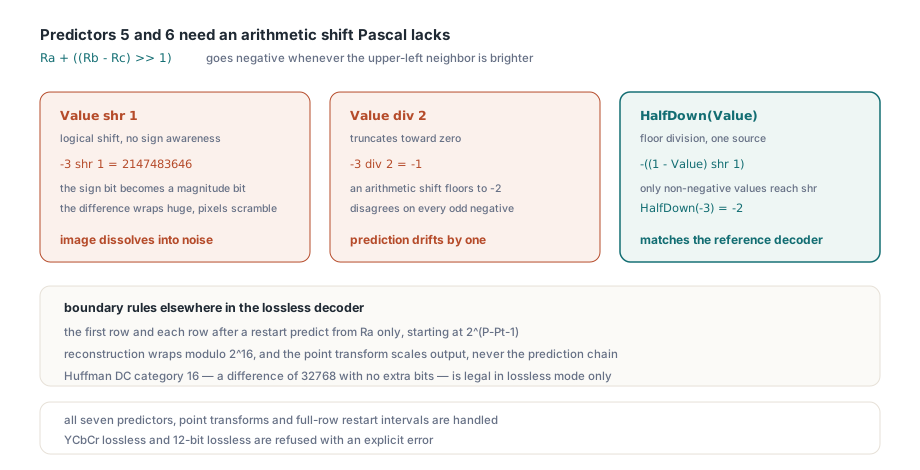
The obvious second attempt, div 2, fails more quietly. div truncates toward zero while an arithmetic shift rounds toward negative infinity; the two disagree on every odd negative value, and the off-by-one prediction propagates along the row. Free Pascal has SarLongint in its System unit. Delphi has nothing equivalent, so if you write your own lossless decoder, a helper like this compiles identically on both:
// Arithmetic shift right by one: floor(Value / 2)
// shr is a logical shift, and div 2 truncates toward zero
function HalfDown(Value: Integer): Integer;
begin
  if Value >= 0 then
    Result := Value shr 1
  else
    Result := -((1 - Value) shr 1);
end;

// Value = -3:  -3 shr 1 = 2147483646,  -3 div 2 = -1,  HalfDown(-3) = -2
The shift is not the only boundary rule in Annex H. The first row, and the first row after each restart marker, predicts from the left neighbor only and starts at 2^(P−Pt−1) for precision P and point transform Pt; every later row starts from the sample above. Reconstruction wraps modulo 2^16, and the point transform scales only the output, never the prediction chain. Huffman DC category 16 (a difference of 32768, no extra bits) is legal only in lossless mode, yet DHT usually precedes the frame header, so the table parser must accept it before knowing the process. For the type-width side of the same class of problem, see Longint and pointer pitfalls on Delphi Linux64
On the import side, PDFlibPas handles all seven predictors, point transforms, and restart intervals that cover whole rows, for both interleaved and separate-plane TIFF layouts. The JPEG precision must equal BitsPerSample and be 8 or 16, and every component must be sampled 1x1. Lossless data tagged as YCbCr, and 12-bit lossless JPEG, are rejected with an explicit error
12-bit DCT and arithmetic decoding, and how to test them
The 12-bit and arithmetic decoders share one inverse DCT and differ only in entropy decoding. In 12-bit Huffman JPEG, DC categories reach 15 and AC categories 14, quantization tables may carry 16-bit entries, and DC prediction resets at the start of every scan and at every restart. Coefficients stay in zigzag order until dequantization, which must use the quantization value at the same zigzag index; only then do they move to natural order for the separable two-pass IDCT
Arithmetic coding replaces Huffman with the QM coder of T.81 Annex D: a 114-entry probability state table, a 64-bin DC statistics area and a 256-bin AC area, steered by conditioning parameters from the DAC segment (defaults L = 0, U = 1, Kx = 5). Statistics, DC context and prediction all reset at every restart and every scan. PDFlibPas keeps DAC segments when it normalizes a shared JPEGTables stream for arithmetic images; drop them and each strip decodes against the default model while the encoder used another
Both decoders cover sequential and progressive scans, interleaved color with subsampled chroma, and RGB, CMYK and YCbCr TIFF pages at 12-bit precision. Hierarchical JPEG and arithmetic-coded lossless JPEG (SOF11) fall outside that set and are rejected, as are 12-bit and arithmetic pages stored as separate planes; those need chunky samples
Binary JPEG fixtures in Delphi tests
Hand-built JPEG fixtures in Delphi tests can fail in a way that looks exactly like a decoder bug; we ran into this one ourselves. A #$xx string constant longer than 255 characters is typed as UnicodeString, and assigning it to an AnsiString goes through the active code page, rewriting bytes $80 to $9F, which are routine in entropy-coded data. Runtime header building has the same trap, since AnsiChar + AnsiChar yields a UnicodeString in Delphi; append single bytes or use SetLength and indexed assignment. For fixtures, store hex text:
uses
  SysUtils, PDFlibrary;

// Test helper you add yourself: the fixture stays plain ASCII,
// so no code page conversion can touch the bytes
function HexToBytes(const Hex: AnsiString): AnsiString;
var
  I: Integer;
begin
  SetLength(Result, Length(Hex) div 2);
  for I := 1 to Length(Result) do
    Result[I] := AnsiChar(StrToInt('$' + string(Copy(Hex, I * 2 - 1, 2))));
end;

function ImportFixture(Lib: TPDFlib; const TiffHex: AnsiString): Integer;
begin
  Result := Lib.AddImageFromString(HexToBytes(TiffHex), 1);  // TIFF page 1
end;
For arithmetic test images, jpegtran -arithmetic converts an existing JPEG losslessly but writes sequential SOF9; SOF10 needs -progressive too. The coefficients do not change, so one djpeg -dct float reference serves both versions, compared with a small tolerance for IDCT rounding. A non-zero image ID proves acceptance only. A pass-through mistake still yields a valid ID and a well-formed PDF, so render the page and compare pixels
These variants tend to arrive together, usually halfway through an archive migration. Licensing, the full image format list and trial downloads are on the PDFlibPas PDF Library for Delphi product page