"value":-.25 is what a JSON writer produces when it copies a perfectly legal PDF number token as is, and a strict RFC 8259 parser gives up at the point right after the minus sign. Its neighbors +1.5 and 007.5 from the same PDF array fail the same way. Turning PDF numbers into JSON means re-spelling each token digit by digit, writing null for NaN and Infinity, and keeping the regional decimal comma out of the output
Four spellings PDF accepts and JSON rejects
The two grammars disagree on four small details. ISO 32000-1 §7.3.3 lets a number start with a plus sign, omit the integer part (.5), end on a bare point (4.) and carry leading zeros (007.5). RFC 8259 §6 allows none of that. A JSON number has an optional minus, an integer part that is either 0 or starts with a digit from 1 to 9, and at least one digit after any decimal point. Producers are entitled to the PDF forms, and generators that print numbers with their own formatting code, along with files someone fixed by hand in a text editor, use them
The collision gets sharper in a library that respects the source text. PDF Library for Delphi (PDFlibPas) keeps the exact characters it parsed for every real number, so a calibrated color value saves back unchanged instead of being rounded to the default four decimals; the reasoning is in preserving parsed PDF decimal precision. The tokenizer already patches .5 into 0.5 and 4. into 4.0 while reading, and integers are rebuilt from their value, so +3 comes back as 3. Three spellings still reach the writer verbatim: a signed leading point (-.25), an explicit plus on a real (+1.5) and leading zeros (007.5)
A writer that pastes those stored characters straight into JSON produces a file that looks fine in an editor. The trouble starts on the way back in. SetObjectJSON returns 0, and LastErrorCode reports PDFLIB_ERROR_OBJECT_JSON_INVALID, which is 105
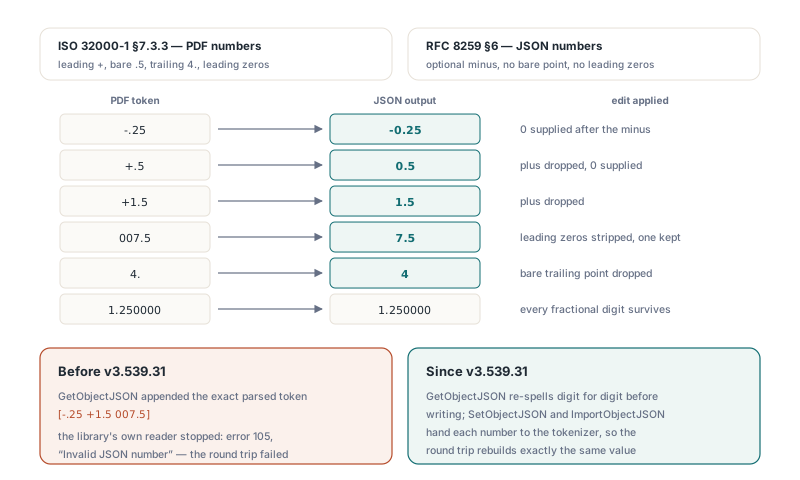
The round trip below is the quickest way to see what GetObjectJSON actually emits. Each number arrives wrapped as {"type":"number","value":...}, and the three awkward tokens come out as -0.25, 1.5 and 7.5
uses
  System.SysUtils, PDFlibrary;

var
  Lib: TPDFlib;
  JSON: AnsiString;
begin
  Lib := TPDFlib.Create;
  try
    if Lib.LoadFromFile('legacy-drawing.pdf', '') = 0 then
      raise Exception.Create('load failed');

    // Object 12 is an array written as [-.25 +1.5 007.5]
    JSON := Lib.GetObjectJSON(12, 0);
    if JSON = '' then
      raise Exception.CreateFmt('export failed, error %d',
        [Lib.LastErrorCode]);
    // Each element reads {"type":"number","value":-0.25} and so on

    // SetObjectJSON returns 1 on success; pass 0 for Options
    if Lib.SetObjectJSON(12, JSON, 0) = 0 then
      raise Exception.CreateFmt('round trip rejected, error %d',
        [Lib.LastErrorCode]);

    Lib.SaveToFile('legacy-drawing-roundtrip.pdf');
  finally
    Lib.Free;
  end;
end;
Re-spelling the token instead of recomputing it
GetObjectJSON edits the stored characters rather than formatting the parsed Double. It reads an optional sign, collects the digits on either side of a single decimal point, and then makes only the changes JSON insists on: the plus goes, leading zeros are stripped down to one, an empty integer part becomes 0, a bare trailing point is dropped, and a minus is put back in front. A token that contains any other character, or no digits at all, is formatted from its parsed value with ten decimals instead, and that path writes null when the value is not finite
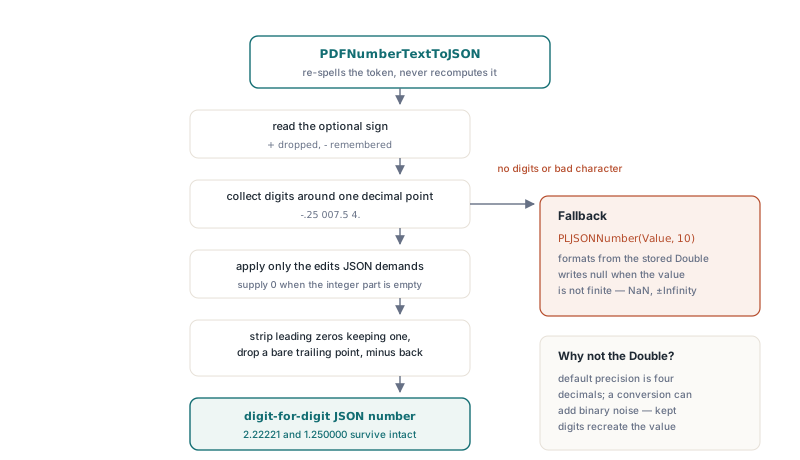
-.25becomes-0.25, and+.5becomes0.5+1.5becomes1.5007.5becomes7.5, while0.75stays as it is4.becomes4if such a token ever reaches the writer2.22221and1.250000keep every fractional digit, trailing zeros included
Formatting from the Double would have been a one-liner, and it would have been wrong in two ways. The document's default output precision is four decimals, so 2.22221 would lose a digit. Raising the precision does not rescue it either: 0.1 has no exact binary form, and a 17-significant-digit conversion prints 0.10000000000000001. Keeping the original digits means SetObjectJSON and ImportObjectJSON, which hand each JSON number back to the PDF tokenizer, rebuild exactly the value the file declared
That promise covers the value. The bytes are another matter. After a re-import, -.25 is stored and saved as -0.25; both spellings are equal under §7.3.3, yet a byte-level diff flags the change. On a document whose byte ranges are covered by a signature, we would not run objects through an export and import cycle at all unless the plan is to sign again afterwards
What does null mean in GetDocumentJSON output?
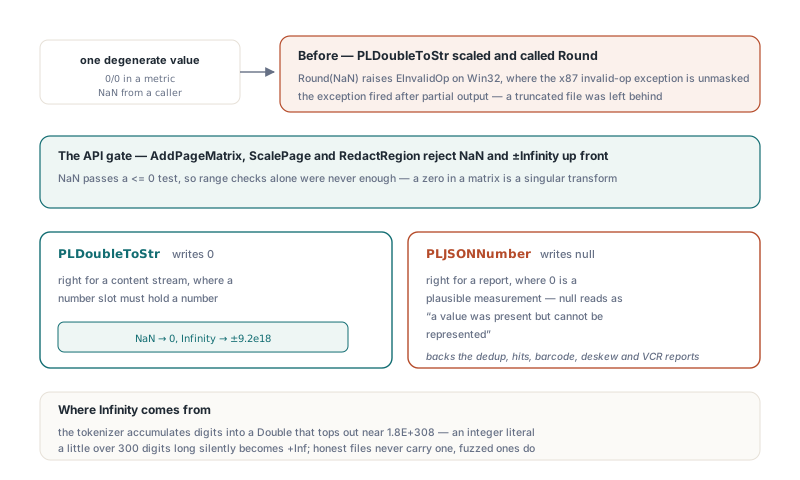
GetDocumentJSON writes null for any number that is NaN or infinite, because RFC 8259 §6 has no syntax for either. Infinity is easier to produce than it sounds. The PDF tokenizer accumulates digits by repeated multiplication into a Double, which tops out near 1.8 × 10308, so an integer literal a little over 300 digits long turns into +Inf during parsing. Ordinary producers never write such a literal; fuzzed and hostile files do, which is why a 400-digit integer belongs in the same test corpus as the cases in hardening a Pascal PDF parser against malicious files
The finiteness check has to come first. GetDocumentJSON prints integral values below MaxInt as integers and everything else with Pascal's Str(D:0:6), which is fine for 1.25 and fatal for +Inf, because Str then writes the text +Inf and no JSON consumer will parse that. The six-decimal formatting also marks what the document JSON is for. It is an overview of the whole file. When you need the exact digits of one object, ask GetObjectJSON for that object
The null is deliberately lossy, and it shares its spelling with something else. A PDF null object also comes out as null in the document JSON, so a consumer cannot tell "the file said null" from "the file said a number too large for a Double" by looking at that one value. GetObjectJSON keeps them apart: the PDF null object is written as {"type":"null"}, and a number keeps its "type":"number" wrapper. Code that reads document JSON should accept null anywhere a number can appear, log the object number, and treat the file as suspect instead of substituting 0
Why can a single NaN abort an SVG or JSON export?
A number formatter that scales its input and calls Round hits Round(NaN), and on Win32, where Delphi leaves the x87 invalid-operation exception unmasked, that raises EInvalidOp. The exception fires after the writer has already emitted part of its output. One degenerate measurement, a 0/0 inside a metric or a NaN passed in by a caller, leaves a truncated file on disk
PLDoubleToStr in PDFlibExtra, the invariant formatter the library uses for content streams, SVG, XML, CSV and most of its JSON, returns 0 for NaN. Its integer branch clamps the scaled value to ±9.2 × 10¹⁸ just like the fractional branch, so Infinity also comes out as a finite literal. In a content stream that is the right call. An operand slot must hold a number, and a viewer that meets +Inf in the middle of a path has nothing sensible to draw
In a report, zero is the wrong call, and we feel strongly about this one: 0 is a perfectly plausible deskew angle or pixel error, so writing it for "no answer" corrupts the data without anyone noticing. Report writers use PLJSONNumber(Value, Decimals) from the same unit instead, which writes null for NaN or Infinity and invariant digits otherwise. GetSimilarImageDeduplicationReportJSON, GetAnnotationHitsJSON and the barcode, deskew, structured text and PDF/VCR reports all go through it, so a non-finite deskew angle reaches the consumer as null
The same function is public, so your own JSON alongside the library's can follow the same rule. The sketch below builds a small skew record; the shape of the record is ours, the formatting call is the library's
uses
  SysUtils, PDFlibTypes, PDFlibExtra;

// Your own report writer, using the library's number rule
function SkewReportJSON(Page: Integer; Angle, Confidence: Double): string;
var
  B: PLStringBuilder;
begin
  B := PLStringBuilder.Create(128);
  try
    // Turn every Double into text first; PLJSONNumber writes null
    // for NaN or Infinity and always uses a decimal point
    B.Append('{"page":').Append(Page)
     .Append(',"angle":').Append(string(PLJSONNumber(Angle, 4)))
     .Append(',"confidence":').Append(string(PLJSONNumber(Confidence, 4)))
     .Append('}');
    // Never B.Append(Angle): on Delphi that overload follows the user locale
    Result := B.ToString;
  finally
    B.Free;
  end;
end;
Where the user locale sneaks into JSON
Any formatter that consults regional settings can put a comma where JSON needs a point. PLFloatToStr in PDFlibExtra is a thin wrapper over FloatToStr, and that is exactly what it does. Write a field such as maxAcceptedMeanError with it on a German or French desktop and you get "maxAcceptedMeanError":1,5. A JSON parser reads that as the value 1 followed by a stray token. That field reports the worst accepted pixel error from perceptual image deduplication, and GetSimilarImageDeduplicationReportJSON writes it through PLJSONNumber(Stats.MaxAcceptedMeanError, 6), so the separator stays a point whatever the machine is set to
The second route is quieter. On Delphi, PLStringBuilder is a plain alias of System.SysUtils.TStringBuilder, whose Append(Double) overload formats through the user locale. Free Pascal builds use a small Unicode builder class from PDFlibTypes instead, because the FPC runtime's own TStringBuilder is ANSI-only. Compile the same source with both and the Delphi build can disagree with the FPC build. A test that only runs on Free Pascal, or only on an en-US machine, will not see the comma
The test below reproduces a comma desktop inside the process and feeds the report to a strict parser. Pick an input that really contains near-duplicate images; with no matches the mean error is 0, and a value with no fractional part hides the separator problem
uses
  System.SysUtils, System.JSON, PDFlibrary;

var
  Lib: TPDFlib;
  Report: WideString;
  Parsed: TJSONValue;
begin
  // Make this process behave like a German or French desktop
  FormatSettings.DecimalSeparator := ',';
  Lib := TPDFlib.Create;
  try
    if Lib.LoadFromFile('scanned-batch.pdf', '') = 0 then
      raise Exception.Create('load failed');
    // Dry run with thresholds 2, 2, 4: the document is not modified
    Lib.GetSimilarImageDeduplicationReportJSON(2, 2, 4, Report);
    Parsed := TJSONObject.ParseJSONValue(Report);
    // This nil check is yours to add, not part of the library
    if Parsed = nil then
      raise Exception.Create('report is not valid JSON on a comma locale');
    Parsed.Free;
  finally
    Lib.Free;
  end;
end;
Three inputs worth keeping in the test suite
Number handling in JSON is cheap to break and cheap to guard. One page carrying -.25, +1.5 and 007.5 covers the grammar gap; check that GetObjectJSON output parses and that SetObjectJSON returns 1. One object holding a 400-digit integer covers overflow; the document JSON should show null at that position. One report produced with DecimalSeparator set to a comma covers the locale. Run each through a strict parser rather than reading the output by eye, because 1,5 and 1.5 are easy to miss in a long line of JSON
Object JSON, document JSON and the analysis reports share these number rules across Delphi, C++Builder and Free Pascal builds. The PDF Library for Delphi product page lists the editions and the rest of the object-level and reporting API