PDFlibPas attaches an embedded file to one specific page rather than to the document as a whole, by writing an /AF array into the page dictionary while the payload itself stays registered in the document EmbeddedFiles name tree. That split is what ISO 32000-2 §14.13 describes, and it is what lets a reader answer the question a document-level attachment cannot: which page does this data belong to
The use cases are more specific than general attachments. A survey report where each page carries the raw measurement series behind its chart. A scanned batch where every page keeps the OCR result that produced its text layer. A drawing set where each sheet carries the CAD extract it was rendered from. In each case a document-level attachment list would be a pile of files with names encoding page numbers, which is a convention rather than a structure
One payload, two places it is referenced from
The important structural point is that page-level association does not create a second copy of anything. The file is embedded once and registered in the EmbeddedFiles name tree exactly as a document-level attachment is, using the same file specification machinery. What differs is where the reference and its relationship key are written: into the page dictionary instead of the document catalog
Two consequences follow. First, a reader that only knows about document-level attachments still finds the payload, because it is in the name tree where such a reader looks. Second, clearing the page association removes the binding, not the file. ClearPageAssociatedFiles detaches the page from its associated files and leaves the payloads reachable through the name tree, which is the conservative behavior: an operation that says clear the association should not silently destroy data another part of the document may reference
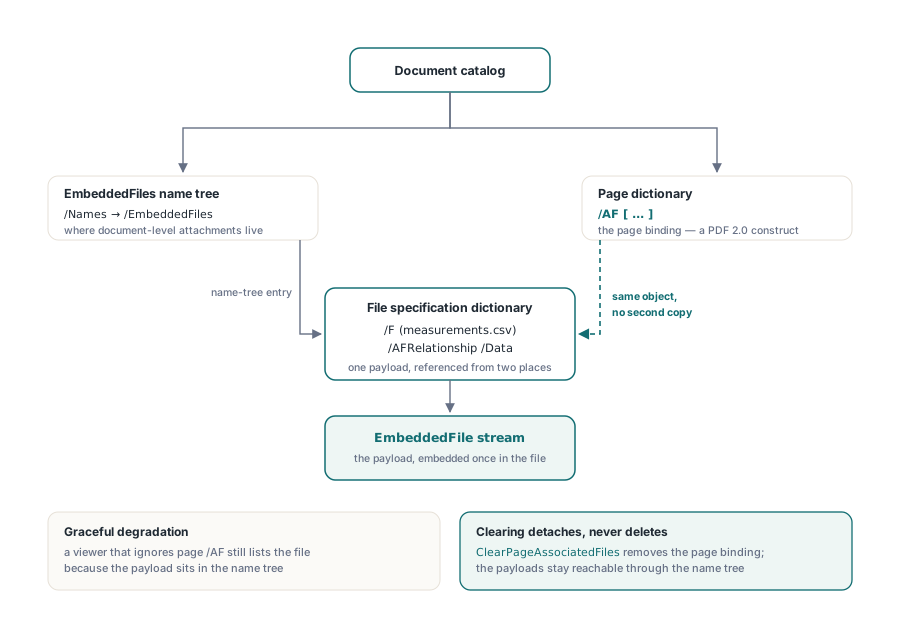
That function has one deliberately narrow success condition worth knowing. It reports success only when the page actually carried an /AF key. A page that never had associations returns failure rather than a cheerful confirmation, so a caller cannot mistake a no-op for a completed cleanup
var
  Lib: TPDFlib;
  Idx, I: Integer;
begin
  Lib := TPDFlib.Create;
  try
    Lib.LoadFromFile('survey-report.pdf');

    // Attach the measurement series that produced the chart on page 3
    Idx := Lib.AddPageAssociatedFileFromFile(3,
      'series-03.csv',            // file on disk
      'measurements.csv',         // display name inside the PDF
      'text/csv',                 // MIME type
      'Raw measurement series for figure 3',
      'Data');                    // AFRelationship, ISO 32000-2 14.13

    if Idx < 0 then
      raise Exception.Create('page association refused');

    for I := 0 to Lib.GetPageAssociatedFileCount(3) - 1 do
      Writeln('page 3 associated file, embedded index ',
        Lib.GetPageAssociatedFileEmbeddedIndex(3, I));

    Lib.SaveToFile('survey-report-with-data.pdf');
  finally
    Lib.Free;
  end;
end;
The relationship string is not free text in practice. ISO 32000-2 defines a vocabulary, Source, Data, Alternative, Supplement, EncryptedPayload, FormData, Schema and Unspecified, and consumers key off it. Data for the numbers behind a chart, Source for the document a page was generated from, Alternative for an equivalent representation. Pick from the vocabulary even when nothing in your pipeline reads it yet, because the next tool in the chain might
Why does the same lookup need FollowRef in both directions?
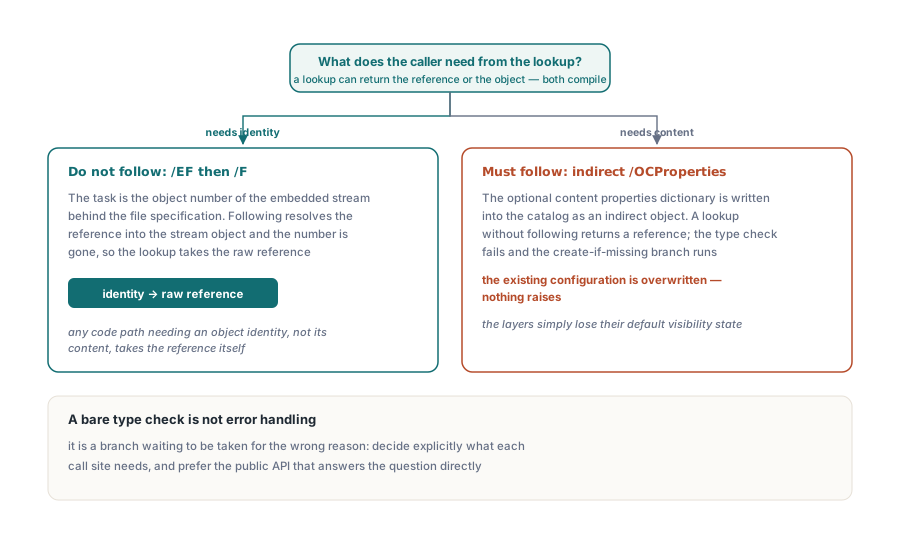
Because reference following answers two different questions, and the code has to know which one it is asking. A key lookup that follows indirect references returns the object the reference points at. A lookup that does not follow returns the reference itself. Both are correct, and using the wrong one produces a silent misbehavior rather than an error
Reading an associated file demonstrates the first direction. To obtain the object number of the embedded stream behind the file specification /EF and /F keys, the lookup must not follow, because following resolves the reference into the stream object and the object number is gone. The rule generalizes: any code path that needs an object identity rather than object content has to take the raw reference
Optional content shows the opposite direction, and it cost more to find. The optional content properties dictionary is written into the catalog as an indirect object, so code that reads it back without following gets a reference rather than a dictionary. A type check on that value then fails, and the natural fallback branch, if there is no configuration, create one, runs and overwrites the configuration that was already there. Nothing raises. The layers described in optional content groups and layers simply lose their default visibility state
The lesson generalizes past both cases. When a lookup can return either a reference or the object, a bare type check is not error handling: it is a branch that will eventually be taken for the wrong reason. Decide explicitly what each call site needs, and prefer the public API that answers the question directly, such as an optional-content count property, over reaching into a protected accessor for the catalog dictionary
// Document-level attachments and page-level associations coexist. An
// embedded file can be marked associated at document level too
if Lib.IsEmbeddedFileAssociated(0) = 0 then
  Lib.SetEmbeddedFileAssociated(0, 1, 'Supplement');

Writeln('document associated files: ', Lib.GetAssociatedFileCount);
Writeln('page 3 associated files  : ',
        Lib.GetPageAssociatedFileCount(3));

// Clearing detaches the page binding; the payload stays in the name tree
if Lib.ClearPageAssociatedFiles(3) > 0 then
  Writeln('page 3 associations removed, payloads still reachable');
What conformance modes do to attachments
Archival profiles restrict what may be embedded, and the restriction is enforced at the entry point rather than at save time. PDF/A-1 forbids embedded files entirely, PDF/A-2 permits only embedded PDF/A documents, and PDF/A-3 is the profile that opened embedding to arbitrary file types, which is precisely why hybrid invoice formats are built on it
PDFlibPas refuses the attachment when the active conformance mode does not allow it, at the call, not hundreds of operations later during output. That is a deliberate choice about where an error is cheapest to act on: a refusal at the call site names the file you were adding, while a refusal at save time names a document and leaves you to work out which of forty attachments caused it
This is also why associated files show up so often in electronic invoicing. A hybrid invoice is a PDF a human reads with a machine-readable XML payload attached and marked with the right relationship, and both the container profile and the relationship key are part of the specification rather than conventions. That construction is covered in building Factur-X and ZUGFeRD hybrid invoices, with the metadata side in the PDF/A-3 XMP extension schema
When should the association be per page rather than per document?
When a consumer needs to know which page the data belongs to, and only then. Document-level attachments are simpler, more widely supported by viewers, and adequate whenever the payload describes the whole document, an invoice XML, a signature manifest, a source archive. Reach for page-level association when the payload is genuinely page-scoped and the page identity is part of its meaning
Support is the practical constraint. Page-level associated files are a PDF 2.0 construct, and viewer support is thinner than for document-level attachments. Because the payload sits in the name tree either way, a viewer that ignores /AF on pages still shows the file in its attachment list, so the degradation is graceful. But if the page binding is essential to your consumer rather than useful metadata, verify the reader you actually target rather than assuming
Page-level associated files, document-level attachments and the archival profile gates that govern both ship in the PDFlibPas Delphi PDF library. If you are also repairing older files on the way in, the metadata and conformance work in converting to PDF/A with metadata repair is what decides which of these attachment routes is available to you in the first place