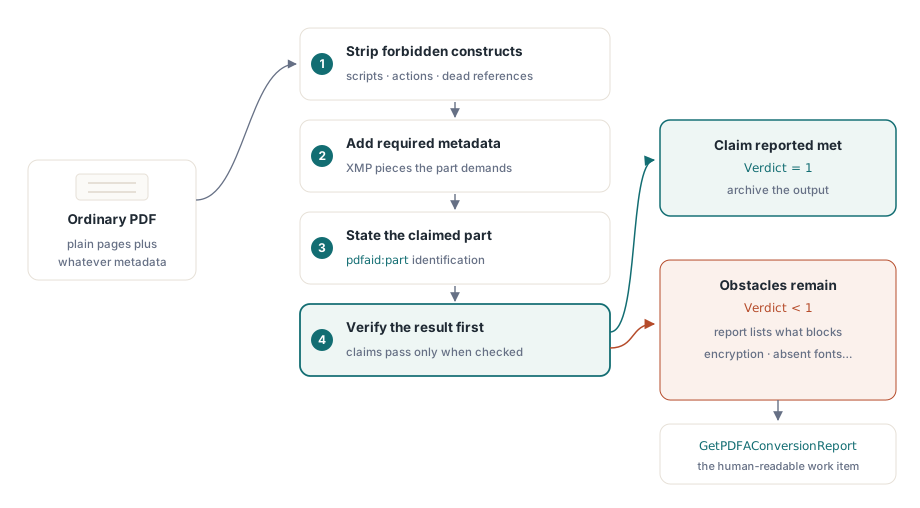
ConvertToPDFA turns an ordinary document into an archival one in a single call: it removes what the chosen part forbids, adds what the part requires, states the part the document claims, and then checks the result. The claim is reported as met only when the check passes, and GetPDFAConversionReport lists what was done and what still stands in the way
That last property is the design decision worth dwelling on. A converter that stamps the claim without checking is worse than no converter at all, because a file that says it is archival and is not passes straight through the very systems that would otherwise have caught it. The failure surfaces years later, in an audit, on a document nobody can regenerate
Why does a valid-looking PDF fail a PDF/A check?
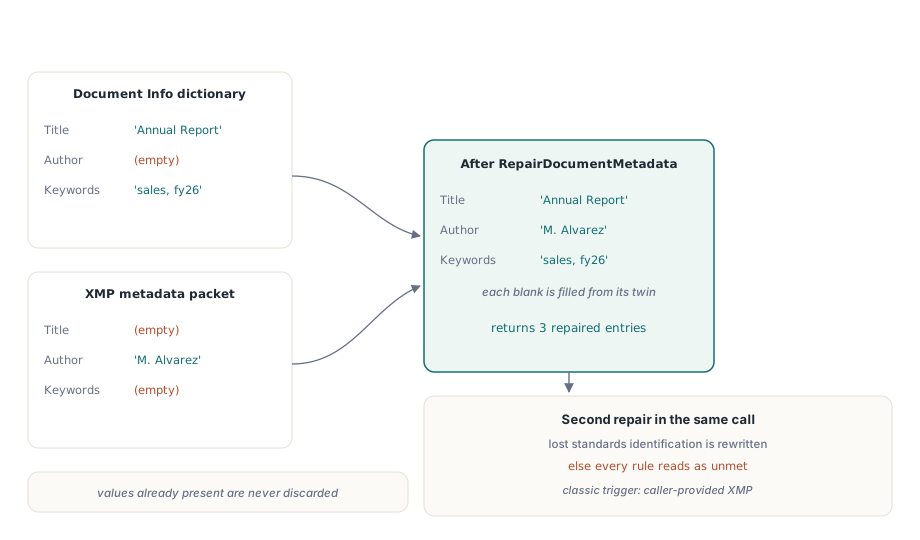
Most often because the two places a PDF says who wrote it disagree. A validator reads both the document information dictionary and the XMP packet and rejects a file where they differ — and most files that fail on this point simply never had the XMP half written at all
RepairDocumentMetadata brings them into agreement and returns how many entries it repaired. Where only one half carries a value, the other is filled from it, so nothing already recorded is thrown away. Nobody has to decide which copy is authoritative, because in practice one copy is empty
There is a second repair in the same call that catches a subtler case. A document set to a PDF/A mode gets its standards identification restored if it was lost, which happens whenever a caller supplies an XMP packet of its own. Without that identification a validator reads the file as an ordinary PDF and reports every rule of the claimed part as unmet — a spectacular-looking failure with one small cause
var
  Lib: TPDFlib;
  Repaired: Integer;
begin
  Lib := TPDFlib.Create;
  try
    Lib.LoadFromFile('incoming.pdf', '');
    Repaired := Lib.RepairDocumentMetadata;
    Log(Format('%d metadata entries brought into agreement', [Repaired]));
    Lib.SaveToFile('incoming-fixed.pdf');
  finally
    Lib.Free;
  end;
end;
Choosing the part before you convert
SetPDFAMode and ConvertToPDFA share the same mode numbering, and three of the values are recent. Mode 9 is PDF/A-4, the part built on PDF 2.0. Mode 10 is PDF/A-4e, which additionally permits 3D and rich media, and mode 11 is PDF/A-4f, which permits an embedded file of any format
Part 4 identifies itself differently from the parts before it: by part number and the year its part was published, with no conformance letter for plain PDF/A-4 and the letter E or F for the two extensions. The check recognizes part 4, judges its files against PDF 2.0 rather than 1.7, and reports a part 4 file that does not state its revision year
Every embedded file in a part 4 document states how it relates to the document, as parts 3 and 4 both require. This is the rule that used to catch ordinary attachments: the relationship was written only for attachments after the first and never for the last, so a document with a single attachment — the common case — carried none at all and failed validation on exactly that point
var
  Verdict: Integer;
begin
  Lib.LoadFromFile('report.pdf', '');
  Verdict := Lib.ConvertToPDFA(9);        // 9 = PDF/A-4, 10 = 4e, 11 = 4f
  Memo1.Lines.Text := Lib.GetPDFAConversionReport;
  if Verdict = 1 then
    Lib.SaveToFile('report-pdfa4.pdf')
  else
    Log('conversion incomplete - see the report for what stands in the way');
end;
What the conversion report is for
Deciding what to do next. A conversion that succeeds needs no report; a conversion that does not is the whole reason the report exists. Some obstacles are removable by a converter and some are not — encryption, forbidden content that carries meaning, a font program that simply is not present anywhere on the machine. The report distinguishes what was done from what remains, which turns "conversion failed" into a work item
Treat the verdict as the gate in a batch pipeline. Convert, read the verdict, and route the file: archive the ones that passed, queue the rest for a human with the report attached. What you should not do is save the output of a failed conversion into the archive because it looks better than the input — it now carries a claim that the check refused to confirm
Reading the mark a file already carries
Before converting anything, know what the document says about itself. A PDF/A check that cannot read the existing standards mark judges every file against part 1 whatever it declares, which means a perfectly valid PDF/A-2 or PDF/A-3 document gets reported as carrying no mark and as being of too high a version — the opposite of the truth
The mark is read whether the producer wrote it as an XMP element or as an attribute. Both forms are ordinary XMP, and accepting only one of them leaves files from other producers looking unmarked. If you have ever wondered why a document that validates elsewhere fails in your own pipeline, this is a good place to look first
Sanitizing before archiving, and the bug worth knowing about
Archival conversion and sanitization often run together, because the content a security policy wants removed overlaps heavily with the content PDF/A forbids. SanitizeDocument removes JavaScript, and removing the last script also removes the empty name tree it leaves behind — a tree that would otherwise still tell a reader the document carried scripts
That second half was learned the hard way: an off-by-one in the package list meant sanitization reported removing scripts while removing none, so a document that had been sanitized still ran its scripts when opened. It is a good argument for the general principle this whole article rests on — verify the result rather than trusting the operation, in your own pipeline as much as in the library
For the surrounding archival work, see the walkthroughs of PDF/A and PDF/UA preflight, true redaction and content removal, and PDF/A-3 XMP extension schemas for Factur-X, which covers the metadata side when the archived document also carries structured invoice data
PDF Library for Delphi is a native Pascal PDF library for Delphi, C++Builder and Lazarus, so conversion, repair and validation all happen inside your own process with no external tool in the chain — see the PDF Library for Delphi product page for the supported PDF/A parts and platforms