PDFlibPas, the losLab PDF Developer Library for Delphi, writes every number it puts into a content stream with a dot decimal separator and no exponent, whatever the Windows regional settings say. Since v3.539.26 AddPageMatrix, ScalePage, DeskewPage, RedactRegion, text-to-path output and recoloring format operands through PLDoubleToStrConst, and since v3.539.33 the parsers that read those numbers back use PLTryStrToFloatInvariant instead of the system locale. On a German, French or Brazilian machine the same code now produces the same bytes as on a US one, which is the only behavior a file format can tolerate
Why does a comma-decimal locale corrupt a PDF without an error?
A comma-decimal locale corrupts a PDF silently because the comma is not a number character in PDF syntax, so the damage reads as valid tokens with the wrong meaning. Before the fix, PLFloatToStr was nothing more than a bare FloatToStr call, and FloatToStr follows FormatSettings.DecimalSeparator. With a comma separator, AddPageMatrix(0.5, 0.5, 0, 0) wrote 0,5 0 0 0,5 0 0 cm. ISO 32000-1 §7.3.3 allows digits, one period and a leading sign in a number and nothing else, so a content parser reads that line as the number 0 followed by an unknown token ,5, and the cm operator ends up with the wrong operands. Nothing raises, nothing logs. The page simply renders with a transformation matrix that has drifted, and working backwards from a misplaced drawing to a locale setting is a miserable afternoon
The second defect hides behind the first. FloatToStr uses the ffGeneral format, which switches to exponent notation once the magnitude drops below 1E-4, so a tiny offset came out as 1E-5. The same §7.3.3 states that PDF does not support the exponent form, which means even a US-locale machine could write an invalid operand given a small enough value. The regression tests for this release pin both failure shapes: they flip the separator to a comma, call the API and scan the resulting content for any token that contains a comma or an exponent
uses
  System.SysUtils, PDFlibrary;

var
  Lib: TPDFlib;
  OldSeparator: Char;
begin
  Lib := TPDFlib.Create;
  try
    Lib.SetPageDimensions(300, 200);
    Lib.DrawBox(10, 10, 20, 20, 1);
    OldSeparator := FormatSettings.DecimalSeparator;
    try
      FormatSettings.DecimalSeparator := ',';   // simulate a de-DE desktop
      Lib.AddPageMatrix(0.5, 0.25, 1E-5, 12.75);
      // v3.539.26 and later write: 0.5 0 0 0.25 0.00001 12.75 cm
      // older builds wrote:        0,5 0 0 0,25 1E-5 12,75 cm
      Writeln(Lib.GetPageContentToString);
    finally
      FormatSettings.DecimalSeparator := OldSeparator;
    end;
  finally
    Lib.Free;
  end;
end;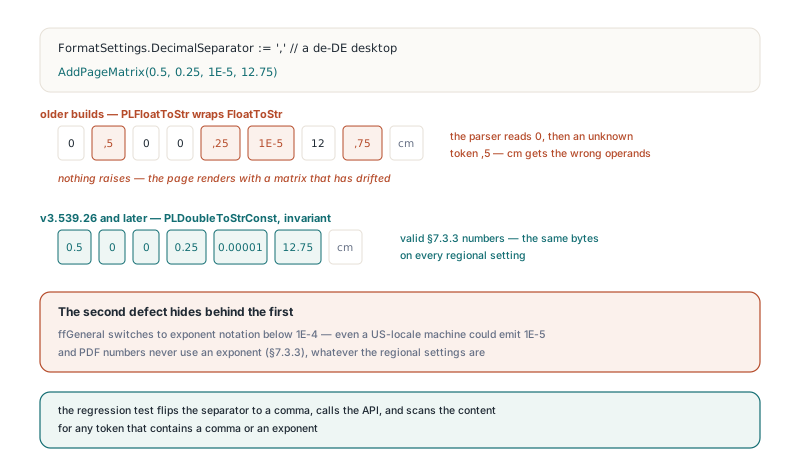
Two kinds of numbers, two families of helpers
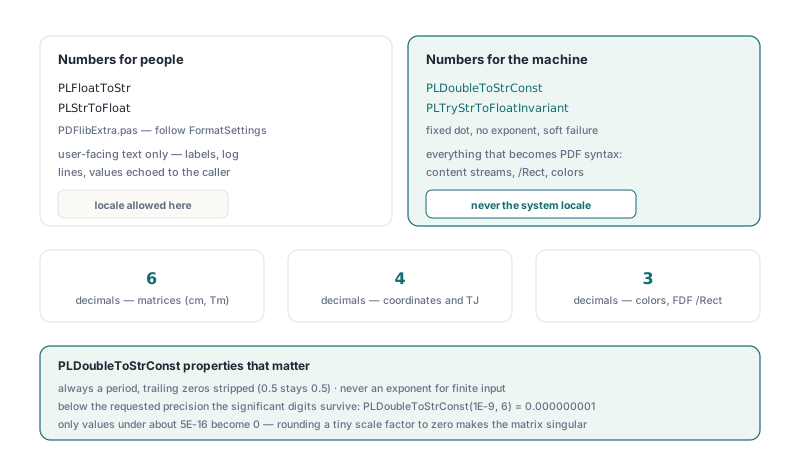
The fix in PDFlibPas is a strict split: numbers shown to people may follow the locale, and numbers written for a machine never do. PLFloatToStr and PLStrToFloat stay in PDFlibExtra.pas for user-facing text, and their declaration now carries a comment saying exactly that. Everything that ends up as PDF syntax goes through PLDoubleToStrConst with a fixed number of decimal places chosen for the job: six for matrices, four for coordinates and TJ adjustments, three for colors and FDF rectangles. The audit for v3.539.26 touched more call sites than the original bug report suggested:
AddPageMatrix,ScalePageandDeskewPage, which all prepend acmto existing page content- The page element builders that emit
Tmresets,TJadvances andcmtransforms - Glyph placement matrices and outline points in the text-to-path converter
- The black fill box that
RedactRegionprepends, the/Rectvalues in FDF export and the operands that recoloring writes
PLDoubleToStrConst is a hand-rolled formatter rather than a wrapper around FloatToStrF, and three of its properties matter here. It always writes a period and strips trailing zeros, so 0.5 stays 0.5 rather than 0.500000. It never writes an exponent for finite input. And a non-zero value smaller than the requested precision keeps its significant digits instead of collapsing to zero, so PLDoubleToStrConst(1E-9, 6) returns 0.000000001; only values below roughly 5E-16 become 0. That last rule exists because rounding a tiny scale factor to zero turns a valid matrix into a singular one, which is a worse bug than the one being fixed
uses
  PDFlibExtra;

procedure CheckNumberHelpers;
var
  V: Double;
begin
  // Machine output: dot decimal, no exponent, trailing zeros stripped
  Assert(PLDoubleToStrConst(1E-5, 6) = '0.00001');
  Assert(PLDoubleToStrConst(-0.5, 6) = '-0.5');
  Assert(PLDoubleToStrConst(0.000012346, 4) = '0.00001235');  // keeps 4 significant digits
  Assert(PLDoubleToStrConst(12345.25, 4) = '12345.25');

  // Machine input: soft failure instead of EConvertError
  Assert(PLTryStrToFloatInvariant('0.5', V) and (V = 0.5));
  Assert(not PLTryStrToFloatInvariant('0,5', V));   // content numbers never use a comma
end;
Why is the parsing side more dangerous than the writing side?
The parsing side is more dangerous because a locale-bound parser does not produce a wrong number, it throws. PLStrToFloat calls StrToFloat, which raises EConvertError when the text does not match the system separator. On a comma-decimal system that meant RecolorPage aborted the moment it met an ordinary 0.5 g operator, so every real-world page failed, not just exotic ones. RenderPageRegionToFile rejected its own documented clip format "10.5,20.5,50.5,40.5", and SVG length attributes, SVG export colors, annotation vertex lists and output intent solidity values were either refused or silently replaced by defaults. A library that works perfectly on the developer machine and fails on the first customer in Munich is exactly the kind of code that, like the cases in the article on Delphi code that works by accident, only appears correct because of where it was tested
v3.539.33 classified every StrToFloat and TryStrToFloat call by where its input comes from. Content stream operands, SVG attributes, painter color strings and comma-separated clip and vertex lists all have a fixed dot syntax, so they now go through PLTryStrToFloatInvariant, which trims the text, parses it with PLInvariantFormatSettings and returns False for empty, malformed or non-finite input instead of raising. A comma-separated list leaves no room for compromise, because a comma cannot be both the list delimiter and the decimal mark. The same pass also fixed an out-of-bounds write: RenderPageRegionToFile used to store a fifth clip value past its four-element buffer. For the recoloring pipeline described in the guide to converting a PDF to one color space, the practical result is that RecolorPage and RecolorDocument no longer abort on a comma-decimal system. Rule values that a caller types into CheckDocumentPolicy are the one parsing case that uses the lenient helper instead, for the reason the next section explains
What happens if you fix only one end of a round trip?
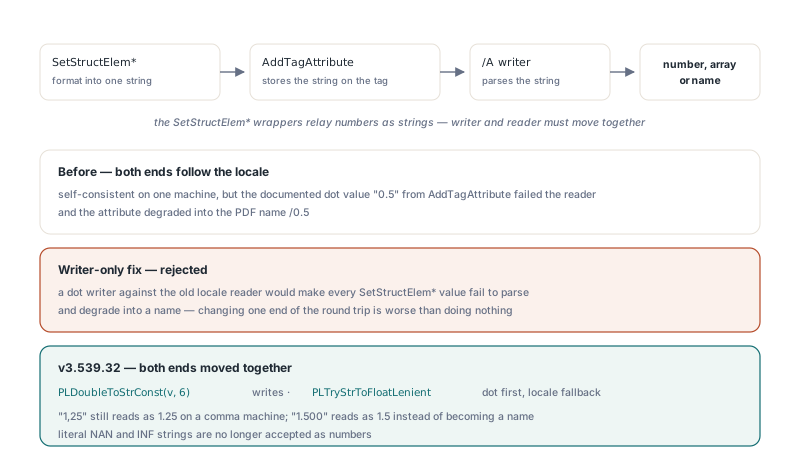
Fixing only one end of a locale round trip breaks code that used to work, which is why the structure attribute change in v3.539.32 moved the writer and the reader together. The SetStructElem* wrappers relay numbers as strings: SetStructElemBBox formats four values into one string, stores it through AddTagAttribute, and the /A writer later parses that string to decide whether it becomes a number, an array or a name. Both ends used the system locale, so on a comma-decimal system the round trip was self-consistent. The bug showed up only when a caller followed the documentation and passed "0.5" to AddTagAttribute: the reader could not parse it and emitted the PDF name /0.5. The PDF/VCR placeholder had the mirror-image problem, because the library generated GTS_BBox with a dot and then validated it with the locale before saving
Changing just the writer to a dot would have been worse than doing nothing, since every SetStructElem* value would then fail the locale-bound reader and degrade into a name. So the writers now use PLDoubleToStrConst(v, 6), and the reader uses the new PLTryStrToFloatLenient, which tries the dot form first and falls back to the system locale. A comma-locale caller who passed "1,25" in the past still gets the number 1.25. The trade-off is deliberate and documented: on a German system "1.500" used to become a name because StrToFloat rejects thousands separators, and it now reads as 1.5, while literal NAN and INF strings are no longer accepted as numbers
uses
  System.SysUtils, PDFlibrary;

var
  Lib: TPDFlib;
begin
  FormatSettings.DecimalSeparator := ',';   // comma-decimal caller
  Lib := TPDFlib.Create;
  try
    Lib.BeginTag('Figure', 'Sales chart', '');
    Lib.SetStructElemBBox(10.5, 20.25, 200.5, 100.75); // /BBox [ 10.5 20.25 200.5 100.75 ]
    Lib.AddTagAttribute('Layout', 'SpaceAfter', '0.5');   // /SpaceAfter 0.5, was /0.5
    Lib.AddTagAttribute('Layout', 'StartIndent', '1,25'); // still /StartIndent 1.25
    Lib.DrawText(20, 20, 'figure');
    Lib.EndTag;
    Lib.SaveToFile('tagged.pdf');
  finally
    Lib.Free;
  end;
end;
Where NaN and infinity get stopped
AddPageMatrix, ScalePage and RedactRegion now reject NaN and infinite arguments up front and return 0, because no PDF number can represent them. ScalePage already refused factors of zero or less, but NaN passes a <= 0 test, so a NaN scale used to travel all the way to the formatter. In v3.539.26 that formatter still called Round on NaN, which raises EInvalidOp on Win32 where the x87 unit does not mask invalid operations; v3.539.31 made PLDoubleToStrConst write 0 for NaN as a last line of defense, but a zero in a matrix is a singular transform, so the API-level check is still the real fix. Two boundaries stay in place on purpose. Metafile state strings are written and read with the locale inside one process and never leave it, so they were left alone. And a test that formats 1E-5 through the page element path must read the content before the layer is rewritten, because re-emitting operands at document precision legitimately turns that value into 0
If your application ships to customers outside the dot-decimal world, the safest habit is the one the PDFlibPas test suite now uses: run the PDF-producing paths once with FormatSettings.DecimalSeparator set to a comma and scan the output for commas and exponents. The article on preserving parsed decimal precision covers the other half of the same story, how numbers read from an existing file keep their exact text on save. Downloads, the full API reference and the trial build are on the PDFlibPas Delphi PDF library product page