PDF Library for Delphi gives Delphi and C++Builder developers three action kinds for navigation that leaves the current page behind: GoToR (Go To Remote) opens a specific page in another PDF file, GoToE (Go To Embedded) opens a PDF file embedded inside the current document, and Launch runs an external program or opens a file through the operating system shell. All three live in ISO 32000-1 §12.6.4, the Action Types section that also defines the everyday GoTo action, and each one carries its own trap for the unwary: a page number that means something different depending on which call builds it, a target that is a name rather than a file path, and a pair of string parameters that look identical but serve two different viewers
None of this is hypothetical. A technical reference package — a main manual, a specifications PDF a distributor updates on its own schedule, a calibration utility installed alongside both — leans on exactly this kind of cross-document wiring: a cross-reference that has to land on page 5 of the specs file, a data sheet worth shipping inside the manual rather than beside it, a link that hands off straight to the calibration tool. This article is the mirror image of reading bookmark and annotation actions back out of an existing PDF: that piece covers consuming a GoToR, Launch, or GoToE action some other producer already wrote into a file; this one covers building those same three action kinds from scratch, including the field-level rules PDF Library for Delphi enforces before it commits a single byte
Three ways for a PDF action to leave the current page
PDF Library for Delphi separates local navigation from everything else at the action's /S key, and GoToR, GoToE, and Launch are the three subtypes whose target sits outside the current page: GoToR under ISO 32000-1 §12.6.4.3, GoToE under §12.6.4.4, and Launch under §12.6.4.5, all inside the broader §12.6.4 Action Types section that also defines the everyday GoTo action. A plain GoTo action's destination names a page object that already exists inside the document, so PDF Library for Delphi can validate it immediately; GoToR and GoToE cannot do that in the same way, since the external file may not even exist on this machine and an embedded file's page count is not something the host document tracks, so both carry an unresolved reference instead of a hard link — a file specification plus a destination for GoToR, an embedded-file name plus a target page for GoToE — while Launch drops the destination concept entirely and just names something for the operating system to run or open. That split shows up as two call families on the write side: high-level, one-shot builders such as AddLinkToFile, AddLinkToFileEx, AddLinkToEmbeddedPDF, and AddLinkToLocalFile create a page-hotspot link annotation and its action together, covering most real layouts — a line of text or an icon a reader clicks — while lower-level setters such as SetActionRemoteDestinationEx, SetActionLaunchOptions, and their AddActionNext* counterparts attach or replace an action on something you already hold a handle to: an existing bookmark, a form-field trigger, or a document- or page-level lifecycle event. Both families end up writing the same dictionary shapes; the difference is where you are standing when you call them, and, as the next section covers, what a page number means when you do
How do you build a GoToR link that opens a page in another PDF file?
A GoToR action needs two things — a file specification and a destination inside that file — and PDF Library for Delphi exposes two different calls for supplying the second part, each with its own page-numbering convention. AddLinkToFile and AddLinkToFileEx, the high-level page-hotspot builders, validate their Page or DestPage argument as greater than zero, the same 1-based numbering PDF Library for Delphi uses everywhere else, including SelectPage. SetActionRemoteDestinationEx, the lower-level setter used to attach or replace a GoToR action on something you already have a handle to, instead validates DestPage as greater than or equal to zero and writes it straight into the action's explicit destination array with no adjustment: it wants the target document's raw, zero-based page index, the numbering ISO 32000-1 specifies for a remote explicit destination. Call the low-level setter with the same number you would hand the high-level builder and the link opens one page early
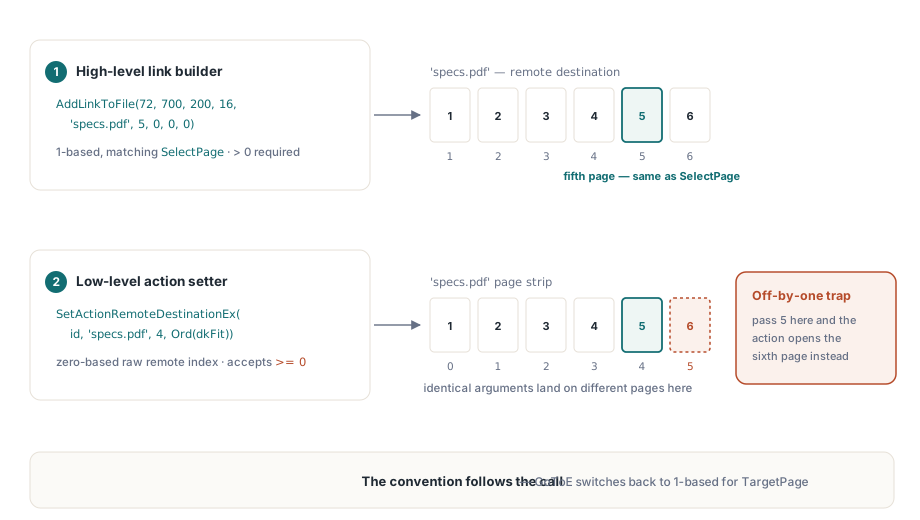
var
  Lib: TPDFlib;
  ActionID: Integer;
begin
  Lib := TPDFlib.Create;
  try
    if Lib.LoadFromFile('manual.pdf', '') = 1 then
    begin
      Lib.SelectPage(12);
      // Page is 1-based here, same as SelectPage above: this opens
      // the fifth page of specs.pdf.
      Lib.AddLinkToFile(72, 700, 200, 16, 'specs.pdf', 5, 0, 0, 0);

      // A later maintenance pass repoints the same link at a
      // reorganized file. SetActionRemoteDestinationEx edits the
      // action directly, and DestPage here is the zero-based index
      // PDF itself uses for a remote explicit destination -- "the
      // fifth page" is now 4, not 5.
      ActionID := Lib.GetAnnotActionID(1);
      Lib.SetActionRemoteDestinationEx(ActionID, 'specs-2026.pdf',
        4, Ord(dkFit), 0, 0, 0, 0, 0, 0, -1);
    end;
  finally
    Lib.Free;
  end;
end;
The rest of SetActionRemoteDestinationEx's arguments are just as literal. ValueMask is a bit set — 1 for left, 2 for top, 4 for right, 8 for bottom, 16 for zoom — and PDF Library for Delphi checks it against DestType before writing anything: a dkFitR destination must supply exactly 15 (all four edges, no zoom), dkFit and dkFitB must supply 0, and dkFitH/dkFitV accept only their one relevant coordinate. Bits you leave unset within an otherwise-valid mask are not omitted from the array; they are written as an explicit PDF null, which ISO 32000-1 treats as "keep whatever value the viewer already has" for that coordinate — a legitimate way to say "jump to this page, leave the zoom alone" rather than an oversight. Zoom itself is stored as a fraction of the value you pass, so a call asking for 150 percent hands the array a stored value of 1.5, and the valid input range is 0 to 6400
How do you link to a PDF that is embedded inside your own document?
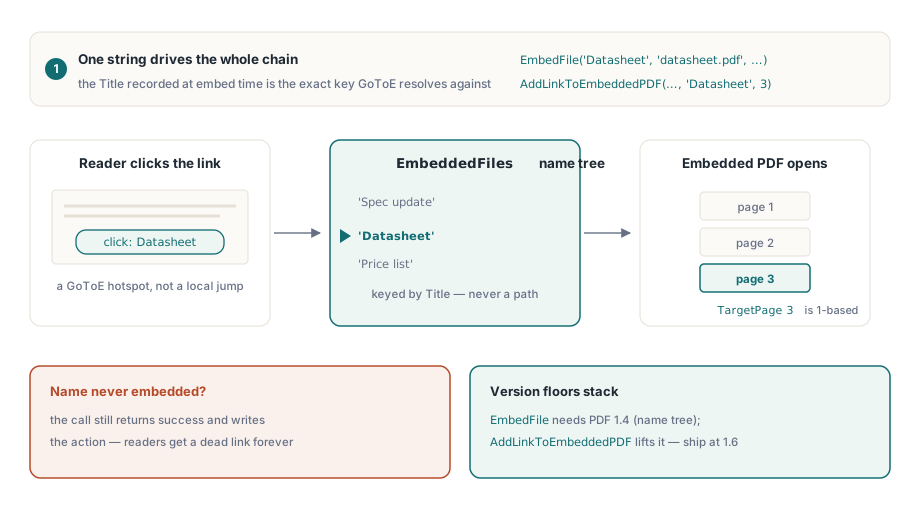
AddLinkToEmbeddedPDF builds the GoToE action, and its target argument, EmbeddedFileName, is a name rather than a path: it has to match the Title string already passed to EmbedFile when the attachment was made, because that title is the literal key PDF Library for Delphi stores in the document's /EmbeddedFiles name tree, and GoToE resolves by looking up that name, not by touching the filesystem again. The function only checks that EmbeddedFileName is non-empty and TargetPage is at least 1 — pass a name that was never actually embedded and the call still returns success, the action still gets written, and the link simply fails to resolve for every reader who clicks it
var
  Lib: TPDFlib;
begin
  Lib := TPDFlib.Create;
  try
    Lib.NewDocument;
    Lib.NewPage;
    // The Title argument becomes the key PDF Library for Delphi stores in the
    // document's EmbeddedFiles name tree -- that string, not
    // "datasheet.pdf", is the target GoToE resolves against.
    if Lib.EmbedFile('Datasheet', 'datasheet.pdf', 'application/pdf') = 1 then
      Lib.AddLinkToEmbeddedPDF(72, 700, 200, 16, 'Datasheet', 3, 0, 0);
    Lib.SaveToFile('manual.pdf');
  finally
    Lib.Free;
  end;
end;
Two version floors stack here, not one. EmbedFile needs PDF 1.4 for the /EmbeddedFiles name tree, and AddLinkToEmbeddedPDF separately raises the floor to PDF 1.6 for the GoToE action type itself, so the effective minimum for any document that uses this feature is 1.6, not 1.4. Notice also that TargetPage here is 1-based, the ordinary PDF Library for Delphi convention — a deliberate contrast with the zero-based DestPage the previous section just covered, and a reminder that which page-number scheme applies depends on the action kind and the specific call, not on one blanket rule. The action's target dictionary can also carry an /R entry of C for child or P for parent, supporting a two-hop chain into an embedded file or back out to its container, though AddLinkToEmbeddedPDF only ever builds the child direction, since that is the one that makes sense from a document doing the embedding rather than being embedded
Launch actions: one FileName, two string targets that are not interchangeable
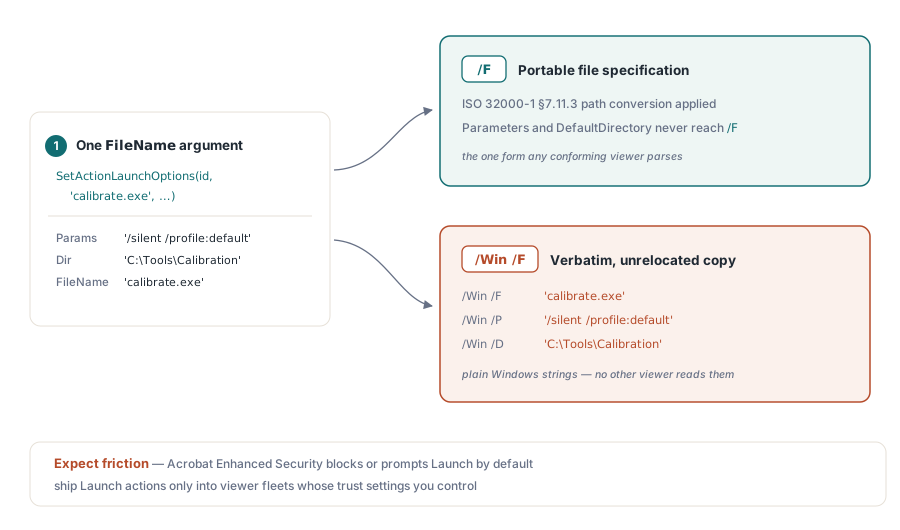
SetActionLaunchOptions writes a Launch action's file target to two different keys from a single FileName argument, and the two keys hold two different kinds of string. The top-level /F key gets a file-specification dictionary, built through the same path-conversion PDF Library for Delphi uses for GoToR, which is the portable form ISO 32000-1 §7.11.3 defines for a file specification dictionary. The /Win sub-dictionary, when PDF Library for Delphi writes one, gets its own /F key set to the raw FileName value exactly as passed in, with no conversion at all, because /Win /F is documented in ISO 32000-1 §12.6.4.5 as a plain Windows path string meant only for a Windows viewer to read. Pass a portable, already-converted path expecting both keys to end up identical and the /Win copy will carry whatever you handed the function, untouched
var
  Lib: TPDFlib;
  ActionID: Integer;
begin
  Lib := TPDFlib.Create;
  try
    if Lib.LoadFromFile('manual.pdf', '') = 1 then
    begin
      Lib.SelectPage(1);
      Lib.AddLinkToLocalFile(72, 660, 220, 16, 'calibrate.exe', 0);
      ActionID := Lib.GetAnnotActionID(1);
      // Operation 0 leaves this as a normal open -- pass 1 to ask a
      // Windows viewer to print instead. Parameters and
      // DefaultDirectory only ever reach /Win /P and /Win /D, never
      // the top-level /F.
      Lib.SetActionLaunchOptions(ActionID, 'calibrate.exe',
        '/silent /profile:default', 'C:\Tools\Calibration', 0, -1);
    end;
  finally
    Lib.Free;
  end;
end;
Treat Launch as the highest-friction action of the three, because its entire purpose is running a program or opening a file outside the PDF sandbox, and every mainstream viewer treats it accordingly. Adobe Acrobat's Enhanced Security blocks or prompts on Launch actions by default unless the target sits in an explicitly trusted location, and most enterprise Acrobat deployments leave that protection turned on. A Launch action in a document handed to the public is therefore not a reliable trigger: plan for it to be blocked, prompted, or silently ignored by whatever viewer opens the file, and save it for closed environments where you also control the viewer's trust settings — an internal kiosk, a controlled corporate rollout, a document that never leaves a machine you manage
The PDF/A gate: why GoToR and Launch calls can return zero
SetActionRemoteDestinationEx and SetActionLaunchOptions both refuse outright when the target document is in any PDF/A conformance mode: both check the document's PDF/A mode as their very first condition and exit with a result of 0 before touching the action, no exception raised. This is deliberate. PDF/A's restrictions on interactive actions rule out Launch specifically, since handing an archival file the ability to run an arbitrary program is exactly the kind of environment-dependent behavior long-term archiving formats exist to prevent, and PDF Library for Delphi applies the same conservative gate to the remote go-to setter in the same code path. The practical consequence is easy to miss during development: the identical call that works on an ordinary PDF will compile, run, and quietly do nothing on a document loaded with a PDF/A conformance level set, so check the return value instead of assuming success — a 0 here is not a malformed-input error, it is the library refusing a request that conflicts with the document's own conformance claim
Where GoToR, GoToE, and Launch fit in a larger PDF Library for Delphi workflow
The three action kinds in this article do not all reach the same places. The companion article on document and page lifecycle action triggers covers SetDocumentAction and SetPageAction, which can attach a GoToR or a Launch action to a trigger like WillClose through the shared PDF_ACTION_BUILDER_REMOTE_DESTINATION and PDF_ACTION_BUILDER_LAUNCH constants — the same builder that also covers a plain URI or JavaScript trigger. GoToE has no such constant and no path into that generic builder at all; AddLinkToEmbeddedPDF is the only way PDF Library for Delphi constructs one, which makes it strictly a page-hotspot action, never a document- or page-level trigger. Where GoToR and Launch do reach the generic builder, the trade-off is control: it builds a GoToR pointing only at a named remote destination and a Launch action with just a file name and parameters, while the explicit page-and-fit-type addressing and the Windows-specific launch options covered in this article are reached only through SetActionRemoteDestinationEx and SetActionLaunchOptions directly
One safety property is worth knowing before building a maintenance tool around these setters. SetActionRemoteDestinationEx and SetActionLaunchOptions build the entire replacement action in a scratch dictionary first, and only delete and copy the /F, /D or /Win, and /NewWindow keys onto the live action once that scratch copy validates — so a call that fails validation, whether from an out-of-range ValueMask or an empty FileName, leaves the original action, and any /Next chain already hanging off it, completely untouched rather than half-overwritten. That matters because GoToR and Launch actions can both sit inside a /Next chain built with AddActionNextRemoteDestinationEx, AddActionNextLaunchEx, or the more general AddActionNextEx, letting a single trigger fire a JavaScript log entry and then a remote jump in sequence. GoToR, GoToE, and Launch construction as described here is part of PDF Library for Delphi, the native PDF library for Delphi and C++Builder