Most developers think of a PDF page as a sheet of paper with text and pictures on it. A georeferenced PDF is more than that. It carries enough information to take a point on the page, measured in ordinary page units, and report the latitude and longitude it sits over in the real world. That single fact is what turns a PDF into a usable carrier for a topographic map, a cadastral survey plot, a flood-zone exhibit, or any GIS export that has to print and still mean something. The geometry is there in the file; the only question is whether your loader reads it
The reason this gets missed is that a GeoPDF opens and prints exactly like any other PDF. Nothing in the rendered page announces that the map is registered to a coordinate system. The registration lives in dictionaries hanging off the page object, never drawn, and a viewer that ignores them shows you the map all the same. To do anything spatial with the file, surveying coordinate readouts, reprojection, overlay against other layers, you have to walk those dictionaries yourself
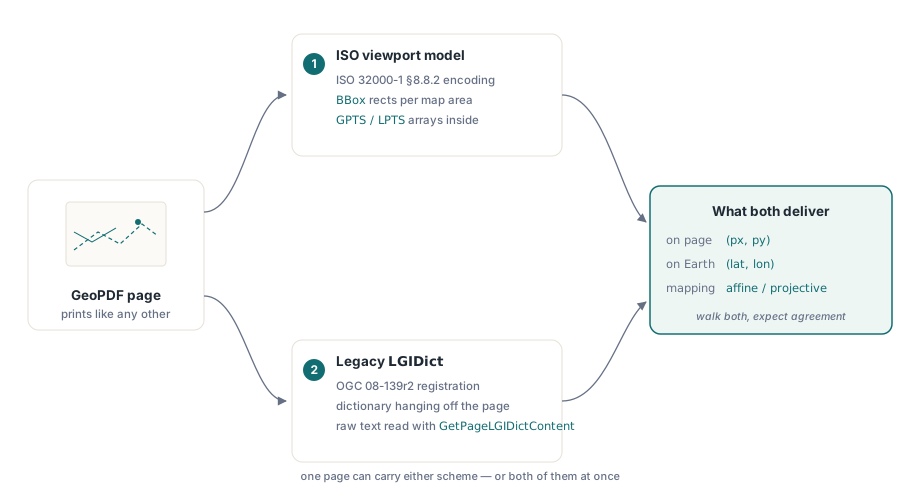
Two standards live in the wild
A reader that wants to handle real-world files has to cope with two georegistration schemes, because both are in circulation and a given file may use either. The older one is the OGC encoding described in OGC 08-139r2, which attaches an LGIDict (a geospatial registration dictionary) to the page. It predates any ISO blessing and was the de facto format for early GeoPDF output, so a large body of legacy maps carries it and nothing else
The modern scheme is the one ISO standardized in ISO 32000-1 §8.8.2. Instead of a single page-level dictionary it models geospatial data as a page Viewport with an attached Measure dictionary, and the measure dictionary names a geographic coordinate system. This is the encoding Acrobat and current GIS exporters write. A robust importer checks for both: read the viewports for the ISO model, and fall back to (or additionally inspect) the LGIDict for files that only carry the legacy registration
Viewports and their bounds
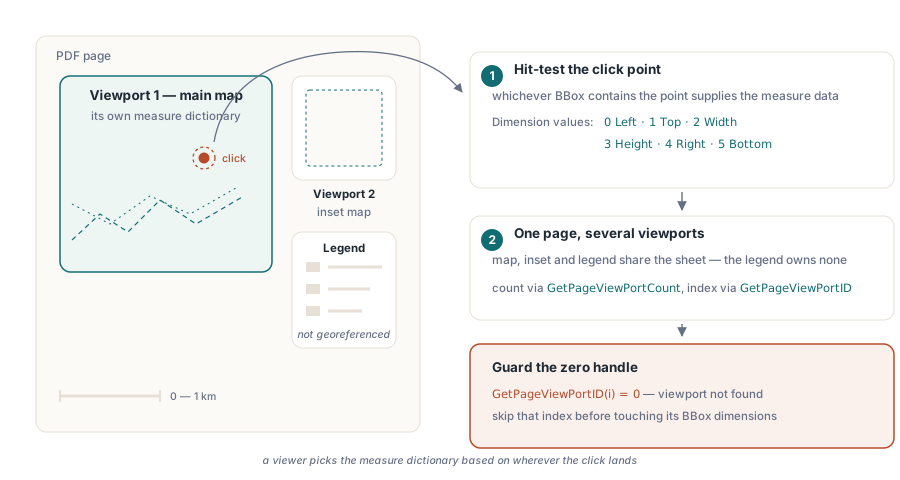
In the ISO model the unit of georegistration is the viewport, and a page may have several. A large sheet can place a main map in one rectangle, an inset at a different scale in another, and a legend panel that is not georeferenced at all. Each viewport carries a BBox, the rectangle on the page that the viewport governs, so the reader knows which part of the sheet a given coordinate system applies to. Hit-testing a clicked point against those boxes is how a viewer decides which measure dictionary to use
PDF Library for Delphi exposes the viewports of the selected page directly. GetPageViewPortCount returns how many there are, GetPageViewPortID turns a one-based index into a ViewPortID handle, and GetViewPortBBox reads the bounding rectangle one dimension at a time. The Dimension argument selects which edge or extent you want: 0 is Left, 1 is Top, 2 is Width, 3 is Height, 4 is Right, and 5 is Bottom
var
  Pdf: TPDFlib;
  vpCount, i, vpID: Integer;
  Left, Top, Width, Height: Double;
begin
  Pdf := TPDFlib.Create;
  try
    if Pdf.LoadFromFile('topo_sheet.pdf', '') <> 1 then
      raise Exception.Create('load failed');
    Pdf.SelectPage(1);

    vpCount := Pdf.GetPageViewPortCount;
    for i := 1 to vpCount do
    begin
      vpID := Pdf.GetPageViewPortID(i);
      Left   := Pdf.GetViewPortBBox(vpID, 0);
      Top    := Pdf.GetViewPortBBox(vpID, 1);
      Width  := Pdf.GetViewPortBBox(vpID, 2);
      Height := Pdf.GetViewPortBBox(vpID, 3);
      // Left/Top/Width/Height describe the map area for this viewport
    end;
  finally
    Pdf.Free;
  end;
end;
A ViewPortID of zero from GetPageViewPortID means the viewport at that index could not be found, so check it before passing the handle on
Inside the measure dictionary
The geometry that registers page to world lives in the measure dictionary attached to a viewport. GetViewPortMeasureDict returns a MeasureDictID for a given ViewPortID, or zero when the viewport has no measure dictionary, which is the normal case for a legend or title panel. The measure dictionary holds three things worth reading: the coordinate systems it references, the arrays that tie page points to geographic points, and the unit in which point data is expressed
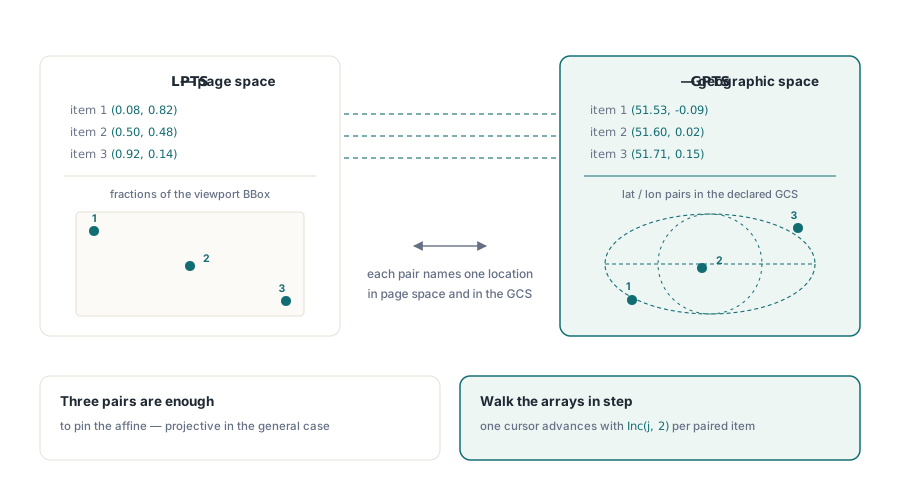
The registration itself is two parallel arrays. GPTS is the array of geographic points, latitude and longitude pairs given in the geographic coordinate system. LPTS is the array of page-space points, expressed as fractions of the viewport's BBox so they survive scaling. Item n of LPTS and item n of GPTS name the same physical location, once in page coordinates and once on the globe. Three or more such pairs pin down the affine, or in the general case projective, transform that maps any page coordinate inside the viewport to a world coordinate. Reading them is a matter of walking both arrays in step
var
  measID, gptsCount, lptsCount, j: Integer;
  lat, lon, px, py: Double;
begin
  measID := Pdf.GetViewPortMeasureDict(vpID);
  if measID <> 0 then
  begin
    gptsCount := Pdf.GetMeasureDictGPTSCount(measID);
    lptsCount := Pdf.GetMeasureDictLPTSCount(measID);
    // GPTS holds lat/lon pairs; LPTS holds the matching page fractions.
    // Both arrays are read with one-based item indices.
    j := 1;
    while j < gptsCount do
    begin
      lat := Pdf.GetMeasureDictGPTSItem(measID, j);
      lon := Pdf.GetMeasureDictGPTSItem(measID, j + 1);
      px  := Pdf.GetMeasureDictLPTSItem(measID, j);
      py  := Pdf.GetMeasureDictLPTSItem(measID, j + 1);
      // (px, py) on the page corresponds to (lat, lon) on the ground
      Inc(j, 2);
    end;
  end;
end;
The measure dictionary also reports its display units through GetMeasureDictPDU, which takes a UnitIndex of 1 for linear, 2 for area, or 3 for angular units and returns a code identifying the specific unit, for example a meter or an international foot for the linear category. The Bounds array, read with GetMeasureDictBoundsItem, describes the quadrilateral within the viewport that the measurement actually covers, which is not always the full rectangle
WKT versus EPSG
The latitude and longitude in GPTS are meaningless without knowing which geographic coordinate system they belong to, since a coordinate of 51.5, -0.1 lands in a different physical spot under WGS 84 than under an older national datum. The measure dictionary answers this through a coordinate system dictionary, reached with GetMeasureDictGCSDict for the geographic system. PDF describes that system in one of two interchangeable ways, and a reader has to accept either
The first is WKT, Well-Known Text, a self-contained string that spells out the datum, ellipsoid, prime meridian, and units in full. It is verbose but unambiguous and needs no external lookup table. The second is an EPSG code, a single integer that indexes a coordinate system in the EPSG registry; 4326 is WGS 84, the frame most consumer GPS data uses. EPSG is compact but assumes the reader can resolve the code against a database. Files appear with one, the other, or both, which is why the API surfaces all three of GetCSDictType, GetCSDictEPSG, and GetCSDictWKT. GetCSDictType reports whether the system is geographic (a GEOGCS, return value 1) or projected (a PROJCS, return value 2), letting you interpret the rest correctly before you trust it
var
  gcsID, csType, epsg: Integer;
  wkt: WideString;
begin
  gcsID := Pdf.GetMeasureDictGCSDict(measID);
  if gcsID <> 0 then
  begin
    csType := Pdf.GetCSDictType(gcsID);   // 1 = GEOGCS, 2 = PROJCS
    epsg   := Pdf.GetCSDictEPSG(gcsID);   // e.g. 4326 for WGS 84, 0 if absent
    wkt    := Pdf.GetCSDictWKT(gcsID);    // full text description, '' if absent
    // Prefer EPSG when present; fall back to parsing WKT otherwise.
  end;
end;
Reading the legacy LGIDict
Files that predate the viewport model, or that were produced by tools still emitting the older encoding, carry their registration in an LGIDict on the page rather than in a measure dictionary. PDF Library for Delphi reports how many such dictionaries a page has through GetPageLGIDictCount and hands back the raw content of each with GetPageLGIDictContent, indexed from one. The returned text is the dictionary as written, holding the OGC 08-139r2 registration fields, which your code then parses to recover the same kind of page-to-world mapping the measure dictionary provides. On the writing side, AddLGIDictToPage attaches an LGIDict to the current page, so a converter can round-trip the legacy form when an old consumer still expects it
var
  lgiCount, k: Integer;
  dictText: WideString;
begin
  lgiCount := Pdf.GetPageLGIDictCount;
  for k := 1 to lgiCount do
  begin
    dictText := Pdf.GetPageLGIDictContent(k);
    // dictText carries the OGC 08-139r2 registration to parse
  end;
end;
Putting the read together
A complete importer treats the two schemes as a pair of passes over each page. Select the page, ask GetPageViewPortCount for the ISO viewports, and for every viewport that owns a measure dictionary pull its BBox, its GPTS and LPTS arrays, its point data unit, and the GCS description through the coordinate system dictionary. Then check GetPageLGIDictCount for any legacy registration the viewport pass did not cover. A map that carries both should agree between them; a map that carries only one still resolves, because you looked in both places. The handles returned along the way, ViewPortID, MeasureDictID, CSDictID, are plain integers that stay valid while the document is loaded, so the whole walk is a few nested loops over the page list with no allocation to manage
Once you can recover the registration, the page becomes a data source rather than a picture. The companion techniques for reading the rest of a page are covered in the article on text, image, and font extraction, and rendering a georeferenced sheet to a device for on-screen measurement is described in the print and preview device-context walkthrough. The geospatial reader described here ships as part of the losLab PDF Library for Delphi and C++Builder, alongside the loading, extraction, and rendering APIs covered elsewhere on this blog