A barcode on a shipping label or an invoice has one job, which is to be read by a scanner on the first pass. Whether it survives that pass is decided long before the package reaches the dock. It is decided by how the symbol was put on the page. The most common mistake in a Delphi reporting pipeline is to render the barcode as a bitmap somewhere else and place that image into the PDF. It looks fine on screen at one zoom level and then degrades everywhere else
The alternative is to draw the symbol as vector content, directly into the page. PDF Library for Delphi exposes a family of drawing calls for exactly this, covering the 2D matrix symbols QR, PDF417, and DataMatrix, the linear families through Code128 and GS1-128, and USPS Intelligent Mail for postal automation. The argument for vector is not aesthetic. It is about whether the bars land where the scanner expects them
Why vector beats a placed bitmap
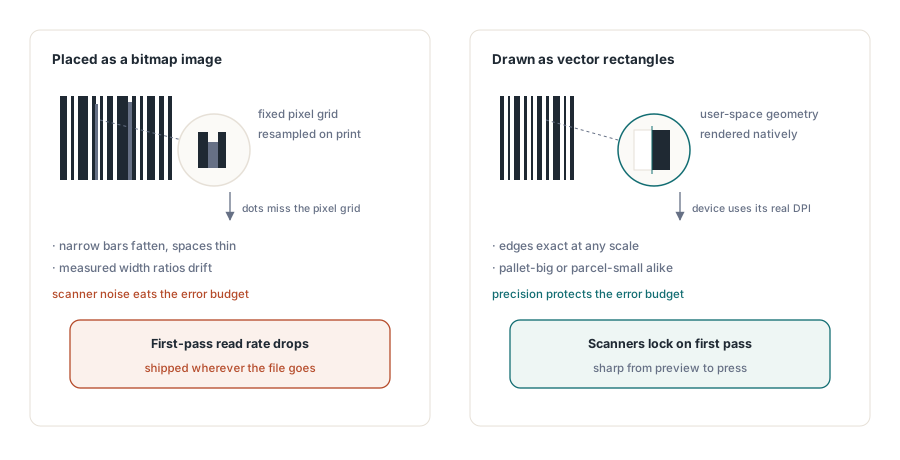
A barcode is a pattern of bars and spaces, or in two dimensions a grid of dark and light modules. The decoder works by measuring the ratio of those widths. Anything that distorts the ratios is noise that eats into the symbol's error budget. A rasterized barcode image carries fixed pixels. When the PDF is rendered to a printer whose dots do not divide evenly into the image grid, the rasterizer has to resample, and module edges that should be sharp get spread across two device pixels. A narrow bar can fatten, an adjacent space can thin, and the width ratio the decoder relies on drifts
Drawn as vector content, the same symbol is a set of filled rectangles described in PDF user-space coordinates. There is no fixed pixel grid to fight. At print time the device renders each rectangle at the resolution it actually has, so every module edge is as crisp as the hardware allows, at any scale and any print size. Scale a vector symbol up for a pallet label or shrink it for a parcel and the geometry stays exact. That precision is what keeps the first-pass read rate high, which is the whole point of putting a barcode on the page
QR codes and the four correction levels
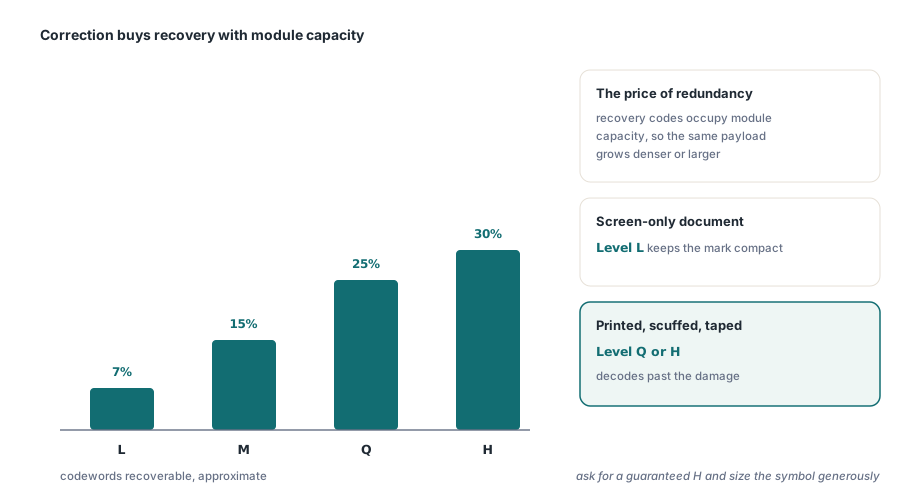
QR is a 2D matrix symbol read in both axes at once, which is why it packs a lot of data into a small square. Its damage tolerance comes from Reed-Solomon error correction, offered at four levels. Level L recovers roughly 7 percent of the codewords, M about 15 percent, Q about 25 percent, and H about 30 percent. Higher correction is not free. The recovery codewords occupy module capacity, so for a fixed amount of data a higher level forces a denser or physically larger symbol
The trade is a question about the environment the symbol will live in. A clean digital document that will only ever be scanned from a screen can sit at L and stay compact. A label that will be printed, handled, scuffed, and possibly partly covered by tape wants Q or H, because the extra redundancy is what lets a decoder reconstruct the payload from a symbol that is no longer pristine. DrawQRCode takes the position and a SymbolSize that fixes the drawn width and height, plus an EncodeOptions value that selects the data mode (0 for automatic, or numeric, alphanumeric, ISO-8859-1, and UTF-8 variants) and a DrawOptions value for orientation
var
  Pdf: TPDFlib;
begin
  Pdf := TPDFlib.Create(nil);
  try
    Pdf.NewDocument;
    Pdf.SetPageSize('A4');
    Pdf.SetMeasurementUnits(1);   // 1 = millimetres
    Pdf.NewPage;

    // 30 mm square QR, automatic encoding, normal orientation
    Pdf.DrawQRCode(20, 20, 30, 'https://www.loslab.com/', 0, 0);

    Pdf.SaveToFile('Label_QR.pdf');
  finally
    Pdf.Free;
  end;
end;
The correction level itself is chosen by the encoder to fit the data into the symbol you asked for. If you need a guaranteed high level for a harsh environment, size the symbol generously so the encoder has the module budget to spend on redundancy rather than being forced down to fit
PDF417 for IDs and shipping labels
PDF417 is a stacked linear symbol. Each row is a short linear barcode, and the rows stack to form a block, which is why it appears on driver licenses, boarding passes, and carrier shipping labels where a wider strip of data has to sit in a rectangular footprint. Its error correction runs on a scale of 0 to 8. Each step roughly doubles the number of correction codewords, so level 5 carries far more redundancy than level 1, at the cost of more codewords on the page
The shape of a PDF417 block is adjustable, and that matters because the label has a fixed area to fill. DrawPDF417SymbolEx exposes the controls the basic call does not. FixedColumns and FixedRows pin the data column count and row count, with 0 meaning let the encoder decide. ErrorLevel takes -1 for automatic or an explicit 0 to 8. ModuleSize is the width of the narrowest element in the current measurement unit, and HeightWidthRatio sets how tall each module is relative to its width, which is how you make the block short and wide or tall and narrow to match the space you have
// Fixed 10 data columns, automatic rows, error level 5,
// module 0.30 mm wide, rows three times the module width tall
Pdf.DrawPDF417SymbolEx(20, 60, 'PDF417 PAYLOAD 0123456789',
  0,        // Options: 0 = normal orientation
  10,       // FixedColumns
  0,        // FixedRows: 0 = automatic
  5,        // ErrorLevel: 0 to 8
  0.30,     // ModuleSize, in the current measurement unit
  3.0);     // HeightWidthRatio
Fixing columns is the usual lever on a label template. A constant column count gives the block a predictable width, so the surrounding layout does not shift as the encoded payload changes length from one document to the next, while the encoder adds rows downward to absorb the difference
DataMatrix for small marks
DataMatrix is the symbol to reach for when the mark has to be small. It is a compact 2D grid that uses ECC 200, the modern Reed-Solomon scheme, and it remains readable at sizes where a QR symbol of the same data would be awkward. That makes it the standard choice for direct part marking, small electronic components, and dense logistics labels
DrawDataMatrixSymbol takes a ModuleSize for the dot pitch, an Encoding of 1 for ASCII, and a SymbolSize that is either 0 for automatic or one of the standard square and rectangular dimensions, from 10x10 up through 132x132. The Options parameter combines orientation with the quiet-zone width, where adding 100 through 400 sets a one through four module white border. The quiet zone is not decoration. A decoder needs that clear margin to find the symbol's finder pattern, and a symbol crammed against other ink is a symbol that fails to acquire
// Auto-sized ASCII DataMatrix, 0.5 mm module, normal orientation
// with a one-module quiet zone (Options 0 + 100)
Pdf.DrawDataMatrixSymbol(20, 110, 0.5, 'DMX-SN-4408812',
  1,        // Encoding: 1 = ASCII
  0,        // SymbolSize: 0 = automatic
  100);     // Options: normal + one-module quiet zone
Where 1D barcodes still rule
Two-dimensional symbols get the attention, but linear barcodes still own large parts of retail and logistics, and the reason is the installed base of laser scanners that read a single sweep. Code128 is the workhorse for alphanumeric data, and its efficiency comes from three character sets. Set A covers control characters and uppercase, set B covers the full printable ASCII range, and set C is the one that matters for numbers. Subset C encodes a pair of digits in a single symbol character, so a run of numeric data takes half the symbol characters it would in set A or B. That is the most compact way to lay down a long numeric barcode, and the PDF Library for Delphi Code128 implementation combines the B and C sets automatically to reach it
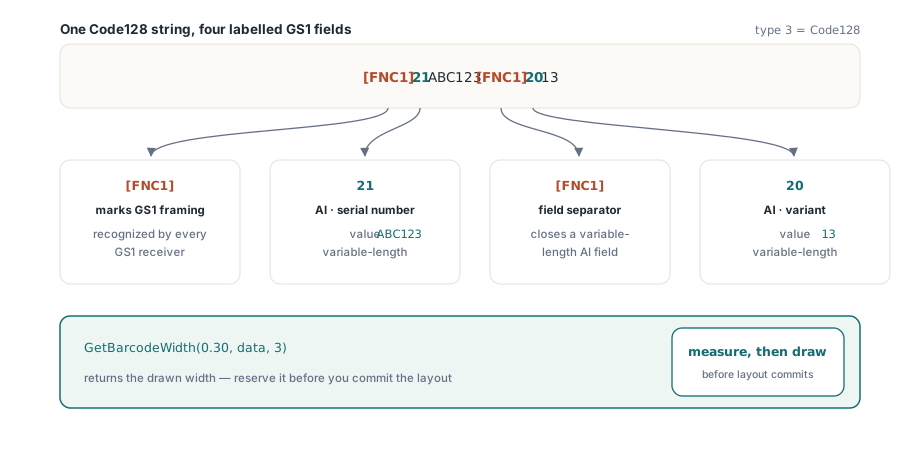
GS1-128, the standard formerly named EAN-128, builds on Code128 by carrying Application Identifiers, the bracketed prefixes that tell a receiving system whether the following digits are a serial number, a batch code, or an expiry date. The structure is marked by FNC1, a special non-data character that flags the symbol as GS1-encoded and separates variable-length fields. In PDF Library for Delphi you draw a GS1-128 symbol with DrawBarcode using the Code128 type and the literal [FNC1] marker placed in the data string where each application identifier begins
var
  W: Double;
begin
  // Code128, with FNC1 markers this becomes a GS1-128 symbol.
  // AI 21 (serial) = ABC123, AI 20 (variant) = 13
  Pdf.DrawBarcode(20, 150, 60, 18, '[FNC1]21ABC123[FNC1]2013',
    3,        // Barcode: 3 = Code128
    0);       // Options: 0 = default drawing

  // Measure the rendered width for a 0.30 mm narrow bar before laying out
  W := Pdf.GetBarcodeWidth(0.30, '[FNC1]21ABC123[FNC1]2013', 3);
end;
For mail, USPS Intelligent Mail, also called OneCode, encodes routing and tracking data in a single height-modulated barcode for postal automation. DrawIntelligentMailBarcode takes explicit geometry for the bar width, the full bar height, the tracker height, and the space width, with the data supplied as a 20, 25, 29, or 31 digit string of digits only. The explicit bar and tracker heights exist because the symbol carries information in whether each bar is a full bar, an ascender, or a descender, and the postal reader depends on those heights being held to specification
Drawing into the page and measuring for layout
Every call shown here draws into the content of the currently selected page, the same surface that receives your text and images, so a barcode is produced as part of normal document generation rather than imported as a separate asset. Because the symbols are vector content, the data they encode and the geometry they occupy are both known at draw time, which is what lets you place them deterministically
Layout for the linear families benefits from measuring first. GetBarcodeWidth returns the total drawn width of a barcode for a given narrow-bar width and barcode type, so you can reserve the exact horizontal space before you commit the draw, rather than guessing and discovering an overlap after the page is built. The 2D symbols are simpler to place because you set their drawn size directly through SymbolSize or ModuleSize, and the symbol fills that footprint. Either way the discipline is the same. Decide the physical size from the scan environment, confirm the symbol fits the slot you have, and let the vector geometry keep every edge sharp from screen preview to final print
For the broader page-building workflow these barcodes drop into, the techniques in our article on text, image, and font extraction cover reading content back out of a PDF, and the guide to large PDF merge and split with direct access shows how to assemble high-volume documents efficiently. Both pair naturally with the drawing API described here, which ships as part of the Delphi PDF Library for Delphi and C++Builder alongside the text, graphics, form, and signature APIs covered elsewhere on this blog