veraPDF flags ISO 19005-1 6.2.3.3 on a file that never draws RGB, calls a bare re f uncalibrated, or fails page 2 whilst an identical page 1 passes. PDF/A judges those rules by what each page paints, so the PDFium Component PDF/A validator for Delphi traces every page down into forms, patterns, glyphs and annotations before ruling on colour and transparency
What 6.2.3.3 and 6.2.4.3 actually require
ISO 19005-1 6.2.3.3 packs three independent rules into one paragraph. A conforming file may use DeviceRGB or DeviceCMYK but shall not use both; if any uncalibrated colour space is used, the file shall contain a PDF/A-1 OutputIntent; and DeviceRGB is allowed only with an intent whose profile is RGB, DeviceCMYK only with a CMYK one. DeviceGray is left out of that list because the clause goes on to explain converting grey under either intent. The intent itself is optional: 6.2.2 says a file may specify one, and only counts an OutputIntents entry with /S /GTS_PDFA1 and a valid ICC profile stream in /DestOutputProfile. So a checker that demands an intent from every file rejects compliant documents that never paint device colour. Part 1 does not mention DefaultRGB or DefaultCMYK, yet a colour remapped through them is rendered in a CIE-based space (ISO 32000-1 §8.6.5.6), which satisfies the device-independence demand of 6.2.3.1; the veraPDF test suite for 6.2.3.3 treats it as calibrated, and PDFium Component reads the clause the same way. The mixing ban stands apart: a PDF/A-1 file that paints both RGB and CMYK fails even when Default entries calibrate both. ISO 19005-2 6.2.4.3 drops that ban and calibrates each space on its own terms, as the right-hand column below shows, so PDFium Component runs one scan per part and applies the mixing check to PDF/A-1 claims alone
| Device space painted | PDF/A-1 (ISO 19005-1 6.2.3.3) | PDF/A-2 and later (ISO 19005-2 6.2.4.3) |
|---|---|---|
| DeviceRGB | DefaultRGB in scope or an RGB intent; not alongside DeviceCMYK | DefaultRGB in scope, or an RGB OutputIntent |
| DeviceCMYK | DefaultCMYK in scope or a CMYK intent; not alongside DeviceRGB | DefaultCMYK in scope, or a CMYK OutputIntent |
| DeviceGray | DefaultGray in scope, or any PDF/A-1 OutputIntent | DefaultGray in scope, or any PDF/A OutputIntent |
What counts as using a colour space?
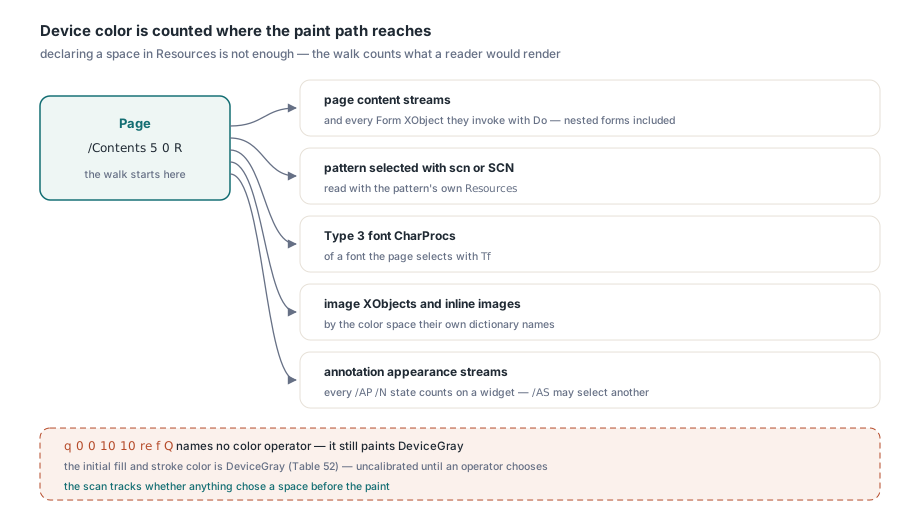
Using a colour space means painting with it on a path a reader will render. Declaring it is not enough. The veraPDF suite makes the point with a 6.2.3.3 pass file: a named Form XObject sets CMYK with K and k, sits in the page's resource dictionary, is never referenced from the page content, and the file's OutputIntent is RGB. A file-wide search for device colour names fails that file, and misses one that paints only DeviceRGB under a CMYK intent, where no two names conflict. PDFium Component walks the drawing graph instead, built on its byte-level PDF/A preflight scanner. From each page, the walk counts colour painted by:
- the page content streams, and every Form XObject they invoke with
Do, nested forms included - a pattern selected with
scnorSCN, read with the pattern's ownResources - the
CharProcsof a Type 3 font selected withTf - image XObjects and inline images, by the colour space their own dictionary names
- annotation appearance streams, painted on top of the page; when a widget's
/AP /Nis a state dictionary, every state counts, since flipping the field paints the one/ASdid not select
The subtler half of reachability is colour the content never names. q 0 0 10 10 re f Q contains no colour operator. It still paints. The initial colour space of the graphics state is DeviceGray (ISO 32000-1 Table 52), so the fill is DeviceGray black, uncalibrated under every part unless a PDF/A OutputIntent or DefaultGray exists. The scan therefore tracks whether anything has chosen a colour yet: rg, k, g and their stroking forms select a device space, cs and CS select whatever they name, and a fill, stroke or text operator reached before any choice records DeviceGray. /CS0 cs 1 0 0 /P0 scn has already picked a space, so that scn is not grey
Inline images bring their colour space and their raw samples into the content stream itself, and a scanner has to read both carefully. The /CS may be an abbreviation (G, RGB, CMYK, I) or a resource name such as one resolving to [/Indexed /DeviceRGB 255 13 0 R], whose base counts; and the bytes between ID and EI are arbitrary binary, so EI ends the image only between whitespace, or an rg inside compressed samples becomes a phantom operator
% page 1: DefaultRGB in scope, and an XObject that nothing invokes
4 0 obj << /Type /Page /Parent 2 0 R /Contents 5 0 R
           /Resources << /ColorSpace << /DefaultRGB 9 0 R >>
                         /XObject << /Fm0 6 0 R >> >> >>
endobj
% page 2: the same content stream, no ColorSpace subdictionary
7 0 obj << /Type /Page /Parent 2 0 R /Contents 5 0 R /Resources << >> >>
endobj
5 0 obj << /Length 46 >> stream
1 0 0 rg 72 72 200 100 re f
q 0 0 10 10 re f Q
endstream
endobj
6 0 obj << /Type /XObject /Subtype /Form /BBox [0 0 50 50] /Length 24 >> stream
0 0 0 1 k 0 0 50 50 re f
endstream
endobj
9 0 obj [/ICCBased 10 0 R]
endobj
Each symptom from the opening falls out of this fragment. /Fm0 never meets a Do, so its k is irrelevant. The bare re f on both pages is DeviceGray with nothing to calibrate it. The rg on page 1 is covered by the DefaultRGB in the resources page 1 paints with; page 2 runs the identical stream against resources that lack the mapping, so the same bytes are uncalibrated there. Expected for a PDF/A-1b claim: pvaiMissingOutputIntent with pvaiMissingIccProfile, driven by page 2's RGB and both pages' grey. The form contributes nothing; invoked, its CMYK would add the PDF/A-1 mixing ban on top
Default colour spaces belong to the resource dictionary that paints
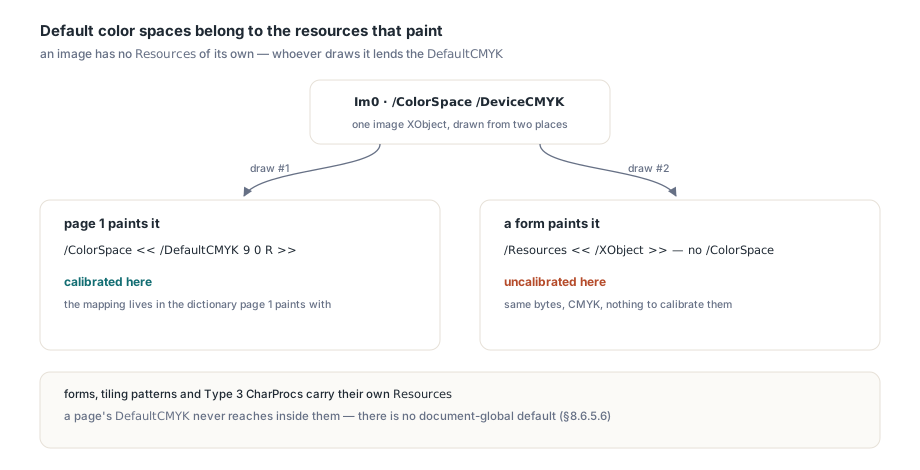
The Default mappings are looked up in the ColorSpace subdictionary of the current resource dictionary (ISO 32000-1 §8.6.5.6), which makes them exactly as local as the resources themselves; a document has no global default. An image XObject has no Resources of its own, so an image whose dictionary says /ColorSpace /DeviceCMYK is calibrated by the DefaultCMYK of whichever page or form draws it, and the same image drawn from two places can be calibrated in one and not the other. Form XObjects, tiling patterns and Type 3 glyph procedures carry their own Resources, so a page's DefaultCMYK does not reach inside them, while a mapping in their own dictionary does. PDFium Component scopes the mappings the same way. The verdict comes back as a TPdfAValidationResult record: the detected Conformance plus an Issues set. That is enough to triage a folder
uses
  System.SysUtils, System.Classes, System.TypInfo, FPdfPdfa;

procedure ReportColorFindings(const FileName: string; Log: TStrings);
const
  ColorRules: TPdfAValidationIssues = [pvaiMissingOutputIntent,
    pvaiMissingIccProfile, pvaiMixedDeviceColorSpaces, pvaiBlendSpaceUndefined];
var
  Source: TFileStream;
  Res: TPdfAValidationResult;
  Found: TPdfAValidationIssues;
  Issue: TPdfAValidationIssue;
begin
  Source := TFileStream.Create(FileName, fmOpenRead or fmShareDenyWrite);
  try
    Res := ValidatePdfACompliance(Source);   // reads from position 0
  finally
    Source.Free;
  end;
  Log.Add(ExtractFileName(FileName) + ': ' +
    GetEnumName(TypeInfo(TPdfAConformance), Ord(Res.Conformance)));
  Found := Res.Issues * ColorRules;
  for Issue in Found do
    case Issue of
      pvaiMissingOutputIntent:
        Log.Add('  reachable uncalibrated device color, no PDF/A OutputIntent');
      pvaiMissingIccProfile:
        Log.Add('  no OutputIntent with a DestOutputProfile ICC stream');
      pvaiMixedDeviceColorSpaces:
        Log.Add('  RGB/CMYK use disagrees with the intent, or PDF/A-1 paints both');
      pvaiBlendSpaceUndefined:
        Log.Add('  transparent page without a blending color space');
    end;
  if Found = [] then
    Log.Add('  device color and blending rules satisfied');
end;
pvaiMissingOutputIntent and pvaiMissingIccProfile appear together when the walk reaches uncalibrated device colour and no PDF/A OutputIntent exists. pvaiMissingIccProfile on its own means an intent exists but carries no profile, which 6.2.2 does not accept as a PDF/A intent. pvaiMixedDeviceColorSpaces covers both the PDF/A-1 mixing ban and a component mismatch: uncalibrated DeviceRGB under a four-component intent, or DeviceCMYK under a three-component one. The set names the rule rather than the page, so in a long or merged document, compare which pages declare Default entries and which do not
When does a transparent page need its own blending space?
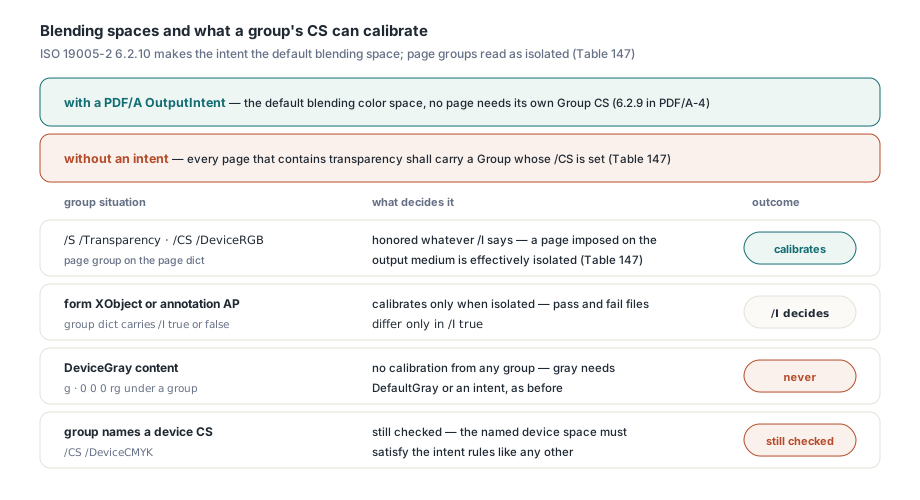
A transparent page needs its own blending colour space only when the document has no PDF/A OutputIntent. ISO 19005-2 6.2.10 (6.2.9 in PDF/A-4) makes the intent the default blending colour space in the sense of ISO 32000-1 §11.3.4; without an intent, every page that contains transparency shall carry a Group whose attributes dictionary (ISO 32000-1 Table 147) includes CS. That CS is also held to 6.2.4, so a page group of /DeviceCMYK under an sRGB intent is reported like a missing one, and PDFium Component raises pvaiBlendSpaceUndefined for both; CalRGB or an ICCBased group space has no such dependency. PDF/A-1 never reaches this question, because ISO 19005-1 6.4 rules out transparency entirely
The hard part is the phrase contains transparency. Annex A of ISO 19005-2 is normative and tests from the page outward; a file-wide count of /SMask keys or /ca values answers a different question. Byte searches also collide with transparency syntax elsewhere: /S /Trans, the forbidden transition action, prefixes every /S /Transparency group, and /Screen is both a forbidden annotation subtype and a standard blend mode, so a name means nothing until it is paired with its key. Following Annex A, PDFium Component treats a page as transparent when any of these is reached from it:
- an ExtGState the content selects with
gsthat has a soft mask dictionary, acaorCAbelow 1, or a blend mode other thanNormal; one declared but never selected does not count - a Form XObject invoked with
Dowhose/Grouphas/S /Transparency, or whose own content meets one of these conditions; a tiling pattern is judged like a form - an image XObject with an
SMaskstream or anSMaskInDatavalue above 0 - a glyph description of a Type 3 font the page shows text with, judged like a form
- an annotation appearance stream, every widget state included, and a blend mode on the annotation dictionary itself
Groups also feed back into the device colour rule, and here the corpus corrected us. The veraPDF suite for 6.2.4.3 holds PDF/A-4 files without any OutputIntent that paint device RGB and are expected to pass, because each page's /Group names a calibrated CS. We assumed only isolated groups could calibrate, since a non-isolated group composites into its backdrop, and that was wrong for page groups: Table 147 notes that a page imposed directly on the output medium is effectively isolated regardless of I, so its CS is honoured. On a Form XObject or annotation appearance the flag does decide it; the suite has a pass and a fail file that differ only in /I true. DeviceGray takes no calibration from a group, because 6.2.4.3 asks for DefaultGray or an intent, and a group whose CS is a device space needs calibrating itself. PDFium Component therefore lets a page group calibrate whatever its /I says, lets a form or appearance group calibrate only when isolated, keeps grey out of group calibration, and still checks a device space that a group names
One OutputIntent instead of a group on every page
If your own code writes the archive, start with a document-level PDF/A OutputIntent. One catalogue entry calibrates DeviceGray everywhere, covers the matching device space on every page, and is the default blending space for every transparent page. Page groups and Default entries are scoped to one resource dictionary each, and the page a later merge adds without them is the one that fails. PDF 2.0 adds OutputIntents to the page object (ISO 32000-2 §7.7.3.3 and §14.11.5); PDFium Component accepts that page-level intent for PDF/A-4 when the catalogue has none, while parts 1 to 3, built on PDF 1.4 to 1.7, look only at the catalogue. For RGB content, SaveAsPdfAToStream adds a catalogue intent built on the PDF/A writer's embedded sRGB ICC profile, and validating the output shows whether the content really was RGB-only
uses
  System.SysUtils, System.Classes, PDFium, FPdfPdfa;

function ArchiveWithSrgbIntent(const InFile, OutFile: string;
  out Remaining: TPdfAValidationIssues): Boolean;
var
  Pdf: TPdf;
  Opts: TPdfASaveOptions;
  Output: TMemoryStream;
  Check: TPdfAValidationResult;
begin
  Result := False;
  Remaining := [];
  Pdf := TPdf.Create(nil);
  Output := TMemoryStream.Create;
  try
    Pdf.FileName := InFile;
    Pdf.Active := True;
    if not Pdf.Active then
      Exit;                           // the file could not be opened
    Opts := TPdfASaveOptions.Default;
    Opts.Conformance := pac2b;        // PDF/A-1 would forbid the transparency outright
    // IccProfileData stays empty: the built-in sRGB IEC61966-2.1 profile is used
    if not Pdf.SaveAsPdfAToStream(Output, Opts) then
      Exit;
    Check := ValidatePdfACompliance(Output);
    Remaining := Check.Issues;
    // Expected for RGB-only content: pvaiMissingOutputIntent and
    // pvaiBlendSpaceUndefined are gone. pvaiMixedDeviceColorSpaces now means
    // a reachable path paints DeviceCMYK that no DefaultCMYK calibrates.
    if Check.IsCompliant then
    begin
      Output.SaveToFile(OutFile);
      Result := True;
    end;
  finally
    Output.Free;
    Pdf.Free;
  end;
end;
A pvaiMixedDeviceColorSpaces that survives the sRGB intent is the walk reporting DeviceCMYK on a reachable path, and that document needs a DefaultCMYK mapping on the pages that paint it, or a CMYK output profile, before PDFium Component will accept it as PDF/A-2b