Picture a converter that labels every file PDF/A-1b, leaves a customer's records system to ingest the output for a year, and then gets the entire batch pushed through veraPDF during an audit, with a third of the files coming back non-conformant. Nothing crashes, no exception is raised, and every viewer on your desk opens the files without complaint. They still are not the standard you claimed. That is the usual failure mode for archival PDF, which is why "we set the flag" is never the same as "it validates"
With PDFium and PDF/A, the first thing to understand is that the engine itself is not the story. PDFium renders, parses, and writes PDF, but its public surface has no ConvertToPDFA, no OutputIntent writer, and no XMP API. Every part of archival conformance, the XMP packet, the OutputIntent and ICC profile, the catalog markers, and the validation, lives in PDFiumPas itself, in a roughly 2,000-line pure Pascal unit (FPdfPdfa.pas) that parses the saved bytes and rewrites them through an incremental update. Knowing where the work happens tells you where the bugs hide, and they are not hiding in PDFium
What PDF/A really requires, and where it gets strict
PDF/A is not a single format. ISO 19005 defines three parts, PDF/A-1, -2, and -3, and within each part it defines conformance levels that promise different things. Level B, the basic level, guarantees only that the visual appearance can be reproduced. Level A, the accessible level, adds a tagged structure tree and Unicode mapping on top of B. Level U, which exists only for parts 2 and 3, sits between them: reliable Unicode text without the full structure tree. ISO 19005-1 has no Level U, and the library encodes that restriction directly
A few rules are the ones that really trip people up in practice. Encryption is forbidden outright, as ISO 19005-1 §6.1.3 and its successors make clear, so a PDF/A file cannot carry an /Encrypt dictionary. The document must declare an output rendering condition through an OutputIntent whose destination is a valid ICC profile (§6.2.3.2). The conformance claim itself must appear as XMP metadata under the PDF/A identification schema. Level A also requires §6.8 logical structure, the tag tree that makes the document machine-readable. Miss any of these and a conformance verifier rejects the file even though it renders perfectly
The one call that writes an archive
PDFiumPas exposes the whole pipeline behind TPdf.SaveAsPdfA. The simple overload accepts a target conformance and defaults to PDF/A-1b, which is the right default for the common case of "make this renderable forever"
var
  Pdf: TPdf;
begin
  Pdf := TPdf.Create(nil);
  try
    Pdf.FileName := 'invoice.pdf';
    Pdf.Active := True;
    // Default conformance is pac1b (PDF/A-1b)
    if Pdf.SaveAsPdfA('invoice_archive.pdf') then
      // file now carries XMP, sRGB OutputIntent, and catalog markers
    else
      raise Exception.Create('PDF/A save failed');
  finally
    Pdf.Free;
  end;
end;
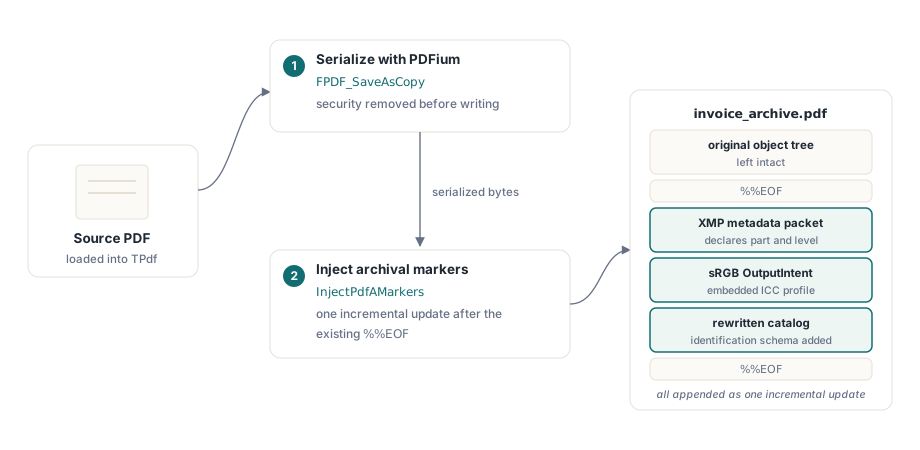
Behind the scenes this is a two-stage operation. SaveAsPdfA first asks PDFium to serialise the document with FPDF_SaveAsCopy, then hands that byte stream to InjectPdfAMarkers, which appends the XMP metadata, the sRGB OutputIntent with its embedded ICC profile, and a rewritten catalog as an incremental update. The source is read from position zero and the destination is written from position zero; the original object tree stays intact and the markers are layered in after the existing %%EOF. If you need the bytes rather than a file, SaveAsPdfAToStream takes a TStream and the same options
Choosing conformance with the options record
To target a specific part and level, pass a TPdfASaveOptions record. Its Conformance field takes a TPdfAConformance value. The enumeration covers every valid combination and nothing else: pac1b, pac1a for part 1; pac2b, pac2u, pac2a for part 2; pac3b, pac3u, pac3a for part 3, plus pacUnknown and pacNone for the validation side. There is no pac1u, because that level does not exist in the standard
var
  Pdf: TPdf;
  Opts: TPdfASaveOptions;
begin
  Pdf := TPdf.Create(nil);
  try
    Pdf.FileName := 'report.pdf';
    Pdf.Active := True;
    Opts := TPdfASaveOptions.Default;
    Opts.Conformance := pac2u;           // PDF/A-2u: reliable Unicode text
    Opts.Title := 'Quarterly Report 2026';
    Opts.Author := 'Finance';
    // Leave IccProfileData empty to use the built-in sRGB IEC61966-2.1 profile
    if not Pdf.SaveAsPdfA('report_a2u.pdf', Opts) then
      raise Exception.Create('PDF/A-2u save failed');
  finally
    Pdf.Free;
  end;
end;
Most of the record can stay empty. Leave Title, Author, Subject, Keywords, Creator, and Producer blank and SaveAsPdfA auto-fills them from the document's Info dictionary via FPDF_GetMetaText. Leave CreationDate and ModDate blank and it uses the current UTC time for both XMP dates. Leave DocumentId and InstanceId blank and the library pre-populates them from FPDF_GetFileIdentifier, falling back to a deterministic ID derived from the source bytes. The one field you may want to override deliberately is IccProfileData: empty means the bundled sRGB IEC61966-2.1 profile, but a CMYK or greyscale workflow should supply its own
Why Level A degrades, and why that is the honest trade-off
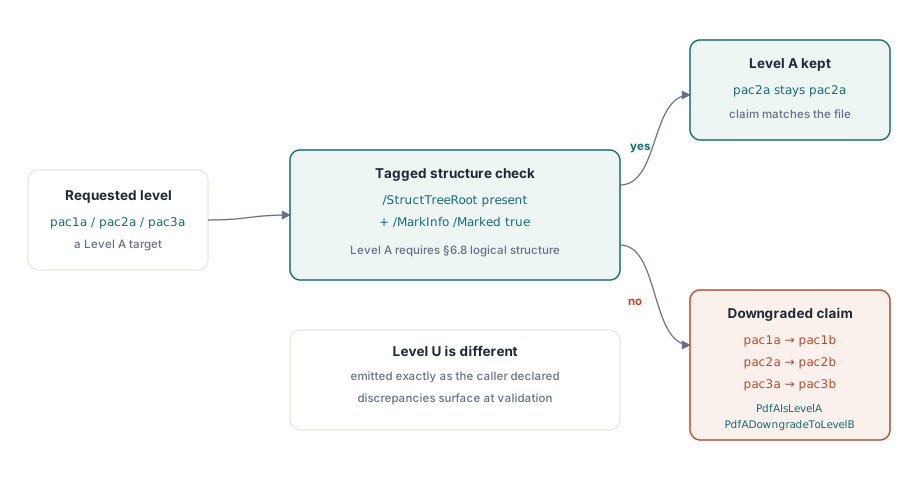
Here is a subtlety that catches people who expect a flag to behave like a guarantee. You can ask for pac1a on a document that has no tag tree, but PDF/A-1a requires §6.8 logical structure, and the library cannot conjure a structure tree out of an untagged PDF. Rather than emit a file that claims Level A while failing it, SaveAsPdfA checks for a real tagged structure (/StructTreeRoot plus /MarkInfo with /Marked true) and, if it is absent, downgrades the claim: pac1a becomes pac1b, pac2a becomes pac2b, and so on across all three parts. The internal helpers are PdfAIsLevelA and PdfADowngradeToLevelB
The reasoning is worth spelling out plainly: a file that honestly declares the level it meets is more useful than one that lies about a level it does not. Level U is handled differently. Detecting genuine Unicode coverage would mean a naive "does it have /ToUnicode" test that over-degrades legitimate documents (WinAnsi and similar encodings are exempt), so the save side emits the U claim as the caller declared it and leaves the discrepancy to be flagged on the validation side instead. If you need a guaranteed Level A archive, tag the document before you convert it; the converter will not invent structure that is not there
The ICC pitfall that only a proper validator catches
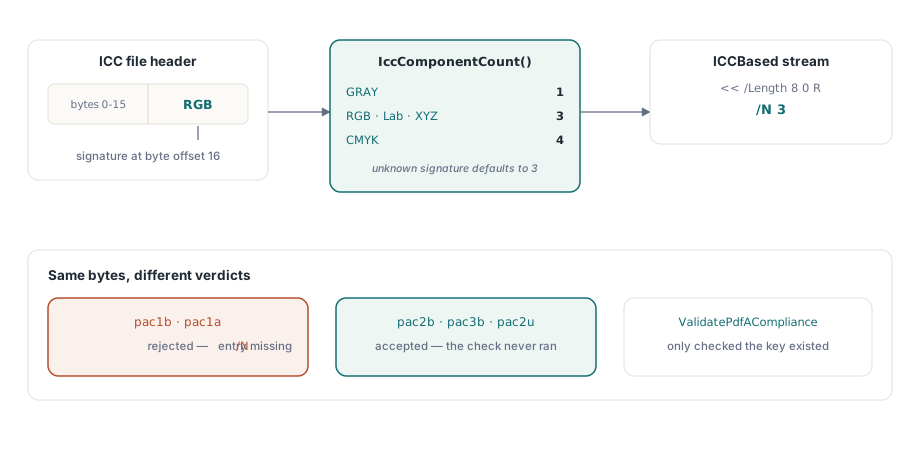
This is the failure that taught the hardest lesson, because the library's own checker passed it while veraPDF, the ISO 19005 reference validator, did not. PDF/A requires the OutputIntent's destination profile to be a valid ICCBased stream, and §6.2.3.2 makes a verifier validate that stream as a colour space. An ICCBased stream must declare /N, the number of colour components. An early version of the injector wrote the ICC stream dictionary with only /Length and no /N, and veraPDF rejected the result with "The N entry (value null)... is missing"
What made it awkward is that the rejection only fired for PDF/A-1b and -1a. The part 2 and part 3 conformance models did not run that particular check on the destination profile, so the identical injected structure validated under pac2b, pac3b, and pac2u but failed under pac1b on nothing more than the pdfaid:part value. A unit test could never spot it, because the library's own ValidatePdfACompliance only checked that the /DestOutputProfile key existed, not what lived inside the stream dictionary. Internal tests stayed green; real archival validation failed
The fix is IccComponentCount, which reads the data colour space signature at offset 16 of the ICC header and maps it to a component count: GRAY is 1, RGB , Lab , and XYZ are 3, CMYK is 4, with an unknown profile defaulting to 3. That count goes into the stream dictionary as /N. It is computed, not hard coded to 3, so that a caller who supplies a CMYK or greyscale profile through IccProfileData still gets the right value. The broader lesson is methodological: the in-library checker and an authoritative validator each have blind spots, and PDF/A output has to be tested end to end against a reference implementation like veraPDF rather than trusted to self-checks. The same incremental-update discipline behind clean archives is covered in checking compressed object and xref streams, which matters because modern PDFs the injector consumes are often built on cross-reference streams
Encryption, xref streams, and the other edge cases
Because ISO 19005 forbids encryption, the save path strips it before writing. SaveAsPdfA applies FPDF_REMOVE_SECURITY when serialising, so an encrypted source, loaded with its password, is decrypted on the way into the archive. On an unencrypted document this is a no-op and changes nothing. The corollary is the same constraint HotPDF enforces from the other direction: a single file cannot be both encrypted and PDF/A. When a workflow needs both, the answer is two artefacts, an encrypted copy for distribution and a separate clean copy for the archive
One more edge stays invisible until it bites: PDF 1.5+ documents that use a pure cross-reference stream and carry no trailer keyword. The injector reads the trailer to find the source /Info and append its incremental update, and it has to accept the xref-stream form, otherwise such a document would be copied through with the markers silently dropped. ISO 32000-1 §7.5.6 explicitly permits a classic trailer incremental update to follow an xref-stream document, with /Prev pointing at the xref-stream offset, which is exactly the structure the injector emits. PDFium's own FPDF_SaveAsCopy always writes a classic trailer, so in the normal pipeline the injector never meets a pure xref-stream source, but the read path handles it for documents that arrive from elsewhere
Verifying before trusting the claim
The library ships a byte-level checker, TPdf.ValidatePdfA, which returns a TPdfAValidationResult. Its Conformance field reports the detected level and Issues is a set of TPdfAValidationIssue values; the convenience method IsCompliant is true only when a real level was detected and the issue set is empty. Run it as a fast first gate in a batch
var
  Pdf: TPdf;
  Res: TPdfAValidationResult;
  Issue: TPdfAValidationIssue;
begin
  Pdf := TPdf.Create(nil);
  try
    Pdf.FileName := 'invoice_archive.pdf';
    Pdf.Active := True;
    Res := Pdf.ValidatePdfA;
    if Res.IsCompliant then
      Writeln('Conformant: detected level ', Ord(Res.Conformance))
    else
      for Issue in Res.Issues do
        Writeln('Issue: ', Ord(Issue));
  finally
    Pdf.Free;
  end;
end;
Be honest about what this buys you. The byte-level checker catches structural problems, such as a missing OutputIntent, a forbidden action, a present /Encrypt, or transparency where part 1 prohibits it, with high confidence, and font embedding detection uses a count heuristic that deliberately reports only a high-confidence signal rather than chasing per-glyph coverage. What it does not do is content-stream operator analysis, which would require a full content parser and is out of scope by design. For a release gate, pair the in-library checker with veraPDF: the checker is instant and runs everywhere with no DLL, veraPDF is authoritative. Wiring that pairing into a batch run is the subject of the batch preflight reporting CLI, which is where this validation belongs in a real archival workflow
The SaveAsPdfA, InjectPdfAMarkers, and ValidatePdfA APIs shown here ship with PDFium Component for Delphi, C++Builder, and Lazarus/FPC. The product page links the full API reference, including the complete conformance enumeration and the options record behind these examples