A scan batch can be nothing but one JPEG per page, with no fonts, no annotations and no bookmarks, and still fail as PDF/raster. ISO 23504-1 asks more of the file than raster-only pages: it has to identify itself with a %PDF-raster-1.0 comment in the trailer area, carry XMP metadata and a trailer /ID, and keep its catalog and Info dictionary to short permitted lists. Checking a capture batch therefore takes two different reads, one over the raw bytes and one over what each page actually draws
Two reads of the same file
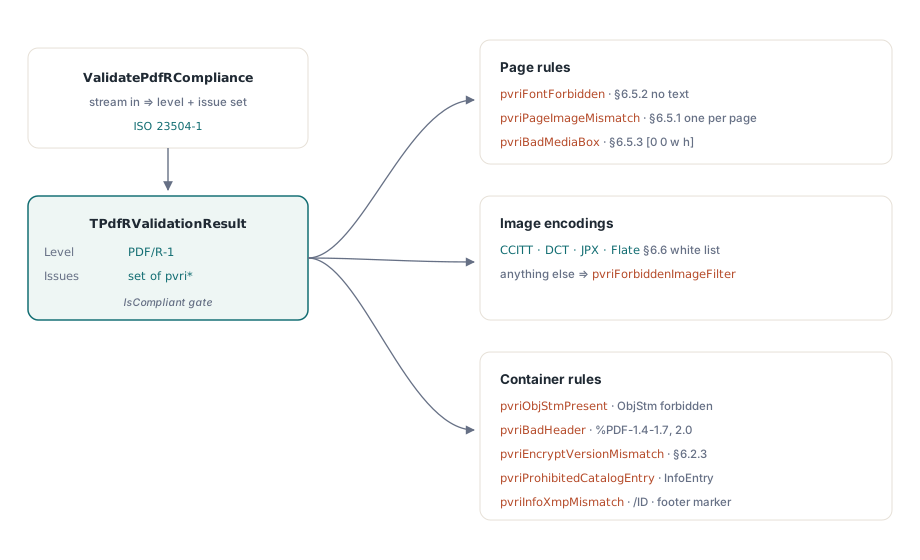
PDF/R validation and SaveAsPdfR ship with the Small Business and Enterprise editions of PDFium Component, which splits the validation along that line. ValidatePdfRCompliance in the FPdfPdfr unit reads a stream and checks the byte-level rules: header version, the raster marker, object streams, catalog and Info entries, XMP, trailer /ID, MediaBox origins, font resources, forbidden filter names and whether the number of image objects matches the number of pages. ValidatePdfRPageFacts checks one page at a time from a TPdfRPageFacts record: how many text, path, form and shading objects the page draws, where the single strip image sits, its pixel size, bit depth, colour space and filter chain
Both reads report through one enumeration, TPdfRValidationIssue, and the combined entry points merge them into a single TPdfRValidationResult. Its Conformance field becomes prc1 only when the raster marker is found, and IsCompliant returns True only when the level is prc1 and the issue set is empty. A file that is perfect in every other respect but lacks the marker reports prcNone, which surprises people the first time they run a clean scan through it
The question is where the page facts come from. TPdf.ValidatePdfR collects them from the loaded document, but it first serialises that document to a temporary store and runs the byte checks on the re-saved copy, so the marker and catalog verdicts describe a fresh save, which may differ from the file on disk. ValidatePdfRasterSource in FPdfBusinessWorkflows takes one snapshot of the input stream and runs both reads against it. For a file that is about to go into an archive, that is the call to use: the verdict then refers to the bytes being archived
uses
  System.Classes, System.SysUtils, System.TypInfo,
  FPdfPdfr, FPdfReport, FPdfBusinessWorkflows;

procedure CheckDeliveredScan(const FileName: string; Log: TStrings);
var
  Src: TFileStream;
  Options: TPdfRasterSourceValidationOptions;
  Report: TPdfRasterSourceValidationReport;
  Issue: TPdfRValidationIssue;
  I: Integer;
begin
  Options := TPdfRasterSourceValidationOptions.Default;
  Options.MaxInputBytes := 512 * 1024 * 1024;     // default budget is 64 MiB
  Options.Validation.MinimumResolutionDpi := 200; // our capture contract
  Src := TFileStream.Create(FileName, fmOpenRead or fmShareDenyWrite);
  try
    if not ValidatePdfRasterSource(Src, Options, Report) then
    begin
      Log.Add(Format('Check stopped (%s): %s',
        [GetEnumName(TypeInfo(TPdfRasterSourceStatus), Ord(Report.Status)),
         Report.ErrorMessage]));
      Exit;
    end;
  finally
    Src.Free;
  end;

  if Report.IsCompliant then
    Log.Add('PDF/R-1 conformant')
  else
  begin
    // Validation.Issues holds the byte-level issues plus every page issue
    for Issue := Low(TPdfRValidationIssue) to High(TPdfRValidationIssue) do
      if Issue in Report.Validation.Issues then
        Log.Add('File: ' + GetEnumName(TypeInfo(TPdfRValidationIssue), Ord(Issue)));
    // PageIssues says which pages to rescan
    for I := 0 to Report.ProcessedPageCount - 1 do
      for Issue := Low(TPdfRValidationIssue) to High(TPdfRValidationIssue) do
        if Issue in Report.PageIssues[I] then
          Log.Add(Format('Page %d: %s', [Report.Pages[I].PageNumber,
            GetEnumName(TypeInfo(TPdfRValidationIssue), Ord(Issue))]));
  end;

  // Keep the machine-readable verdict next to the archived file
  Log.Add(Report.ToJson(TPdfReportLimits.Default));
end;
Two defaults in TPdfRasterSourceValidationOptions matter for scan batches. MaxInputBytes is 64 MiB and MaxPages is 1000; a long batch of colour scans can exceed the byte budget, and the check then ends with status prssBudgetExceeded and Complete False. MemoryLimitBytes is 8 MiB, beyond which the snapshot spills to TemporaryDirectory and the report sets SnapshotSpilled. Report.IsCompliant also requires Complete, so a check that stopped halfway never reads as a pass
Why does an OCR text layer fail PDF/R?
Because a raster page draws the scanned image and nothing else. An invisible OCR layer is a normal addition in a PDF/A workflow, and it puts two things into the file that PDF/R excludes: a font resource, reported by the byte read as pvriFontForbidden, and text objects on the page, reported by the page read as pvriNonRasterPageContent. The same page issue fires for vector paths, shadings and form XObjects, so a stamped page number or a drawn border rule fails in the same way as hidden text
The page-to-image relationship is strict too. Each page has to carry exactly one strip image; pvriPageImageMismatch fires on a page with no image and on a page whose scan was written as two images side by side. On the byte side the count is taken over every object whose /Subtype is /Image, so any extra image object, a soft mask attached to the strip for example, pushes the total past the page count
Geometry gets two checks. pvriBadMediaBox reports a MediaBox that does not start at [0 0 ...]; the byte read inspects inline numeric arrays. The page read then compares the strip's drawn bounds with the MediaBox and reports pvriStripGeometryInvalid when any edge is off by more than GeometryTolerancePoints, 0.5 point by default. A scanner driver that leaves a white margin by scaling the image to 98% of the page fails here, even though the page looks fine on screen. Setting RequireFullPageStrip to False switches the coverage test off for internal files where a margin is acceptable
Which image encodings pass
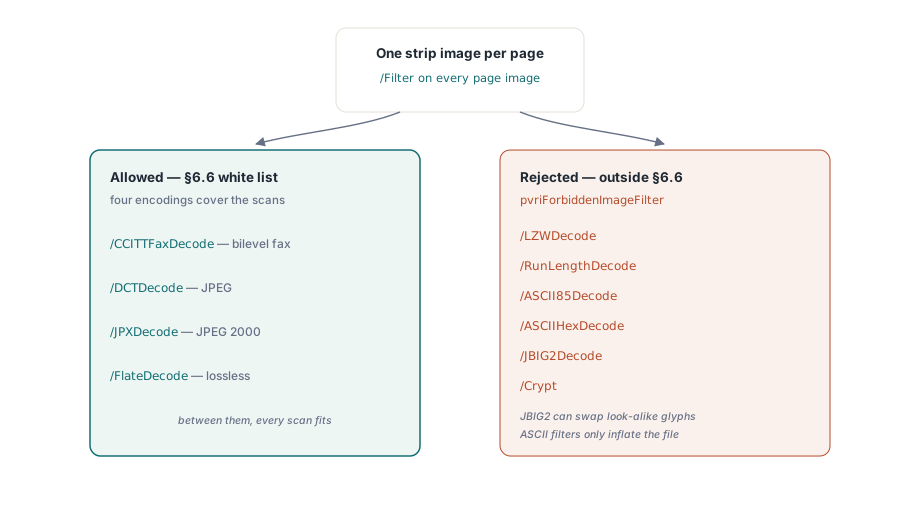
The validator accepts four strip filters: /CCITTFaxDecode, /DCTDecode, /JPXDecode and /FlateDecode. The byte read flags the other standard filters by name as pvriForbiddenImageFilter: /LZWDecode, /RunLengthDecode, /ASCII85Decode, /ASCIIHexDecode, /JBIG2Decode and /Crypt
JBIG2 is the rejection capture teams hit first. It is permitted in PDF/A and compresses bilevel pages very well, so a capture profile built for PDF/A may already emit it. Its lossy pattern-matching mode is also known to replace a scanned glyph with a similar-looking one, a documented problem with digits on scanned forms, and a raster archive exists precisely so that what was on paper is what is in the file. Re-encoding those pages as CCITT Group 4 keeps them bilevel and lossless
The page read goes one step further and looks at the filter chain together with the image's bit depth and colour space, reporting mismatches as pvriImageCompressionParametersInvalid:
- A chain of more than one filter is rejected, so an ASCII85-wrapped Flate image fails twice, once on the byte side and once here
/CCITTFaxDecodemust sit on a 1-bit DeviceGray strip/DCTDecodemust sit on an 8-bit or 24-bit strip in DeviceGray or DeviceRGB/FlateDecodeis accepted on 1-bit strips; a 24-bit Flate page fails this check/JPXDecodeis accepted at 1, 8 or 24 bits per pixel
Independently of the filter, a strip whose colour space is neither DeviceGray nor DeviceRGB gets pvriImageColorInvalid. An ICC-based or CMYK scan therefore has to be converted before it is wrapped, and the cheapest place to do that is the scanner profile, before any PDF is written
How the strip resolution is worked out
When the image carries its own resolution, the page read uses it. When it does not, the effective resolution is derived from pixels and page size: pixel width times 72 divided by MediaBox width in points, and the same for height. Suppose a scanner writes a 2550 by 3300 pixel strip onto a US Letter page of 612 by 792 points. That works out to exactly 300 dpi in both directions. The same page at 600 by 776 pixels comes to about 70.6 dpi horizontally, which is below the default minimum of 72, so the page gets pvriImageResolutionInvalid
The default range in TPdfRValidationOptions is 72 to 2400 dpi. Those bounds only catch obviously broken pages. A capture contract usually promises a specific minimum, often 200 or 300 dpi, and that value belongs in MinimumResolutionDpi: a 150 dpi page passes the default range, and it is exactly the page that contract was written to exclude. Setting either bound to 0 turns that side of the check off
ValidatePdfRPageFacts is public, so the same rules can run before any PDF exists, straight from what the scanner reports about each image:
uses
  FPdfPdfr;

// Builds page facts from scanner output; this helper is yours, not part of the library
function ScannerStripFacts(PixelW, PixelH: Integer;
  PageWidthPt, PageHeightPt: Single; const Filter: string;
  BitsPerPixel: LongWord; ColorSpace: Integer): TPdfRPageFacts;
begin
  Result := Default(TPdfRPageFacts);
  Result.PageNumber := 1;
  Result.MediaWidth := PageWidthPt;
  Result.MediaHeight := PageHeightPt;
  Result.ImageCount := 1;
  Result.ImageRight := PageWidthPt;   // strip covers the whole page
  Result.ImageTop := PageHeightPt;
  Result.PixelWidth := PixelW;        // HorizontalDpi left at 0: derived
  Result.PixelHeight := PixelH;
  Result.BitsPerPixel := BitsPerPixel;
  Result.ColorSpace := ColorSpace;    // 1 = DeviceGray, 2 = DeviceRGB
  SetLength(Result.Filters, 1);
  Result.Filters[0] := Filter;
end;

var
  Opts: TPdfRValidationOptions;
  Issues: TPdfRValidationIssues;
begin
  Opts := TPdfRValidationOptions.Default;
  Opts.MinimumResolutionDpi := 300;

  // 300 dpi colour JPEG on Letter: empty set
  Issues := ValidatePdfRPageFacts(
    ScannerStripFacts(2550, 3300, 612, 792, 'DCTDecode', 24, 2), Opts);

  // Same page compressed with Flate at 24 bits:
  // [pvriImageCompressionParametersInvalid]
  Issues := ValidatePdfRPageFacts(
    ScannerStripFacts(2550, 3300, 612, 792, 'FlateDecode', 24, 2), Opts);
end;
Catalog, Info dictionary and XMP
Besides the required /Type and /Pages, ISO 23504-1 permits only Version, ViewerPreferences, PageLayout, PageMode, AcroForm and Metadata in the catalog. The validator checks the catalog against the 21 standard keys outside that set and raises pvriProhibitedCatalogEntry when any of them appears, among them Outlines, Names, PageLabels, OpenAction, StructTreeRoot, MarkInfo, Lang, OCProperties and OutputIntents. The last one matters in practice: a PDF/A file always carries an output intent, so a single file cannot satisfy both profiles
The Info dictionary may hold Creator, Producer, CreationDate and ModDate; Title, Author, Subject, Keywords and Trapped raise pvriProhibitedInfoEntry. A catalog without a /Metadata stream gets pvriMissingXmpMetadata. When the stream is there but its XMP lacks any of xmp:CreateDate, xmp:ModifyDate and xmp:MetadataDate, the finding is pvriMetadataInvalid instead. pvriInfoXmpMismatch compares Producer with pdf:Producer and Creator with xmp:CreatorTool. Dates are left out of that comparison because the two encodings legitimately differ, and Info values stored as hex strings are skipped. A typical trigger is a later tool rewriting the Info Producer without touching the XMP
The remaining container rules are short. The header has to be %PDF-1.4 through %PDF-1.7 or %PDF-2.0 (pvriBadHeader), any /Type /ObjStm stream raises pvriObjStmPresent, and an encrypted file must use a %PDF-2.0 header (pvriEncryptVersionMismatch). With RequireEncryptedPdf20Profile left on, the encryption dictionary must also declare /V 5 or 6 with /R 5 or later, or the file gets pvriEncryptedPdf20ProfileInvalid
Writing the markers
TPdfRSaveOptions carries Creator, Producer, CreationDate, ModDate, DocumentId and InstanceId, and has no field for Title, Author, Subject or Keywords because the profile prohibits them. StripInfoOptionalEntries and StripCatalogOptionalEntries both default to True and remove the excluded entries from the source; set either to False and the entries stay, at the cost of conformance. TPdf.SaveAsPdfR fills empty option fields from the loaded document's own metadata and file identifiers, removes security, then writes the marker, the trimmed dictionaries, the XMP packet and the trailer /ID
uses
  System.Classes, System.SysUtils, PDFium, FPdfPdfr;

procedure WrapScanAsPdfR(const InFile, OutFile: string; Log: TStrings);
var
  Pdf: TPdf;
  Opts: TPdfRSaveOptions;
  Written: TFileStream;
  Res: TPdfRValidationResult;
begin
  Pdf := TPdf.Create(nil);
  try
    Pdf.FileName := InFile;
    Pdf.Active := True;
    Opts := TPdfRSaveOptions.Default;
    Opts.Creator := 'Capture Station 4';   // Producer, dates and IDs come from the source
    if not Pdf.SaveAsPdfR(OutFile, Opts) then
      raise Exception.Create('PDF/R save failed: ' + InFile);
  finally
    Pdf.Free;
  end;

  // Check the bytes that were written, not the in-memory document
  Written := TFileStream.Create(OutFile, fmOpenRead or fmShareDenyWrite);
  try
    Res := ValidatePdfRCompliance(Written);
    if pvriPageImageMismatch in Res.Issues then
      Log.Add('A source page still has no single strip image');
    if pvriFontForbidden in Res.Issues then
      Log.Add('The source carries fonts; rescan or drop the text layer');
  finally
    Written.Free;
  end;
end;
Wrapping changes metadata and identification only. A source page that draws vector text, or carries no strip image, comes out of SaveAsPdfR with the same page content and fails the same page checks. The page content is left alone deliberately, since quietly re-rendering a scan would change the very pixels the archive is meant to preserve. Running CheckDeliveredScan from the first listing on OutFile gives the full verdict, page reads included
Where PDF/R fits in a capture pipeline
PDF/R suits deliverables where the scan itself is the record and fidelity is the whole contract: evidentiary imaging, check and remittance capture, drawing archives from a large-format scanner. Once a document needs searchable text, tagging, attachments or bookmarks, it belongs in PDF/A, because every one of those features lands on the excluded lists above
Many teams keep both. A PDF/R original is written once and never changes, and a PDF/A derivative with an OCR layer serves retrieval. The validators are independent, so one batch job can check each file against the profile it claims. The archival side is covered in PDF/A archival compliance and PDF/A preflight validation, and print output in validating print-ready PDF/X documents
The PDF/R checks shown here are part of the Small Business and Enterprise editions of PDFium Component for Delphi, C++Builder and Lazarus, next to validators for PDF/A, PDF/X, PDF/E and PDF/UA; editions and supported IDE versions are on the PDFium Component product page