PDFium Component checks PDF/A Info-to-XMP metadata equivalence with TPdf.InspectPdfAMetadata and repairs it with TPdf.NormalizePdfAMetadata. ISO 19005-1 (as corrected by Cor.1) requires each of the eight mapped Info entries, Title through ModDate, to carry the same value as its XMP property, not merely to exist; the check reads the correct RDF shape, matches namespaces by URI and compares dates as instants
The bug report that usually starts this conversation looks harmless. A document management system stamps a new /ModDate into the Info dictionary on every incremental save, leaves the XMP packet alone, and six months later an archive audit flags thousands of files as non-conformant. Both dates are there. They just stopped agreeing on the first edit, and a presence check never noticed. Title edits made through an Info-only API, and an Author string like Finance; Controlling that some tool split into two dc:creator items, fail the same way
Why does PDF/A reject metadata that exists in both places?
PDF/A rejects it because ISO 19005-1 §6.7.3 is a value rule, not a presence rule: Table 1 maps eight Info keys to XMP properties, and once an Info key is present, the mapped XMP property must hold an equivalent value. The byte-level scanner described in PDF/A preflight validation with PDFium Component only confirms that xmp:CreateDate and xmp:ModifyDate exist (pvaiMissingXmpDates). Since v3.72.0, TPdf.ValidatePdfA additionally runs the full value comparison and adds pvaiInfoXmpValueMismatch to the issue set when an XMP packet exists but disagrees with Info (a packet that cannot be parsed counts as disagreeing). A missing packet stays reported as pvaiMissingXmpMetadata, so the two issues never double-count the same defect
What RDF shape does each mapped XMP property need?
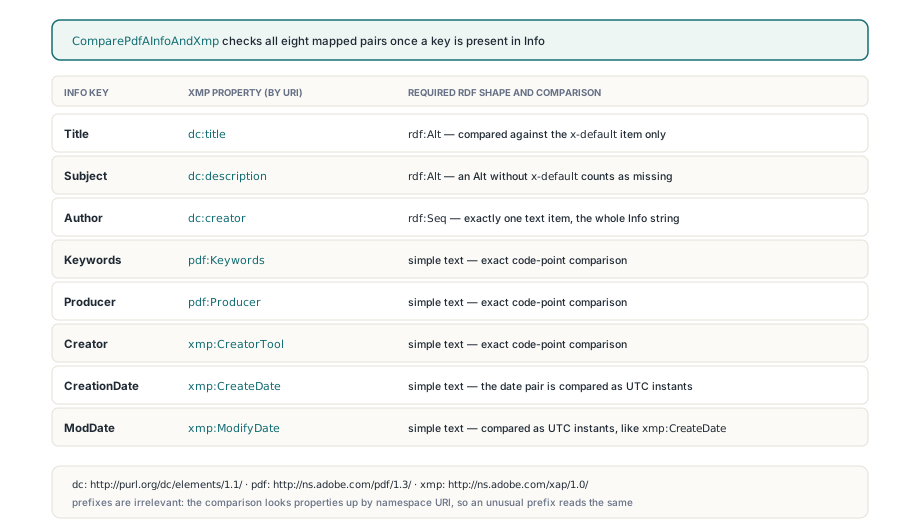
Each of the eight mappings has a fixed XMP type, and a correct value in the wrong container still fails. ComparePdfAInfoAndXmp in FPdfPdfa.pas looks properties up by namespace URI, so a packet that binds http://purl.org/dc/elements/1.1/ to an unusual prefix is read exactly like one using dc. The required shapes are:
- Title →
dc:titleand Subject →dc:description: anrdf:Altlanguage alternative, compared against itsx-defaultitem only (the language tag is matched case-insensitively); an Alt withoutx-defaultcounts as missing - Author →
dc:creator: anrdf:Seqwith exactly one text item holding the whole Info string, so a semicolon-separated author list stays a single entry - Keywords →
pdf:Keywordsand Producer →pdf:Producer(namespacehttp://ns.adobe.com/pdf/1.3/): simple text properties - Creator →
xmp:CreatorTool, CreationDate →xmp:CreateDate, ModDate →xmp:ModifyDate(namespacehttp://ns.adobe.com/xap/1.0/): simple text properties
<dc:title><rdf:Alt><rdf:li xml:lang="x-default">Quarterly Report 2026</rdf:li></rdf:Alt></dc:title>
<dc:creator><rdf:Seq><rdf:li>Finance; Controlling</rdf:li></rdf:Seq></dc:creator>
<pdf:Producer>PDFium Component</pdf:Producer>
Text values are compared as exact Unicode code-point sequences, with no trimming, case folding or normalisation. A trailing space, or a precomposed é on one side and a decomposed e plus combining accent on the other, is a genuine mismatch. The Info side always comes from PDFium's own decoding of PDFDocEncoding and UTF-16 text through FPDF_GetMetaText, which keeps the library from re-implementing string decoding and getting it subtly wrong; the XMP side is only as clean as the bytes that produced it, which is why the codepage traps that corrupt XMP metadata under Free Pascal matter here too
When are a PDF date and an XMP date equal?
A PDF date and an XMP date are equal when they describe the same instant to the second, with the same time-zone knowledge on both sides. Both parsers accept legal reduced precision, so D:2026 and 2026 both mean 1 January 2026, 00:00:00. When both values carry a zone, they are converted to UTC before comparison: D:20260827093659+08'00' equals 2026-08-27T01:36:59Z. When neither carries a zone, the local components are compared as written. When only one side has a zone, the result is pamsValueMismatch, because inventing an offset would be a guess. A non-zero fractional second such as .250 in XMP also forces a mismatch, since a PDF date has no way to express it and silently rounding it away would hide a real disagreement; .000 is accepted. Unparseable values are reported separately as pamsInvalidInfoDate or pamsInvalidXmpDate
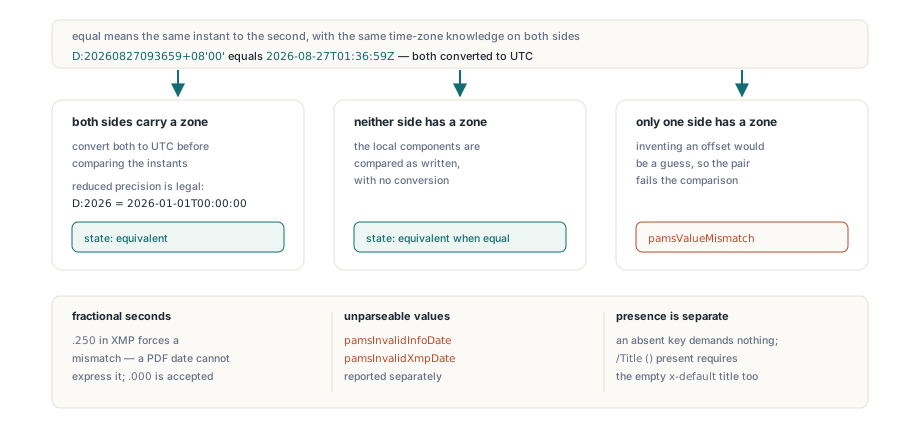
Presence has its own rule. TPdfAMetadataValues.Present is a set filled by walking the active trailer's /Info dictionary, and it keeps "key absent" apart from "key present with an empty string". An absent key yields pamsNotRequired and demands nothing from XMP; /Title () is present, so the XMP packet must carry an empty x-default title as well
How do you inspect Info and XMP metadata before saving?
TPdf.InspectPdfAMetadata returns a TPdfAMetadataReport with one TPdfAMetadataComparison per field, each holding the Info value, the XMP value and a TPdfAMetadataState, so a failure can be explained without reverse-engineering a single validation flag. MismatchFields summarises the failing set, HasXmpPacket tells you whether a packet was found, and XmpParseError carries the parser message when the packet exists but cannot be read
uses
  System.SysUtils, PDFium, FPdfPdfa;

const
  FieldNames: array[TPdfAMetadataField] of string = (
    'Title', 'Author', 'Subject', 'Keywords',
    'Creator', 'Producer', 'CreationDate', 'ModDate');
  StateNames: array[TPdfAMetadataState] of string = (
    'not required', 'equivalent', 'XMP missing', 'XMP type mismatch',
    'value mismatch', 'invalid Info date', 'invalid XMP date');

procedure ReportMetadata(Pdf: TPdf);
var
  Report: TPdfAMetadataReport;
  Item: TPdfAMetadataComparison;
begin
  Report := Pdf.InspectPdfAMetadata;
  if Report.XmpParseError <> '' then
    Writeln('XMP packet unreadable: ', Report.XmpParseError)
  else if not Report.HasXmpPacket then
    Writeln('No XMP packet at all');
  for Item in Report.Comparisons do
    if not Item.IsEquivalent then
      Writeln(Format('%-12s %-18s Info="%s" XMP="%s"',
        [FieldNames[Item.Field], StateNames[Item.State],
         Item.InfoValue, Item.XmpValue]));
end;
What does NormalizePdfAMetadata change, and what does it refuse?
TPdf.NormalizePdfAMetadata treats the Info dictionary as the source of truth and rewrites only the XMP properties whose field landed in MismatchFields; everything else in the packet survives. Title and Subject are written into the x-default item while other language alternatives stay intact, Author becomes a one-item rdf:Seq, unknown namespaces and unrelated properties are preserved, and XMP properties for absent Info keys are left untouched. A zoned Info date is written as a canonical UTC XMP date with a Z suffix; a zone-less one keeps its local components. The file overload saves through a temporary file and an atomic replace, and the XMP update itself is appended as an incremental update
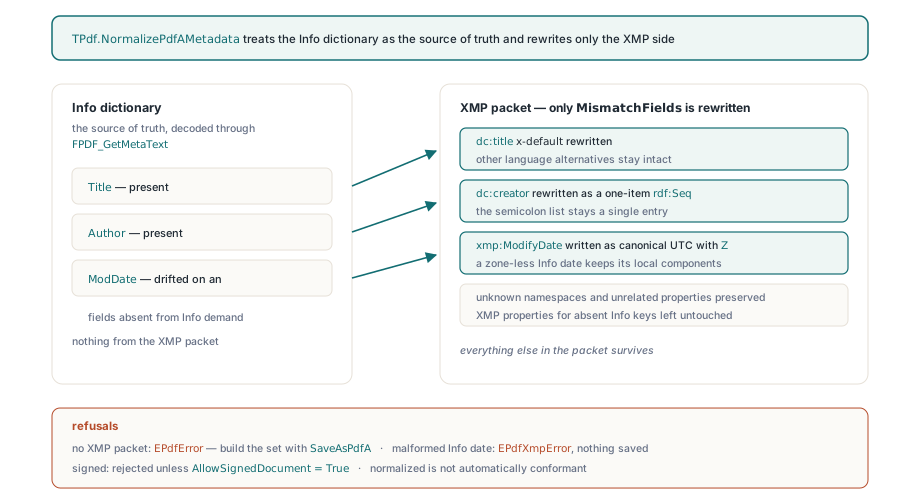
The refusals are deliberate. With no XMP packet the method raises EPdfError, because building a complete PDF/A identification and metadata set is the job of SaveAsPdfA, covered in creating PDF/A archival files with PDFium Component. A malformed Info date raises EPdfXmpError rather than writing a plausible-looking wrong value, and nothing is saved. Signed documents are rejected unless the caller passes AllowSignedDocument = True. Equivalence is one rule of ISO 19005-1, too, so a normalised file is not automatically a conformant one
uses
  System.SysUtils, PDFium, FPdfPdfa, FPdfXmp;

procedure NormalizeArchive(const Source, Target: string);
var
  Pdf: TPdf;
  Report: TPdfAMetadataReport;
begin
  Pdf := TPdf.Create(nil);
  try
    Pdf.FileName := Source;
    Pdf.Active := True;
    Report := Pdf.InspectPdfAMetadata;
    if Report.IsEquivalent then
      Exit;                      // already consistent, leave the file alone
    if not Report.HasXmpPacket then
      raise Exception.Create('No XMP packet: convert with SaveAsPdfA instead');
    try
      if not Pdf.NormalizePdfAMetadata(Target) then
        raise Exception.Create('Normalized save failed');
    except
      on E: EPdfXmpError do      // malformed Info date or unreadable packet
        raise Exception.CreateFmt('Cannot normalize %s: %s', [Source, E.Message]);
    end;
  finally
    Pdf.Free;
  end;
end;
Running the comparison on your own XMP packet
ComparePdfAInfoAndXmp and SynchronizePdfAInfoToXmp are plain functions in FPdfPdfa that work on a TPdfXmpPacket with no document loaded, which suits unit tests and pipelines that assemble XMP from a template. The one trap is Present: a record initialised with Default(TPdfAMetadataValues) has an empty set, every field then reports pamsNotRequired, and the comparison passes vacuously no matter what values you filled in
uses
  System.SysUtils, System.IOUtils, FPdfPdfa, FPdfXmp;

procedure AlignTemplate(const TemplateFile: string);
var
  Info: TPdfAMetadataValues;
  Packet: TPdfXmpPacket;
  Changed: TPdfAMetadataFields;
begin
  Info := Default(TPdfAMetadataValues);
  Info.Title := 'Quarterly Report 2026';
  Info.Author := 'Finance; Controlling';
  Info.ModDate := 'D:20260827093659+08''00''';
  // Present decides which fields are mandatory; values alone are ignored
  Info.Present := [pamfTitle, pamfAuthor, pamfModDate];

  Packet := TPdfXmpPacket.Parse(TFile.ReadAllText(TemplateFile, TEncoding.UTF8));
  try
    Changed := SynchronizePdfAInfoToXmp(Info, Packet);
    // xmp:ModifyDate is now 2026-08-27T01:36:59Z, dc:creator a one-item rdf:Seq
    if Changed <> [] then
      TFile.WriteAllBytes(TemplateFile, Packet.ToUtf8);
  finally
    Packet.Free;
  end;
end;
If your pipeline archives documents that other systems keep editing, pair a nightly InspectPdfAMetadata sweep with NormalizePdfAMetadata for the files that drift, and keep ValidatePdfA as the gate before anything leaves for long-term storage. The typed report, the repair path and the rest of the PDF/A tooling ship in the PDFium Component for Delphi and C++Builder