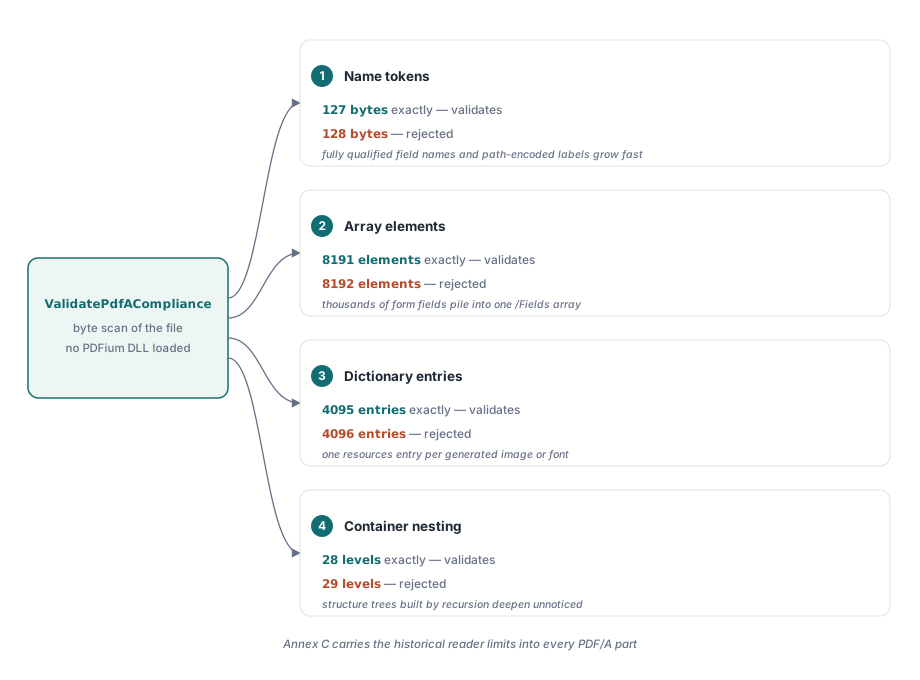
PDFium Component validates the ISO 19005-1 Annex C implementation limits — 127-byte name tokens, 8191 array elements, 4095 dictionary entries and 28 levels of container nesting — and reports a symbolic TrueType font that carries an /Encoding entry. Both checks run on the byte-scan path, so a Delphi or Lazarus application gets the verdict without loading the PDFium DLL at all
These are the failures that puzzle people most, because the document looks fine. It renders, it prints, every font is embedded, the output intent is present. Then a validator rejects it over a dictionary that has 4096 entries, and nothing in the visible document explains why
What are the Annex C limits actually protecting?
Interoperability with implementations that predate your generator. Annex C carries forward the PDF Reference implementation limits into every PDF/A part, and the numbers are not arbitrary — they describe what a conforming reader was historically required to handle. A file that exceeds them may open perfectly in a modern viewer and fail in the archival reader that a records system standardised on fifteen years ago, which is precisely the scenario PDF/A exists to prevent
The four limits are inclusive. A name token of exactly 127 bytes validates; 128 does not. An array with exactly 8191 elements validates; 8192 does not. PDFium Component pins both sides of every boundary in its test suite for that reason, because an off-by-one in a limit check produces the worst kind of validator: one that rejects conforming files and is believed anyway
uses FPdfPdfa;

var
  Src: TFileStream;
  Res: TPdfAValidationResult;
begin
  Src := TFileStream.Create('archive.pdf', fmOpenRead or fmShareDenyWrite);
  try
    Res := ValidatePdfACompliance(Src);
    if pvaiArrayOverLimit in Res.Issues then
      Memo1.Lines.Add('An array carries more than 8191 elements');
    if pvaiDictOverLimit in Res.Issues then
      Memo1.Lines.Add('A dictionary carries more than 4095 entries');
    if pvaiNestingOverLimit in Res.Issues then
      Memo1.Lines.Add('Containers nest deeper than 28 levels');
    if pvaiNameOverLimit in Res.Issues then
      Memo1.Lines.Add('A name token is longer than 127 bytes');
  finally
    Src.Free;
  end;
end;
Which generators actually hit these limits?
Ones that build structure programmatically, which is most line-of-business output. A form with several thousand fields produces an /Annots array or an AcroForm /Fields array that grows past 8191. A page whose resources dictionary accumulates one entry per generated image or font instance crosses 4095. Deeply generated structure trees — a tagged document built by recursion over a nested data model — walk past 28 levels without anyone noticing, because no one looks at nesting depth
Long names come from a different habit: encoding data into name tokens. A colorant name built from a customer identifier, an optional-content group named after a full file path, a form field whose fully qualified name concatenates six levels of hierarchy. Names are cheap to generate and easy to make long, and 127 bytes disappears faster than you would expect once a UTF-8 encoded label is involved
The fix is structural in every case. Split the array, split the dictionary, flatten the nesting, shorten the name — the preflight recommendation for each issue names the concrete limit rather than telling you the file is invalid. Marker injection cannot help here: these are not metadata claims, they are the shape of the object graph
Why a symbolic TrueType font must not carry /Encoding
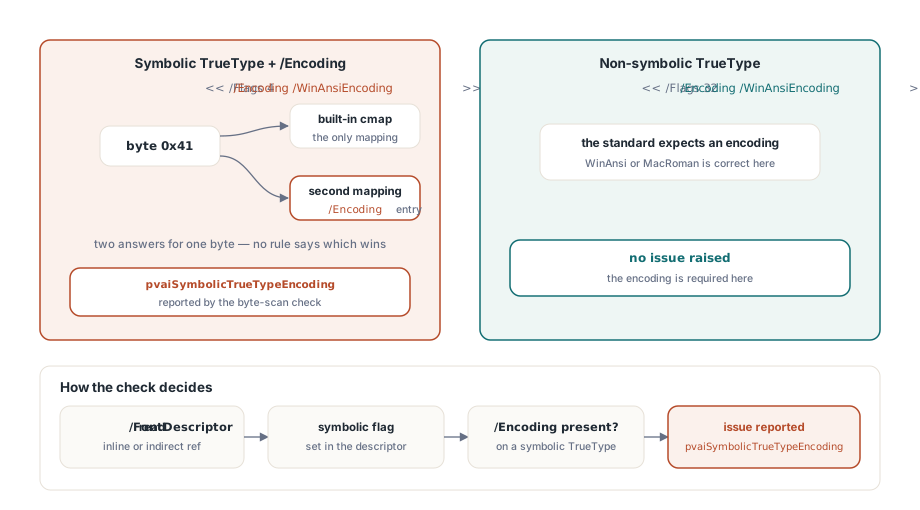
Because ISO 19005-1 §6.3.7 admits only the font's built-in cmap for symbolic TrueType fonts, and an /Encoding entry would contradict it. A symbolic font maps codes to glyphs on its own terms — that is what symbolic means. Add an encoding table and there are now two answers to the question "which glyph does byte 0x41 select", with no rule in the file saying which wins. Different readers resolve it differently, and a document that renders as text in one viewer renders as dingbats in another
PDFium Component reads the symbolic flag from the /FontDescriptor, whether the descriptor is written inline in the font dictionary or referenced indirectly. A non-symbolic TrueType font keeps its required /WinAnsiEncoding or /MacRomanEncoding without being flagged, because for non-symbolic fonts the encoding is exactly what the standard asks for. The check fires on the contradiction, not on the presence of an encoding
if pvaiSymbolicTrueTypeEncoding in Res.Issues then
  Memo1.Lines.Add(
    'A symbolic TrueType font carries /Encoding; PDF/A admits only its ' +
    'built-in cmap (ISO 19005-1 6.3.7)');
The practical source of this defect is font subsetting done by a producer that treats every TrueType font the same way. Symbol, Wingdings, barcode fonts and icon fonts are the usual carriers — exactly the fonts a business document uses for checkboxes, logos and barcodes, and exactly the ones nobody re-examines when a document fails validation over "fonts"
How the issues arrive in a preflight report
The four container limits are classified under structure; the symbolic TrueType encoding issue is classified under content. That split matters when a report goes to two different people: structure findings usually belong to whoever wrote the generator, and content findings usually belong to whoever supplied the assets
Each issue carries a recommendation that names the remedy in concrete terms — shorten name tokens to 127 bytes or fewer, split arrays so none carries more than 8191 elements, remove /Encoding from symbolic TrueType fonts. A report that says "not PDF/A conformant" starts an investigation. A report that says which limit was exceeded and by what ends one
Validating without the DLL, and why that matters here
All the checks above run against the file bytes, so they work in a service that has no PDFium binary deployed, in a build step, or on a machine where loading a native DLL is a policy problem. That is a deliberate design line in PDFium Component: the checks that can be answered from structure are answered from structure, and the DLL is reserved for the ones that genuinely need a rendering engine
For the surrounding workflow — running validation over a folder, producing reports, and deciding what to do with the findings — see the walkthroughs of PDF/A preflight validation in Delphi and the batch preflight report CLI. For the archival profile choice that sits above all of these checks, the notes on PDF/A archival compliance cover which part and level to target before you start fixing findings
PDFium Component wraps the PDFium engine for Delphi, C++Builder and Lazarus with a high-level VCL API and a set of conformance validators that run with or without the DLL — see the PDFium Component product page for the supported standards and platforms